Setting Up a DNS Domain Name Resolution Server on Linux (Detailed Version)
This article provides a detailed introduction on how to configure a DNS server in Linux, including the working principle of DNS, local caching, the DNS query process, as well as the configuration of forward and reverse queries. The steps include server configuration, editing the BIND configuration file, adding resolution information, and client testing, while also mentioning precautions and common troubleshooting methods.
————Introduction————
Setting up a DNS server in Linux involves configuring and running software to provide DNS services. DNS (Domain Name System) is a system on the Internet that translates domain names into corresponding IP addresses, allowing users to access websites through easily memorable domain names instead of remembering a long string of numbers.
Table of Contents
————Introduction————
Where does DNS get IP addresses?
The role of DNS
1. Server Configuration
2. Editing Configuration Files
Defining Forward Queries
Defining Reverse Queries
Modifying Forward and Reverse Zone Files (Key Point)
Adding Resolution Information (Forward)
Adding Resolution Information (Reverse)
3. Client Testing
Forward Resolution Testing
Reverse Resolution Testing
Editing
Precautions
Where does DNS get IP addresses?
- 1. Local Cache: The DNS server stores previously queried domain names and their corresponding IP addresses in a local cache to speed up response times for subsequent queries. If a domain name has been queried before, the DNS server retrieves the corresponding IP address directly from the local cache.
- 2. Recursive Queries: If the target domain name’s IP address is not in the local cache, the DNS server initiates a recursive query. It first sends a query request to the root name server, which returns the IP address of the authoritative name server responsible for the top-level domain (such as .com, .net, .org, etc.). The DNS server then sends a query request to the authoritative name server until it obtains the target domain name’s IP address or the query fails.
- 3. Forwarding Queries: The DNS server can also be configured to forward queries, meaning it forwards queries that miss the local cache to other DNS servers for processing. Typically, the local DNS server sends these requests to the DNS servers provided by the ISP (Internet Service Provider) or other reliable DNS servers for handling.
The Role of DNS
- 1. Domain Name Resolution: The primary role of DNS is to resolve domain names into corresponding IP addresses. When a user enters a domain name in a browser, the DNS system converts this domain name into the corresponding IP address, allowing the browser to find and access the target website via the IP address.
- 2. Load Balancing: DNS resolution can achieve load balancing by resolving multiple servers’ domain names into different IP addresses and returning them to users at different times. This can distribute traffic across multiple servers, improving website access speed and stability.
- 3. Email Server Location: DNS is also used to specify the IP address of mail servers. When sending an email, the mail server uses DNS resolution to find the mail server’s IP address for the recipient’s domain name and then sends the email.
- 4. Preventing DNS Hijacking: DNS can also prevent DNS hijacking, which is the malicious modification of DNS resolution results to carry out network attacks or monitor user activities. For example, DNSSEC (DNS Security Extensions) can protect the integrity and authenticity of DNS resolution results through digital signatures.
- 5. Providing Other Network Services: DNS can also be used to provide other network services, such as reverse DNS resolution (resolving IP addresses to domain names), dynamic domain name resolution (mapping dynamic IP addresses to domain names), domain registration, etc.
Next, let’s discuss how to set up DNS resolution locally.
The following experimental tests are conducted on a CentOS operating system in VMware.
First, server configuration.
1.Server Configuration
Configure IP, disable the firewall and SELinux.
Install the BIND package, which is the installation package for DNS, and needs to be downloaded.
yum install bind -y

2. Editing Configuration Files
/etc/named.conf is the configuration file for DNS.
vim /etc/named.conf
options {
        listen-on port 53 { any; };
        listen-on-v6 port 53 { ::1; };
        directory       "/var/named";
        dump-file       "/var/named/data/cache_dump.db";
        statistics-file "/var/named/data/named_stats.txt";
        memstatistics-file "/var/named/data/named_mem_stats.txt";
        recursing-file  "/var/named/data/named.recursing";
        secroots-file   "/var/named/data/named.secroots";
        allow-query     { any; };
}
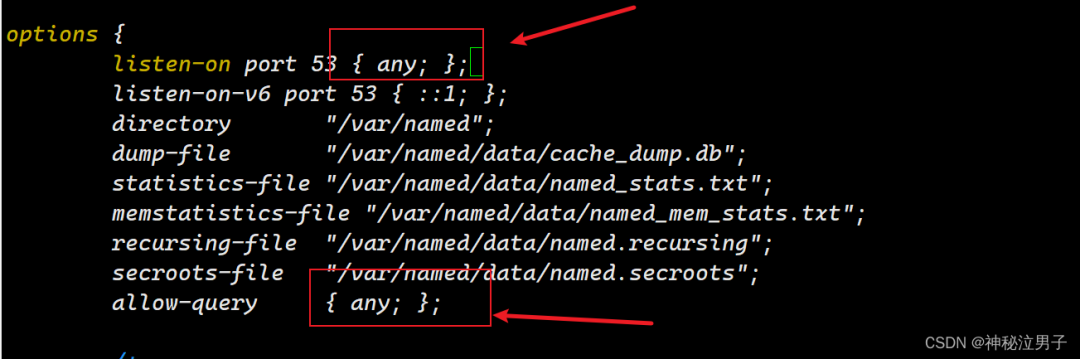
The following is a detailed explanation of the configuration:
Just for your understanding, the main focus is on the letters in the red box in the image.
- 1. options: This section contains general option settings for the DNS server.
- 2. listen-on port 53 { any; }: Specifies the port on which the DNS server listens. In this example, the DNS server listens on port 53, allowing any IP address to connect to that port. This means the DNS server will accept DNS query requests from any IP address.
- 3. listen-on-v6 port 53 { ::1; }: Specifies the listening port for IPv6 addresses. In this example, the DNS server listens on port 53 for IPv6 addresses, allowing only the local IPv6 address (::1) to connect to that port.
- 4. directory “/var/named”; Specifies the directory path where the DNS server’s related data files are stored. In this example, the data files are stored in the /var/named directory.
- 5. dump-file “/var/named/data/cache_dump.db”; Specifies the file path where the DNS server writes the cache content when it shuts down. This file is typically used for debugging and troubleshooting.
- 6. statistics-file “/var/named/data/named_stats.txt”; Specifies the file path for the DNS server’s statistical output, used to record the operational statistics of the DNS server.
- 7. memstatistics-file “/var/named/data/named_mem_stats.txt”; Specifies the file path for the DNS server’s memory usage statistics output, used to record the memory usage of the DNS server.
- 8. recursing-file “/var/named/data/named.recursing”; Specifies the file path for the DNS server’s recursive query record.
- 9. secroots-file “/var/named/data/named.secroots”; Specifies the file path for the DNS server’s security root file.
- 10. allow-query { any; }; Specifies the range of IP addresses allowed to query. In this example, any IP address is allowed to perform DNS queries.
Defining Forward Queries
Forward queries are one of the most common types of DNS queries.
Forward queries are used to resolve domain names into IP addresses, allowing users to access various network resources on the Internet using easily memorable domain names instead of remembering IP addresses.
Add the following information to the DNS configuration file:
zone "example.com" IN {
        type master;
        file "example.com.zone";
        allow-update { none; };
};
The content in the red box is what you need.
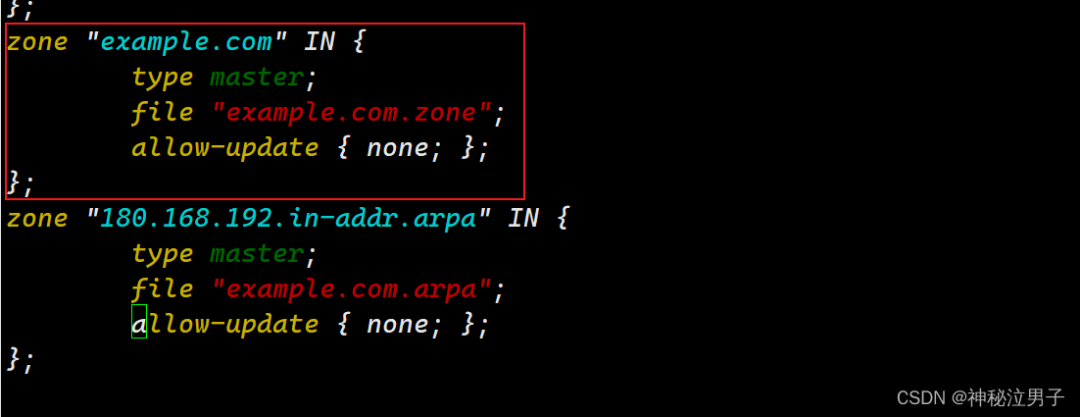
Here is a detailed explanation of the configuration:
It is important to emphasize that the file specifies the file path.
<span>type master;</span>: Indicates that this is the primary DNS server responsible for providing data for the “example.com” zone.
<span>file "example.com.zone";</span>: Specifies the path to the file containing the “example.com” zone data.
<span>allow-update { none; };</span>: Specifies the permissions for dynamic updates to the zone. In this case,<span>none</span>means no dynamic updates are allowed, so the zone data can only be updated by manually editing the zone file.
Defining Reverse Queries
Reverse queries are a method of querying from an IP address to a domain name.
Reverse queries are mainly used for security auditing, network management, and verifying IP address ownership. For example, when receiving network traffic from a certain IP address, a reverse query can confirm the domain name corresponding to that IP address, thus identifying the source of the traffic.
zone "180.168.192.in-addr.arpa" IN {
        type master;
        file "example.com.arpa";
        allow-update { none; };
};
As shown in the red box.
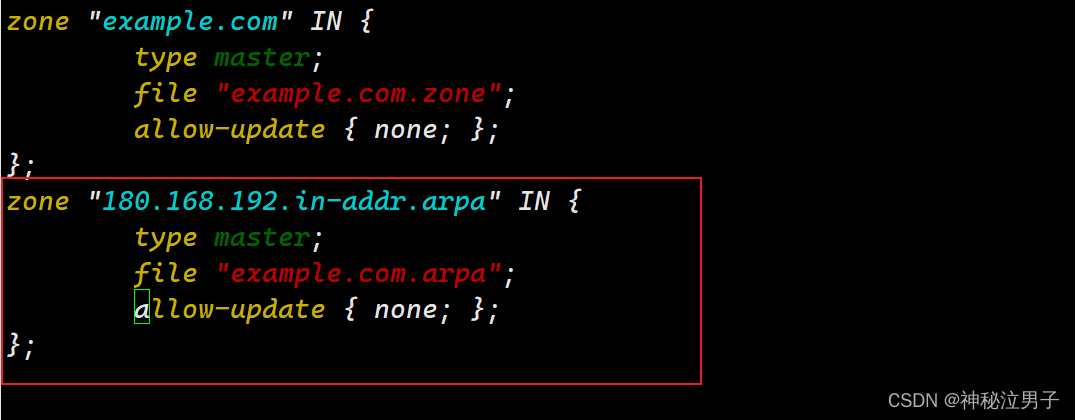
Check for syntax errors.
named-checkconf /etc/named.conf
After editing, save and exit, then restart.
systemctl restart named
Modifying Forward and Reverse Zone Files (Key Point)
Navigate to the directory where the DNS server-related files are stored <span>/var/named/</span>
cd /var/named/
Observe these two files; they are actually instance files. Next, we will copy two copies (any one will do).
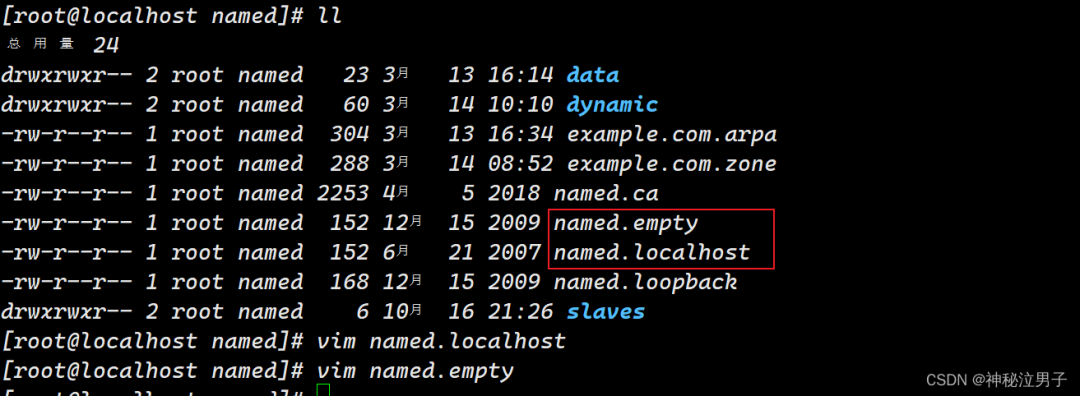
As follows:
cp -p named.empty example.com.zone
cp -p named.empty example.com.arpa
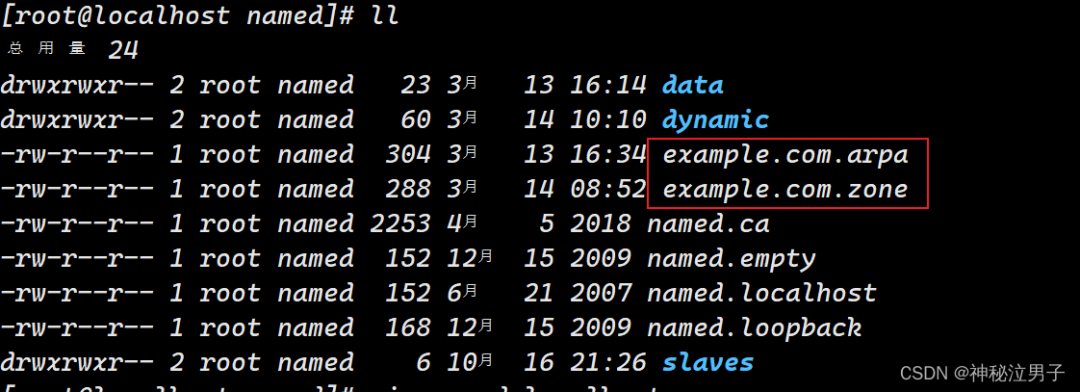
The following are the copied files:
example.com.zone will be used for forward query resolution.
example.com.arpa will be used for reverse query resolution.
Adding Resolution Information (Forward)
vim example.com.zone
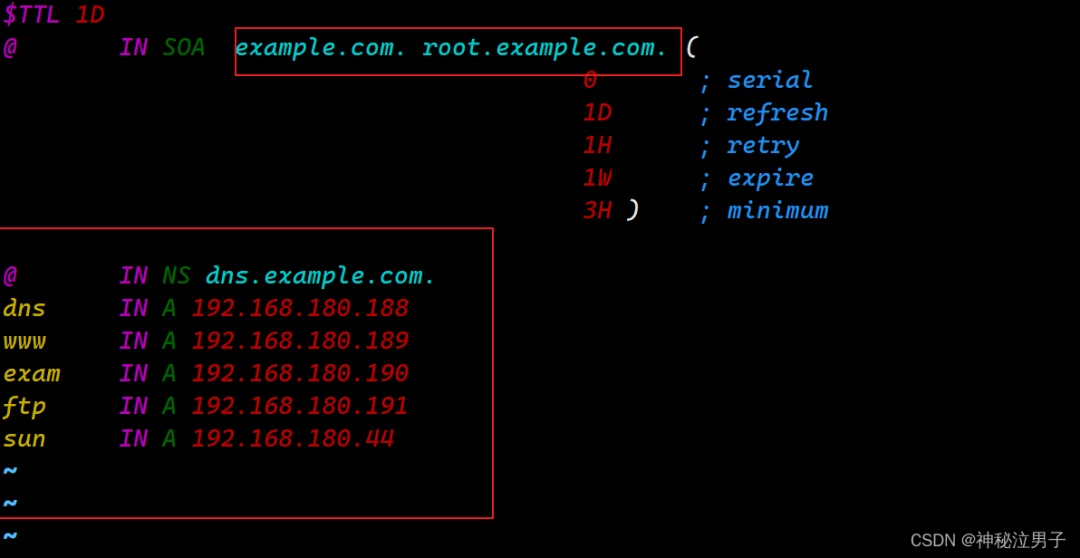
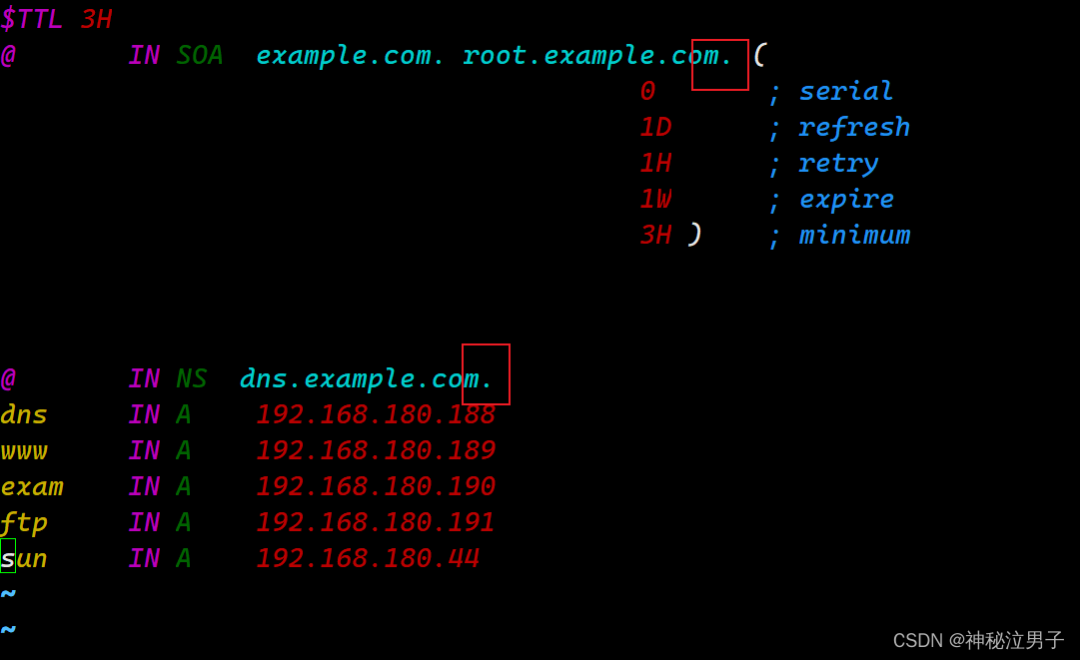
Observe the following configuration:
The format is as follows; please write according to this.
The content in the red box can be modified.
- 1.
<span>example.com.</span>: Specifies the main domain as<span>example.com</span>. - 2.
<span>root.example.com.</span>: This field specifies the email address of the DNS server responsible for managing the domain, in the form of<span>[email protected]</span>.<span>root</span>specifies the administrator of this domain (or root administrator), while<span>example.com</span>is the domain part of the administrator’s email address. - 3.
<span>@ IN NS dns.example.com.</span>: This line specifies that the DNS server for the domain<span>example.com</span>is<span>dns.example.com</span>. NS records (Name Server) specify the DNS server managing a specific zone. - 4.
<span>dns IN A 192.168.180.188</span>: This line specifies that the hostname<span>dns</span>corresponds to the IP address<span>192.168.180.188</span>. A records (Address Record) are used to resolve domain names to IPv4 addresses. - 5.
<span>www IN A 192.168.180.189</span>: This line specifies that the hostname<span>www</span>corresponds to the IP address<span>192.168.180.189</span>. - 6.
<span>exam IN A 192.168.180.190</span>: This line specifies that the hostname<span>exam</span>corresponds to the IP address<span>192.168.180.190</span>. - 7.
<span>ftp IN A 192.168.180.191</span>: This line specifies that the hostname<span>ftp</span>corresponds to the IP address<span>192.168.180.191</span>. - 8.
<span>sun IN A 192.168.180.44</span>: This line specifies that the hostname<span>sun</span>corresponds to the IP address<span>192.168.180.44</span>.
Adding Resolution Information (Reverse)
vim example.com.arpa
Observe the following configuration:
The format is as follows; please write according to this.
The content in the red box can be modified.
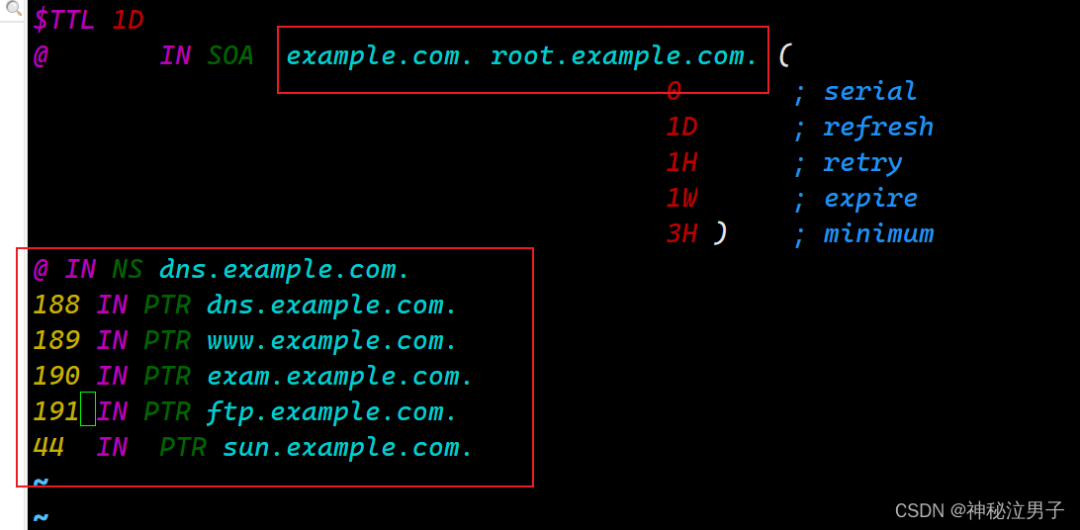
PTR records map IP addresses to corresponding domain names.
@ IN NS dns.example.com.: This line specifies that the DNS server for this reverse zone is dns.example.com. NS records (Name Server) specify the DNS server managing a specific zone.
188 IN PTR dns.example.com.: This line specifies that the host with an IP address ending in 188 corresponds to the domain name dns.example.com. PTR records (Pointer Record) are used to resolve IP addresses to domain names.
189 IN PTR www.example.com.: This line specifies that the host with an IP address ending in 189 corresponds to the domain name www.example.com.
190 IN PTR exam.example.com.: This line specifies that the host with an IP address ending in 190 corresponds to the domain name exam.example.com.
191 IN PTR ftp.example.com.: This line specifies that the host with an IP address ending in 191 corresponds to the domain name ftp.example.com.
44 IN PTR sun.example.com.: This line specifies that the host with an IP address ending in 44 corresponds to the domain name sun.example.com.
At this point, all configuration information has been written. Restart the service.
3. Client Testing
Configure IP, disable the firewall and SELinux.
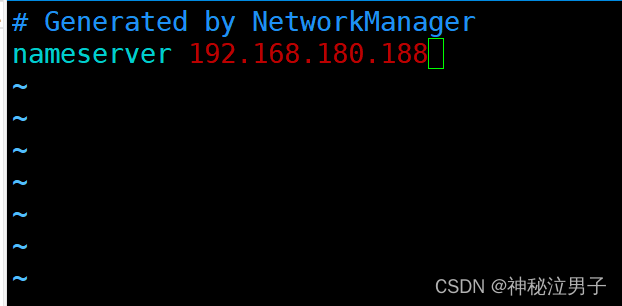
[root@localhost ~] vim /etc/resolv.conf
<span>/etc/resolv.conf</span> is an important file for configuring DNS resolution.
Point it to the DNS server’s IP address.
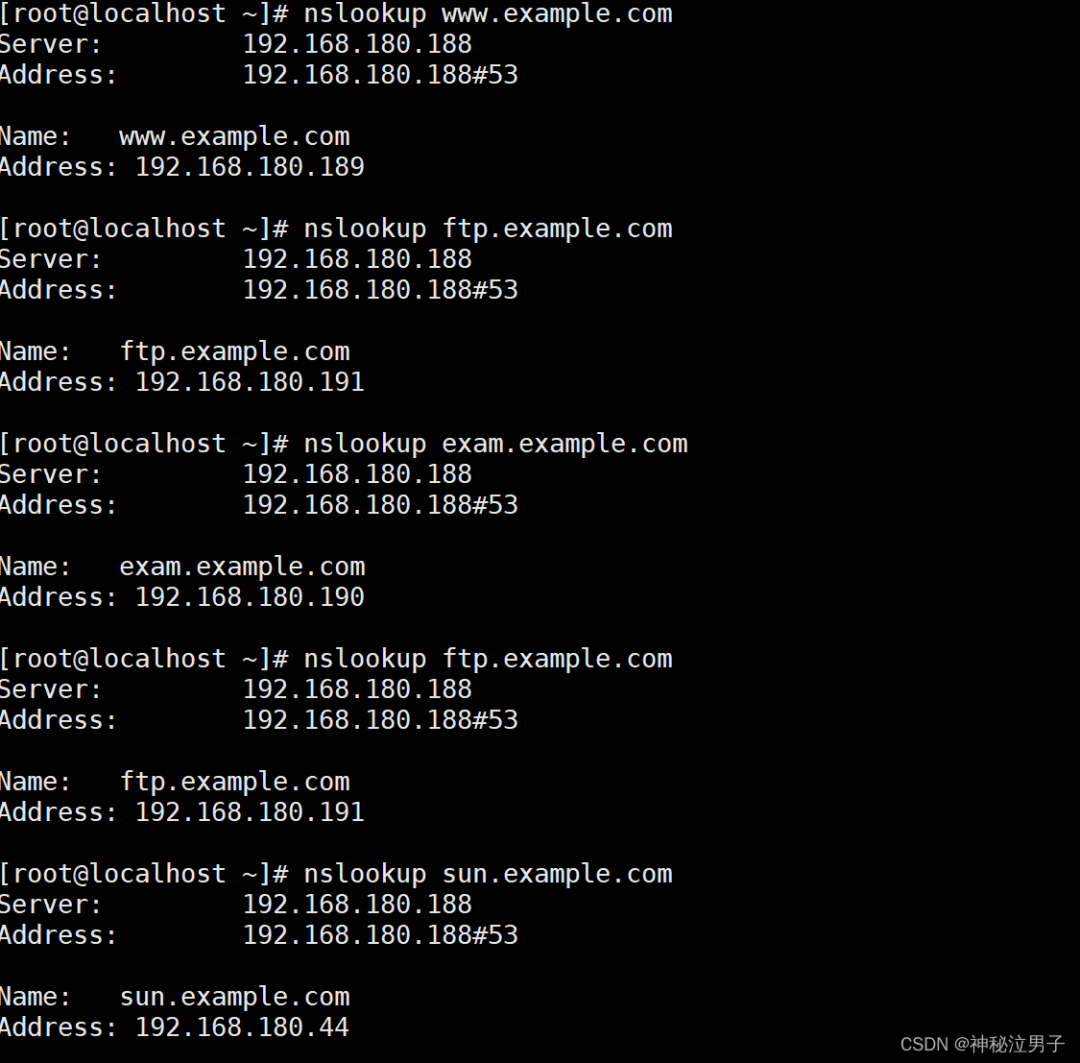
Forward Resolution Testing
Testing shows that everything corresponds to the configuration file relationships.
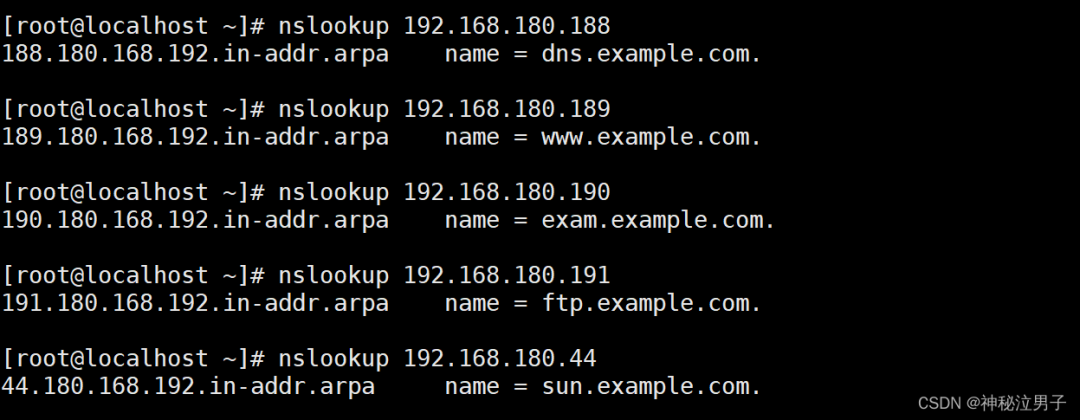
Reverse Resolution Testing
Testing shows that everything corresponds to the configuration file relationships.
Precautions
If you find that after restarting:
Job for named.service failed because the control process exited with error code. See "systemctl status named.service" and "journalctl -xe" for details.

Then there is an error in the configuration file that you edited.
Use <span>vim /etc/named.conf</span> to edit this file and carefully observe the information you edited.
If resolution fails, then there is a problem in the forward and reverse resolution files.
Also, remember to add the dot.
Link:https://blog.csdn.net/jxjdhdnd/article/details/136699043?spm=1001.2014.3001.5502