Author: billpchen, Frontend Developer at Tencent Kandian
After the HTTP/2 standard was published in 2015, most mainstream browsers supported this standard by the end of that year. Since then, with advantages such as multiplexing, header compression, and server push, HTTP/2 has gained increasing favor among developers. Unbeknownst to many, HTTP has now evolved to its third generation, and Tencent has also kept pace with technological trends, with many projects gradually adopting HTTP/3. This article discusses the principles of HTTP/3 and the methods for business integration based on the practical experience of integrating HTTP/3 into Interest Community.
1. Principles of HTTP/3
1.1 History of HTTP
Before introducing HTTP/3, let’s briefly look at the history of HTTP to understand the background of HTTP/3’s emergence.
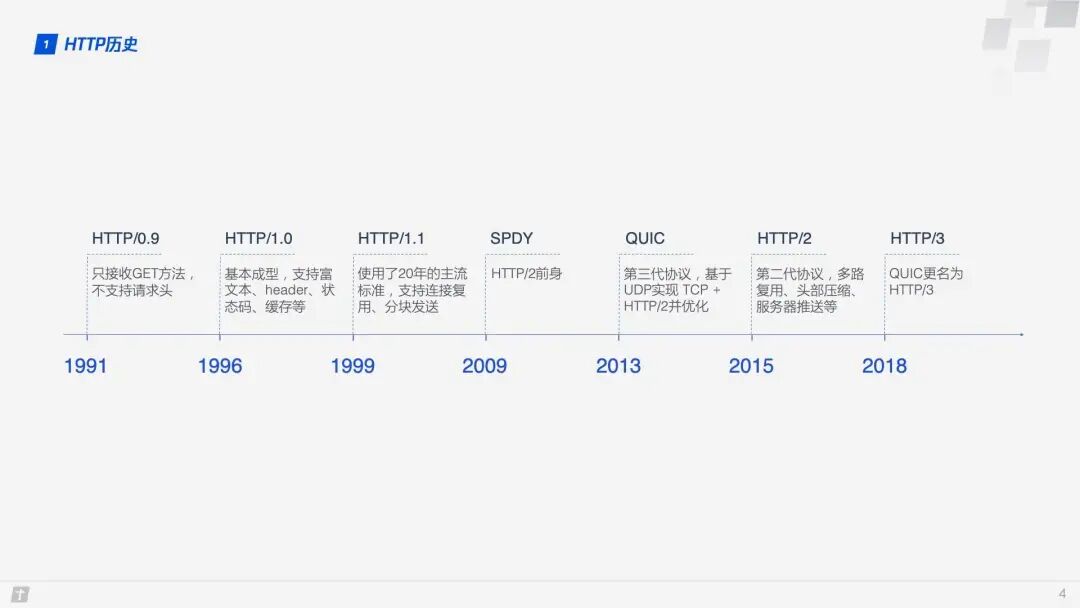
With the development of network technology, the HTTP/1.1 designed in 1999 can no longer meet the demands, so Google designed SPDY based on TCP in 2009. Later, the SPDY development team pushed for SPDY to become an official standard, but it ultimately did not pass. However, the SPDY development team participated throughout the process of formulating HTTP/2, referencing many designs from SPDY, so we generally consider SPDY to be the predecessor of HTTP/2. Both SPDY and HTTP/2 are based on TCP, which has inherent disadvantages in efficiency compared to UDP. Therefore, in 2013, Google developed a transport layer protocol called QUIC based on UDP, hoping it could replace TCP and make web transmission more efficient. Subsequently, it was proposed that the HTTP based on the QUIC protocol (HTTP over QUIC) be officially renamed HTTP/3.
1.2 Overview of the QUIC Protocol
TCP has always been a crucial protocol at the transport layer, while UDP has remained relatively obscure. When asked about the differences between TCP and UDP in interviews, responses regarding UDP are often brief. For a long time, UDP has been perceived as a fast but unreliable transport layer protocol. However, sometimes, from another perspective, a disadvantage can also be an advantage. QUIC (Quick UDP Internet Connections) is based on UDP, precisely because of UDP’s speed and efficiency. At the same time, QUIC integrates the advantages of TCP, TLS, and HTTP/2 and optimizes them. A diagram can clearly illustrate their relationships.
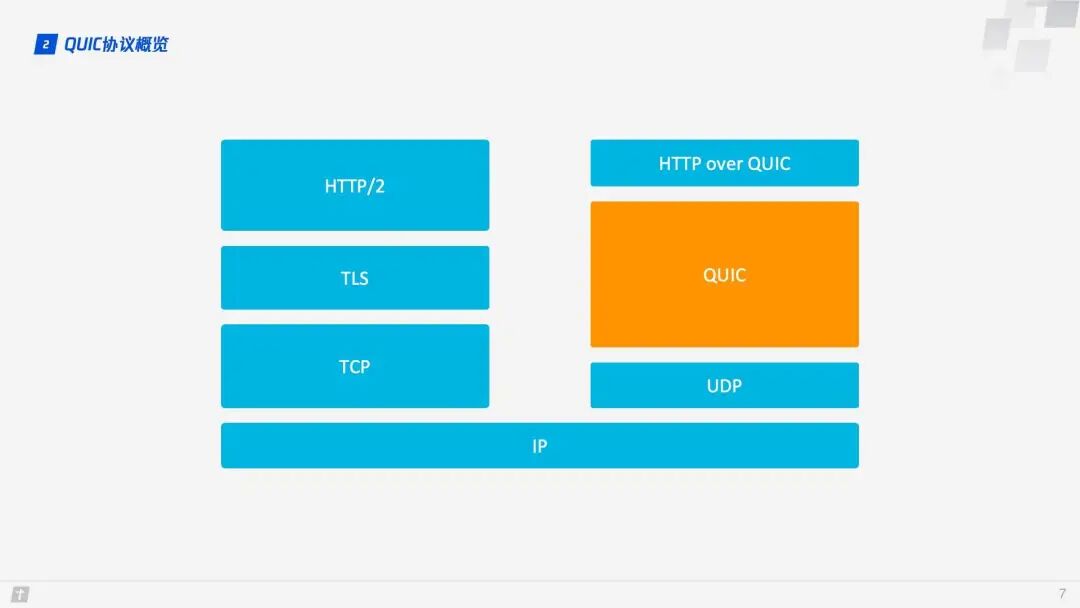
So what is the relationship between QUIC and HTTP/3? QUIC is a transport layer protocol designed to replace TCP and SSL/TLS. Above the transport layer, there is the application layer, where well-known application layer protocols such as HTTP, FTP, IMAP, etc., can theoretically run on top of QUIC. The HTTP protocol running on QUIC is referred to as HTTP/3, which is the meaning of “HTTP over QUIC, i.e., HTTP/3”.
Therefore, to understand HTTP/3, one cannot bypass QUIC. Below, we will mainly explore several important features to deepen our understanding of QUIC.
1.3 Zero RTT Connection Establishment
A diagram can vividly illustrate the differences in connection establishment between HTTP/2 and HTTP/3.
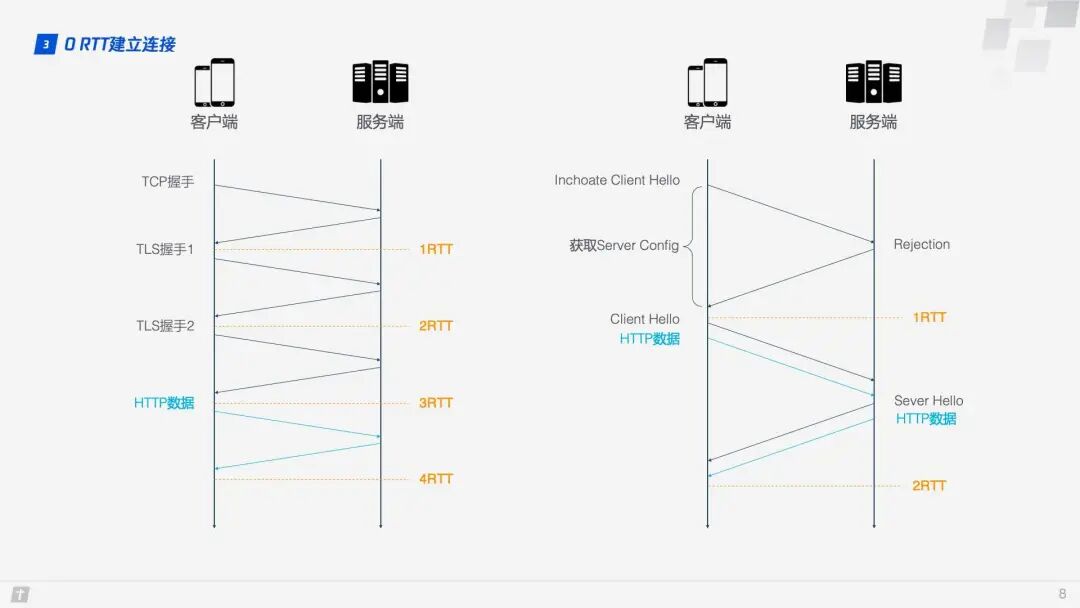
HTTP/2 requires 3 RTTs to establish a connection. If session reuse is considered, meaning the symmetric key obtained from the first handshake is cached, it still requires 2 RTTs. Furthermore, if TLS is upgraded to 1.3, then an HTTP/2 connection requires 2 RTTs, and considering session reuse, it requires 1 RTT. Some may argue that HTTP/2 does not necessarily require HTTPS, and the handshake process can be simplified. This is true; the HTTP/2 standard does not require HTTPS. However, in practice, all browser implementations require HTTP/2 to be based on HTTPS, making encrypted connections essential. In contrast, HTTP/3 requires only 1 RTT for the first connection, and subsequent connections can achieve 0 RTT, meaning the first packet sent from the client to the server contains request data, a feat that HTTP/2 cannot match. What is the principle behind this? Let’s take a closer look at the QUIC connection process.
Step 1: During the first connection, the client sends an Inchoate Client Hello to the server to request a connection;
Step 2: The server generates g, p, a, calculates A based on g, p, and a, then places g, p, A into the Server Config and sends a Rejection message back to the client;
Step 3: Upon receiving g, p, A, the client generates b, calculates B based on g, p, b, and calculates the initial key K based on A, p, b. After calculating B and K, the client encrypts the HTTP data using K and sends it to the server along with B;
Step 4: The server receives B, generates the same key as the client based on a, p, B, and uses this key to decrypt the received HTTP data. For further security (forward secrecy), the server updates its random number a and public key, generates a new key S, and sends the public key back to the client via the Server Hello message, along with the HTTP response data;
Step 5: Upon receiving the Server Hello, the client generates a new key S that matches the server, and subsequent transmissions use S for encryption.
Thus, QUIC takes a total of 1 RTT from requesting a connection to officially receiving HTTP data. This 1 RTT is mainly to obtain the Server Config. If the client caches the Server Config for subsequent connections, it can directly send HTTP data, achieving 0 RTT connection establishment.
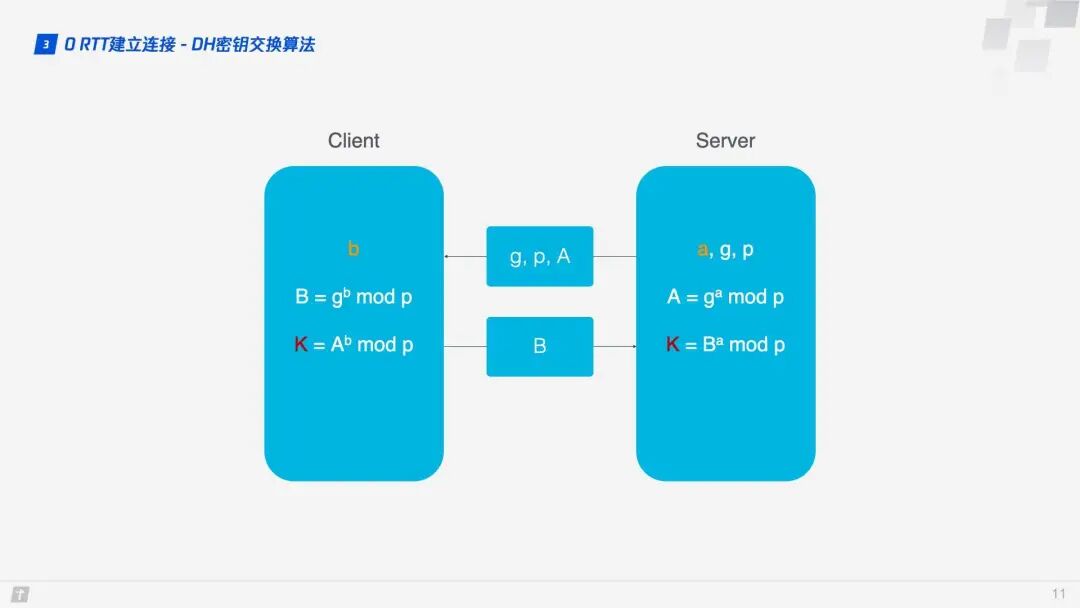
Here, the DH key exchange algorithm is used, where the core of the DH algorithm is that the server generates three random numbers a, g, p, with a kept private, while g and p are transmitted to the client. The client generates a random number b. Through the DH algorithm, both the client and server can calculate the same key. During this process, a and b do not participate in network transmission, greatly enhancing security. Since p and g are large numbers, even if p, g, A, and B transmitted over the network are intercepted, current computing power cannot crack the key.
1.4 Connection Migration
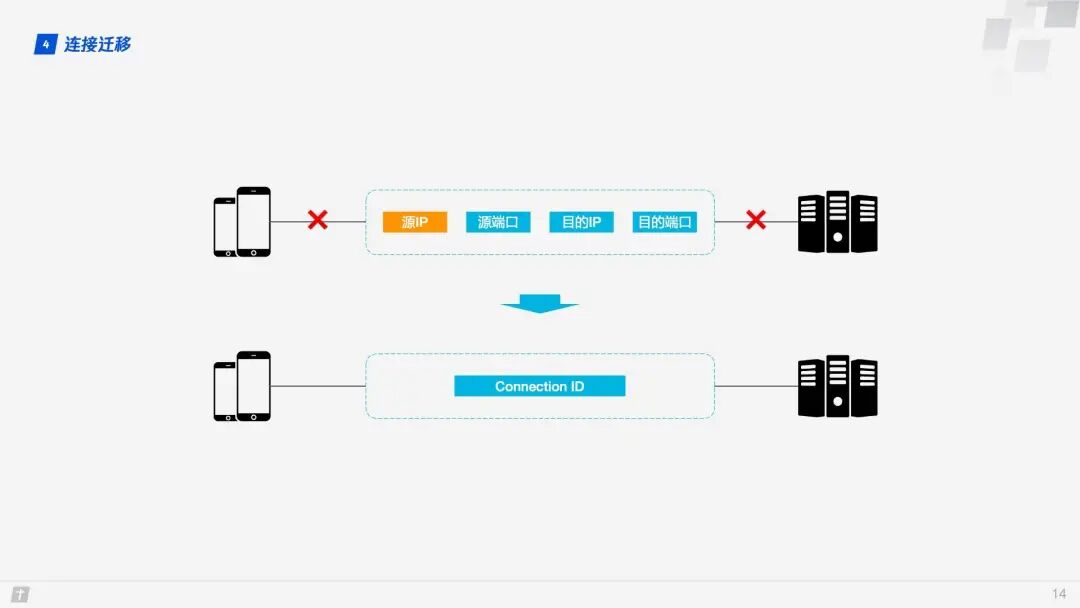
TCP connections are based on a four-tuple (source IP, source port, destination IP, destination port). When switching networks, at least one of these factors changes, leading to a change in the connection. When a connection changes, if the original TCP connection is still used, it will result in a connection failure, necessitating a wait for the original connection to time out before re-establishing the connection. This is why we sometimes find that when switching to a new network, even if the new network is in good condition, the content still takes a long time to load. If implemented well, when a network change is detected, a new TCP connection can be established immediately. However, even then, establishing a new connection still takes hundreds of milliseconds.
QUIC connections are not affected by the four-tuple. When any of these four elements change, the original connection can still be maintained. How is this achieved? The principle is simple: QUIC connections do not use the four-tuple as an identifier but instead use a 64-bit random number known as the Connection ID. Even if the IP or port changes, as long as the Connection ID remains unchanged, the connection can still be maintained.
1.5 Head-of-Line Blocking / Multiplexing
Both HTTP/1.1 and HTTP/2 suffer from head-of-line blocking issues. So, what is head-of-line blocking?
TCP is a connection-oriented protocol, meaning that after sending a request, it needs to receive an ACK message to confirm that the other party has received the data. If each request must wait for the ACK message of the previous request before sending the next one, the efficiency is undoubtedly very low. Later, HTTP/1.1 introduced the Pipelining technique, allowing multiple requests to be sent simultaneously over a single TCP connection, significantly improving transmission efficiency.
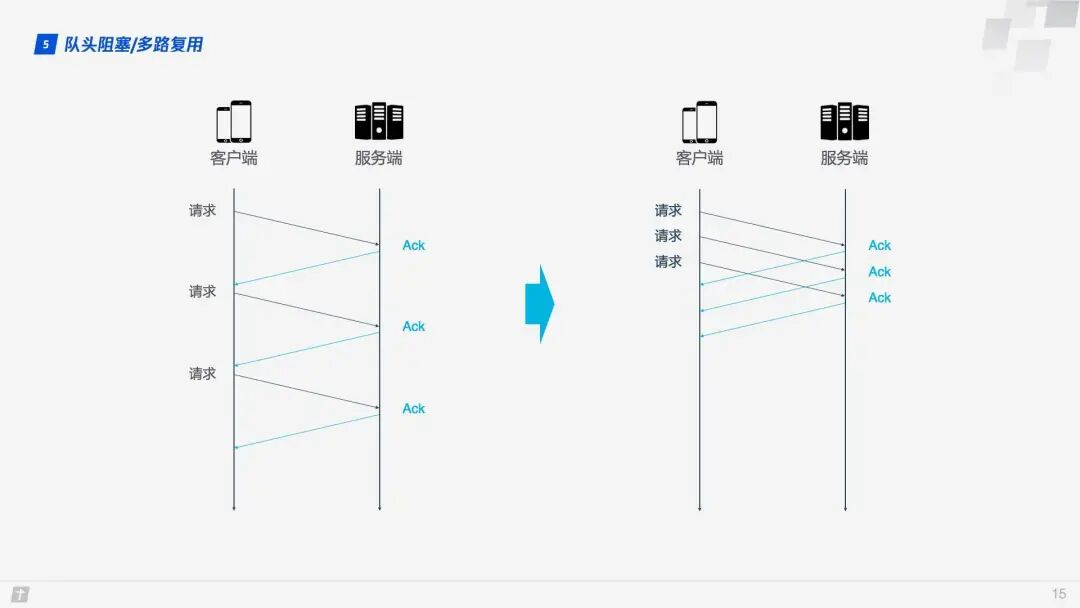
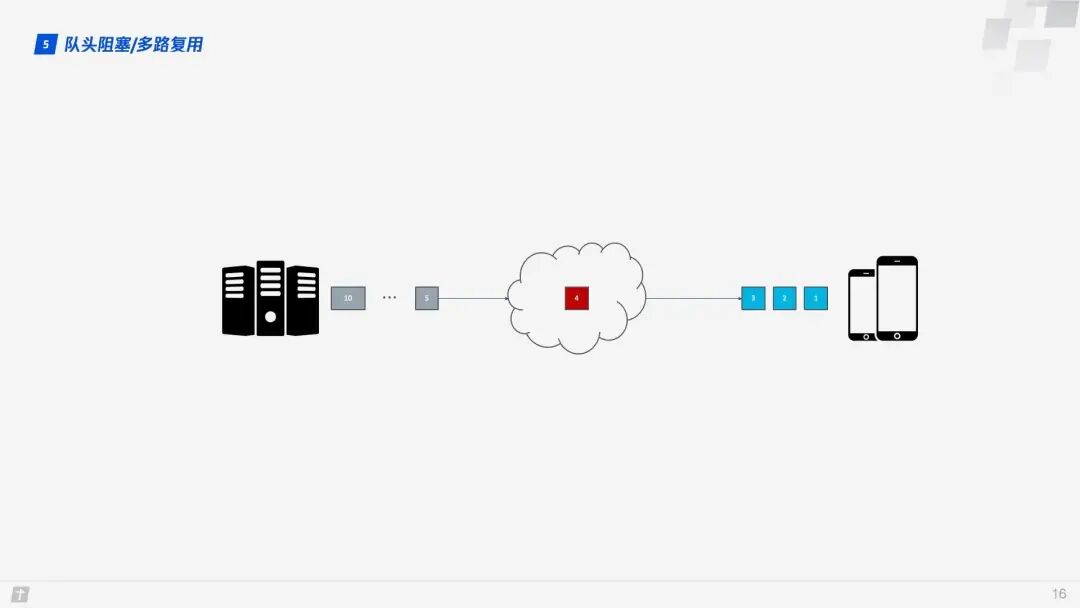
In this context, let’s discuss the head-of-line blocking in HTTP/1.1. In the diagram below, a single TCP connection transmits 10 requests simultaneously. The first, second, and third requests have been received by the client, but the fourth request is lost. As a result, requests five through ten are blocked and must wait for the fourth request to be processed before they can be handled, wasting bandwidth resources.
Therefore, HTTP generally allows each host to establish six TCP connections, which can better utilize bandwidth resources, but the head-of-line blocking issue still exists within each connection.
HTTP/2’s multiplexing solves the aforementioned head-of-line blocking problem. Unlike HTTP/1.1, where the next request’s data packets can only be transmitted after all data packets of the previous request have been transmitted, in HTTP/2, each request is split into multiple frames and transmitted simultaneously over a single TCP connection. Thus, even if one request is blocked, it does not affect other requests. As shown in the diagram below, different colors represent different requests, and blocks of the same color represent frames that have been split from the request.
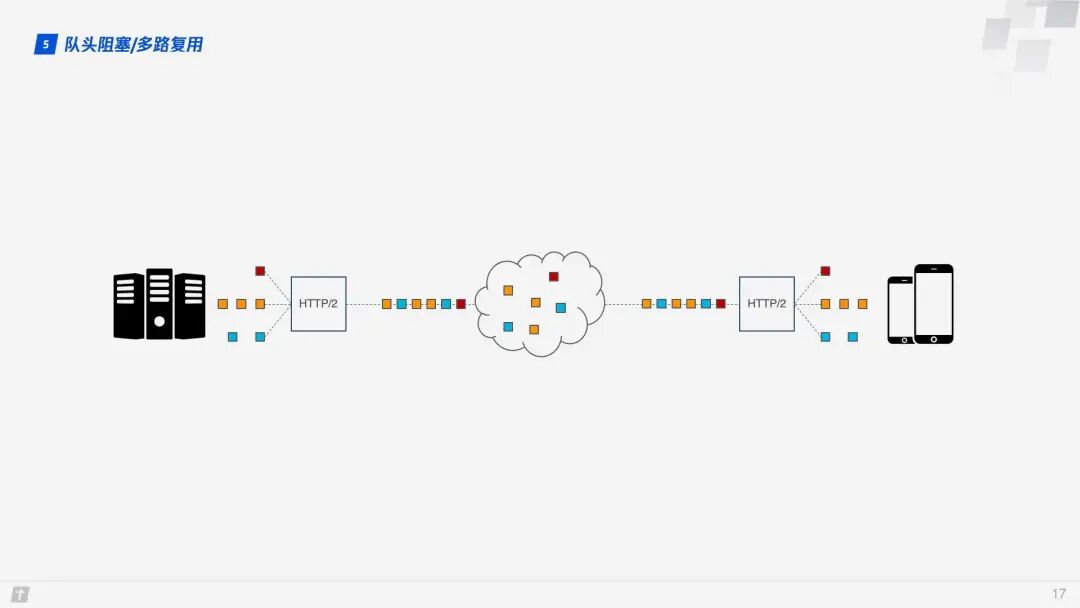
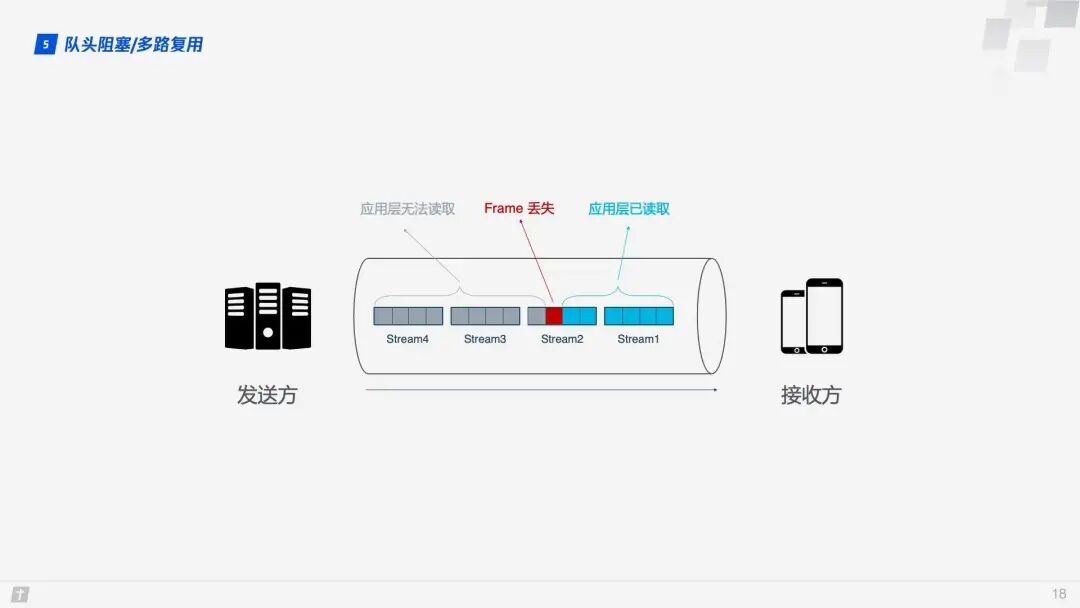
However, the story does not end there. Although HTTP/2 can solve blocking at the “request” granularity, the underlying TCP protocol still suffers from head-of-line blocking issues. Each request in HTTP/2 is split into multiple frames, and frames from different requests combine to form streams. A stream is a logical transmission unit over TCP, allowing HTTP/2 to achieve the goal of sending multiple requests simultaneously over a single connection, which is the principle of multiplexing. Let’s look at an example where four streams are sent simultaneously over a single TCP connection. If Stream1 is successfully delivered, but the third frame of Stream2 is lost, TCP processes data in strict order, requiring the sender to retransmit the third frame. Although Streams 3 and 4 have been received, they cannot be processed, causing the entire connection to be blocked.
Moreover, since HTTP/2 must use HTTPS, and the TLS protocol used by HTTPS also has head-of-line blocking issues, TLS organizes data based on records, encrypting a batch of data (i.e., a record) together and then splitting it into multiple TCP packets for transmission. Generally, each record is 16K, containing 12 TCP packets. If any one of these 12 TCP packets is lost, the entire record cannot be decrypted.
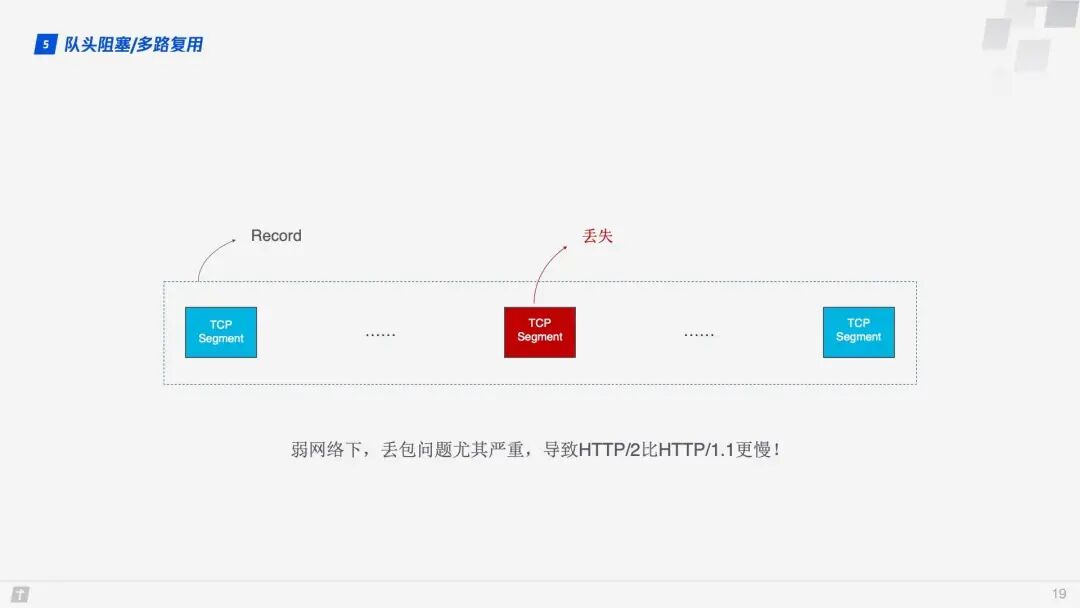
Head-of-line blocking can cause HTTP/2 to be slower than HTTP/1.1 in weak network environments where packet loss is more likely!
So how does QUIC solve the head-of-line blocking problem? There are two main points:
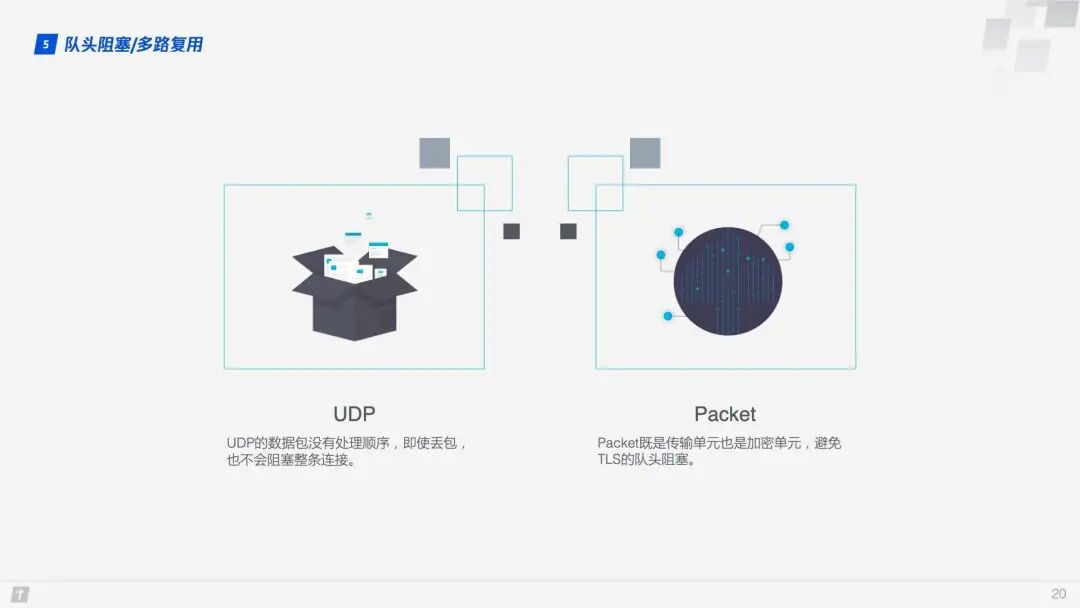
- QUIC’s transmission unit is a packet, and the encryption unit is also a packet. The entire encryption, transmission, and decryption process is based on packets, which avoids the head-of-line blocking issues of TLS;
- QUIC is based on UDP, where UDP packets are not processed in order at the receiving end. Even if a packet is lost in the middle, it does not block the entire connection, and other resources can be processed normally.
1.6 Congestion Control
The purpose of congestion control is to prevent too much data from flooding the network at once, causing it to exceed its maximum load. QUIC’s congestion control is similar to TCP but has made improvements on this basis. Therefore, let’s briefly introduce TCP’s congestion control.
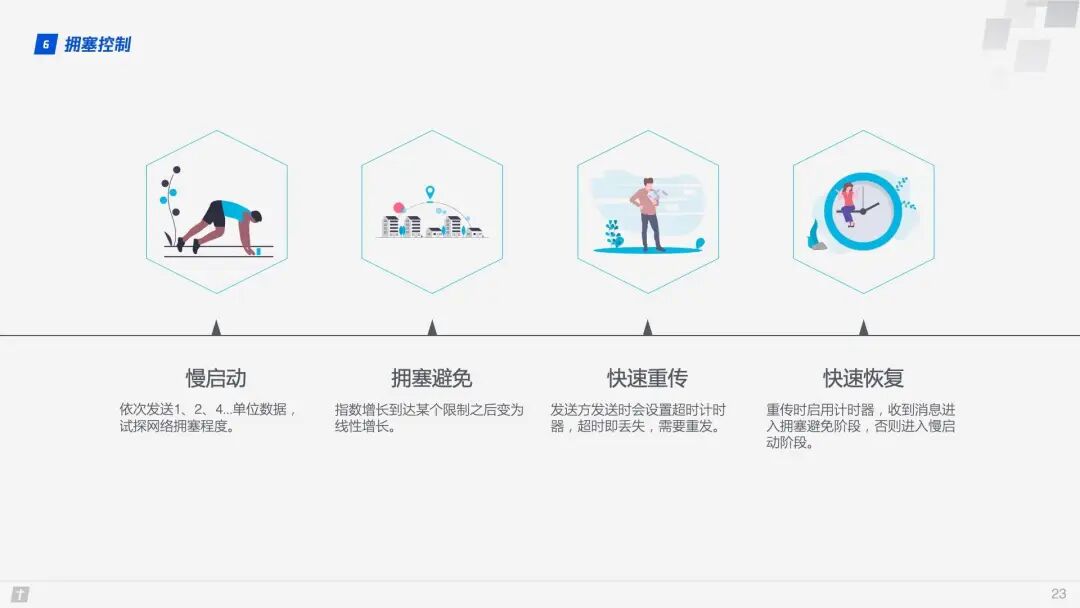
TCP congestion control consists of four core algorithms: slow start, congestion avoidance, fast retransmit, and fast recovery. Understanding these four algorithms provides a general understanding of TCP’s congestion control.
- Slow Start: The sender sends 1 unit of data to the receiver. After receiving confirmation from the other party, it sends 2 units of data, then 4, 8, and so on, growing exponentially. This process continuously probes the network’s congestion level, exceeding a threshold will lead to network congestion;
- Congestion Avoidance: Exponential growth cannot be infinite. After reaching a certain limit (the slow start threshold), exponential growth becomes linear growth;
- Fast Retransmit: The sender sets a timeout timer for each transmission. If a timeout occurs, it is considered lost and needs to be retransmitted;
- Fast Recovery: Based on the fast retransmit above, when the sender retransmits data, it also starts a timeout timer. If it receives a confirmation message, it enters the congestion avoidance phase; if it still times out, it returns to the slow start phase.
QUIC re-implements the Cubic algorithm of the TCP protocol for congestion control and has made several improvements on this basis. Below are some features of QUIC’s improved congestion control.
1.6.1 Hot Plugging
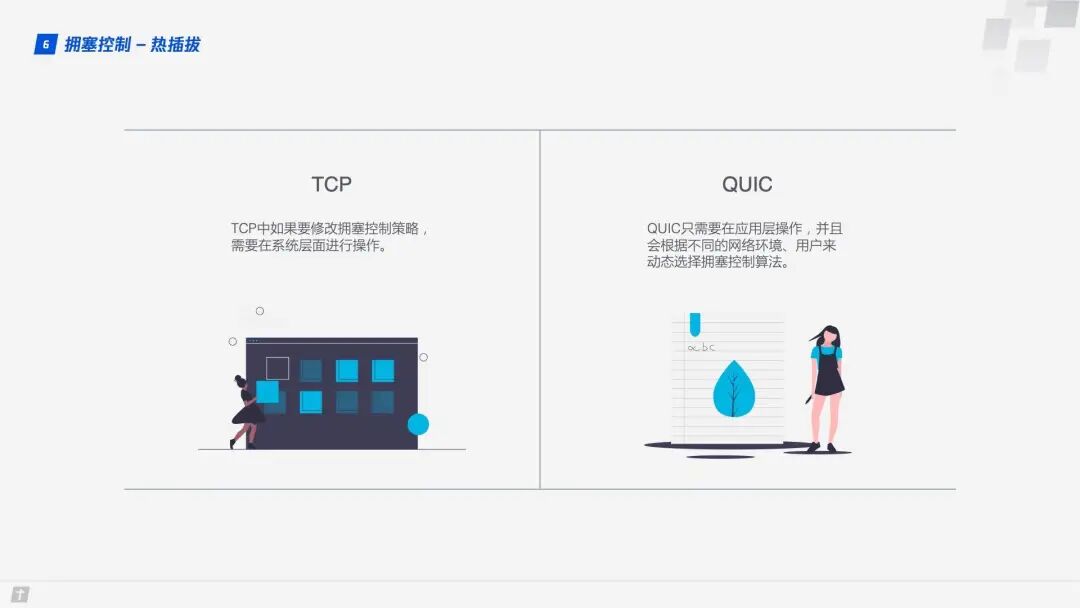
In TCP, modifying the congestion control strategy requires system-level operations. In QUIC, changing the congestion control strategy only requires application-level operations, and QUIC dynamically selects the congestion control algorithm based on different network environments and users.
1.6.2 Forward Error Correction (FEC)
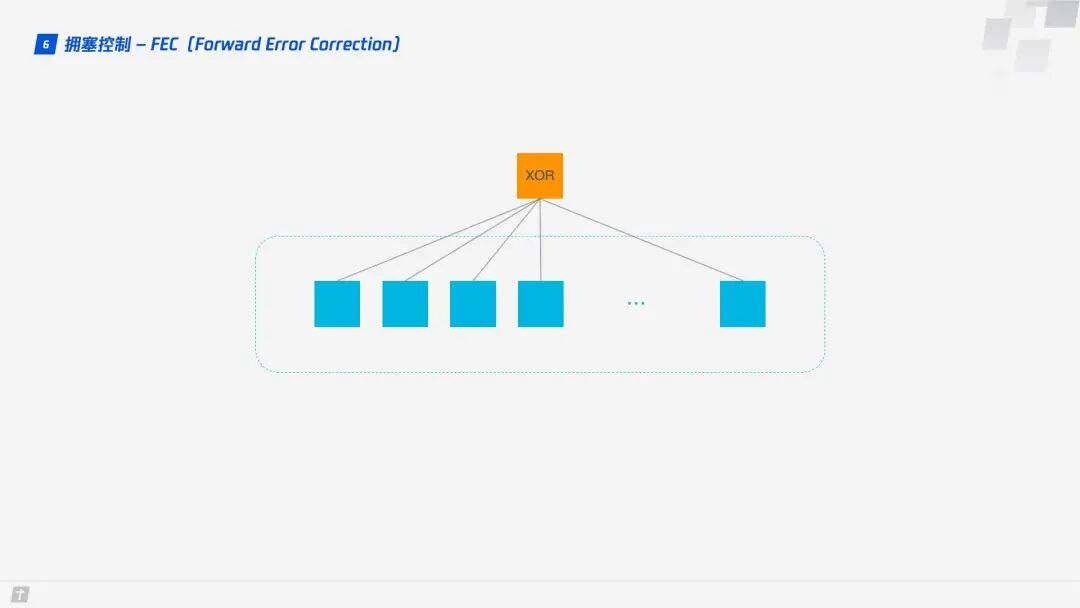
QUIC uses Forward Error Correction (FEC) technology to increase the protocol’s fault tolerance. A segment of data is split into 10 packets, and each packet undergoes an XOR operation. The result of this operation is transmitted as an FEC packet along with the data packets. If, unfortunately, one data packet is lost during transmission, the missing packet’s data can be inferred from the remaining 9 packets and the FEC packet, greatly enhancing the protocol’s fault tolerance.
This is a solution that aligns with current network technology; bandwidth is no longer the bottleneck for network transmission, but round-trip time is. Therefore, new network transmission protocols can appropriately increase data redundancy to reduce retransmission operations.
1.6.3 Monotonically Increasing Packet Number
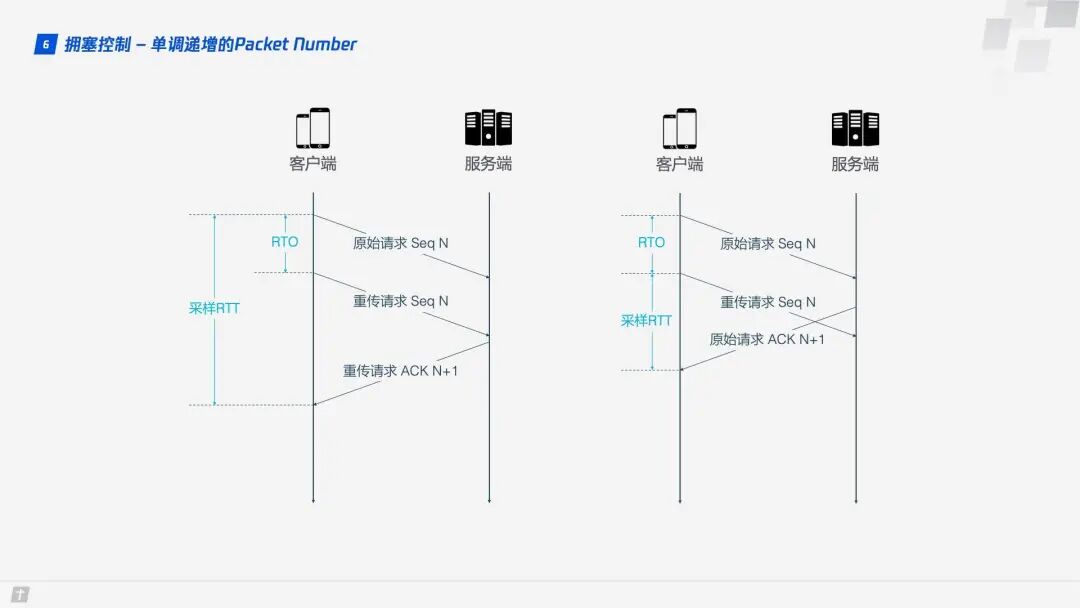
To ensure reliability, TCP uses Sequence Numbers and ACKs to confirm whether messages arrive in order, but this design has flaws.
When a timeout occurs, the client initiates a retransmission. Later, it receives an ACK confirmation message, but since the ACK message for the original request and the retransmission request is the same, the client is confused, not knowing whether this ACK corresponds to the original request or the retransmission request. If the client assumes it is the ACK for the original request, but it is actually the left diagram’s situation, the calculated sample RTT will be too large; if the client assumes it is the ACK for the retransmission request, but it is actually the right diagram’s situation, it will lead to a sample RTT that is too small. The terms in the diagram include RTO, which refers to Retransmission TimeOut, and is very similar to the familiar RTT (Round Trip Time). Sample RTT affects RTO calculations, and accurately grasping the timeout duration is crucial; both too long and too short are inappropriate.
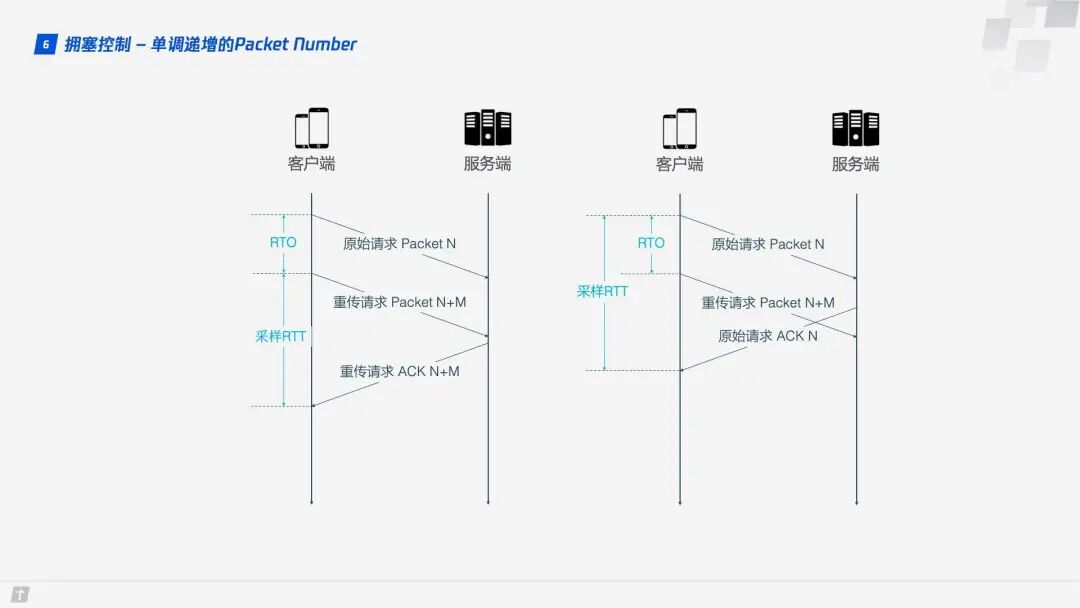
QUIC resolves the ambiguity issue mentioned above. Unlike Sequence Numbers, Packet Numbers are strictly monotonically increasing. If Packet N is lost, the retransmission will not use N as the identifier but a larger number, such as N + M. This way, when the sender receives the confirmation message, it can easily determine whether the ACK corresponds to the original request or the retransmission request.
1.6.4 ACK Delay
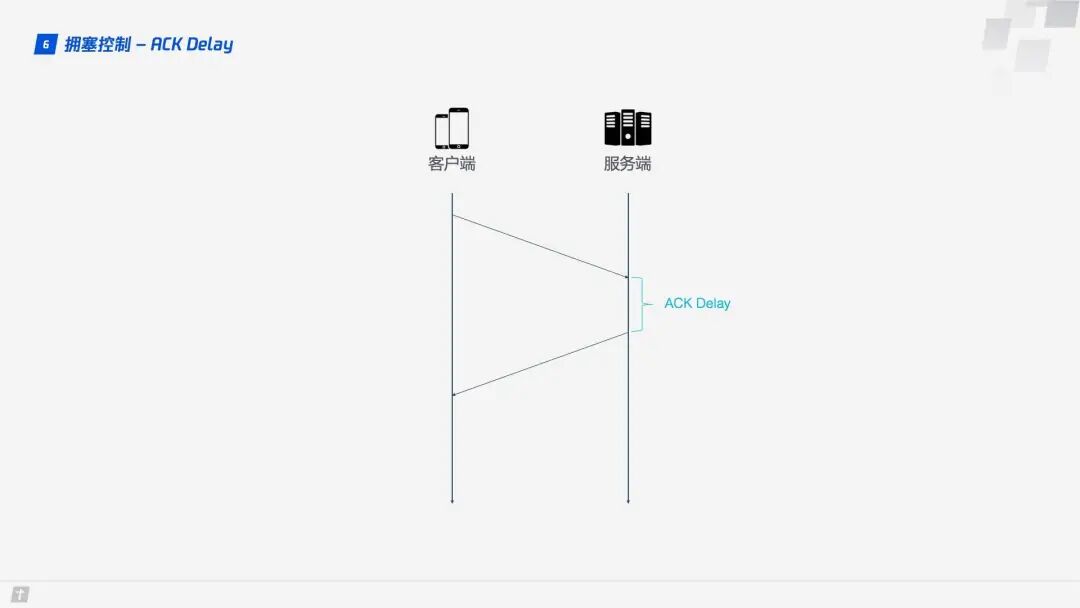
TCP does not consider the delay between the receiver receiving data and sending the confirmation message when calculating RTT, as shown in the diagram below. This delay is known as ACK Delay. QUIC takes this delay into account, making RTT calculations more accurate.
1.6.5 More ACK Blocks
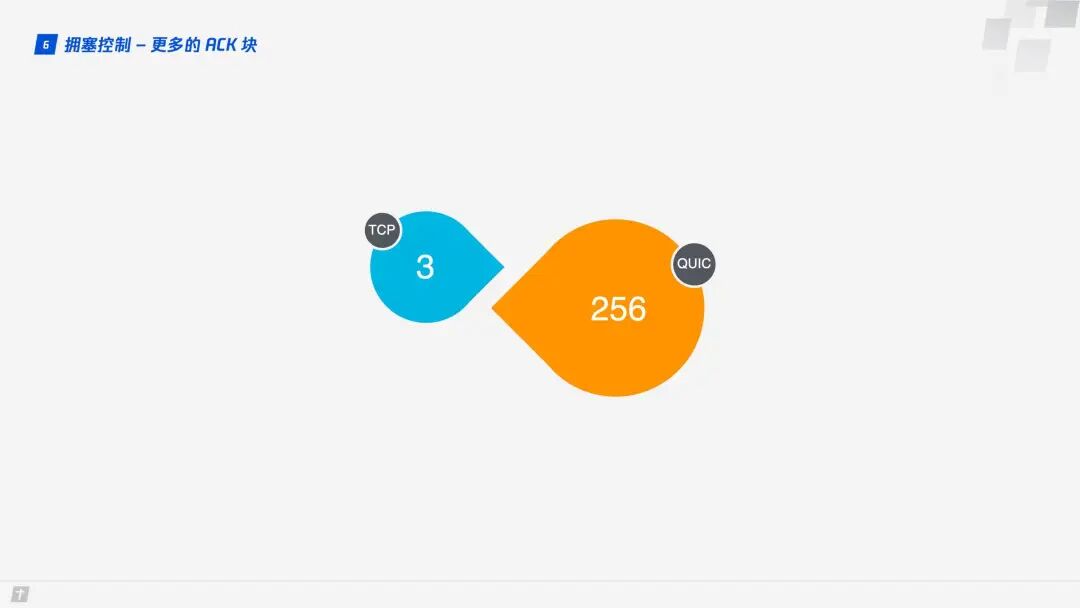
Generally, the receiver should send an ACK reply after receiving a message from the sender to indicate that the data has been received. However, immediately replying with an ACK for every received data packet is cumbersome, so typically, multiple data packets are received before sending a reply. TCP SACK provides a maximum of 3 ACK blocks. However, in some scenarios, such as downloading, the server only needs to return data, but according to TCP’s design, an ACK must be returned for every three data packets received. In contrast, QUIC can carry up to 256 ACK blocks. In networks with high packet loss rates, more ACK blocks can reduce retransmissions and improve network efficiency.
1.7 Flow Control
TCP performs flow control on each TCP connection, which means that the sender should not send data too quickly, allowing the receiver to keep up; otherwise, data overflow and loss may occur. TCP’s flow control is mainly implemented through a sliding window. It can be seen that congestion control mainly controls the sender’s sending strategy but does not consider the receiver’s receiving capacity, while flow control complements this aspect.
QUIC only needs to establish a single connection, over which multiple streams can be transmitted simultaneously. It is like having a road with warehouses at both ends, and many vehicles transporting goods along the road. QUIC’s flow control has two levels: connection level and stream level. This is akin to controlling the total flow on the road to prevent too many vehicles from flooding in at once, as well as preventing a single vehicle from transporting too many goods at once, which would also overwhelm processing capacity.
How does QUIC implement flow control? Let’s first look at the flow control of a single stream. When a stream has not yet transmitted data, the receive window (flow control receive window) is the maximum receive window (flow control receive window). As the receiver receives data, the receive window gradually shrinks. Among the received data, some have been processed, while others have not yet been processed. In the diagram below, the blue blocks represent processed data, while the yellow blocks represent unprocessed data, which causes the receive window of the stream to shrink.
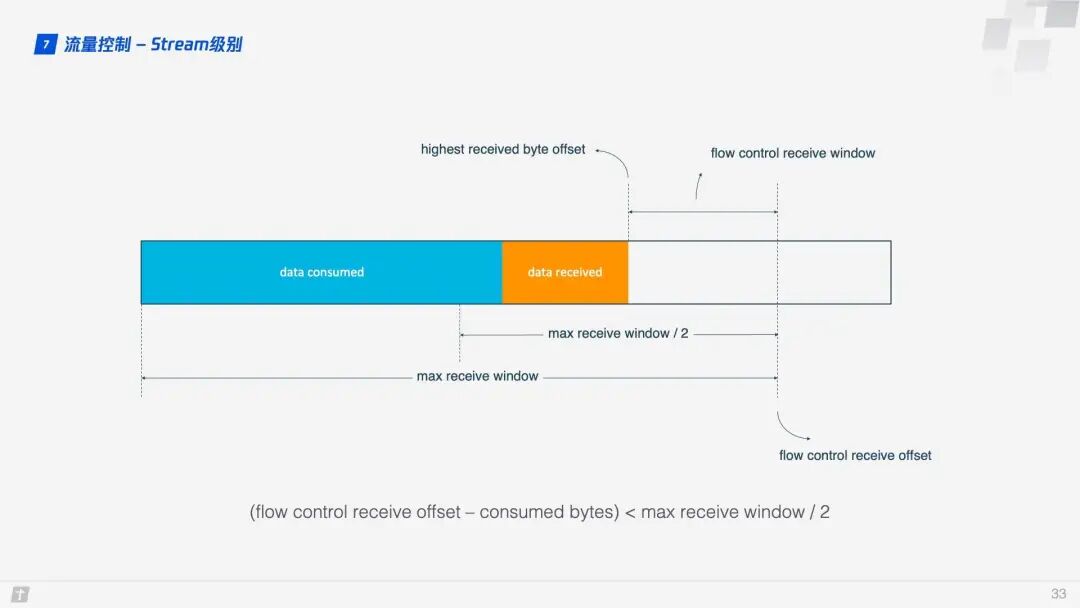
As data continues to be processed, the receiver can handle more data. When (flow control receive offset – consumed bytes) < (max receive window / 2) is satisfied, the receiver will send a WINDOW_UPDATE frame to inform the sender that it can send more data. At this point, the flow control receive offset will shift, and the receive window will increase, allowing the sender to send more data to the receiver.
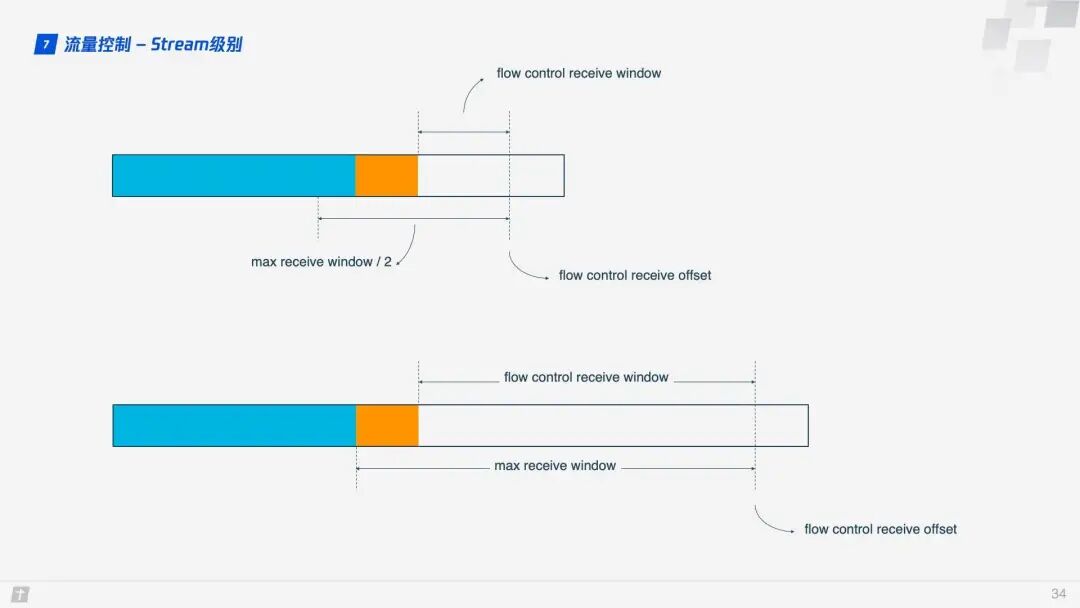
The stream-level flow control has limited effectiveness in preventing the receiver from receiving too much data, and connection-level flow control is also needed. Understanding stream flow control makes it easy to understand connection flow control. In a stream, the receive window (flow control receive window) = maximum receive window (max receive window) – received data (highest received byte offset), while for a connection: the receive window = Stream1 receive window + Stream2 receive window + … + StreamN receive window.
2. Practical Implementation of HTTP/3
2.1 X5 Kernel and STGW
The X5 kernel is a browser kernel developed by Tencent for the Android system, created to address the high adaptation costs, insecurity, and instability of traditional Android system browser kernels. STGW stands for Secure Tencent Gateway, which refers to Tencent’s secure cloud gateway. Both have supported the QUIC protocol for over two years.
So, how can businesses running on X5 integrate QUIC? Thanks to X5 and STGW, the changes required for business integration with QUIC are minimal, requiring only two steps.
Step 1. Enable the whitelist on STGW to allow the business domain to access the QUIC protocol;
Step 2. Add the alt-svc attribute to the Response Header of the business resources, for example: alt-svc: quic=”:443″; ma=2592000; v=”44,43,39″.
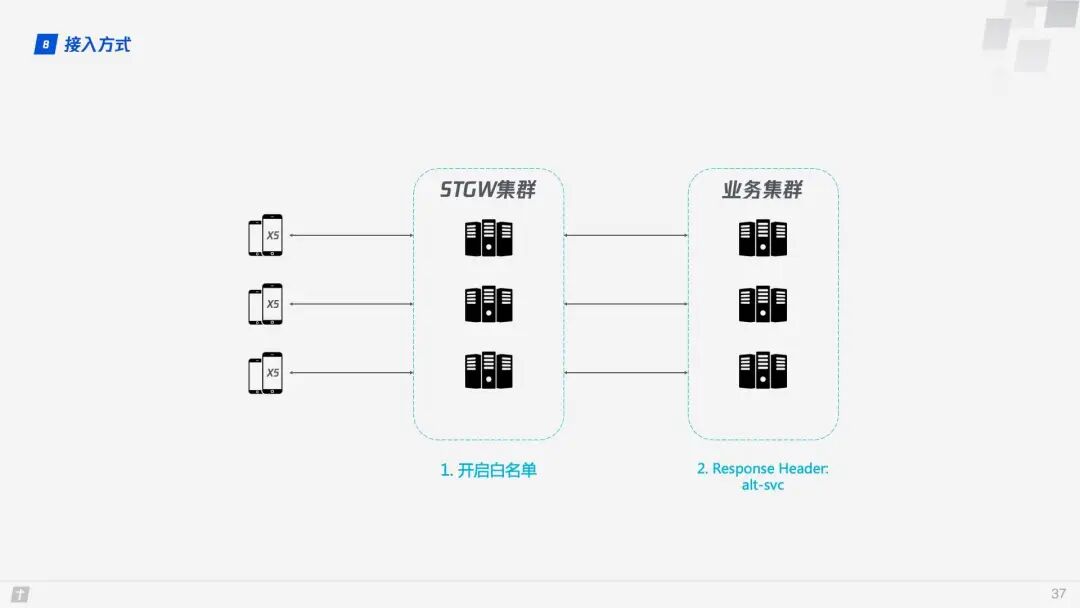
When integrating QUIC, the advantages of STGW are very apparent, as communication occurs between STGW and QUIC-supporting clients (in this case, X5), while the business backend continues to communicate using HTTP/1.1. The Server Config and other cached information required by QUIC are maintained by STGW.
2.2 Negotiation Upgrade and Racing
Once the business domain is added to STGW’s whitelist and the alt-svc attribute is added to the Response Header of the business resources, how does QUIC establish a connection? There is a key step: negotiation upgrade. The client is unsure whether the server supports QUIC, and if it rashly requests to establish a QUIC connection, it may fail. Therefore, a negotiation upgrade process is necessary to determine whether to use QUIC.
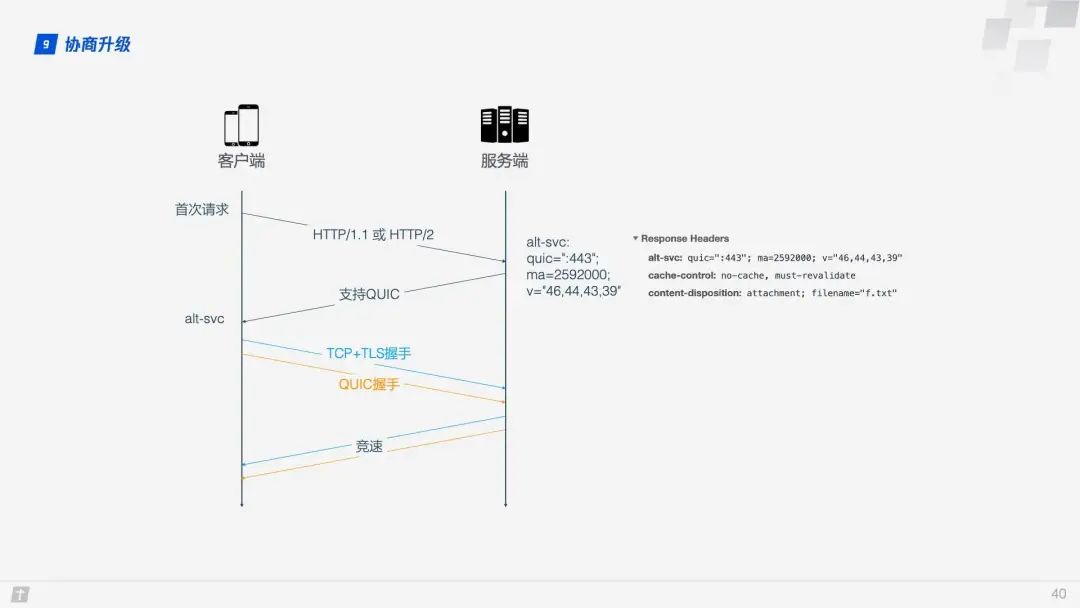
During the first request, the client will use HTTP/1.1 or HTTP/2. If the server supports QUIC, it will return the alt-svc header in the response data, informing the client that it can use QUIC for the next request. The alt-svc header mainly contains the following information:
- quic: the listening port;
- ma: the validity period, in seconds, promising to support QUIC during this time;
- version number: listing all supported version numbers of QUIC, as QUIC iterates quickly.
After confirming that the server supports QUIC, the client simultaneously initiates both a QUIC connection and a TCP connection to the server, comparing the speeds of the two connections and selecting the faster protocol. This process is called “racing,” and QUIC usually wins.
2.3 QUIC Performance
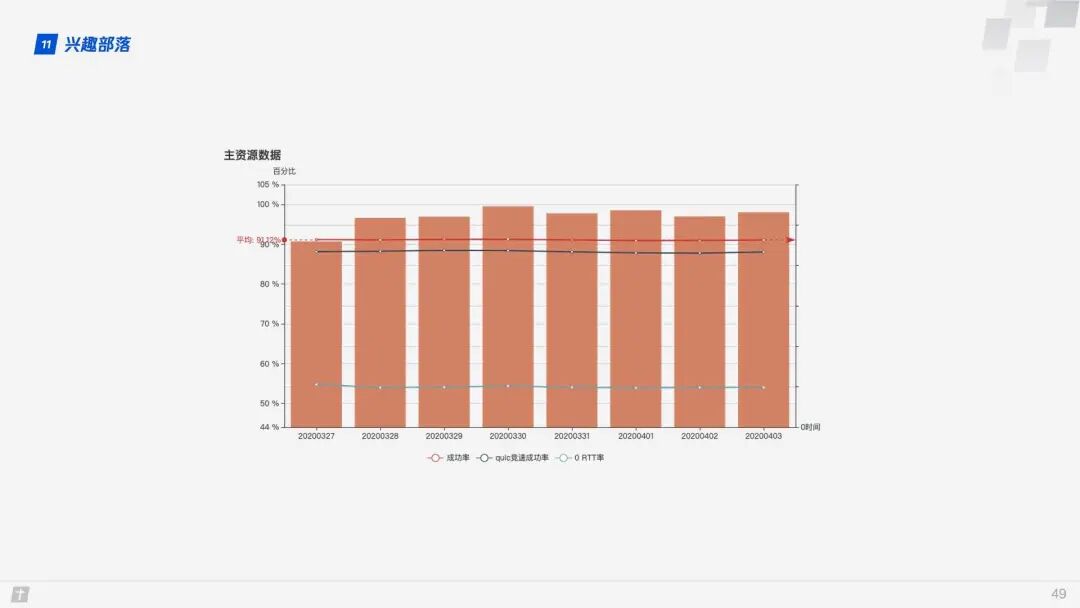
The success rate of establishing QUIC connections is over 90%, with a racing success rate also close to 90%, and the 0 RTT rate is around 55%.
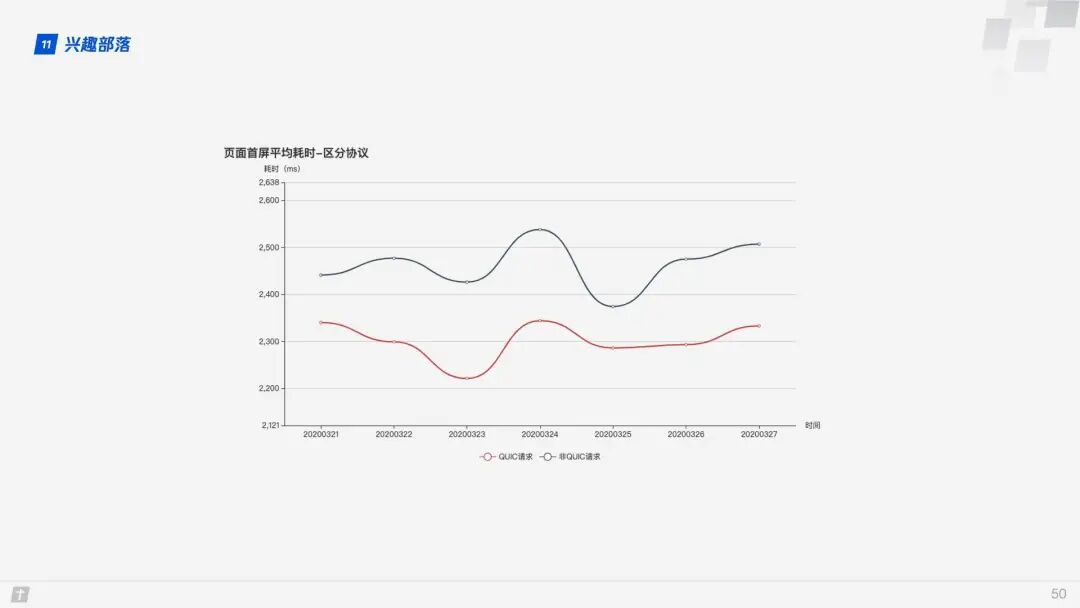
When using the QUIC protocol, the time to first screen is reduced by 10% compared to non-QUIC protocols.
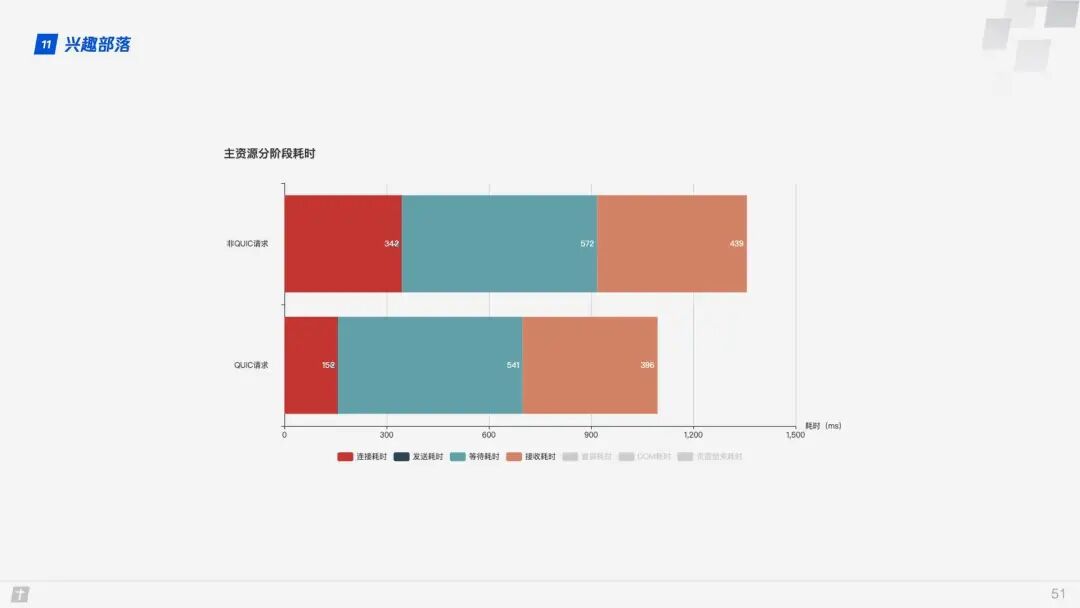
From the different stages of resource acquisition, the time saved during the connection phase when using the QUIC protocol is particularly noticeable.
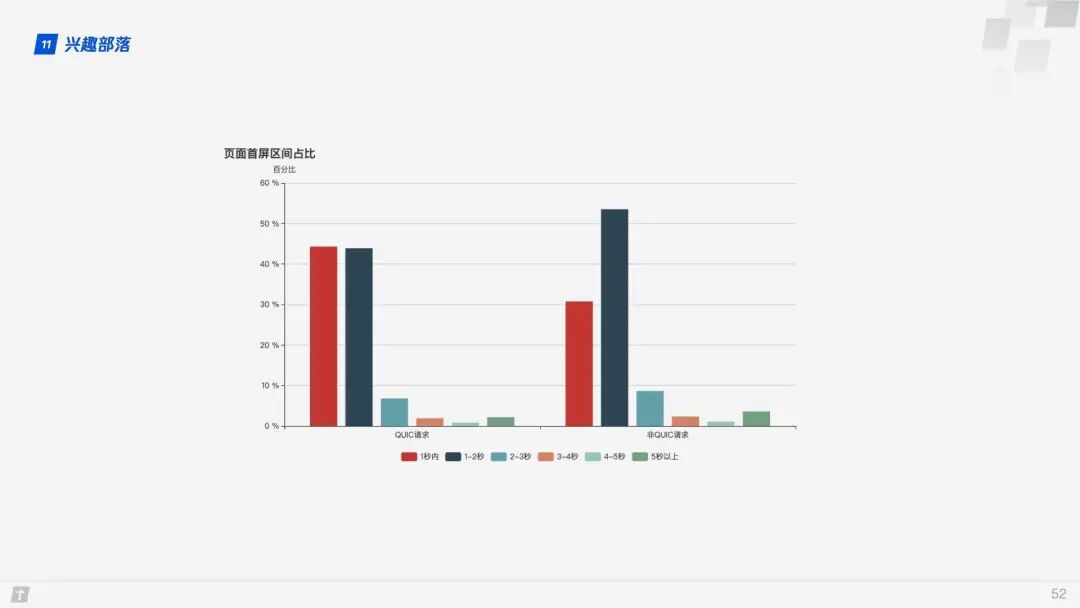
From the proportion chart of the time to first screen, it is evident that after using the QUIC protocol, the proportion of time to first screen within 1 second has significantly increased, approximately by 12%.
3. Conclusion
QUIC has shed the burdens of TCP and TLS, based on UDP, and has borrowed and improved upon the experiences of TCP, TLS, and HTTP/2, achieving a secure, efficient, and reliable HTTP communication protocol. With excellent features such as 0 RTT connection establishment, smooth connection migration, virtually eliminating head-of-line blocking, and improved congestion and flow control, QUIC achieves better performance than HTTP/2 in most scenarios.
A week ago, Microsoft announced the open-sourcing of its internal QUIC library – MsQuic, and will fully recommend the QUIC protocol to replace TCP/IP.
The future of HTTP/3 is promising.