

Introduction
Recently, due to the need to migrate a core library to a new data center, we planned to use Data Guard for the migration. However, we need to set up a new RAC, and the purchased hardware maintenance does not support RHEL 7.9, only RHEL 8.5 and later operating systems. Therefore, we intend to install Oracle 19c RAC on RHEL 9.6, and here we look for some evidence of support for RHEL 9.

Main Content
Oracle 19c is supported on Linux 9, as stated in the official documentation installation list, which includes RHEL 7, 8, and 9, as well as Oracle Linux 7, 8, and 9. However, it does not specify the database RU version. We know that the ARM version starts supporting from 19.19, and the installation package downloaded from the official website is directly 19.19. So, does x64 Linux 9 support the installation of Oracle 19c? The official installation package only provides the base package of 19.3, which may need to be verified.
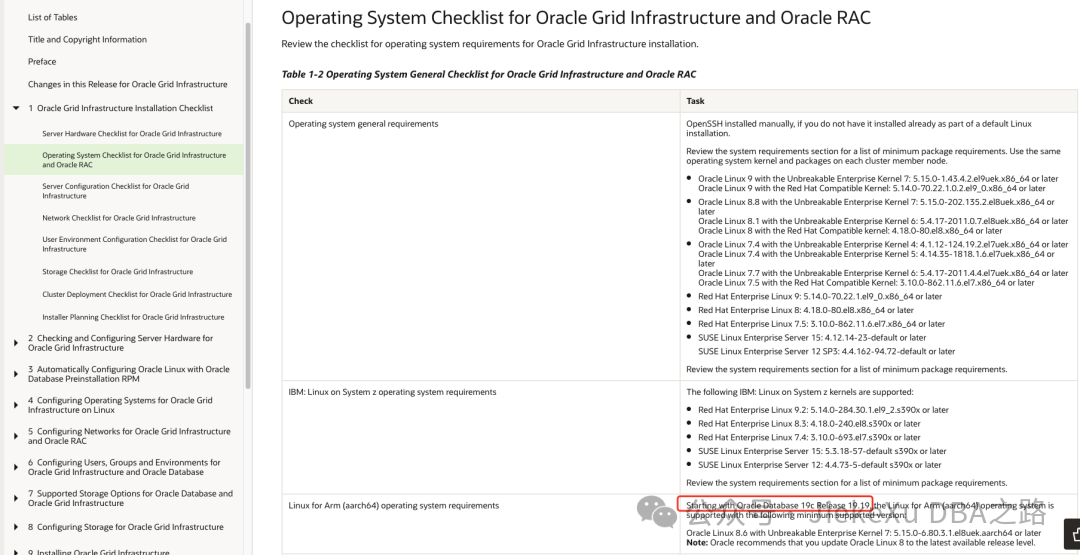
After verification, Linux 9 can be installed, but it must run on UEK7 (Unbreakable Enterprise Kernel) and the database patch version must be 19.19 or higher. The following image is the certification list provided by the official MOS interface, which clearly requires a minimum RU of 19.19.
Linux 9 supports the deployment of Oracle GI
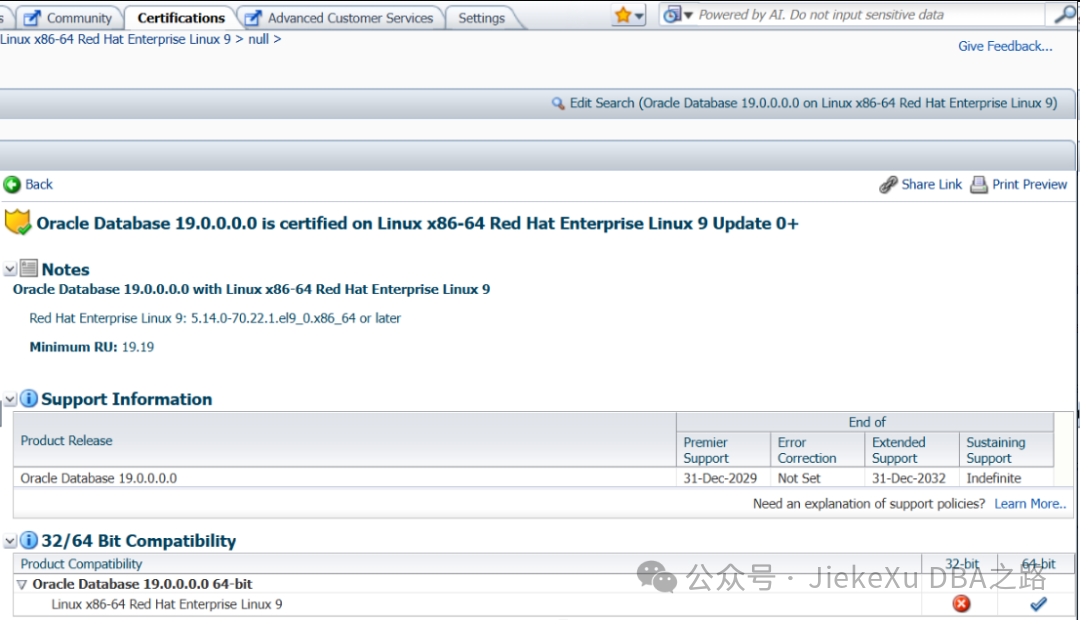
Linux 9 supports the deployment of Oracle DB, but requires a minimum patch RU19
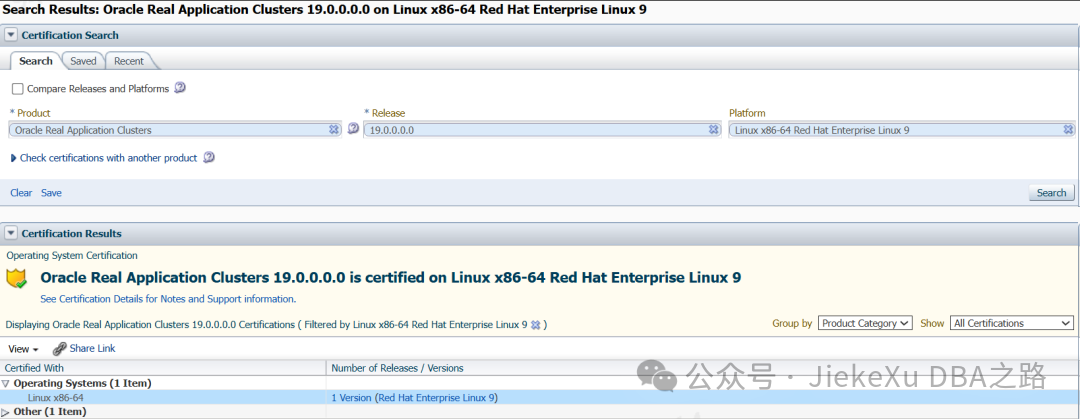
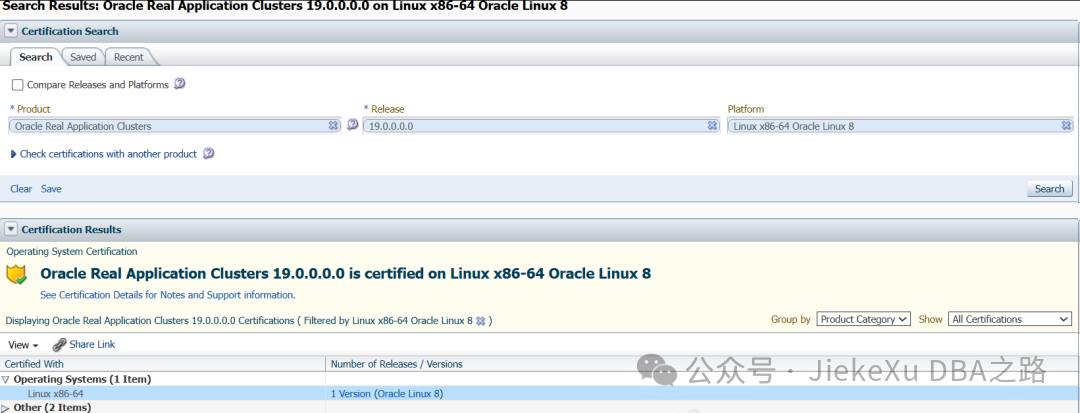
Linux 8 supports the deployment of Oracle RAC
Kernel Requirements
Oracle Linux 9 with Unbreakable Enterprise Kernel 7: 5.15.0-1.43.4.2.el9uek.x86_64 or higher, Oracle Linux 9 with Red Hat compatible kernel: 5.14.0-70.22.1.0.2.el9_0.x86_64 or higher, Red Hat Enterprise Linux 9: 5.14.0-70.22.1.0.2.el9_0.x86_64 or higher.
Minimum Hardware Requirements
a. Ensure your system meets the following physical memory requirements: Minimum: 1 GB RAM Recommended: 2 GB RAM or more Note: Swap space allocation relative to RAM.
| RAM Memory | Swap Space |
|---|---|
| Between 1 GB and 2 GB | 1.5 times the size of RAM |
| Between 2 GB and 16 GB | Equal to the size of RAM |
| Greater than 16 GB | 16 GB |
Note: The above recommendations (from the Oracle Database Installation Guide for Linux 19c) are minimum installation recommendations. More RAM and swap space may be required to tune/improve RDBMS performance.
c. /tmp directory 1.0 GB (1024MB) disk space (disk space less than 2TB).
d. If the available space in the /tmp directory is less than the required space, complete one of the following steps:
- Delete unnecessary files from the /tmp directory to meet the disk space requirements.
- Set the TMP and TMPDIR environment variables when setting up the oracle user environment.
e. Approximately 7.2 GB of local disk space is required for database software files.
f. If you plan to create a preconfigured database during installation, the file system(s) you choose must have at least 2 GB of available disk space. For production databases, you must estimate disk space requirements based on database usage.
RPM Package Requirements
Starting from 19c, Oracle’s official development team has decided not to document specific versions of RPM packages, only to provide the minimum specified operating system version + service pack (i.e., OL 9 or RHEL 9) RPM version. However, users can upgrade RPM to the latest version themselves.
Database preinstall RPM download link (external and internal repositories)
https://public-yum.oracle.com/repo/OracleLinux/OL9/appstream/x86_64/getPackage/oracle-database-preinstall-19c-1.0-1.el9.x86_64.rpm

--You can use the following command to download oracle-database-preinstall-19c RPM (no version number required)
# dnf update -y
--or wget https://public-yum.oracle.com/repo/OracleLinux/OL9/appstream/x86_64/getPackage/oracle-database-preinstall-19c-1.0-1.el9.x86_64.rpm
# dnf install oracle-database-preinstall-19c -y

--View logs /var/log/oracle-database-preinstall-19c/backup/timestamp/orakernel.log
--Packages for Red Hat Enterprise Linux 9

bc
binutils
compat-openssl11
elfutils-libelf
fontconfig
glibc
glibc-devel
ksh
libaio
libasan
liblsan
libX11
libXau
libXi
libXrender
libXtst
libxcrypt-compat
libgcc
libibverbs
libnsl
librdmacm
libstdc++
libxcb
libvirt-libs
make
policycoreutils
policycoreutils-python-utils
smartmontools
sysstat

Note - For 64-Bit Oracle Database Client Installs, below Packages are required
libnsl2
libnsl2-devel
Oracle Database Preinstallation RPM will perform the following actions:
- Automatically download and install any additional RPM packages required to install Oracle Grid Infrastructure and Oracle Database, resolving any dependencies.
- Create an Oracle user and create oraInventory (oinstall) and OSDBA (dba) groups for that user.
- Set sysctl.conf settings, system startup parameters, and driver parameters to values recommended by the Oracle Database preinstallation RPM program as needed.
- Set hard and soft resource limits.
- Set other recommended parameters depending on your kernel version.
- Set in the kernel of Linux x86_64 and Linux aarch64 computers.
When installing Oracle Database or Oracle Grid Infrastructure for the first time on a system, configure the Oracle Database preinstallation RPM only once on the operating system. Do not install the Oracle Database Preinstallation RPM again for subsequent installations on the same system.
Do not install the Oracle Database Preinstallation RPM on Oracle integrated systems (such as Oracle Exadata Database Machine). Oracle integrated systems include integrated system software that contains the required version of the operating system kernel and all packages.
Minimum Operating System Resource Parameter Settings
semmsl 250
semmns 32000
semopm 100
semmni 128
--shmall greater than or equal to shmmax value, located at /proc/sys/kernel/shmall
--shmmax half the size of physical memory (in bytes) /proc/sys/kernel/shmmax
shmall Greater than or equal to the value of shmmax, in pages /proc/sys/kernel/shmall
shmmax Half the size of physical memory in bytes /proc/sys/kernel/shmmax
shmmni 4096
panic_on_oops 1
file-max 6815744
aio-max-nr 1048576
ip_local_port_range Minimum: 9000
ip_local_port_range Maximum: 65500
rmem_default 262144
rmem_max 4194304
wmem_default 262144
wmem_max 1048576
Verify that the latest version of PAM is loaded, then add or edit the following line in the /etc/pam.d/login file (if it does not already exist):
session required pam_limits.so
Installation Example
$ export CV_ASSUME_DISTID=OL8    <<<<<   If performing Installation on Oracle Linux 9
$ export CV_ASSUME_DISTID=RHEL8      <<<<<   If performing Installation on RedHat Linux 9
$ mv $ORACLE_HOME/OPatch $ORACLE_HOME/OPatch_bkp
$ unzip -qqd $ORACLE_HOME <Location of OPatch Zip file>/p6880880_190000_Linux-x86-64.zip

For eg-
$ mv /u01/app/oracle/product/19c/dbhome_1/OPatch /u01/app/oracle/product/19c/dbhome_1/OPatch_bkp
$ unzip -qqd /u01/app/oracle/product/19c/dbhome_1 /u01/app/patches/p6880880_190000_Linux-x86-64.zip

To perform Installation using 19.22 DB RU+19.22 OCW Merge Patch
$ ./runInstaller -applyRU <19.22 DBRU Patch 35943157 unzip Location> -applyOneOffs <19.22 OCW RU 35967489 unzip location>
For eg-
$ ./runInstaller -applyRU /u01/app/patches/35940989/35943157 -applyOneOffs /u01/app/patches/35940989/35967489
Reference Links
https://docs.oracle.com/en/database/oracle/oracle-database/19/cwlin/operating-system-checklist-for-oracle-grid-infrastructure-and-oracle-rac.html
https://docs.oracle.com/en/database/oracle/oracle-database/19/ladbi/automatically-configuring-oracle-linux-with-oracle-preinstallation-rpm.html
https://docs.oracle.com/en/database/oracle/oracle-database/19/rnrdm/linux-platform-issues.html#GUID-9D8F6EB9-264D-479A-8F28-580E89BC6B4C
https://support.oracle.com/epmos/faces/Dashboard
Requirements for Installing Oracle Database/Client 19c (19.22 or higher) on OL9 or RHEL9
64-bit (x86-64) (Doc ID 2982833.1)
The full text is complete, I hope it can help you who are reading. If you find it helpful, feel free to share it with your friends and colleagues, share it with anyone you care about, and let’s learn and progress together~~~
If you found this article helpful, feel free to forward it to your colleagues or friends for discussion and learning!

Step-by-Step Guide to Installing GBase 8s on Huawei Cloud
18,000 Words Step-by-Step Guide on Quickly Diagnosing Oracle RAC Startup Issues
MySQL Performance Improvement Techniques
Oracle 19c | Complete Checklist for Upgrading Database to 19c Using DBUA
Most Comprehensive and Detailed Steps for Upgrading Oracle 19c 19.10 DBRU Latest Patch (Collection Version)