1. Introduction
Using <span>numpy</span> and <span>pandas</span> for data transformation.
2. Vectorized Computation
Assuming we have the following housing data:
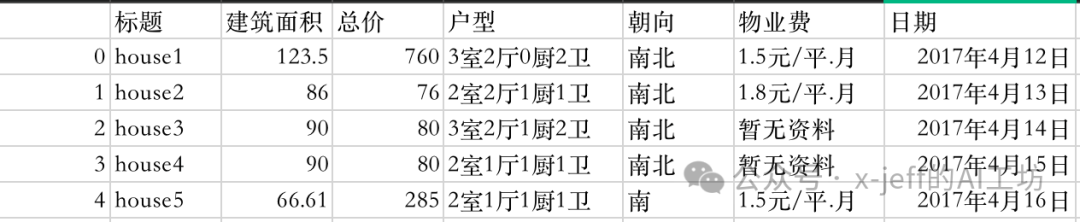
Read in using <span>pandas</span>:
import pandas as pd
df=pd.read_csv("house_price.csv")
If rows or columns are not fully displayed when viewing the DataFrame, you can add the following code to resolve it:
# Display all columns
pd.set_option('display.max_columns', None)
# Display all rows
pd.set_option('display.max_rows', None)
👉 The unit of the “Total Price” column is ten thousand yuan, convert it to yuan:
df["总价"]*10000
👉 Merge the “Orientation” and “Layout” columns:
df["朝向"]+df["户型"]
👉 Create a new column “Average Price”:
df["均价"]=df["总价"] * 10000 / df["建筑面积"]
3.<span>Apply</span>、<span>Map</span>、<span>ApplyMap</span>
<span>Map</span>: Applies a function to each element in a Series.<span>Apply</span>: Applies a function to rows or columns in a DataFrame.<span>ApplyMap</span>: Applies a function to each element in a DataFrame.
3.1.<span>Map</span>
👉 Remove the “yuan” from “Property Fee”:
Method 1:
def removeDollar(e):
    return e.split('元')[0]
df["物业费"].map(removeDollar)
<span>split</span>usage 👉:<span>split</span>. Example:s="1.5元/平米.月" s.split("元")# returns a list ['1.5', '/平米.月'] s.split("元")[0]# returns 1.5
Method 2 (using a lambda function):
df["物业费"].map(lambda e:e.split('元')[0])
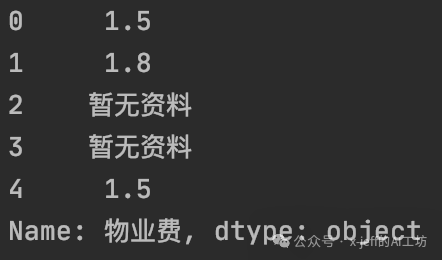
The results of both methods are the same:
3.2.<span>Apply</span>
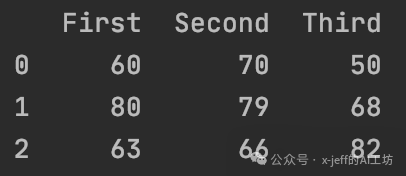
Create the following DataFrame:
df2=pd.DataFrame([[60,70,50],[80,79,68],[63,66,82]],columns=["First","Second","Third"])
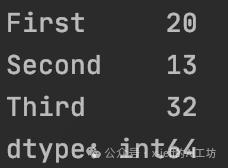
df2.apply(lambda e:e.max()-e.min(),axis=0)# defaults to axis=0
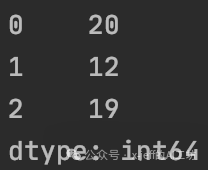
df2.apply(lambda e:e.max()-e.min(),axis=1)
<span>axis=0</span> outputs by column as:
<span>axis=1</span> outputs by row as:
3.3.<span>ApplyMap</span>
Replace all elements “No Data” in df with missing values (NaN):
# Method 1
def convertNaN(e):
    if e == "暂无资料":
        return np.nan
    else:
        return e
df.applymap(convertNaN)
# Method 2
df.applymap(lambda e:np.nan if e=="暂无资料" else e)
4. Code Repository
- https://github.com/x-jeff/Python_Code_Demo/tree/master/Demo14
🔥 Click “Read Original” to jump to my personal blog for a better reading experience~
⬇️ Scan to follow me for the latest article updates⬇️