Similar to other programming languages, the IEC 61131-3 programming standard provides various data types, including basic types and composite types. The data type determines the memory capacity required for variable values, thereby limiting the maximum and minimum values that can be stored in the variable.
In this issue, we will focus on the data types in the IEC 61131-3 programming standard, which is the content of Chapter 4! The link to the original English version: Sharing the Top 10 PLC Programming Books of 2023

Basic Types
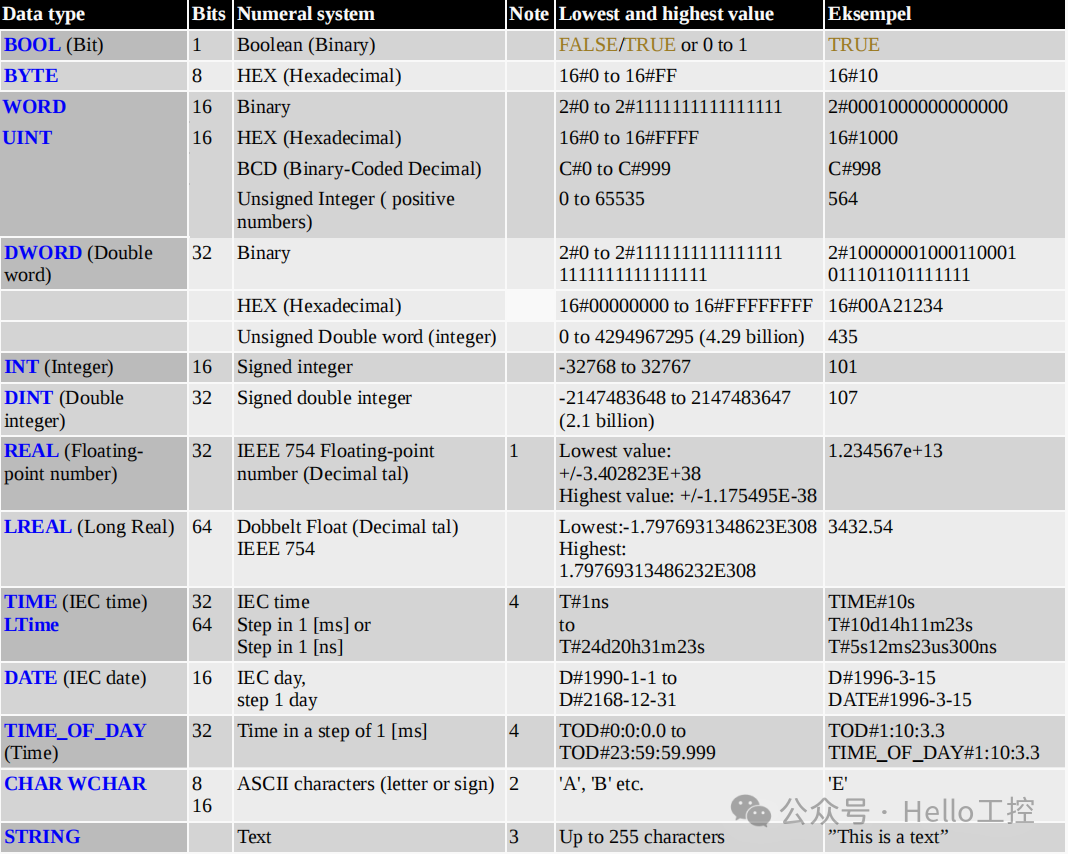
The following simple data types are standard configurations for all PLC controllers:
Note:
-
The table retains the original numerical representation (such as16#, 2#, C# and other prefixes), in accordance with the IEC 61131-3 standard specifications
-
Technical terms such as BOOL, BYTE, WORD, etc., are kept in uppercase English, in line with industry automation conventions
-
Example values maintain their original format for easy reference during actual programming

Data Type Considerations
Limitations of INT Type
When using INT type, there may be compatibility issues when exchanging data between computer systems with different bit widths. For example:
-
PLC with a 16-bit operating system
-
Computer with a 64-bit operating system
-
8-bit embedded computer in sensors/measuring instruments
Precision issues with Real Type
-
The effective digits of Real type (single-precision floating-point, 32 bits) are typically 6~7 decimal digits, determined by its binary storage structure.
-
In PLC or computer communication, if Real type is transmitted directly, it may lead to data inconsistency due to precision limitations (e.g.,
<span><span>1234.56789</span></span>being truncated to<span><span>1234.567</span></span>). -
Therefore, in engineering, it is common to use the integer scaling method (e.g., multiply by 100 and then transmit as INT/DINT, and divide by 100 after transmission) to avoid floating-point precision issues.
Explanation of Character Types
-
STRING consists of a CHAR array with a default length of 255 characters, while some PLCs limit the maximum to 80 characters.
-
CHAR and WCHAR are not available in some PLCs, and a single character can be replaced with STRING(1).
-
Common Chinese characters can use the WSTRING type.
TIME/DATE Handling Mechanism in PLC
In PLCs, TIME (time) and DATE (date) are stored internally as integers (INT/DINT), with a reference point of January 1, 1970, 00:00 (i.e., Unix timestamp). Therefore, the time value in PLC can be converted to an integer, but the specific conversion method should refer to the documentation of each PLC model.
PLC Time Source and Precision Issues
-
Default Time Source
-
The current time of the PLC is usually provided by its built-in electronic components (such as RTC real-time clock chips).
-
However, this clock has low precision and may experience time drift (e.g., a few seconds error per day).
High-Precision Time Synchronization Solutions
-
If precise time is required, the PLC should be connected to an atomic clock or a Network Time Protocol (NTP) server.
-
For example, the PLC can synchronize time daily with a connected regular PC to ensure the accuracy of the automation system’s time.
Importance of Network Time Synchronization
All PLCs within the same network must maintain consistent time, otherwise it may lead to:
-
Incorrect timestamps for alarm records
-
Confusion in date/time markings for data logs (such as event logs, user operation records)
-
Impact on fault diagnosis, auditing, and system collaborative operation

Enumeration Data Type (ENUM)
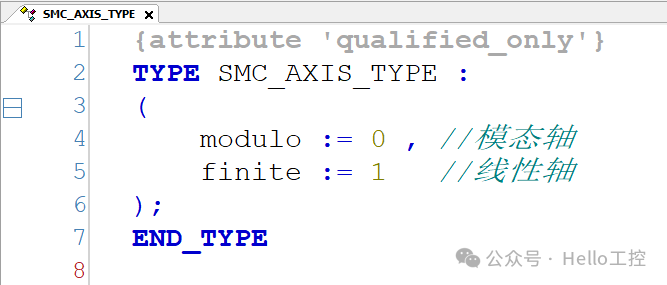
Enumeration types contain a set of uniquely named constant values, with names that must have semantic characteristics (reflecting actual usage), declared withTYPE to start andEND_TYPE to end!
For example, in motion control, the two most typical types of axes:
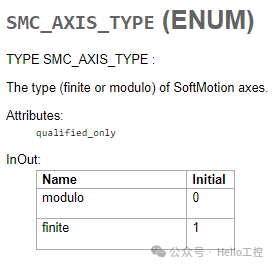
Corresponding code:
Compatibility Notes
For PLC systems that do not supportENUM, independent constants can be used as substitutes:

Technical Advantages of Using Enumeration Variable Types
-
Improved code readability
-
Reduced programming errors caused by magic numbers
-
Enhanced program maintainability
Of course, beginners can temporarily avoid using these without affecting program design!

Structure Data Type (STRUCT)
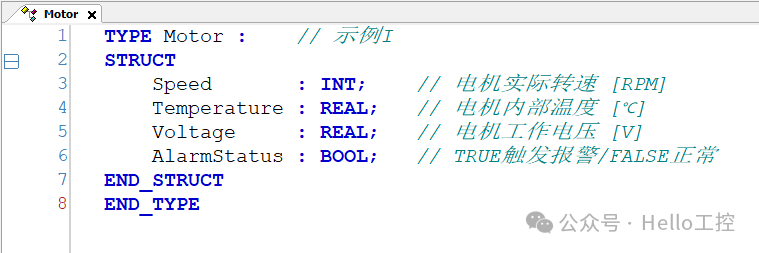
A structure (STRUCT) is a composite data type used to organize multiple related variables into a logical unit. It is declared using the keywordsTYPE,STRUCT, andEND_STRUCT, with each member variable following the format“name: data type;” ending with a semicolon.
Advantages of Structured Programming
-
Cluster management of variables: Organizing related variables (such as the same device/same domain parameters) into a unified structure significantly improves: code readability (avoiding naming conflicts); maintenance efficiency (batch modification of similar components)
-
Encapsulation of object-oriented features: Packing all attributes of a device (such as tank capacity + sensors + switches)
-
Reusability: Quickly creating device clusters through instantiation
-
Extensibility: New attributes can be added by simply modifying the STRUCT definition

Array (ARRAY) – A Collection of Same Type Data
An array (ARRAY) is a structure that can store a collection of elements of the same data type. All elements are contiguously arranged in memory, making array operations very efficient. The length of the array is fixed and cannot be changed during program execution, but it supports multi-dimensional indexing.
Advantages and Challenges of Arrays
-
Advantages:
-
Quick code writing, clear structure
-
Suitable for batch processing of the same type of data
-
Challenges:
-
Need to pay attention to data access logic (e.g., index out of bounds issues)
Array Declaration and Example
An array belongs to a multi-element data type. The following example declares a one-dimensional array <span>SpeedArray</span> containing 6 INT type elements:

-
The first element position is 1, and the last element is 6
-
It is recommended that the naming convention includes the
<span>Array</span>suffix (e.g.,<span>SpeedArray</span>), for easier code maintenance
Typical Applications of One-Dimensional Arrays
-
Calculating averages
-
Queue management
-
First-In-First-Out (FIFO) processing
-
Data collection and sorting
Supports all data types, including <span>STRING</span>, <span>STRUCT</span> or functions.
Applications of Multi-Dimensional Arrays
Two-Dimensional Arrays
Suitable for scenarios such as parking lots, shelves, charts, or pivot tables:

Three-Dimensional Arrays
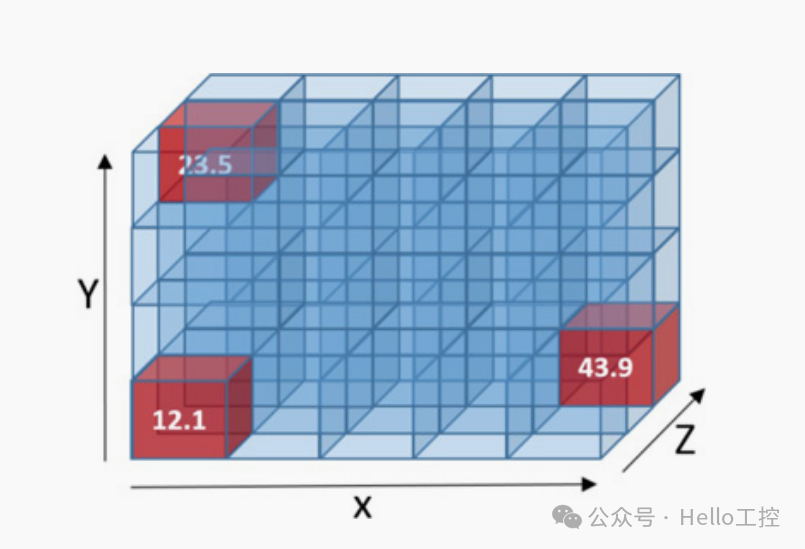
Definition example (such as warehouse pallet stacking or three-dimensional coordinates):

-
Coordinate analogy: X (1~5), Y (1~4), Z (1~3)
-
Total number of elements = product of dimensions (in this case, 60)
Zero-Based Index Arrays
Array indices can start from 0, the following example contains 4 elements (indices 0~3):

Array Assignment Operations
Single Value Insertion
-
One-dimensional array assignment:

-
Three-dimensional array assignment:

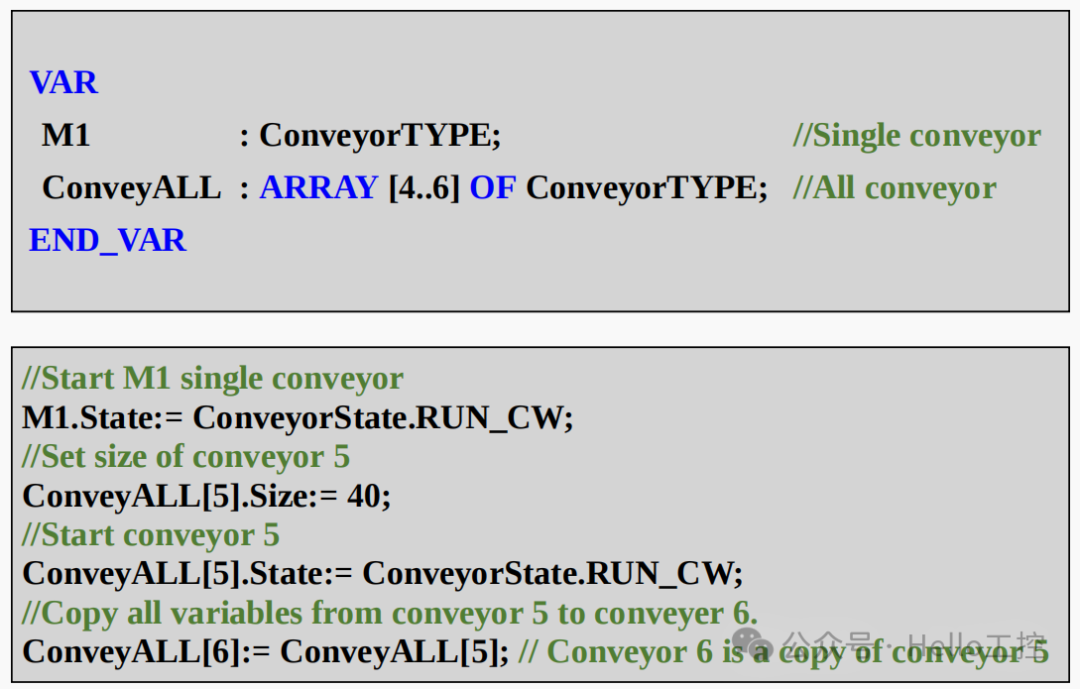
For the above three data types: ENUM, STRUCT, ARRAY, beginners can temporarily avoid mastering them at the initial stage, and once understood and familiar, they can try using these for programming! The original book also provides an example of a conveyor belt:
Finally, if you do not have the original English version of the materials, please leave a message to obtain it!

- [Video Course] Codesys V3.5 Series Introductory Course(150 people have learned)
- [Video Course] Codesys SoftMotion Basic Course(45 people have learned)
- [Video Course] Codesys SoftMotion Electronic Gear Course(17 people have learned)
- [Video Course] Codesys SoftMotion Electronic Cam Course(12 people have learned)
- [Video Course] Codesys Library Custom Library Creation(24 people have learned)
-
Efficient, real-time, flexible: In-depth analysis of EtherCAT bus technology (final part)
-
Comprehensive analysis of RS232, RS422, and RS485 serial communication technology (final part)
-
Comprehensive analysis of Modbus protocol (final part)
-
Comprehensive analysis of Profibus technology (final part)
-
Comprehensive analysis of Profinet technology (final part)
-
Comprehensive analysis of EtherNet/IP technology (final part)
-
Comprehensive analysis of CAN and CANopen bus technology (final part)
-
Comprehensive analysis of OPC UA communication technology (final part)

——–END——–
 If you like this article, please share and “like” it and “look at it”