File Transfer Protocol
Generally speaking, the primary purpose of connecting computers to a network is to obtain data, and file transfer is a very important method of acquiring data. Today’s internet consists of tens of millions of physical devices, including personal computers, workstations, servers, minicomputers, mainframes, and supercomputers, all with different models and architectures. Even personal computers may run different operating systems such as Windows, Linux, UNIX, or Mac. To solve the file transfer issues among such a complex and diverse set of devices, the File Transfer Protocol (FTP) was developed.
FTP is a protocol for transferring files over the internet, based on a client/server model, using ports 20 and 21 by default. Port 20 (data port) is used for data transfer, while port 21 (command port) is used to receive FTP commands and parameters sent by the client. FTP servers are commonly deployed within internal networks, characterized by ease of setup and management. Additionally, some FTP client tools support multi-point downloads and resume capabilities, making FTP services popular among users. The transmission topology of the FTP protocol is shown in the figure below.
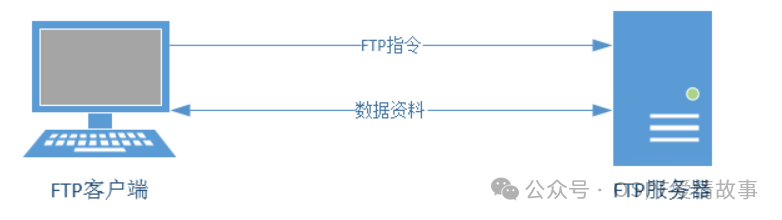
The FTP server is a host that provides file storage and access services over the internet according to the FTP protocol, while the FTP client is the host that sends connection requests to the server to establish a data transfer link. The FTP protocol has two operational modes:
Active Mode: The FTP server actively initiates a connection request to the client.
Passive Mode: The FTP server waits for the client to initiate a connection request (this is the default operational mode of FTP).
vsftpd (Very Secure FTP Daemon) is an FTP service program that runs on the Linux operating system. It is not only completely open-source and free but also has high security, fast transfer speeds, and supports virtual user authentication, which is not available in other FTP service programs.
After configuring the YUM software repository, you can install the vsftpd service program.
Installation command: yum install -y vsftpd
The Firewalld and iptables firewall tools block the FTP protocol ports by default. Therefore, before officially configuring the vsftpd service program, to avoid interference from these default firewall policies, you need to clear the default policies of the iptables firewall and save the current cleaned firewall policy state:
Iptables
iptables -F
service iptables save
Firewalld
systemctl stop firewalld
systemctl disable firewalld
The main configuration file for the vsftpd service program (/etc/vsftpd/vsftpd.conf) has a total length of 123 lines, but most parameters at the beginning are commented out with a hash (#), so there is no need to spend too much time on the commented information. We can add the -v parameter to the grep command to filter and exclude the lines that do not contain a hash (#) (i.e., filter out all comment information), and then write the filtered parameter lines back to the original main configuration file:
[root@linuxprobe ~]# mv /etc/vsftpd/vsftpd.conf /etc/vsftpd/vsftpd.conf_bak
[root@linuxprobe ~]# grep -v “#” /etc/vsftpd/vsftpd.conf_bak > /etc/vsftpd/vsftpd.conf
[root@linuxprobe ~]# cat /etc/vsftpd/vsftpd.conf
anonymous_enable=YES
local_enable=YES
write_enable=YES
local_umask=022
dirmessage_enable=YES
xferlog_enable=YES
connect_from_port_20=YES
xferlog_std_format=YES
listen=NO
listen_ipv6=YES
pam_service_name=vsftpd
userlist_enable=YES
tcp_wrappers=YES
Note: The functions of the configuration parameters will not be explained in detail.
0.2 Vsftp Service Program
As a more secure file transfer service program, vsftpd allows users to log in to the FTP server using three authentication modes.
Anonymous Open Mode: This is the least secure authentication mode, where anyone can log in to the FTP server without password verification.
Local User Mode: This mode authenticates using local account password information from the Linux system, making it more secure than the anonymous open mode and also simple to configure. However, if a hacker cracks the account information, they can log in to the FTP server without restriction, thus gaining complete control over the server.
Virtual User Mode: This is the most secure authentication mode among the three, requiring a separate user database file for the FTP service, creating account information for password verification that does not actually exist in the server system, and is only used for authentication by the FTP service program. Thus, even if a hacker cracks the account information, they cannot log into the server, effectively reducing the scope and impact of damage.
ftp is a command-line client tool for managing FTP transfer services in Linux systems. We first manually install this ftp client tool to check results in subsequent experiments.
yum install -y ftp
1.2.1 Anonymous Access Mode
As mentioned earlier, in the vsftpd service program, the anonymous open mode is the least secure authentication mode. Anyone can log in to the FTP server without password verification. This mode is generally used to access unimportant public files (important files should not be stored in production environments). Of course, if the range of hosts allowed to access the vsftpd service program is set to the internal network of the enterprise using firewall management tools introduced in Chapter 8 (such as the Tcp_wrappers service program), basic security can also be provided.
The vsftpd service program has anonymous open mode enabled by default. What we need to do is to grant anonymous users permission to upload and download files, as well as create, delete, and rename files. It is important to note that granting these permissions to anonymous users poses potential risks; we are only doing this to practice configuring the vsftpd service program in the Linux system and do not recommend doing so in production environments.
[root@linuxprobe ~]# vim /etc/vsftpd/vsftpd.conf
anonymous_enable=YES
anon_umask=022
anon_upload_enable=YES
anon_mkdir_write_enable=YES
anon_other_write_enable=YES
local_enable=YES
write_enable=YES
local_umask=022
dirmessage_enable=YES
xferlog_enable=YES
connect_from_port_20=YES
xferlog_std_format=YES
listen=NO
listen_ipv6=YES
pam_service_name=vsftpd
userlist_enable=YES
tcp_wrappers=YES
In the main configuration file of the vsftpd service program, correctly fill in the parameters, then save and exit. You also need to restart the vsftpd service program to make the new configuration parameters take effect. It is important to remind readers that in production environments or during RHCSA, RHCE, and RHCA certification exams, you must add the configured service program to the startup items to ensure that the server can continue to provide transfer services after a reboot:
systemctl restart vsftpd
systemctl enable vsftpd
Now you can execute the ftp command on the client to connect to the remote FTP server. In the anonymous open authentication mode of the vsftpd service program, the account is uniformly set to anonymous, and the password is empty. Moreover, after connecting to the FTP server, the default access is to the /var/ftp directory. We can switch to the pub directory under this directory and then try to create a new directory file to check if we have write permissions:
ftp ip address
The system displays a refusal to create the directory! We have cleared the iptables firewall policy earlier, and we have also added permissions for anonymous users to create directories and write files in the main configuration file of the vsftpd service program. It is recommended that everyone not rush to look further but instead think about the solution to this problem to exercise your Linux system troubleshooting skills.
As mentioned earlier, in the anonymous open authentication mode of the vsftpd service program, the default access is to the /var/ftp directory. Checking the permissions of this directory reveals that only the root administrator has write permissions. No wonder the system refuses the operation! Now we will change the ownership of the directory to the system account ftp (which already exists in the system), and that should work:
1.2.2 Local Access Mode
Compared to the anonymous open mode, the local user mode is more secure and also simple to configure. If you were previously using the anonymous open mode, you can now disable it and enable the local user mode.
[root@linuxprobe ~]# vim /etc/vsftpd/vsftpd.conf
anonymous_enable=NO
local_enable=YES
write_enable=YES
local_umask=022
dirmessage_enable=YES
xferlog_enable=YES
connect_from_port_20=YES
xferlog_std_format=YES
listen=NO
listen_ipv6=YES
pam_service_name=vsftpd
userlist_enable=YES
tcp_wrappers=YES
In the main configuration file of the vsftpd service program, correctly fill in the parameters, then save and exit. You also need to restart the vsftpd service program to make the new configuration parameters take effect. Readers who restored the virtual machine after completing the previous experiment also need to add the configured service to the startup items so that the vsftpd service can still be used normally after the system restarts.
systemctl restart vsftpd
Then you can access it directly using the username and password!