For mobile gaming enthusiasts, a common issue they face is: the large area of their home, where the Wi-Fi signal strength varies in different rooms. This leads to the need to stay fixed in one room to enjoy gaming, and many even install two routers.

Today, iQOO product manager @GeLanV revealed a brand new black technology – “Dual Wi-Fi Acceleration”. Users can connect to a secondary Wi-Fi in addition to their main Wi-Fi, allowing both Wi-Fi networks to work simultaneously, resulting in more stable gaming performance, faster download speeds, and smoother webpage loading.
It is reported that dual-band Wi-Fi supports two different frequency bands, namely 2.4G and 5G, and is compatible with 802.11a/b/g/n technologies, which belong to the fifth generation of Wi-Fi transmission technology. The main advantage of this technology is its stronger stability compared to single-band Wi-Fi, higher transmission rates, and better energy efficiency.
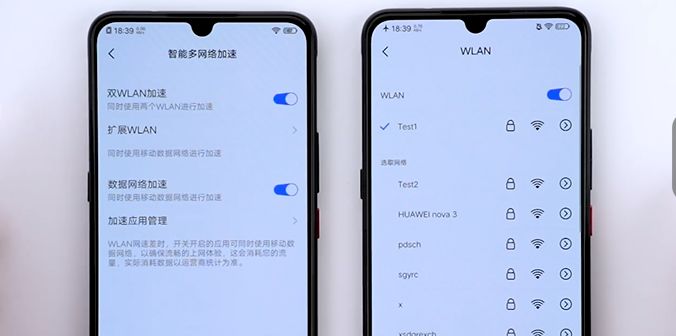
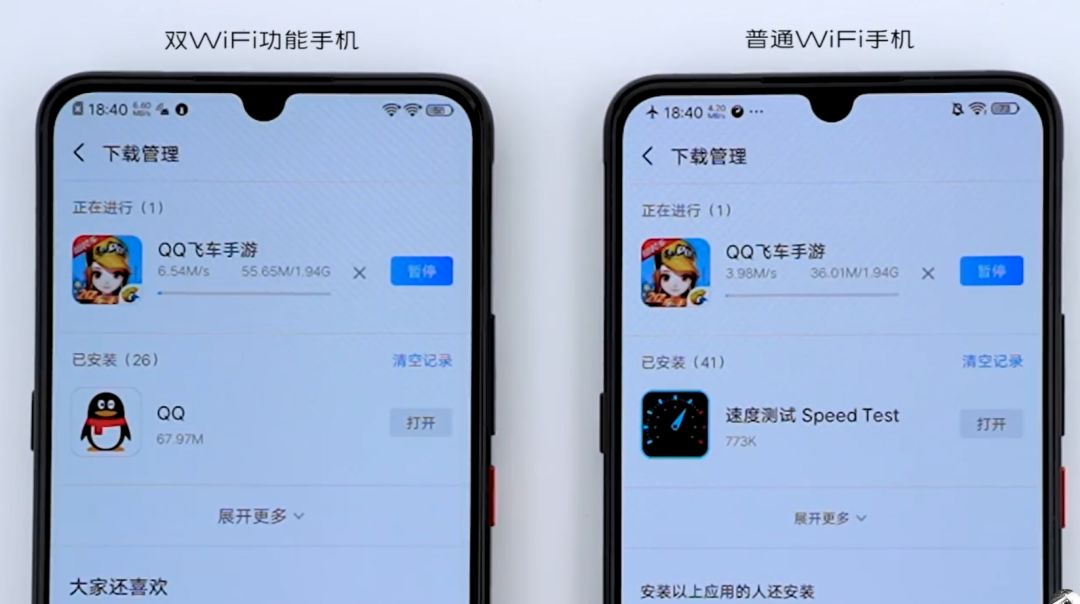
For users with two Wi-Fi networks at home, when gaming, moving from one room to another avoids the disconnection that occurs when switching between two Wi-Fi signals. Additionally, from the released video, it is evident that the download speed under dual Wi-Fi conditions significantly exceeds that of single Wi-Fi.
In the afternoon, ColorOS’s official Weibo announced that the ColorOS 6 “Dual Wi-Fi Network Acceleration” feature is now available for the Reno 10x Zoom version for trial use.

According to the official introduction, “Dual Wi-Fi Network Acceleration” utilizes the capabilities of DBS/DBDC chips to allow smartphones to connect to two Wi-Fi networks simultaneously, intelligently doubling the internet speed, eliminating Wi-Fi lag, and making internet browsing smoother.
Dual Wi-Fi acceleration has the following features:
• One 2.4 G hotspot and one 5G hotspot, operating on different frequency bands without interference, can independently send and receive data in parallel;
• Two 2.4G hotspots on the same channel, or two 5G hotspots on the same channel, can time-division multiplex the channel to send and receive data (TBD);
• The two hotspots can have the same SSID (Wi-Fi name) or two different SSIDs, such as Wi-Fi A and Wi-Fi B;
• The two hotspots can be from the same router device, such as two hotspots from a dual-band router at home; or they can be from two different router devices.
Currently, most dual Wi-Fi concepts on the market are still limited to the 2.4GHz and 5GHz dual channels, specifically referring to the ability to support these two channels, rather than allowing simultaneous connections to two channels. In contrast, ColorOS 6’s dual Wi-Fi allows simultaneous connections to two different hotspots, establishing two Wi-Fi pathways, and utilizing policy routing and link aggregation/splitting technology to use both pathways for internet access, achieving speed doubling and seamless network switching.
This reduces user costs and intelligently determines the scenarios that require activating dual Wi-Fi. Currently, there are mainly two scenarios that will activate the dual Wi-Fi feature:
1. Poor network. Network speed is less than 200KB/s, with excessive latency;
2. Slow download speeds. For example, the network consistently stays between 500KB/s and 1MB/s.
Users who want to experience the dual Wi-Fi network acceleration feature can go to the ColorOS community to download the installation package.
Compatibility Risk Notice:
1. Ensure that your model is OPPO Reno 10x Zoom, as currently, only this model supports the dual Wi-Fi network acceleration feature;
2. The adaptation process will clear your phone data, so please ensure you have backed up your phone data before proceeding (phone backup tutorial);
3. The dual Wi-Fi network acceleration feature is only a trial version;
How to adapt to ColorOS 6 “Dual Wi-Fi Network Acceleration” feature?
Backup 1. Confirm that your model is OPPO Reno 10x Zoom and back up your phone data: Settings – Other Settings – Backup and Restore – Create New Backup;
Copy 2. After backing up, the file is located in the root directory of the phone storage – backup folder. Please copy this file to your computer or other storage devices for safekeeping.
Download 3. Download the dual Wi-Fi network firmware package and copy the upgrade firmware package to the phone storage directory;
Install 4. Power off the phone, then long press the “Power” button and “Volume Down” button to enter Recovery mode, select the installation upgrade file, find the corresponding upgrade firmware package, and click “Install” to upgrade;
Success 5. Do not operate the phone during the upgrade process. After the upgrade is complete, a “Installation Successful” pop-up will appear. Click the “Restart” button, and after the phone restarts, you will have the ColorOS 6 “Dual Wi-Fi Network Acceleration” feature.
What Others Are Watching:
Qualcomm’s New Processor Released: Performance Increased by 50%
No Fear of Sanctions! Huawei’s Phone Shipments Will Hit New Highs
First Batch of 8 5G Phones Pass 3C Certification, Half from Huawei, None from Xiaomi
iPhone Design Finally Set for Major Changes! Screen-to-Body Ratio Significantly Increased