This is specifically designed for those aiming for Linux operations positions in major companies, featuring10 in-depth interview questions covering high-frequency topics such as fault diagnosis, architecture design, and kernel principles, along with problem-solving approaches and bonus tips:
1. Fault Diagnosis: When the TCP half-connection count of an online server surges to over 50,000, how to locate the root cause within 30 minutes?
Key Points:<span><span>netstat</span></span>/<span><span>ss</span></span> command chain + kernel parameter tuning + attack and defense confrontation
Solution Approach:
# 1. Quickly confirm attack characteristics
ss -ant | awk 'NR>1 {print $1}' | sort | uniq -c | sort -nr
watch -n 1 "netstat -ant | grep SYN_RECV | wc -l"  # Monitor growth trend

# 2. Packet capture to analyze source IP (avoid tcpdump crashing the server)
tcpdump -i eth0 -nn -c 1000 'tcp[13] & 2 != 0' | awk '{print $3}' | cut -d. -f1-4 | sort | uniq -c

# 3. Dynamic firewall ban (automation script)
iptables -A INPUT -p tcp --syn -m limit --limit 1/s --limit-burst 3 -j ACCEPT
iptables -A INPUT -p tcp --syn -j DROP
Bonus Points: Suggest using the <span><span>conntrack</span></span> module to count the rate of new connections, or deploy the eBPF-based real-time filtering tool cilium
2. Architecture Design: How to design a download service that supports tens of millions of concurrent connections and overcome disk IO bottlenecks?
Key Points: Distributed storage + cache layering + protocol optimization
Core Solution:
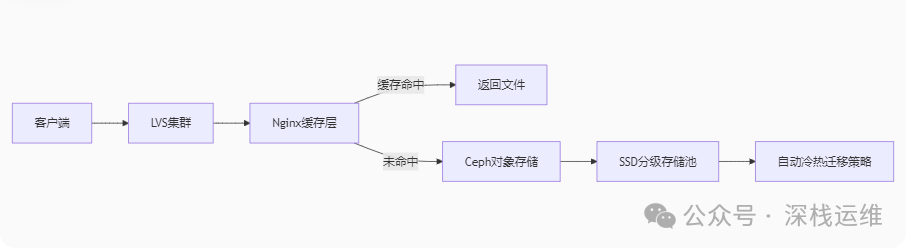 Key Technical Points: Use sharded downloads (Range Request) to distribute IO pressure; Enable open_file_cache in Nginx to cache metadata;
Configure Ceph with the bluestore engine + NVMe SSD log disk;
3. Kernel Principles: When a process is killed by OOM, how does the kernel choose the “victim”?
Key Points: OOM Killer algorithm + cgroup strategy
In-Depth Analysis:
Scoring mechanism: calculate oom_score = memory usage * 10 + child process memory * 5 + running time (minutes) * (-2)
Intervention methods:
echo -1000 > /proc/<pid>/oom_score_adj  # Protect critical processes
systemd service configuration: OOMScoreAdjust=-500
Large Company Practice: K8s QoS policies (Guaranteed > Burstable > BestEffort)
4. Security Defense: The server has been implanted with a mining virus, and all system commands have been tampered with. How to respond in an emergency?
Key Points: Forensics and recovery in a trustless environment
Operational Steps:
1. Isolate the network:<span><span>iptables -P INPUT DROP;</span></span>
<span><span> 2. Use statically compiled BusyBox to replace system commands:</span></span>
curl https://busybox.net/downloads/binaries/1.30.0-i686/busybox -o /tmp/bb
chmod +x /tmp/bb
/tmp/bb lsof -n | grep deleted  # Find hidden processes
3. Memory dump analysis: gcore -o /tmp/core <pid>
5. Performance Tuning: MySQL is still slow on NVMe SSD disks. How to prove that Page Cache is the culprit?
Key Points:Page Cache mechanism + direct I/O verification
Ultimate Operation:
-- 1. Confirm Page Cache usage
grep -i cached /proc/meminfo
-- 2. Bypass Page Cache for comparison test
set session sql_log_bin=0;
alter table orders ENGINE=InnoDB, ROW_FORMAT=COMPRESSED, KEY_BLOCK_SIZE=8;
flush tables with read lock;
sysbench --test=fileio --file-num=1 --file-total-size=50G prepare
Ultimate Solution: Adjust <span><span>/proc/sys/vm/dirty_ratio</span></span> + enable MySQL’s <span><span>O_DIRECT</span></span>
6. Containerization: K8s nodes frequently show NotReady. How to determine if it’s a CNI plugin issue?
Key Points: CNI network principles + eBPF diagnostics
Troubleshooting Tools:
# 1. Check CNI configuration
ls /etc/cni/net.d/
journalctl -u kubelet -n 100 | grep cni
# 2. Cross-node network testing (nsenter method)
kubectl debug node/<node-name> --image=nicolaka/netshoot
iperf3 -c <pod-ip> -p 5201
Advanced Techniques: Use <span><span>cilium connectivity test</span></span> for network matrix testing
7. Automated Operations: How to use Ansible to batch restart tens of thousands of servers within 3 minutes?
Key Points: Ansible optimization + asynchronous control
Performance Plan:
# ansible.cfg key configuration
[defaults]
forks = 1000
poll_interval = 1
[ssh_connection]
pipelining = true
# Asynchronous task execution
ansible all -m shell -a "/sbin/reboot" -B 180 -P 0Taboo: Avoid using <span><span>serial</span></span> parameter which leads to serial execution!
8. Storage Disaster: EXT4 filesystem superblock corruption, how to recover from backup?
Key Points: Rescue of filesystem metadata
Rescue Commands:
# 1. Find backup superblock location
mke2fs -n /dev/sdb1
# 2. Recover from position 32768
fsck -b 32768 /dev/sdb1
Preventive Measures: Enable <span><span>tune2fs -S 1</span></span> to sync metadata every second
9. Network Protocol: Why does the time_wait state in a TCP connection need to be maintained for 2MSL?
Key Points: Underlying principles of TCP’s four-way handshake
In-Depth Answer:
Prevent interference from old connection packets: Ensure that late packets disappear in the network (MSL=60s)
Ensure reliable closure: If the final ACK is lost, the passive closing party will resend FIN
Tuning Controversy: Modifying <span><span>net.ipv4.tcp_tw_reuse=1</span></span> needs to be combined with <span><span>tcp_timestamps=1</span></span>
10. Cloud Computing: OpenStack VM creation is slow. How to optimize from the QEMU/KVM layer?
Key Points: Performance bottleneck analysis of the virtualization stack
Performance Bombshell:
# /etc/nova/nova.conf
[libvirt]
cpu_mode = host-passthrough
disk_cachemodes = file=writeback,block=writeback
hw_disk_discard = unmap
# Pre-allocate disk (avoid dynamic allocation IO delay)
qemu-img create -f qcow2 -o preallocation=metadata disk.img 50G11 Interview Strategies: “Three Do’s and Three Don’ts”
| Action | Correct Demonstration | Incorrect Demonstration |
| Answer Logic | Use the “phenomenon → tool → data → conclusion” four-part structure | Directly throw commands without explanation |
| Principle Deep Dive | Main animation architecture diagram/state machine (whiteboard at hand) | Only say “refer to the documentation” |
| Fault Resolution | Emphasize monitoring (Prometheus metrics as evidence) | Only rely on experience and guesswork |
| New Technology Awareness | Demonstrate eBPF/BCC toolchain practical output | Stacking terms without context |