【Introduction】 In the wave of digital transformation, virtualization technology has become a cornerstone of enterprise IT architecture. Especially, VMware virtualization networks, with their flexibility, high availability, and security, play a significant role in network architectures across various industries. This article will comprehensively analyze the essence of VMware virtualization and network architecture design, starting from core concepts and combining practical cases with a command quick reference.
1. Core Concept Review
1. VMware Network Components: Including port groups (VMkernel and virtual machine port groups), virtual switches (standard switches and distributed switches), and physical network cards. 2. VLAN: Logically isolating network traffic to improve performance and security, VLAN IDs must be consistent between virtual and physical switches. 3. Physical Network Configuration Recommendations: Disable STP on ESXi-facing ports, enable PortFast, configure as Trunk or Access mode as needed, and enable LACP if necessary. 4. NIC Teaming: Provides fault tolerance and load balancing, supporting three strategies: source port ID, source MAC address, and IP hash. 5. TCP/IP Protocol Model: Understanding the four-layer/five-layer model and the functions of each layer is fundamental to mastering network communication.
2. Technical Details
1. Port Groups and VLANs: Port groups correspond one-to-one with VLANs, with VMkernel port groups used for management, vMotion, storage, and other dedicated traffic. 2. Choosing Virtual Switch Types: Distributed switches are suitable for large clusters, providing centralized management and consistent configuration; standard switches are suitable for cost-limited or simple demand scenarios. 3. NIC Teaming Strategies and Security Policies: Choose load balancing methods based on business needs, keep promiscuous mode off except in special cases, and maintain default settings for MAC address changes and forged transmits. 4. TCP/IP Stack Application: The encapsulation and decapsulation process from the application layer to the physical layer is key to understanding data flow.
3. Case Analysis
【Case 1: Network Topology of a Shopping Mall】 The shopping mall’s network is connected via a dedicated line from the operator, linking the office area, merchant network, and customer wireless network through aggregation switches. The office area is isolated from the merchant/customer networks via VLANs, with the office area using independent access switches and IP address ranges, while merchants and customers connect via wireless APs and are managed through different VLANs. LACP aggregated links are configured on the core switch to ensure high bandwidth and redundancy. 【Case 2: Network Architecture of a Hospital】 The hospital adopts a three-center architecture (main data center, cloud host room, cloud backup center), with a fully redundant design, core switches and firewalls stacked, and links using LACP aggregation. Different business systems (HIS, LIS, CIS, PACS, etc.) are assigned independent VLANs and access control is enforced through firewalls. The storage system uses a SAN architecture, with imaging and business data stored separately and transmitted through dedicated VLANs to ensure performance and security.
4. Common VMware Command Quick Reference
ESXi Host Information Viewing# View ESXi system version          esxcli system version get          # View host CPU/memory information          esxcli hardware cpu list          esxcli hardware memory get
Network Related Commands# View VMkernel interface information          esxcli network ip interface list          # View physical NIC status          esxcli network nic list          # Configure VMkernel static IP          esxcli network ip interface ipv4 set -i vmk1 -I 192.168.10.10 -N 255.255.255.0 -t static
Storage Management# View all storage devices          esxcli storage core device list          # View mounted datastores          esxcli storage filesystem list          # Rescan storage adapters          esxcli storage core adapter rescan --all
Service Management# Restart management network service          services.sh restart          # Restart host agent service          /etc/init.d/hostd restart          /etc/init.d/vpxa restart
PowerCLI Batch Management Example# Connect to vCenter          Connect-VIServer -Server vcenter.example.com -User admin -Password 'yourpass'          # List all virtual machines          Get-VM          # Start virtual machine          Start-VM -VM "MyVM"          # Create snapshot          New-Snapshot -VM "MyVM" -Name "BeforeUpgrade"          # Remove snapshot          Remove-Snapshot -VM "MyVM" -Name "BeforeUpgrade"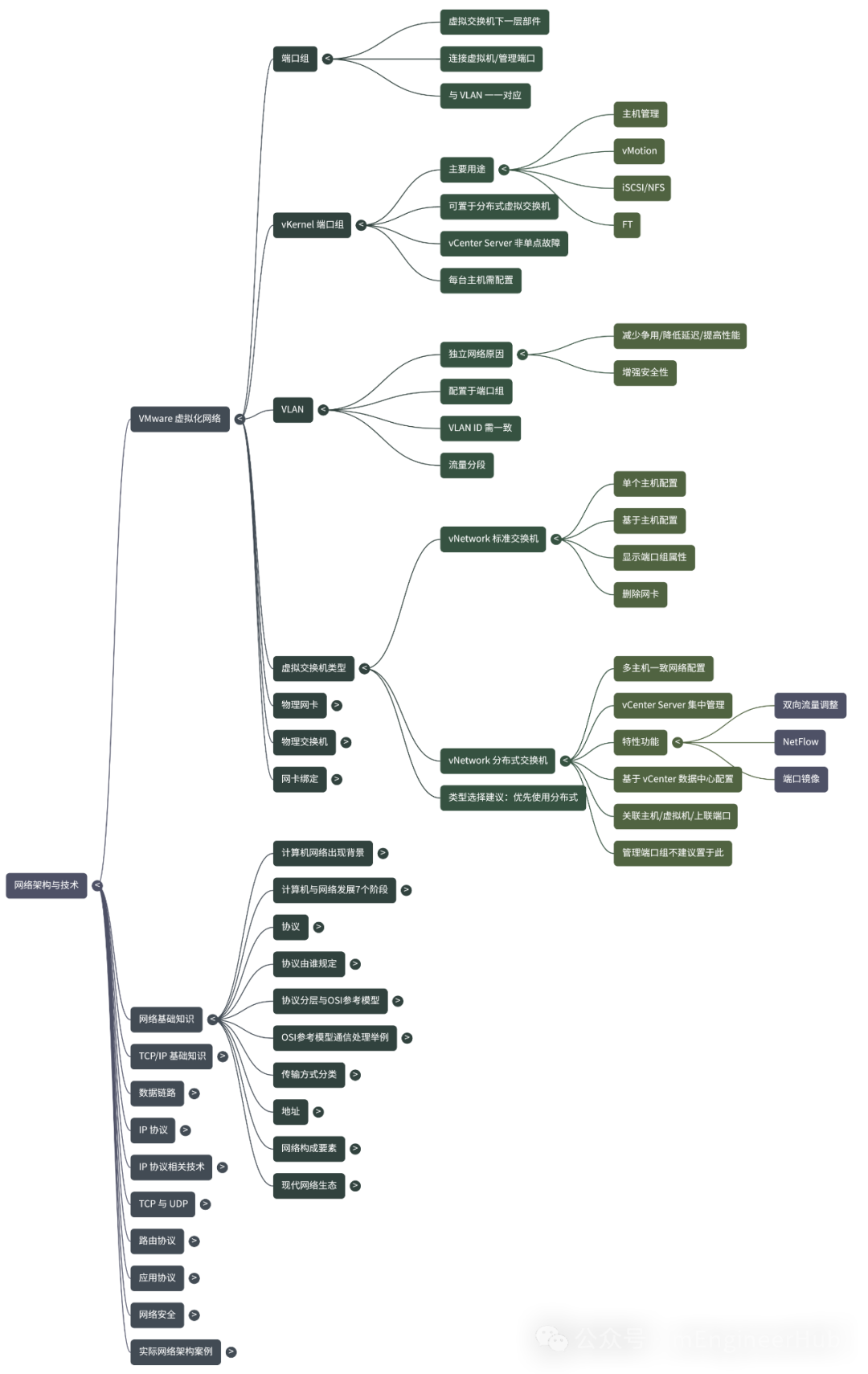
5. Quiz (Interactive Section)
1. What is a port group in VMware? What types of objects does it connect? 2. Why is VLAN needed in a VMware virtualization environment? 3. What is the difference between a standard switch and a distributed switch? 4. Why is it recommended to disable STP and enable PortFast on physical switches facing ESXi ports?
6. Summary and Guidance
Whether for large hospitals or commercial complexes, the integration of virtualization and physical networks requires comprehensive consideration in architecture design, security policies, and performance optimization. The flexibility and scalability of VMware virtualization networks, combined with reasonable VLAN segmentation, link redundancy, and centralized management, can significantly enhance network reliability and security.