Click ▲ to follow “IT168 Enterprise” to pin the public account
More exciting content delivered to you first
Author: Li Bin, Zhao Xuefeng, Financial Technology Engineers, Special Contributors to the Architect Community!
Performance tuning of application services is a critical issue that needs attention before deploying any system. While there are numerous articles discussing tuning methods at the system and software levels, after exhausting all tricks, is there really no potential left to exploit? By understanding the operational characteristics of the Linux kernel, and with simple configurations, there are still many feasible solutions. This article will introduce a method based on adjusting Linux kernel CPU affinity parameters to extract the last bit of performance advantage.
1. Background Knowledge
The CPU is the core of conventional application execution. From a performance perspective, it is essential to understand physical CPUs, logical CPUs, and the implementation of hyper-threading technology.
1. Physical CPU: The actual number of CPUs installed on the machine.
2. Logical CPU: A physical CPU can have multiple logical processing cores. Based on Intel’s Hyper-Threading technology, more core computing power can be formed on this basis.
3. Hyper-Threading Technology: This technology uses special hardware instructions to simulate a single CPU core as multiple logical CPUs, forming a multi-core, multi-threaded CPU.
In summary, the logical relationship among the three is as follows:
Number of logical CPUs = Number of physical CPUs * Number of CPU cores * 2 (if hyper-threading is supported and enabled)
2. Principles of CPU Affinity Parameters
CPU affinity is a scheduling attribute that can bind a process to one or a group of CPUs. There are two types of CPU affinity: soft affinity and hard affinity.
1) Soft CPU affinity means that a process should run on a specified CPU for as long as possible without being migrated to other processors. The inherent characteristics of the Linux kernel imply that processes typically do not migrate frequently between processors to avoid the computational overhead of such migrations, achieving optimal balance.
2) The Linux kernel also includes a mechanism for hard CPU affinity, allowing developers to implement hard CPU affinity. This means that it is possible to explicitly specify on which (or which) processors a process should run.
In the Linux kernel, the process data structure is task_struct, where the affinity-related aspect is the cpus_allowed bitmask. This bitmask consists of n bits, corresponding one-to-one with the n logical CPUs in the system. If a given bit is set for a specified process, then that process can run on the corresponding CPU.
For example, on a server with 32 logical CPUs:
0x00000001 Processor 0 logical CPU can run
0x00000003 Processor 0-1 logical CPUs can migrate
0xFFFFFFFF All Processor 0-31 logical CPUs can migrate (default state of the Linux kernel)
Typically, the Linux kernel can effectively schedule processes, running them where they should be, meaning on available processors to achieve good overall performance. The Linux kernel includes algorithms to detect task load migration between CPUs, enabling process migration to reduce the pressure on busy processors.
3. Setting CPU Affinity
Linux provides several methods that allow users to specify that a process can only run on certain (or specific) CPUs by modifying the bitmask. Generally, in applications, it is sufficient to use the default scheduler behavior. However, sometimes we may want to modify these default behaviors for performance optimization. Generally, there are three reasons to use hard CPU affinity: there is a large amount of computation to be done; the application is complex; or time-sensitive, deterministic processes are running.
After summarizing various methods, the following two clear examples illustrate how to configure CPU affinity.
1) Setting CPU affinity in application source code
Hard CPU affinity can be set programmatically, as the Linux kernel provides several system APIs, such as: sched_set_affinity(), sched_get_affinity(), CPU_ZERO(), CPU_SET(), etc. A simple example of setting hard CPU affinity is as follows:
#include <sched.h>
#include <unistd.h>
#include <stdlib.h>
#include <stdio.h>
int main(void)
{
int i, nrcpus;
cpu_set_t mask;
unsigned long bitmask = 0;
CPU_ZERO(&mask); // Clear a set
CPU_SET(0, &mask); // Add the specified CPU0 to the set
CPU_SET(2, &mask);// Add the specified CPU2 to the set
if (sched_setaffinity(0,sizeof(cpu_set_t), &mask) == -1)
{
perror(“sched_setaffinity”);
exit(-1);
}
return 0;
}
2) Setting CPU affinity via command line
Hard CPU affinity can also be set using the taskset command. The command format for taskset is:
taskset [options] mask command [arg]…
taskset [options] –p[mask] pid
mask is the CPU affinity
command is the executable program
arg are the parameters for the command
pid is the process ID
The first command is used to set the hard CPU affinity for an executable program, while the second command is used to set the hard CPU affinity for an already running process.
Final Thoughts
Recently, in a project, I encountered an issue with unstable CPU usage. After much analysis, I traced it back to a problem related to CPU affinity. Under stable pressure and normal calculations without external bottlenecks, there was an inexplicable severe fluctuation in CPU usage. As shown in the figure below:
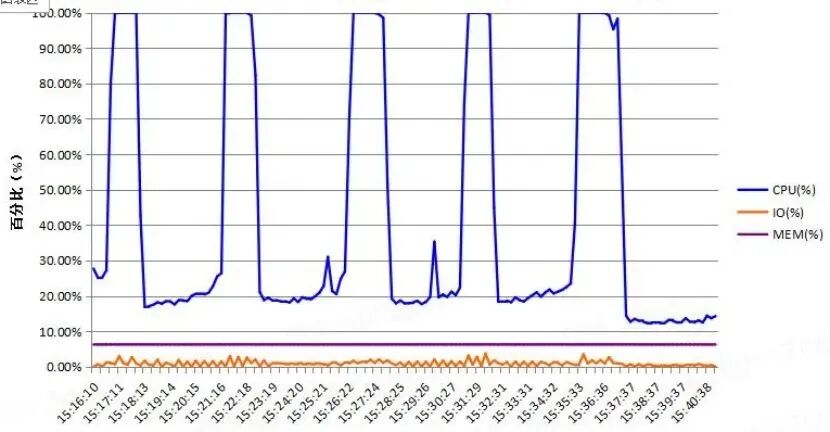
If you encounter similar issues in the future, consider adjusting CPU affinity as a potential solution, and try tweaking this parameter to see if it has a remarkable effect.
IT168 Enterprise


Let some people see the future of enterprise IT first


WeChat Public Account ID: IT168qiye