Scan to FollowLearn Embedded Together, learn and grow together

This series of articles on FreeRTOS aims to help beginners quickly get started and master the basic principles and usage methods of FreeRTOS while organizing knowledge.
Getting Started with FreeRTOS – Exploring the System
The official Chinese version of the FreeRTOS website is now online!
FreeRTOS Coding Standards and Data Types
This article introduces the task management related content of FreeRTOS.
Basic Concepts
In an RTOS, a real-time application can be treated as an independent task. Each task has its own execution environment and does not depend on other tasks or the RTOS scheduler.
FreeRTOS is an operating system that supports multitasking. Tasks can use or wait for CPU, memory space, and other system resources, running independently of other tasks.
At any given time, only one task can run, and which task runs is determined by the RTOS scheduler.
Each task has its own execution environment, which is the stack. This means that each task must have a stack, and when a task switches, its context is saved in the stack, allowing it to resume execution from the stack later.
Similarly, tasks also have priorities, with higher priority tasks running first.
The significance of the priority value differs from uCos and RT-Thread. In FreeRTOS, the higher the priority value, the higher the priority; conversely, the lower the value, the lower the priority.
Task Scheduling
The core part of an RTOS is the thread (task) scheduler. The scheduler’s role is to determine which thread needs to be executed based on the scheduling algorithm.
The RTOS scheduler is responsible for ensuring that when a task starts executing, its context (register values, stack contents, etc.) is the same as when the task last exited.
FreeRTOS supports two scheduling methods:
- Priority-based preemptive scheduling
- Round-robin scheduling
Preemptive Scheduling
Each task is assigned a priority. Preemptive scheduling means that when a higher priority task is ready, it immediately takes over the CPU and starts executing.
The key point is that each task is assigned different priorities, and the preemptive scheduler will select the highest priority task from the ready list to run.
In FreeRTOS, the lower the priority value, the lower the task priority; conversely, the higher the value, the higher the priority.
The preemptive scheduling process can be illustrated as follows. Task1 has the lowest priority, Task2 has a medium priority, and Task3 has the highest priority.
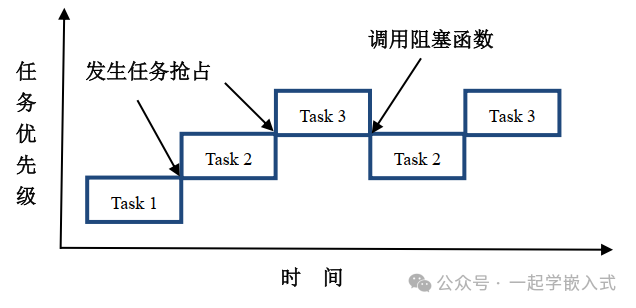
- Task Task1 is running, and Task2 is ready. Under the preemptive scheduler, Task2 preempts Task1’s execution. Task2 enters the running state, and Task1 transitions from running to ready state.
- Task Task2 is running, and Task3 is ready. Under the preemptive scheduler, Task3 preempts Task2’s execution. Task3 enters the running state, and Task2 transitions from running to ready state.
- During Task3’s execution, it calls a blocking API function, such as vTaskDelay, causing Task3 to be suspended. The preemptive scheduler finds that the next highest priority task to execute is Task2, which transitions from ready to running state.
- Task Task2 is running, and during its execution, Task3 becomes ready again. Under the preemptive scheduler, Task3 preempts Task2’s execution. Task3 enters the running state, and Task2 transitions from running to ready state.
This is a simple process of task scheduling and switching through preemptive scheduling with tasks of different priorities.
Round-robin Scheduling
FreeRTOS allows multiple tasks to have the same priority, and tasks with the same priority are scheduled using round-robin.
A time slice is the amount of CPU time that tasks of the same priority can share. In RTOS, the smallest time unit is one tick, which is the SysTick interrupt cycle.
The round-robin scheduling process can be illustrated as follows, with four tasks having the same priority.
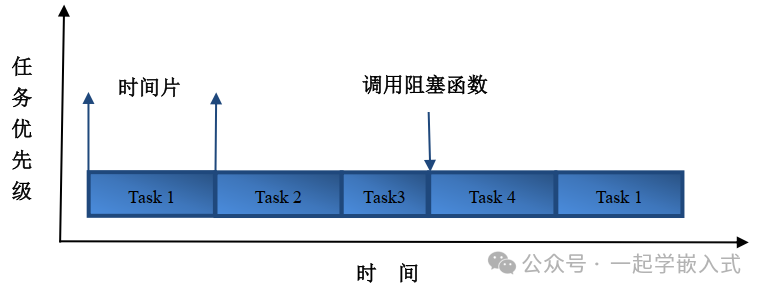
Four tasks of the same priority run in turn, with the running time being the time slice allocated by the system.
Task States
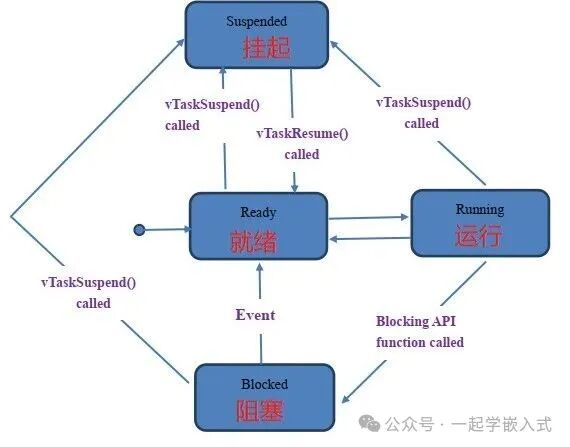
FreeRTOS tasks have four states:
- Running: The state when the task is currently executing. At this time, it occupies the CPU.
- Ready: The state when the task can run but is not currently running, and can be scheduled by the scheduler at any time.
- Blocked: The state when the task is delayed, waiting for a semaphore, message queue, or other events.
- Suspended: The state when a task is suspended by calling the function
<span>vTaskSuspend()</span>. Once suspended, the task will not be executed until the function<span>xTaskResume()</span>is called to resume it.
The state transition diagram is as follows:
Task Stack
FreeRTOS tasks have independent stacks. During task switching, the current task’s context is stored in the stack, and when the task resumes execution, the context information is read from the stack for restoration.
The task stack is also used to store local variables within functions. When one function calls another, the local variables of the function are temporarily stored in the stack.
The growth direction of the task stack is determined by the chip architecture: it can grow from high addresses to low addresses or from low addresses to high addresses.
Task Operation Functions
Task Creation
In FreeRTOS, tasks are created using the <span>xTaskCreate()</span> or <span>xTaskCreateStatic()</span> functions.
BaseType_t xTaskCreate(
    TaskFunction_t pvTaskCode,        // Task function pointer
    const char * const pcName,        // Task name (for debugging)
    uint16_t usStackDepth,            // Task stack depth (in words)
    void *pvParameters,               // Parameters passed to the task
    UBaseType_t uxPriority,           // Task priority
    TaskHandle_t *pxCreatedTask       // Task handle (for referencing the task)
);
Example code:
void vTaskFunction(void *pvParameters)
{
    const char *pcTaskName = (const char *)pvParameters;
    for(;;)
    {
        vPrintf("%s is running\n", pcTaskName);
        vTaskDelay(1000 / portTICK_PERIOD_MS);
    }
}

void main()
{
    TaskHandle_t xHandle = NULL;

    xTaskCreate(
        vTaskFunction,       // Task function
        "Task1",             // Task name
        100,                // Stack size
        (void*)"Task1",      // Parameters passed to the task
        1,                   // Priority
        &xHandle            // Task handle
    );

    vTaskStartScheduler();   // Start the scheduler
}
Static Task Creation
For memory-constrained systems, tasks can be created using static memory allocation:
TaskHandle_t xTaskCreateStatic(
    TaskFunction_t pxTaskCode,
    const char * const pcName,
    uint32_t ulStackDepth,
    void *pvParameters,
    UBaseType_t uxPriority,
    StackType_t *pxStackBuffer,
    StaticTask_t *pxTaskBuffer
);
Task Deletion
Tasks can be deleted by calling the <span>vTaskDelete()</span> function for themselves or other tasks:
void vTaskDelete(TaskHandle_t xTaskToDelete);
If the parameter is NULL, it indicates that the task is deleting itself. The resources occupied by the deleted task (stack space, task control block, etc.) will be reclaimed by the idle task.
Task Scheduling and Control
Task Priority
FreeRTOS supports task priority scheduling, with higher priority values indicating higher priority. The available priority range depends on the <span>configMAX_PRIORITIES</span> configuration parameter.
Common priority-related functions:
// Set task priority
void vTaskPrioritySet(TaskHandle_t xTask, UBaseType_t uxNewPriority);

// Get task priority
UBaseType_t uxTaskPriorityGet(TaskHandle_t xTask);
Task Delay
FreeRTOS provides two delay functions:
<span>vTaskDelay()</span>: relative delay, delaying for a specified time from the moment of calling
void vTaskDelay(const TickType_t xTicksToDelay);
<span>vTaskDelayUntil()</span>: absolute delay, used for fixed frequency task execution
void vTaskDelayUntil(TickType_t *pxPreviousWakeTime, const TickType_t xTimeIncrement);
Example:
void vPeriodicTask(void *pvParameters)
{
    TickType_t xLastWakeTime = xTaskGetTickCount();
    const TickType_t xFrequency = 100; // 100 ticks

    for(;;) {
        // Perform periodic work
        doPeriodicWork();

        // Precise delay to ensure fixed frequency
        vTaskDelayUntil(&xLastWakeTime, xFrequency);
    }
}
Task Suspension and Resumption
// Suspend task
void vTaskSuspend(TaskHandle_t xTaskToSuspend);

// Resume task
void vTaskResume(TaskHandle_t xTaskToResume);

// Resume task from interrupt service routine
BaseType_t xTaskResumeFromISR(TaskHandle_t xTaskToResume);
Idle Task Hook Function
The idle task hook function can be configured to perform specific operations (such as entering low power mode) when the system is idle:
void vApplicationIdleHook(void)
{
    // Enter low power mode
    enterLowPowerMode();
}
This needs to be enabled in FreeRTOSConfig.h with <span>configUSE_IDLE_HOOK</span>.
Task Usage
- Set task priorities appropriately:
- Set higher priority for critical tasks
- Set lower priority for non-real-time tasks
- Avoid too many high-priority tasks
- Allocate stack space based on actual task needs
- Use
<span>uxTaskGetStackHighWaterMark()</span>to monitor stack usage
- Divide tasks by functional modules
- Separate high real-time requirement parts into individual tasks
- Avoid overly complex single tasks
- Use mutexes to protect shared resources
- Avoid priority inversion issues
- Check API function return values
- Handle situations like memory shortages appropriately
FreeRTOS task management provides powerful capabilities to build complex embedded real-time systems. By designing task structures, priority arrangements, and communication mechanisms reasonably, efficient and reliable embedded applications can be constructed.
OK, the content introduction is complete. Thank you for reading, keep it up~

Follow 【Learn Embedded Together】 to become better together.
If you find the article good, click “Share”, “Like”, or “Recommend”!