GESP Python Level 2 Exam Point Detailed Review Notes
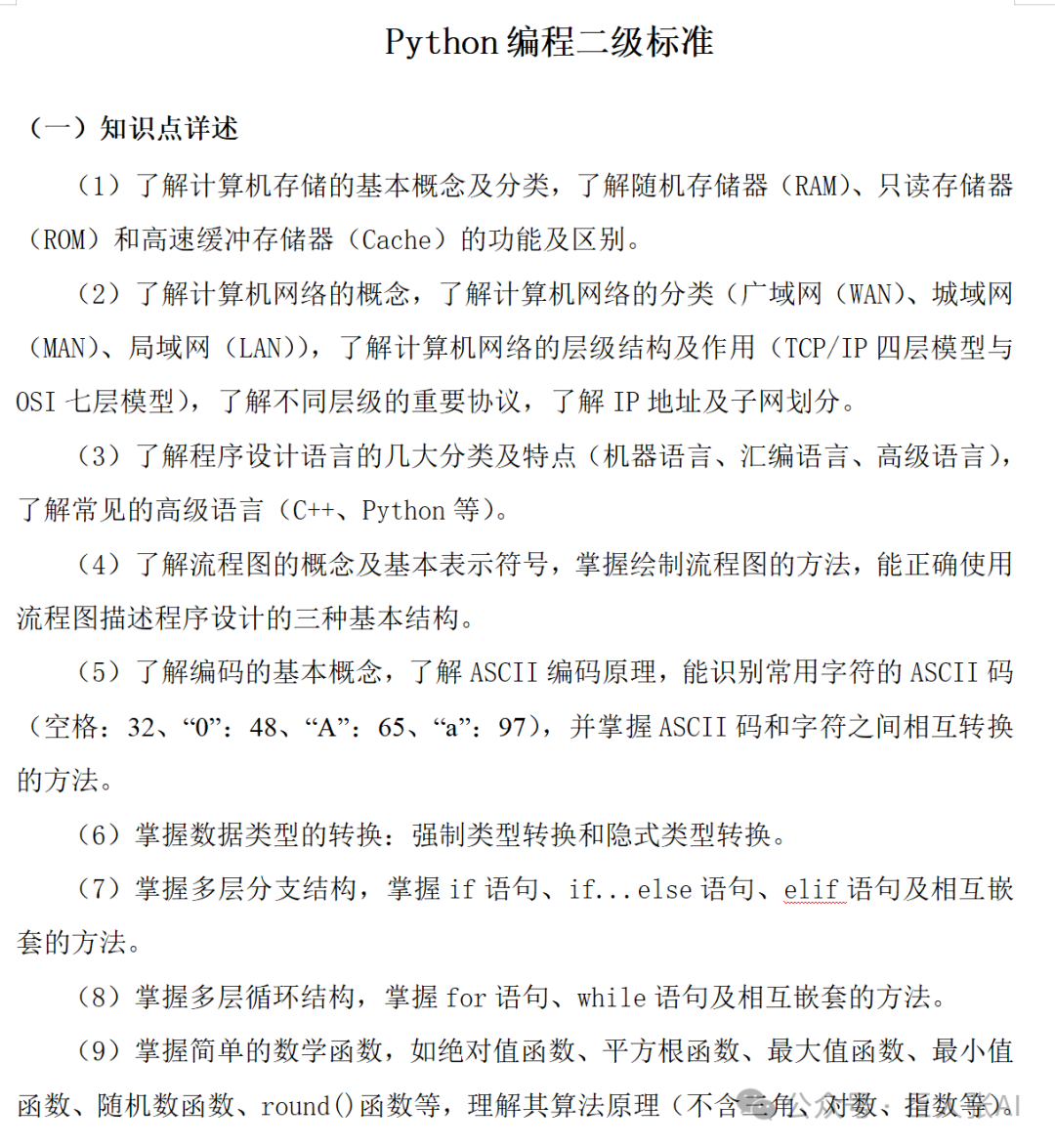
1. Basics of Computer Storage
✅ Key Points:
- 1. Basic concepts and classifications of computer storage
- 2. Functions and differences of three main types of memory
| Memory Type | Function | Characteristics |
|---|---|---|
| RAM (Random Access Memory) | Read and write, data lost when power is off | Main memory, used during program execution |
| ROM (Read-Only Memory) | Data can only be read, not modified (some can be erased) | Stores firmware, such as BIOS |
| Cache (High-Speed Buffer Memory) | Increases CPU access speed | Located between CPU and memory, small capacity but fast speed |
🔍 Differences:
- • RAM is volatile storage, while ROM is non-volatile;
- • Cache is the fastest but has the smallest capacity.
2. Basics of Computer Networks
✅ Key Points:
- 1. Concept of computer networks
- 2. Network classifications
- 3. Network hierarchy structure and protocol models
- 4. IP addresses and subnetting
🌐 Network Classifications:
- • WAN (Wide Area Network): Large coverage (e.g., the Internet)
- • MAN (Metropolitan Area Network): City-level network
- • LAN (Local Area Network): Small range (e.g., schools, internal company networks)
🏗️ Hierarchical Structure Models:
| Model | Layers | Description |
|---|---|---|
| TCP/IP Four-Layer Model | 4 layers | Network Interface Layer, Internet Layer, Transport Layer, Application Layer |
| OSI Seven-Layer Model | 7 layers | Physical Layer → Application Layer (from bottom to top) |
🔍 Important Protocols:
- • TCP/IP: Transmission Control Protocol/Internet Protocol
- • HTTP/HTTPS: Web communication
- • FTP: File transfer
- • DNS: Domain name resolution
- • IP Address: e.g.,
<span>192.168.1.1</span>, IPv4 is represented in 32-bit binary, usually segmented in decimal.- • Subnetting: Dividing IP addresses into network and host portions using a subnet mask.
3. Basics of Programming Languages
✅ Key Points:
- 1. Classification and characteristics of programming languages
- 2. Introduction to common high-level languages
🧱 Language Classifications:
| Type | Characteristics | Examples |
|---|---|---|
| Machine Language | Binary code, executed directly by the CPU | 010101… |
| Assembly Language | Uses mnemonics (e.g., MOV, ADD), requires assembler for translation | Low-level language |
| High-Level Language | Close to natural language, easy to read and write | C++, Python, Java |
✅ Common High-Level Languages:
- • C++: Object-oriented, efficient, suitable for system development
- • Python: Concise syntax, suitable for beginners and data analysis
4. Flowcharts and Program Structure
✅ Key Points:
- 1. Basic concepts of flowcharts
- 2. Common symbols
- 3. Flowchart representations of three basic structures
📊 Basic Flowchart Symbols:
| Flowchart Symbol | Name | Function |
|---|---|---|
| 🔵 Oval | Start/End Box | Beginning / End of the program |
| 🔶 Rectangle | Process Box | Operations such as assignment, calculation, etc. |
| 🔷 Diamond | Decision Box | Conditional judgment (e.g., if statement) |
| ➡️ Arrow | Flow Line | Order of program execution |
🔄 Three Basic Structures:
- 1. Sequential Structure: Executed in order
- 2. Selection Structure: if / if-else
- 3. Loop Structure: for / while
✅ Can describe the above three structures using flowcharts!
5. Encoding and ASCII Code
✅ Key Points:
- 1. Basic concepts of encoding
- 2. Principle of ASCII encoding
- 3. Character and ASCII code conversion
📝 ASCII Encoding Table (Common):
- • ASCII encoding is the basic character encoding for computers, using integers from 0-127 to represent characters (e.g., space = 32, A=65, a=97).
- • In Python, use
<span>ord(character)</span>to get the ASCII code of a character, and<span>chr(code)</span>to convert ASCII code to character (a must-know function for level 2).
| Character | ASCII Code |
|---|---|
| Space | 32 |
| ‘0’ | 48 |
| ‘A’ | 65 |
| ‘a’ | 97 |
💡 Lowercase letters are 32 greater than uppercase letters (e.g., ‘a’=97, ‘A’=65)
🔁 Methods for Character and ASCII Code Conversion:
# 1. Get the ASCII code of a character
print(ord('A'))  # Output: 65 (common level 2 question: A-Z is 65-90, a-z is 97-122)
print(ord('a'))  # Output: 97
print(ord(' '))  # Output: 32 (the ASCII code for space is a common mistake in level 2)

# 2. Convert ASCII code to character
print(chr(66))   # Output: B
print(chr(98))   # Output: b
print(chr(48))   # Output: 0 (the ASCII code for the digit 0 is 48, not 0)

# 3. Practical: Convert lowercase letters to uppercase letters (a common level 2 programming question)
char = 'c'
upper_char = chr(ord(char) - 32)  # Lowercase is 32 greater than uppercase
print(upper_char)  # Output: C
6. Data Type Conversion
✅ Key Points:
- 1. Implicit Type Conversion
- 2. Explicit Type Conversion
⚙️ Type Conversion Methods:
◆ 1. Implicit Conversion (Automatic)
- • During operations, Python automatically converts lower precision types to higher precision (e.g., int→float).
result1 = 1 + 2.0# int + float → result is float
print(type(result1), result1)  # Output: <class 'float'> 3.0

result2 = True + 3# Boolean is a special integer (True=1, False=0)
print(result2)  # Output: 4 (common level 2 multiple choice question)
◆ 2. Explicit Conversion (Manual)
- •
<span>int()</span>/<span>float()</span>/<span>str()</span>for active conversion, must pay attention to the legality of conversion.
# 1. Legal conversion
num_str = "123"
num_int = int(num_str)  # Convert string to integer
print(type(num_int), num_int)  # Output: <class 'int'> 123

float_num = float(num_int)  # Convert integer to float
print(type(float_num), float_num)  # Output: <class 'float'> 123.0

# 2. Common mistake: converting non-numeric strings to integers/floats will raise an error (common level 2 programming question for exception handling)
# err_num = int("abc")  # Runtime error: ValueError: invalid literal for int() with base 10: 'abc'
# err_float = float("12a3")  # Same error
7. Branching Structures (Selection Structures)
✅ Key Points:
- 1. if Statement
- 2. if…else Statement
- 3. Nested Usage
🧩 Syntax Examples:
◆ 1. if Statement
a = int(input("Please enter the day of the week (1-7):"))
if a == 1:
    print("Today wear new clothes")
◆ 2. if…else
a = int(input("Please enter the day of the week (1-7):"))
if a == 1:
    print("Today wear new clothes")
else:
    print("Today cannot wear new clothes")
◆ 3. Nested Usage
a= int(input("Please enter your age (between 8-80):"))
if a >= 8 and a <=25:
    print("I am in school!")
elif a >=26 and a<=60:
    print("I am working!")
elif a > 60:
    print("I am retired!")
else:
    print("This age is not yet counted!")
8. Loop Structures
✅ Key Points:
- 1. for Loop
- 2. while Loop
- 3. Nested Loops
🔄 Three Types of Loop Syntax:
◆ 1. for Loop (Most Common)
sum = 0# Initialize sum variable to count the final result
for i in range(1,4):
    sum += i # Accumulate
print(sum) # 6
◆ Supplement: [range Function]
for i in range(4):
    print(i) #0 1 2 3
for i in range(0, 4):
    print(i) #0 1 2 3
for i in range(0, 4, 2):
    print(i) #0 2
for i in range(4, 0, -1):
    print(i) #4 3 2 1
◆ 2. while Loop (Check before executing)
i = 1# Initialize variable 1
sum = 0# Initialize sum variable to count the final result
while i <= 3: # If variable is less than or equal to 3, execute the following loop body
    sum += i # Accumulate
    i += 1 # Increment i by 1
print(sum) # 6
3. Nested for Loops
- • Loop statements, like branching statements, can also be nested. Specifically, while loops can be nested within while loops, and for loops can be nested within for loops. Since the loop variable of for is more clearly defined, double for loop nesting is more common.
for i in range(1, 3):
    for i in range(1, 4):
        print("Hello World!") # Outputs 6 Hello Worlds!
◆ Supplement: break and continue
◆ 1. break
“
The break statement is used to exit the entire loop (referring to exiting the nearest loop).
(1) Single for Loop
- • Requirement: Output all integers between 1 and 10, separated by “|”
for i in range(1, 11):
    print(i, end="|")
# Final result: 1|2|3|4|5|6|7|8|9|10|
If we give the sequence as range(1, 11), it is still the sequence from 1 to 11, but we only want to output integers between 1 and 3, how can we do that? At this point, we can use the break statement.
for i in range(1, 11):
    print(i, end="|")
    if i == 3:
        break
# Final result: 1|2|3|
(2) Nested for Loop
# Outer loop i takes values from 1 to 4
for i in range(1, 5):
    print(f"Executing the {i}th outer loop")

    # j takes values from 1 to 3
    for j in range(1, 4):
        if j == 2:
            break
        print(f"Executing the {j}th inner loop")
Result:
Executing the 1th outer loop
	Executing the 1th inner loop
Executing the 2th outer loop
	Executing the 1th inner loop
Executing the 3th outer loop
	Executing the 1th inner loop
Executing the 4th outer loop
	Executing the 1th inner loop
“
Conclusion:
- • In the above code, break is written in the inner loop, when it encounters the second iteration of the inner loop, it directly exits the inner loop, thus the inner loop can only execute once;
- • The outer loop will continue to loop until the corresponding boundary value, the outer loop is not affected.
◆ 2. continue
“
The continue statement is used to exit the current loop (referring to exiting the nearest loop).
(1) Single for Loop
Continuing with the previous example, if we give the sequence as range(1, 11), it is still the sequence from 1 to 11, but now we want to output all integers between 1 and 10, but not the integer 3, how can we do that? At this point, we can use the continue statement.
for i in range(1, 11):
    # Note: here continue must be executed before the output statement, otherwise it is useless
    if i == 3:
        continue
    print(i, end="|")
# Final result: 1|2|4|5|6|7|8|9|10|
(2) Nested for Loop
# Outer loop i takes values from 1 to 3
for i in range(1, 4):
    print(f"Executing the {i}th outer loop")
    # j takes values from 1 to 3
    for j in range(1, 4):
        if j == 2:
            continue
        print(f"Executing the {j}th inner loop")
Result:
Executing the 1th outer loop
	Executing the 1th inner loop
	Executing the 3th inner loop
Executing the 2th outer loop
	Executing the 1th inner loop
	Executing the 3th inner loop
Executing the 3th outer loop
	Executing the 1th inner loop
	Executing the 3th inner loop
“
Conclusion:
- • In the above code, continue is written in the inner loop, when it encounters the second iteration of the inner loop, it will exit this iteration of the inner loop and continue to execute the next iteration of the inner loop;
- • The outer loop will continue to loop until the corresponding boundary value, the outer loop is not affected.
9. Common Mathematical Functions
✅ Key Points:
Level 1 only tests basic operations, while level 2 requires mastery of common functions in the math module and random module for random number generation, and proficiency in importing modules in different ways.
| Module | Function | Functionality | Code Example |
|---|---|---|---|
| Built-in Functions | <span>abs(x)</span> |
Calculate absolute value | <span>abs(-10) → 10</span> |
| Built-in Functions | <span>max(a,b,c)</span> |
Find maximum value | <span>max(1,5,3) → 5</span> |
| Built-in Functions | <span>round(x)</span> |
Round to nearest integer | <span>round(3.1415) → 3</span> |
| math Module | <span>math.sqrt(x)</span> |
Calculate square root | <span>math.sqrt(16) → 4.0</span> |
| math Module | <span>math.ceil(x)</span> |
Round up | <span>math.ceil(3.2) → 4</span> |
| math Module | <span>math.floor(x)</span> |
Round down | <span>math.floor(3.9) → 3</span> |
| random Module | <span>random.random()</span> |
Generate random float between 0 and 1 | <span>random.random() → 0.567</span> |
| random Module | <span>random.randint(a,b)</span> |
Generate random integer between a and b | <span>random.randint(1,10) → 7</span> |
◆ Code Example
# Three ways to import modules (must-know for level 2)
# Method 1: Import the entire module, call functions using module_name.function
from random import randint
from math import ceil, sqrt
import random as r
import math as m
import math
import random

print(math.sqrt(25))  # Output: 5.0
print(random.randint(10, 20))  # Generate random integer between 10 and 20

# Method 2: Import module and alias (simplify code)
print(m.floor(3.9))  # Output: 3
print(r.random())    # Generate random float between 0 and 1

# Method 3: Import specific functions from the module (no need to write module name)
print(ceil(2.1))     # Output: 3
print(randint(1, 5))  # Generate random integer between 1 and 5

# Level 2 programming question example: Generate 3 random numbers between 1-100, calculate the average
num1 = randint(1, 100)
num2 = randint(1, 100)
num3 = randint(1, 100)
average = (num1 + num2 + num3) / 3
print(f"Random numbers: {num1},{num2},{num3}, average: {average:.2f}")  # .2f keeps 2 decimal places