Wired mesh networking, wireless mesh networking, AC + AP ceiling installation, and AC + AP networking are four methods for achieving whole house WiFi coverage in home or small to medium-sized scenarios. Among these,wired mesh networking and wired mesh networking both belong to the mesh technology system (the core difference lies in the “backhaul method”),AC + AP ceiling networking is a specific form of AC + AP networking (the installation method of the AP differs).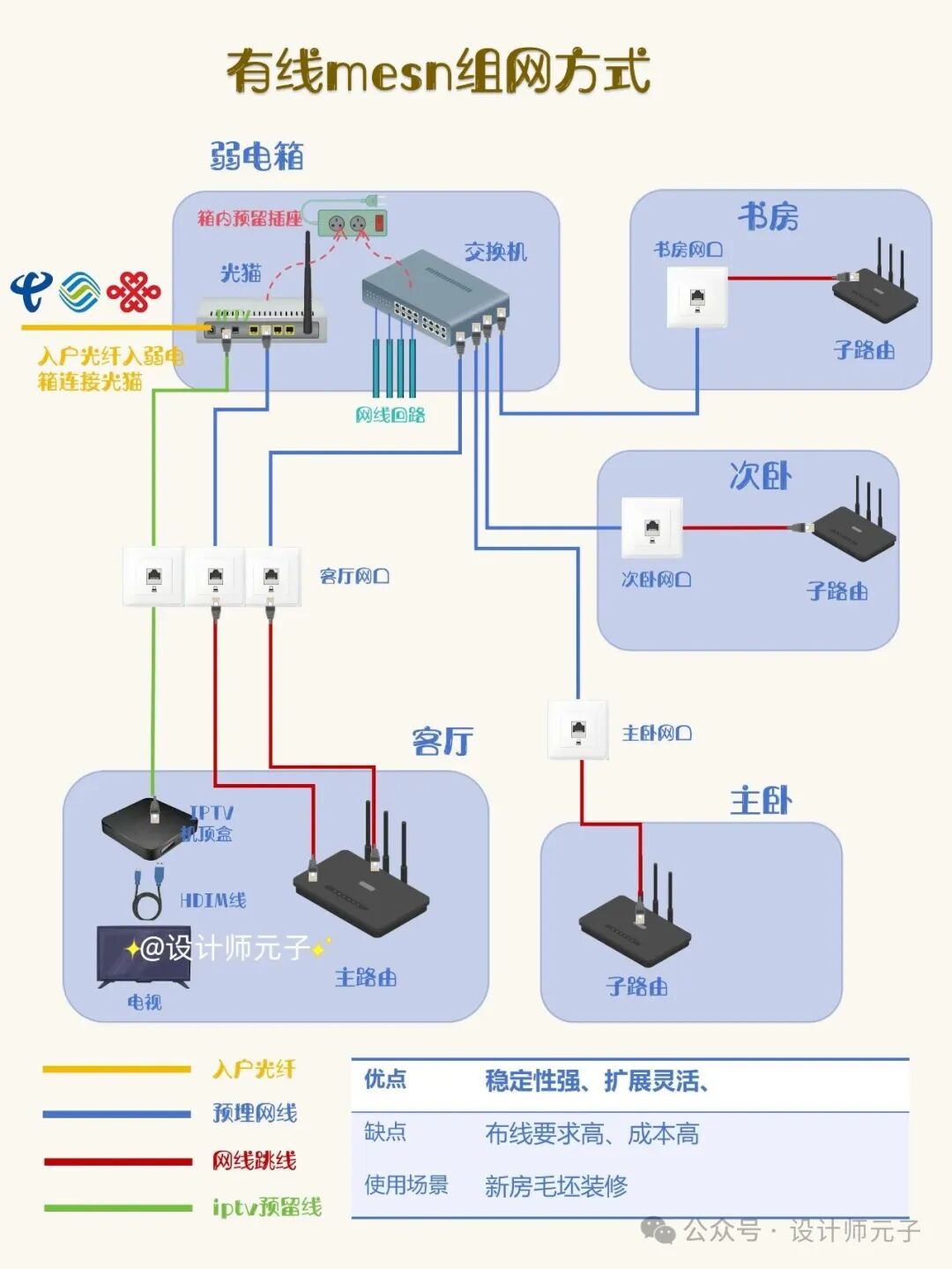
1. Wired Mesh Networking
Principle: Multiple mesh routers (nodes) are connected via Ethernet cables (referred to as “wired backhaul”), with the main node connected to the optical modem, and the sub-nodes interconnected via Ethernet with the main node/other sub-nodes, forming a mesh network.
- Advantages:
- Extremely stable: Data is transmitted between nodes via wired connections, unaffected by walls or wireless interference, with speeds approaching theoretical Ethernet rates (supporting gigabit or even 10-gigabit), and low latency.
- Seamless roaming experience: Inherits the automatic switching feature of mesh technology, and due to the wired backhaul, switching is almost imperceptible (suitable for gaming, video calls, etc., where real-time performance is critical).
- Flexible scalability: Sub-nodes can be added according to the layout, and new nodes only need to be connected via Ethernet without complex configuration.
- Disadvantages:
- Wiring required: Sub-nodes must be connected to the main node via Ethernet, making it suitable for new homes with reserved wiring; retrofitting in older homes may damage the decor.
- Higher cost: Multiple mesh routers (usually of the same brand for best performance) need to be purchased, resulting in a total cost higher than a single router or wireless mesh (if additional wiring is needed, costs increase further).
- Applicable scenarios: New home renovations (with reserved wiring), large apartments/duplexes/villas, families with high requirements for network stability and speed (such as 4K/8K viewing, gaming, multiple devices connected simultaneously).
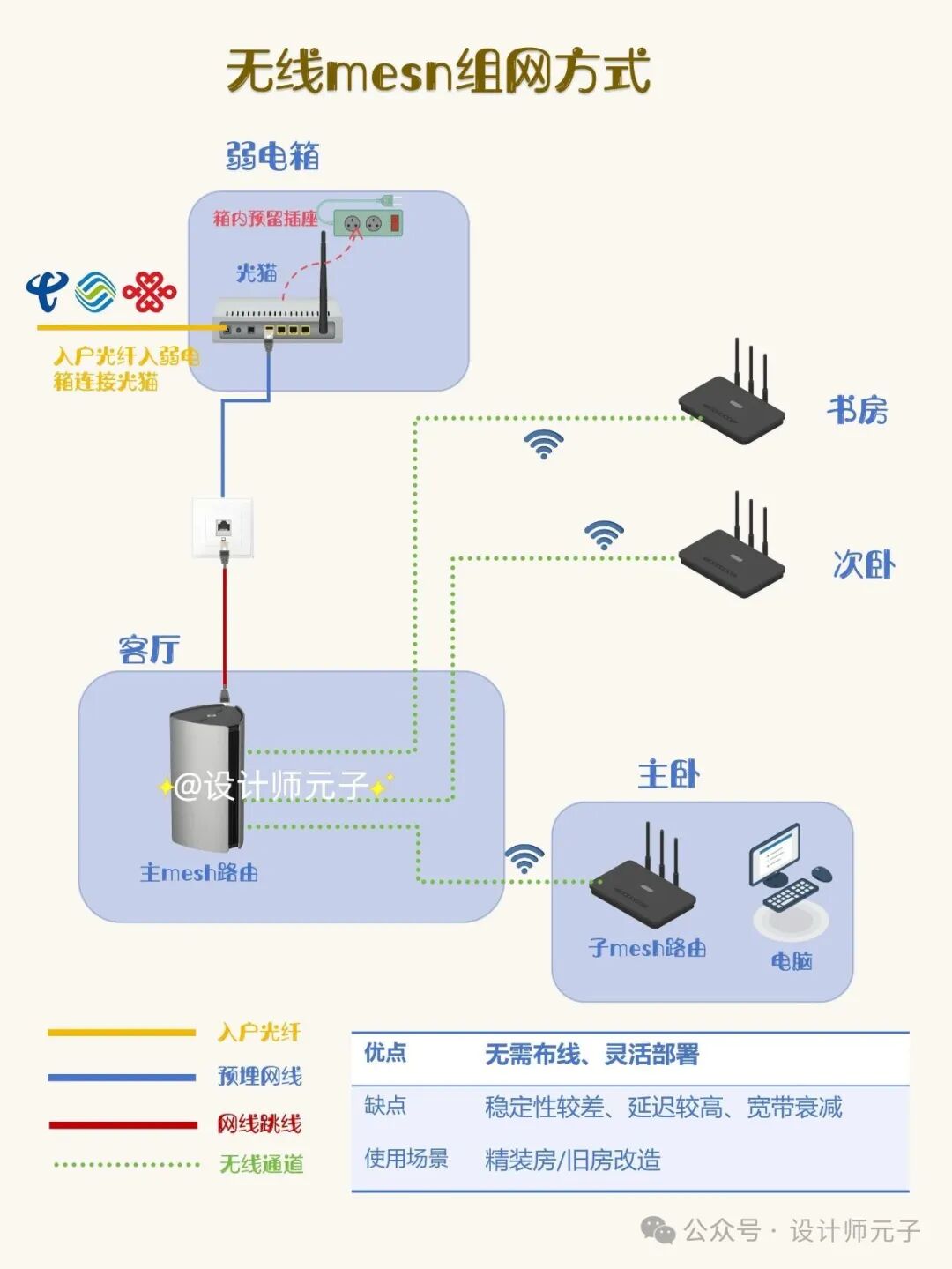
2. Wireless Mesh Networking
Principle: Multiple mesh routers are interconnected via wireless signals (referred to as “wireless backhaul”), with the main node connected to the optical modem, and sub-nodes communicating with the main node/other sub-nodes via WiFi, forming coverage.
- Advantages:
- No wiring required: Sub-nodes only need to be plugged in to extend the signal, suitable for older homes, rental properties, and other scenarios where wiring is not possible, with simple deployment (just unbox and pair).
- Wide coverage: Multiple nodes working together can cover large apartments or complex layouts, solving the dead zone problem of a single router.
- Seamless roaming: Devices supporting 802.11k/v/r protocols can automatically switch between nodes, avoiding the hassle of manually switching WiFi.
- Disadvantages:
- Stability depends on the environment: If there are walls or too much distance between nodes, the wireless backhaul may be interfered with, leading to speed fluctuations and increased latency (especially in multi-wall scenarios).
- Speed loss: Wireless backhaul consumes part of the bandwidth (usually 20%-50% loss), and the actual speed may be lower than wired connections.
- Higher cost: Multiple mesh routers are required, resulting in a total cost higher than a single router or powerline solution.
- Applicable scenarios: Large apartments (over 120㎡), older homes/rental properties where wiring is not possible, families that require roaming experience but can accept some stability fluctuations.
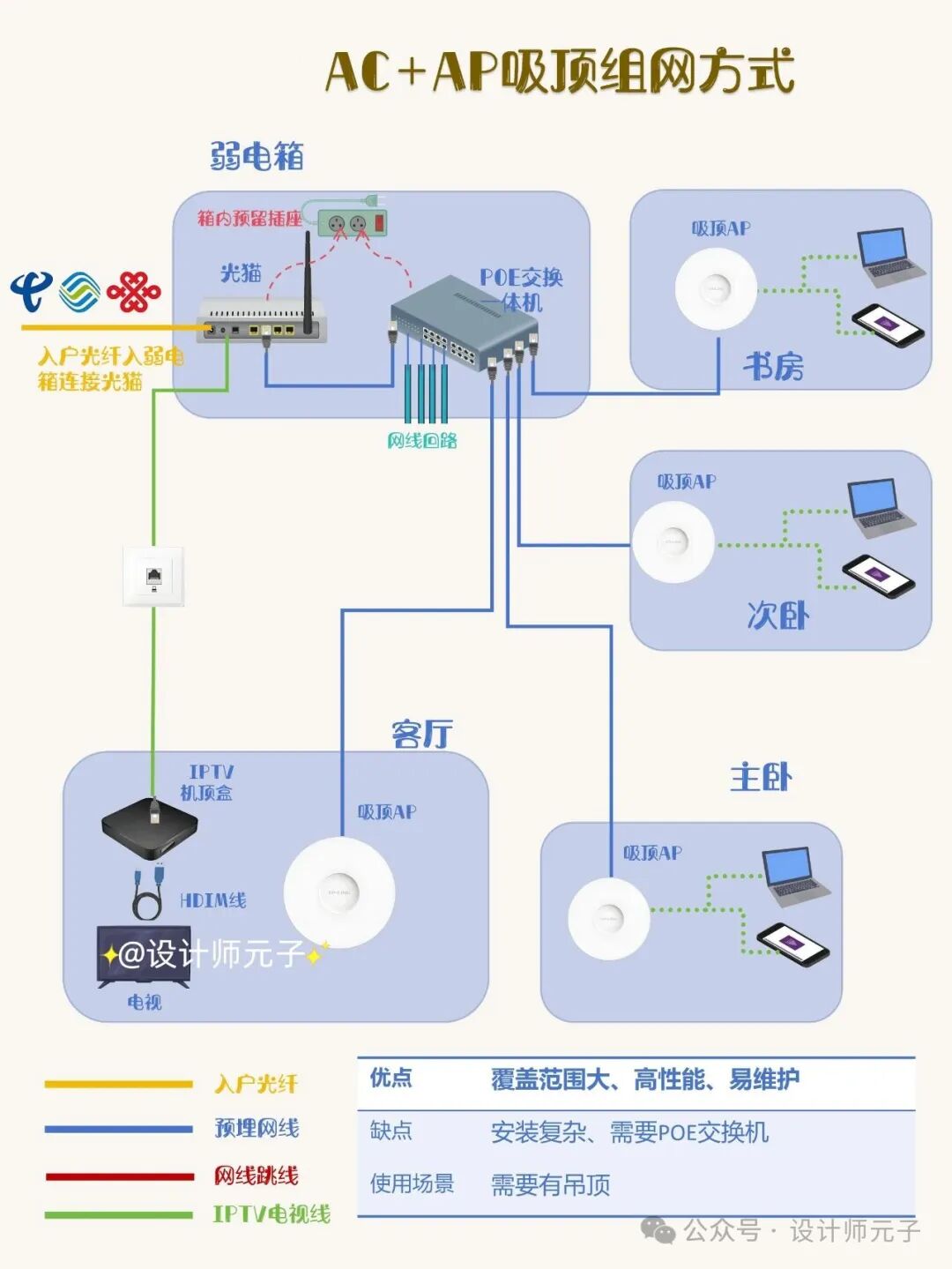
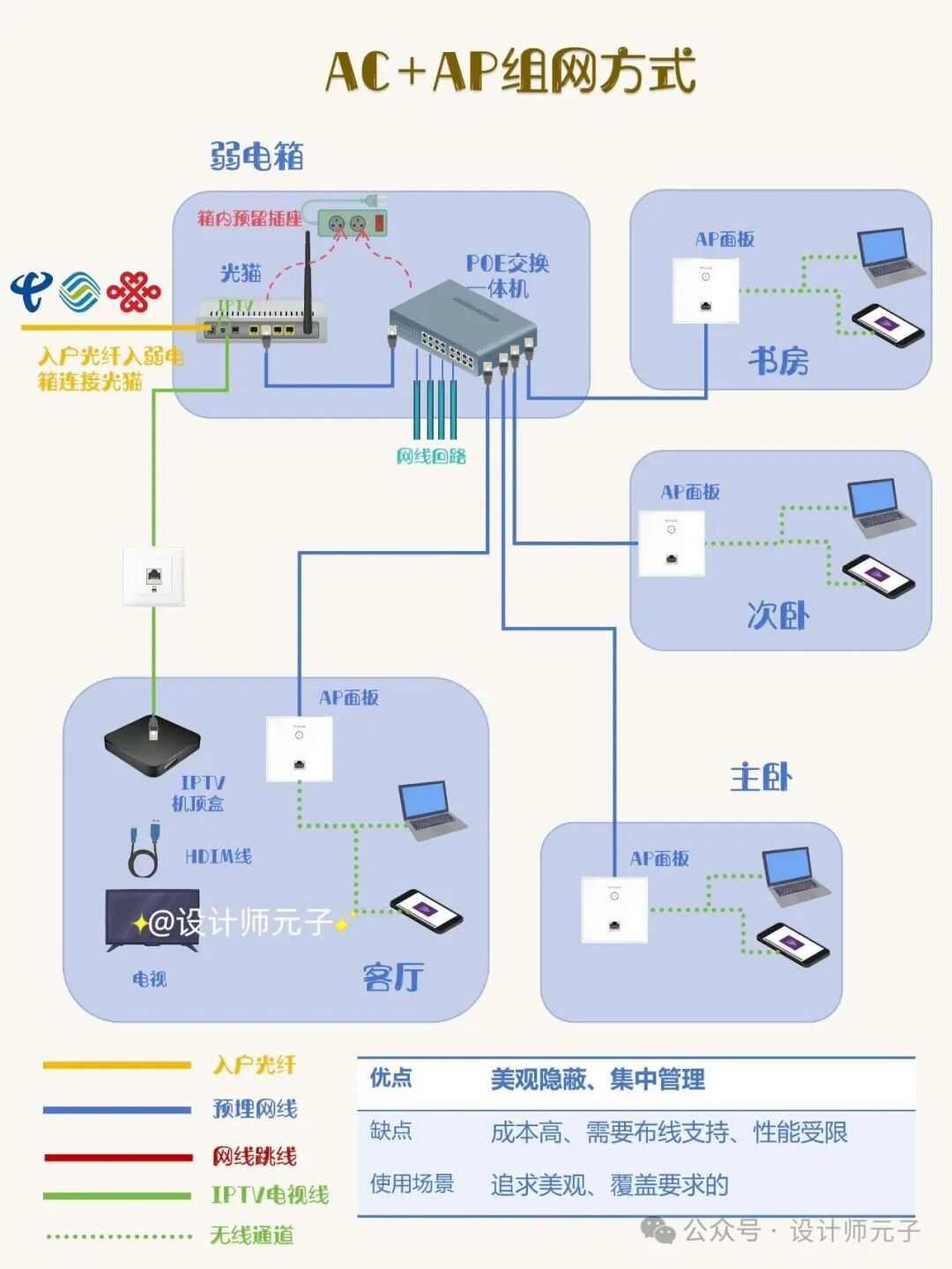
3. AC + AP Networking (including Ceiling-mounted AP)
Principle: Composed of an “AC controller” (central management device) and multiple “APs (access points)”, the main router connects to the optical modem and the AC controller, which centrally manages all APs. APs connect to the main router/switch via Ethernet, providing WiFi coverage. AC + AP ceiling networking is one form: the AP is ceiling-mounted (installed in the ceiling, aesthetically pleasing and with wide coverage), while other forms include panel APs (installed at wall socket locations) and wall-mounted APs.
- Advantages:
- Top-notch stability: APs are connected to the main router via wired connections, with no signal interference, and speeds entirely depend on the Ethernet (supporting gigabit/10-gigabit), suitable for high bandwidth demands.
- Efficient centralized management: The AC controller uniformly configures all APs’ WiFi names, passwords, channels, etc., without needing individual settings, and supports seamless roaming (requires configuration of 802.11k/v/r protocols).
- Uniform coverage: APs can be evenly deployed according to the layout (e.g., ceiling APs have a large coverage radius, suitable for living rooms; panel APs are suitable for bedrooms), avoiding signal overlap or dead zones.
- Aesthetic appeal: Ceiling APs or panel APs can be installed discreetly (ceiling-mounted embedded in the ceiling, panel-style replacing wall sockets), not taking up space, suitable for families that prioritize decor style.
- Disadvantages:
- Wiring required in advance: APs must be connected via Ethernet (need to connect to the main router/switch), requiring reserved wiring and power during renovation (ceiling APs need ceiling wiring), and retrofitting costs are very high.
- High initial cost: Purchasing AC controllers, APs, switches (when multiple APs are used), etc., results in a total cost higher than mesh networking (especially high-end APs).
- Complex configuration: Requires setting IP allocation for AC and AP, roaming parameters, etc., which has certain technical requirements (recommended to be debugged by professionals).
- Applicable scenarios: New home renovations (with reserved wiring and AP installation locations), large apartments/multi-story buildings, scenarios with extremely high requirements for network stability and aesthetics (such as home theater rooms, corporate offices, high-end residences).
Summary Comparison Table
| Networking Method | Core Devices | Backhaul Method | Stability | Speed | Deployment Difficulty | Cost | Applicable Scenarios |
|---|---|---|---|---|---|---|---|
| Wired Mesh Networking | Multiple Mesh Routers | Wired | ★★★★★ | High | Medium (requires wiring) | Medium-High | New homes, large apartments, high stability requirements |
| Wireless Mesh Networking | Multiple Mesh Routers | Wireless | ★★★☆☆ | Medium | Simple (no wiring required) | Medium-High | Older homes, large apartments, roaming needs |
| AC + AP Networking | AC Controller + Multiple APs + Switch | Wired | ★★★★★ | High | Complex (requires wiring + debugging) | High | New home renovations, high-end needs, enterprises |
Selection Recommendations:
- For cost-effectiveness and convenience: choose wireless mesh for older homes, and a single router for small new homes.
- For stability and high speed: prioritize AC + AP or wired mesh for new home renovations (with reserved wiring).
- For temporary transitions or where wiring is not possible: use wireless mesh or powerline networking (powerline is suitable for low-speed needs).#WholeHouseWiFiNetworking#EthernetCable#WirelessRouter#MeshNetworking#WholeHouseWiFiCoverage#NetworkDeviceSharing