
Click the blue text to follow us
1. Introduction to RK2118M
With the rapid development of smart cockpit technology, the in-vehicle audio scene has placed higher demands on hardware performance. Complex scenarios involving multiple speakers, microphones, and sound zones require more powerful interface capabilities, higher AI computing power, and more cost-effective audio processing chips. The RK2118M has emerged to meet these needs.
The RK2118M is a high-performance tri-core HiFi4 DSP processor designed specifically for smart voice interaction and in-vehicle audio applications. It integrates FIR/IIR accelerators, an asynchronous sample rate converter hardware engine, and an NPU dedicated to audio AI processing, significantly enhancing audio processing capabilities. Additionally, the dual-core STAR-M33 processor supports operating system execution, UI rendering, and application protocol stack development, with integrated 1024KB system memory and XIP Flash interface to accommodate diverse application development.
The RK2118M also offers a rich set of peripheral interfaces, including SAI (compatible with I2S, PCM, TDM protocols), PDM, SPDIF, RMII, UART, I2C, SPI, PWM, CAN, etc., reducing hardware development complexity and costs.
Figure (1) shows the internal resources of the RK2118M and its application in in-vehicle audio systems.
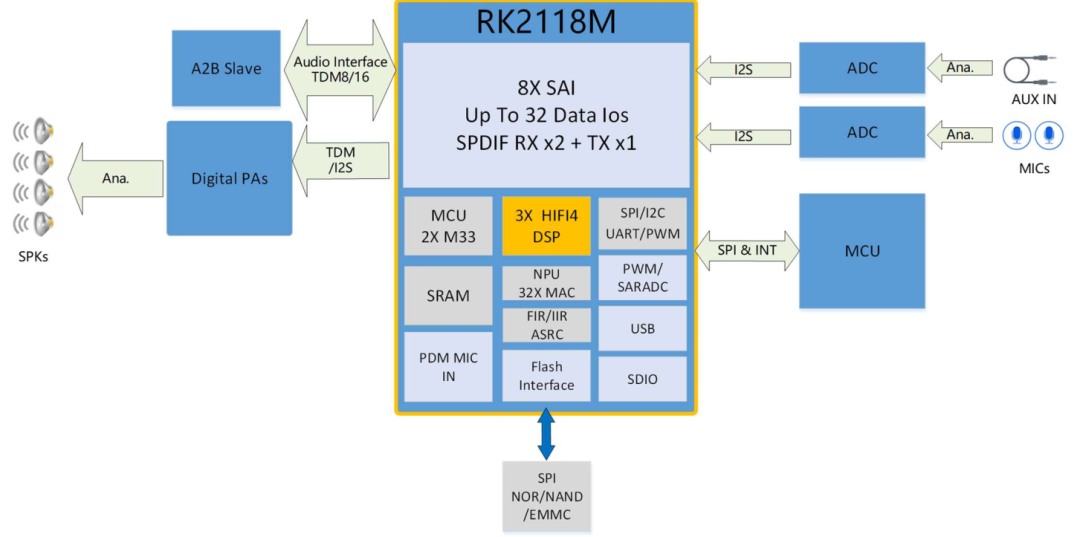
Figure (1)
RK_EVB2_AUTOMOTIVE_DSP_RK2118M_V20 is the official EVB released by Rockchip, utilizing a discrete power supply scheme and storing data on SPI Nor Flash. It supports commonly used devices in automotive applications such as FM/AM receivers, A2B chips, ADCs, audio amplifiers, and cockpit SOCs. The RK2118M features a flexible and convenient IO matrix function, allowing UART, I2C, SPI, PWM, CAN, SARADC, and other peripheral interfaces to be reused on the matrix IO, integrating a stable and producible solution. The functional interfaces of the EVB are shown in Figure (2).
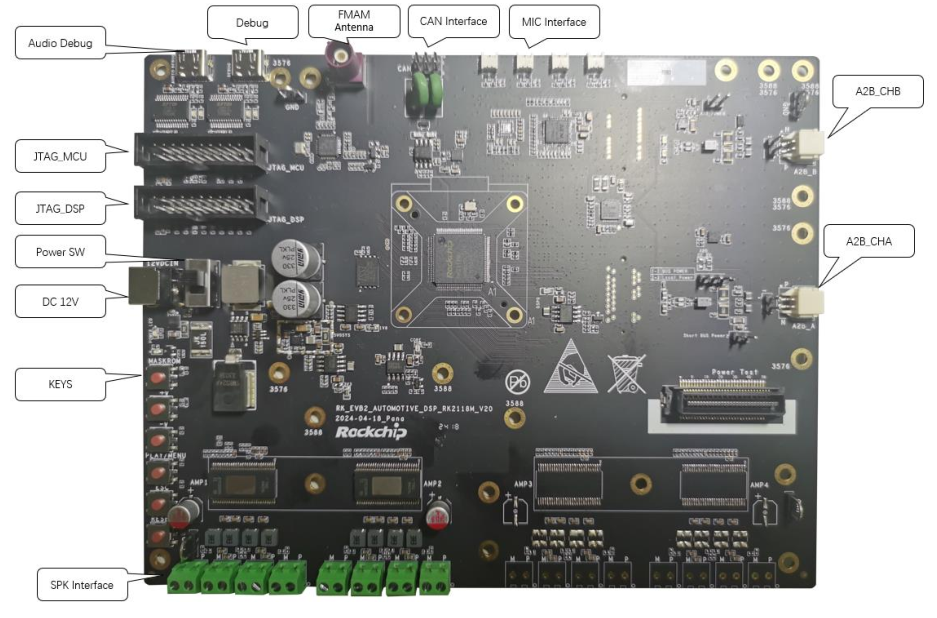
Figure (2)
2. Development Environment
The RK2118M SDK compilation development environment uses a physical machine or WSL (Windows Subsystem for Linux) running 64-bit Ubuntu 20.04 or Ubuntu 18.04. For specific installation, refer to: https://learn.microsoft.com/en-us/windows/wsl/install. The compilation tools selected are SCons + GCC, which are officially recommended by RT-Thread. SCons is an open-source build system written in Python, and the GCC cross-compiler is provided by ARM. This document uses WSL Ubuntu 18.04 as the development system.
Once the development system is ready, follow these steps to install the necessary tools:
1. Update the system package list
$ sudo apt update
2. Install gcc-arm-embedded (the actual operation may not succeed, but it does not affect the SDK build)
$ sudo add-apt-repository ppa:team-gcc-arm-embedded/ppa
$ sudo apt-get update
$ sudo apt-get install gcc-arm-embedded
3. Install scons, clang-format, astyle, build-essential, and other tools
$ sudo apt-get install scons clang-format astyle build-essential dosfstools libncurses5-dev
4. Install Python
$ sudo apt-get install python3
$ sudo apt-get install python3-pip
5. Download the cross-compiler
$ wget https://developer.arm.com/-/media/Files/downloads/gnu/13.2.rel1/binrel/arm-gnu-toolchain-13.2.rel1-x86_64-arm-none-eabi.tar.xz
$ tar xvf arm-gnu-toolchain-13.2.rel1-x86_64-arm-none-eabi.tar.xz
$ export RTT_EXEC_PATH=/path/to/toolchain/arm-gnu-toolchain-13.2.Rel1-x86_64-arm-none-eabi/bin
The above operations are referenced in Figure (3).

Figure (3)
3. SDK Download and Compilation
The RK2118 SDK is released through the Rockchip code server. Obtain the RK2118 RT-Thread software package. You need to contact the Rockchip technical window ([email protected]) to get it.
SSH public key is used for server authentication and authorization. After obtaining it, you can place the corresponding file in the system home directory, as shown in Figure (4).
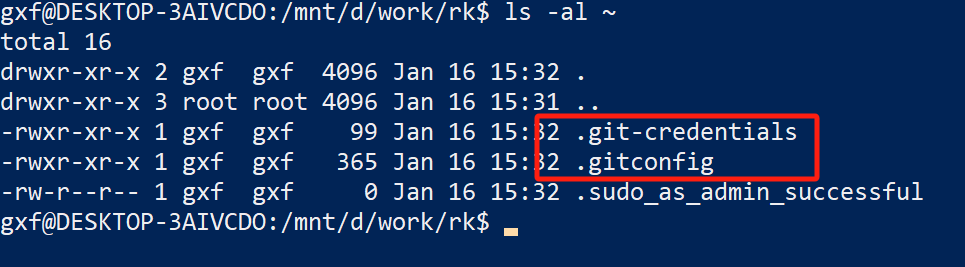
Figure (4)
Use repo to synchronize the code
1. Download the RK repo (even if you already have repo in the system, it is still recommended to use the repo provided by RK to avoid unexpected errors)
$ sudo git clone https://gerrit.rock-chips.com:8443/repo-release/tools/repo
Figures (5), (6), (7), and (8) show the printed information after successfully completing the code synchronization.
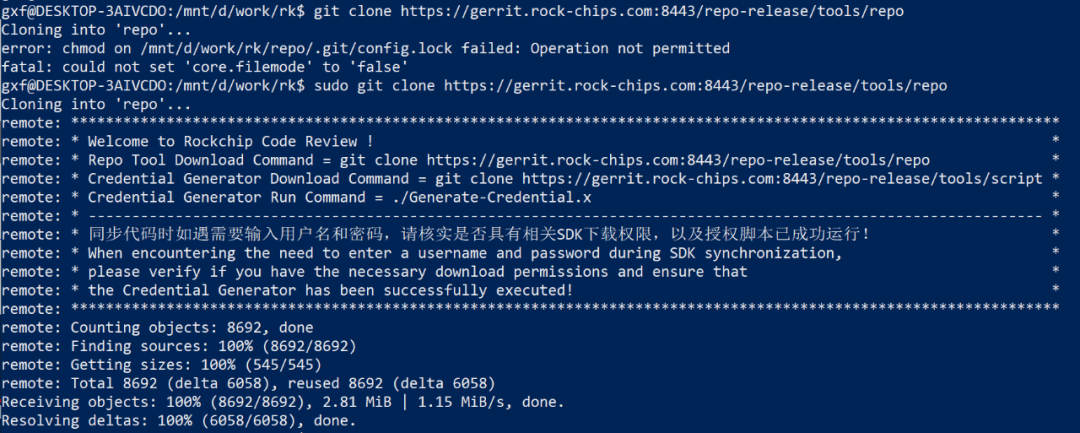
Figure (5)
$ sudo ./repo/repo init –repo-url https://gerrit.rock-chips.com:8443/repo-release/tools/repo -u https://gerrit.rock-chips.com:8443/RTOS/manifests -b rk2118 -m rk2118.xml
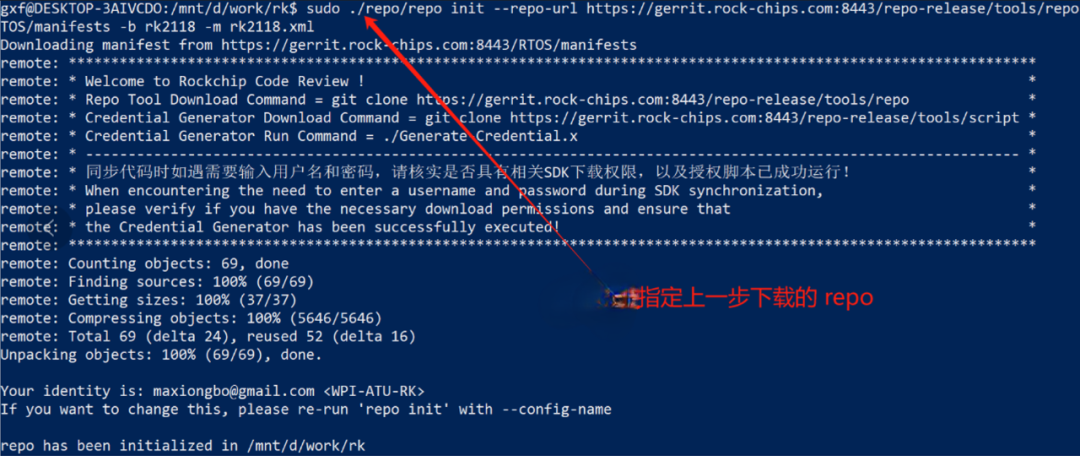
Figure (6)
3. Code synchronization
$ sudo .repo/repo/repo sync
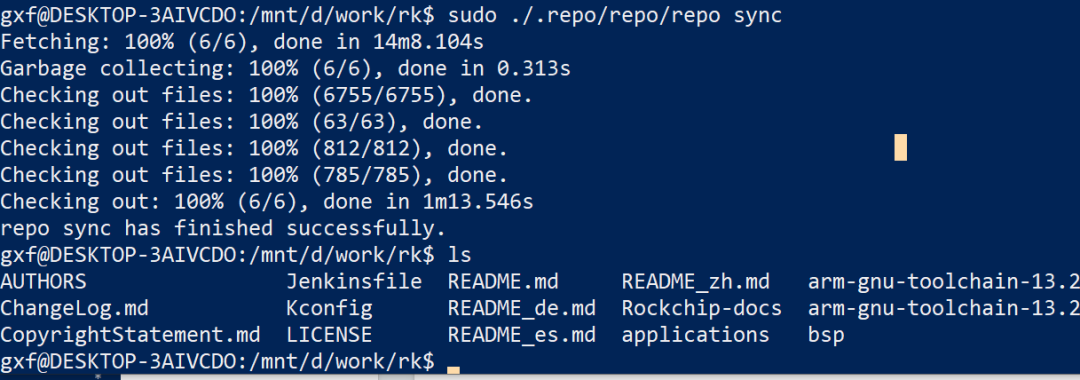
Figure (7)
4. Version confirmation
$ cd .repo/manifests
$ git log rk2118.xml
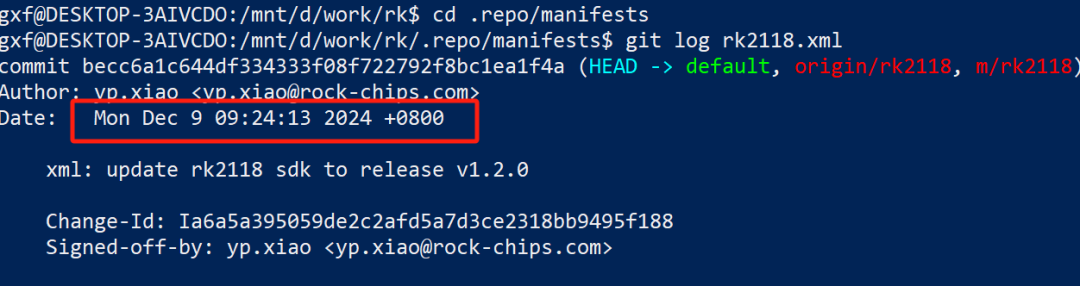
Figure (8)
5. Code compilation
Confirm that RTT_EXEC_PATH is set correctly
$ cd bsp/rockchip/rk2118
$ ./build.sh board/adsp_demo/setting.ini
The generated firmware is located at Image/Firmware.img
4. Download and Run
The download tool is located in the SDK’s bsp\rockchip\tools\ path. Unzip SocToolKit_v2.1_20241202_01_win.zip,
Double-click the SocToolKit application, and the interface shown in Figure (9) will appear. Click OK.
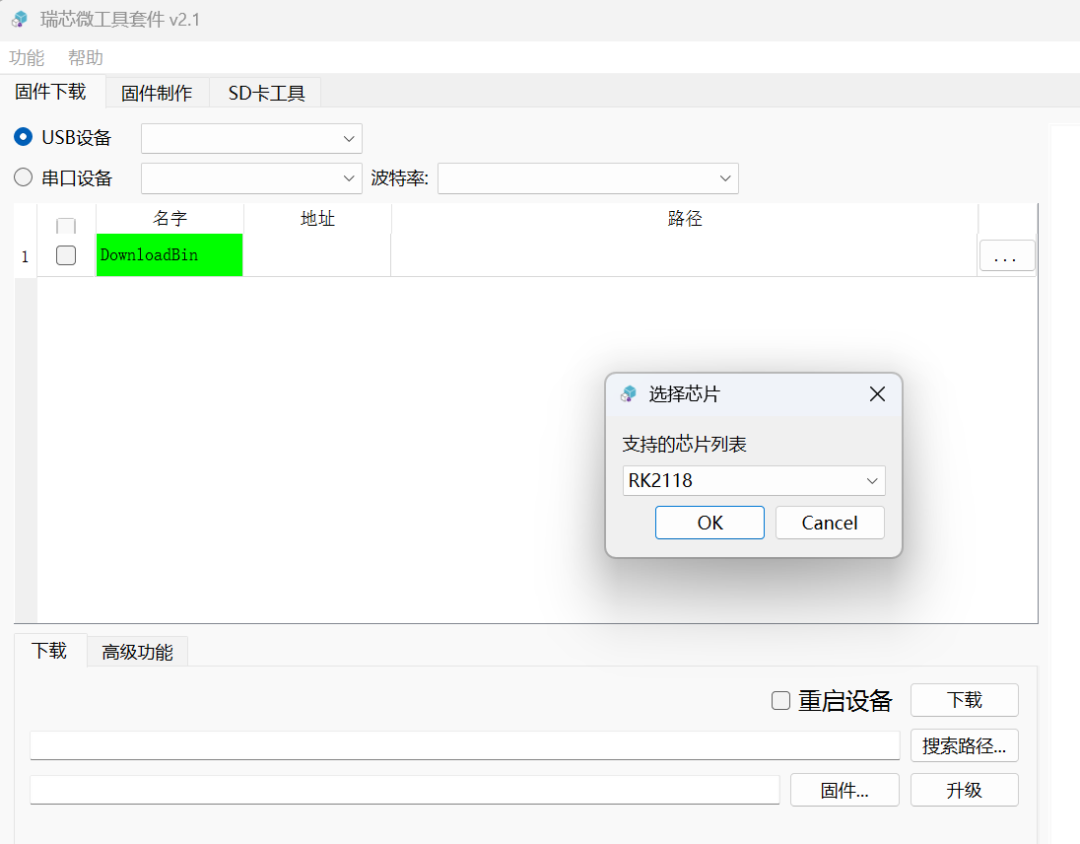
Figure (9)
Then follow these steps:
1. Select the serial port device based on the PC device manager, choose the corresponding serial port, and set the baud rate to 1500000.
2. Right-click and select Add to increase a download project, naming it fw, with a flash address of 0x00000000.
3. Select DownloadBin to download the file bsp\rockchip\rk2118\Image\MiniLoaderAll.bin,
This will be downloaded to the RK2118M’s SRAM via the serial port and run to download other files to flash.
4. Select the fw download item bsp\rockchip\rk2118\Image\Firmware.img, which is the RT-Thread image compiled to run on MCU0 in the previous section.
After completing the above operations, the download tool interface will display as shown in Figure (10).
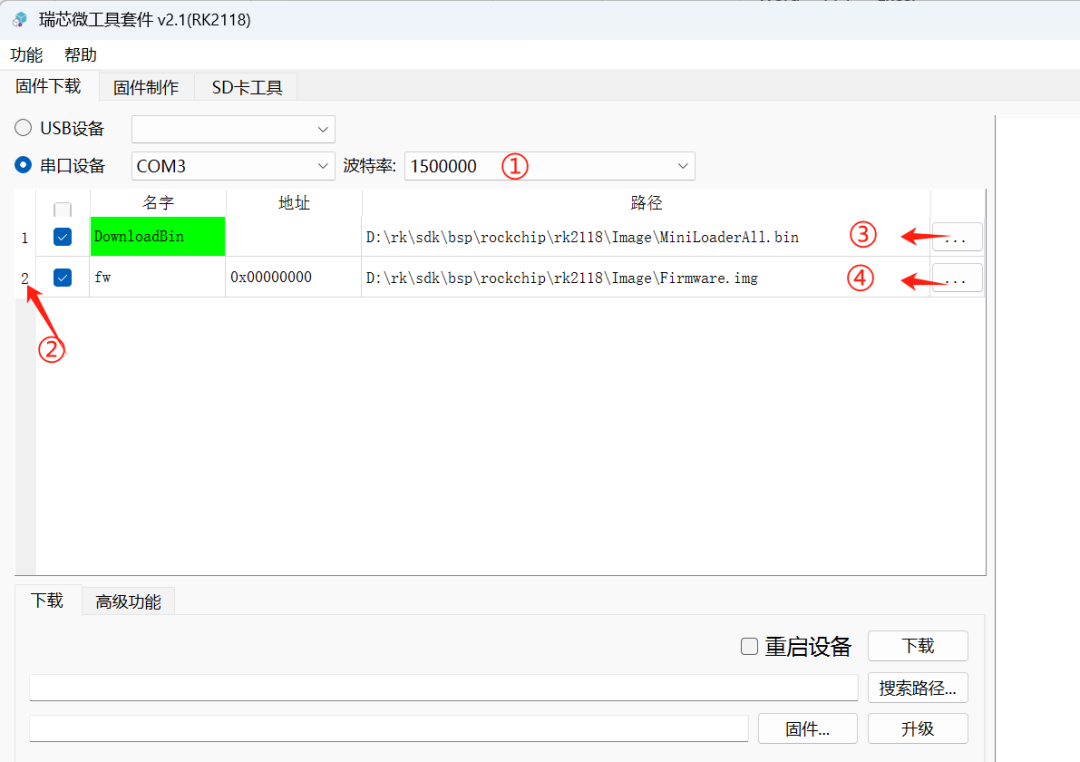
Figure (10)
Finally, connect the board as shown in Figure (11), link the 12V power supply and download serial port, while holding down the maskrom button, switch the power to the ON position. At this point, the download tool’s serial port device column will display Maskrom, click the download button to start downloading the firmware, and the corresponding serial port device column will show Loader.
Note:When performing the download task, be sure to disconnect the AUDIO DEBUG development board wiring, otherwise the download will fail without any prompt.
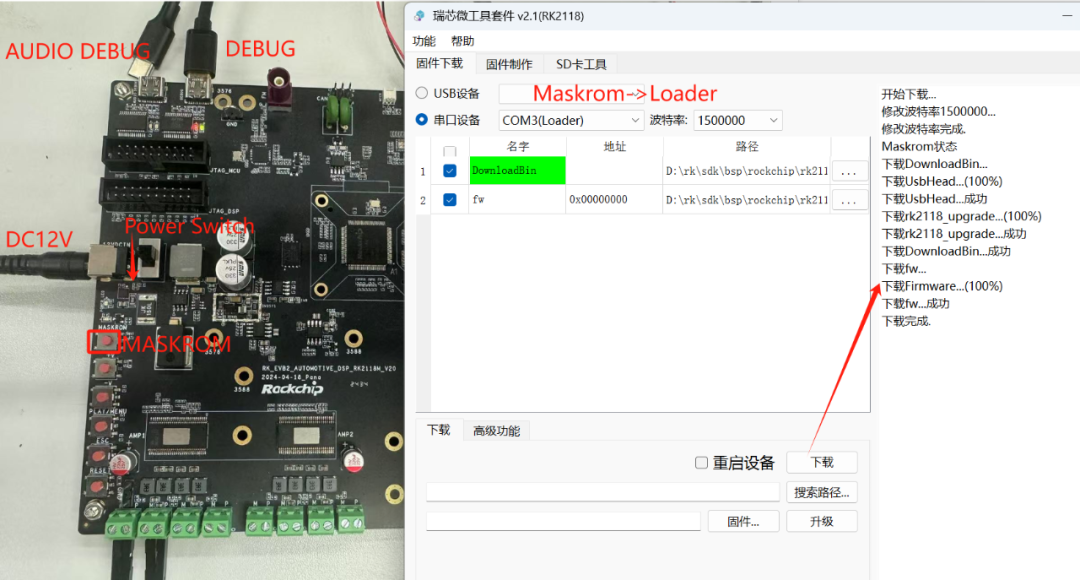
Figure (11)
After the download is complete, close the download tool (to prevent occupation), use a serial port tool to open the corresponding COM port, power cycle the board, and the serial port tool will print the startup LOG, see Figure (12).
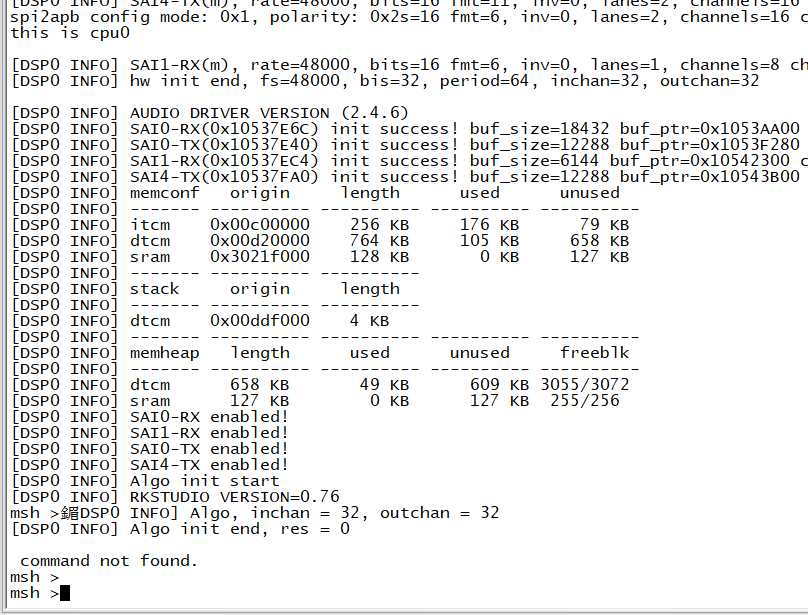
Figure (12)
5. References
-
Rockchip_RK2118M_EVB_V20_User_Guide_V1.0_20240820_CN.pdf
-
Rockchip_RK2118_Quick_Start_RT-Thread_CN.pdf
-
Rockchip_RK2118_RT-Thread_SDK_Release_CN.pdf
By following the above steps, you can quickly set up the RK2118M SDK development environment and complete firmware download and operation, laying a solid foundation for smart cockpit audio processing development.
Welcome to follow the expert blogger: Automotive Expert
Learn more about automotive-related application knowledge!

Welcome to follow the Dalian Dalian Engineer Community – Expert Insights
👇👇👇


ClickRead the original text to obtain technical documents and more information!

Like
Collect
Share