Recommended Reading
Implementation of Balanced Binary Tree in C Language | Illustrated + Detailed Code
8 Basic and Practical Classic Examples of C Language [Source Code Included]
25,000 words, 80 diagrams summarizing computer network knowledge, hurry up and bookmark
Programmer’s Healthy Work Schedule, 99% of Programmers Can’t Achieve It
Recursive Calls in C Language Clarified by These 13 Questions
Main Content
Multi-file programming is the core practice of modular development in C language. By distributing code across multiple source files (<span>.c</span>) and header files (<span>.h</span>), it enhances code maintainability, reusability, and collaboration efficiency. The following is a detailed explanation covering concepts, structure, compilation process, precautions, and practical applications.
1. Core Concepts of Multi-File Programming
-
Modular Design Principles
- Function Division: Each module (
<span>.c</span>file) is responsible for a single function, such as mathematical operations, data structure manipulation, hardware interfaces, etc. - Separation of Interface and Implementation: Header files (
<span>.h</span>) define interfaces (function declarations, macros, structures), while source files (<span>.c</span>) implement specific logic. - Low Coupling and High Cohesion: Minimize dependencies between modules, with tightly related functionalities within a module.
Advantages of Multi-File Programming
- Code Reusability: Common functionalities (like linked list operations, logging modules) can be encapsulated as independent modules for use in multiple projects.
- Team Collaboration: During multi-person development, different modules can be developed in parallel, reducing conflicts.
- Compilation Efficiency: Only modified files need to be recompiled, not the entire project.
- Easy Maintenance: Faster problem localization, with a controllable scope of modifications.
2. File Structure and Responsibilities
-
Header Files (
<span>.h</span>)
- Function Declarations (Prototypes)
- Macro Definitions (
<span>#define</span>) - Structure/Union Definitions (
<span>struct</span>/<span>union</span>) - Global Variable Declarations (
<span>extern</span>) - Type Definitions (
<span>typedef</span>)
- Content:
- Protection Mechanism: Use
<span>#ifndef</span>/<span>#define</span>/<span>#endif</span>to prevent multiple inclusions and avoid symbol redefinition errors.// example.h #ifndef EXAMPLE_H #define EXAMPLE_H extern int global_var; // Global variable declaration void func(void); // Function declaration #endif // EXAMPLE_H
Source Files (<span>.c</span>)
- Function Definitions (Implementations)
- Global Variable Definitions (Optional)
- Static Variables and Functions (
<span>static</span>modifier, limiting scope)
- Content:
- Dependency Management: Include required interfaces using
<span>#include "header.h"</span>, and use<span>#include <header.h></span>for standard library header files. - Example:
// example.c
#include "example.h"  // Custom header file
#include <stdio.h>    // Standard library header file

int global_var = 0;  // Global variable definition

void func(void) {
    printf("Global var: %d\n", global_var++);
}
Main Program File (<span>main.c</span>)
- Contains the
<span>main()</span>function, responsible for calling functionalities of other modules. - Only necessary header files should be included to avoid redundant dependencies.
3. Multi-File Compilation Process
Multi-file compilation consists of compilation and linking phases, ultimately generating an executable file.
-
Compilation Phase
<span>-c</span>: Compile only, do not link.<span>-Wall</span>: Enable all warnings.<span>-g</span>: Generate debugging information (for GDB debugging).
- Objective: Independently compile each
<span>.c</span>file into object files (<span>.o</span>or<span>.obj</span>), containing machine code and unresolved symbol references. - Command Example (using GCC as an example):
gcc -c main.c -o main.o # Compile main program gcc -c example.c -o example.o # Compile module - Key Parameters:
Linking Phase
- Static Libraries (
<span>.a</span>): Code is directly embedded at compile time, generating standalone executable files. - Dynamic Libraries (
<span>.so</span>/<span>.dll</span>): Loaded at runtime, saving space but depending on external files.
- Objective: Merge object files and library files, resolve symbol references, and generate executable files.
- Command Example:
gcc main.o example.o -o program # Link all object files - Static vs Dynamic Libraries:
Directly Compile Multiple Files: All source files can be compiled at once:
gcc main.c example.c -o program
4. Best Practices for Multi-File Programming
-
File Naming and Organization
- Maintain consistency, such as
<span>module.c</span>and<span>module.h</span>. - For large projects, use directory structures:
project/
├── main.c
├── utils/
│   ├── utils.h
│   └── utils.c
└── math/
    ├── math.h
    └── math.c
Global Variables and Function Scope
- Defined in
<span>.c</span>, used in<span>.h</span>with<span>extern</span>declaration for external access. - Limit usage, prefer passing data through function parameters.
- Global Variables:
- Static Functions: Use
<span>static</span>to modify functions or variables, limiting scope to the current file to avoid naming conflicts.// utils.c static void helper() { /* Only callable within utils.c */ }
Header File Dependency Management
- Avoid Circular Dependencies: A.h includes B.h, B.h includes A.h → Compilation error.
- Forward Declarations: Use structure pointers in header files instead of complete definitions to reduce dependencies.
// a.h
typedef struct B B_t;  // Forward declaration
void func(B_t* ptr);
Error Handling and Debugging
- Use
<span>printf</span>or<span>gdb</span>to trace symbol resolution. - Check the symbol table of object files:
<span>nm main.o</span>.
- Header file not included →
<span>undefined reference</span>error. - Duplicate definition →
<span>multiple definition</span>error.
- Locating Compilation Errors:
- Debugging Tips:
5. Practical Case: Implementing a Calculator Module
-
Header File
<span>calc.h</span>#ifndef CALC_H #define CALC_H int add(int a, int b); int subtract(int a, int b); int multiply(int a, int b); float divide(int a, int b); #endif // CALC_H -
Source File
<span>calc.c</span>#include "calc.h" int add(int a, int b) { return a + b; } int subtract(int a, int b) { return a - b; } int multiply(int a, int b) { return a * b; } float divide(int a, int b) { return (b != 0) ? (float)a / b : 0; } -
Main Program
<span>main.c</span>#include <stdio.h> #include "calc.h" int main() { printf("Add: %d\n", add(5, 3)); printf("Divide: %.2f\n", divide(10, 3)); return 0; } -
Compilation and Execution
gcc -c calc.c -o calc.o
gcc -c main.c -o main.o
gcc main.o calc.o -o calculator
./calculator
Clion Run Result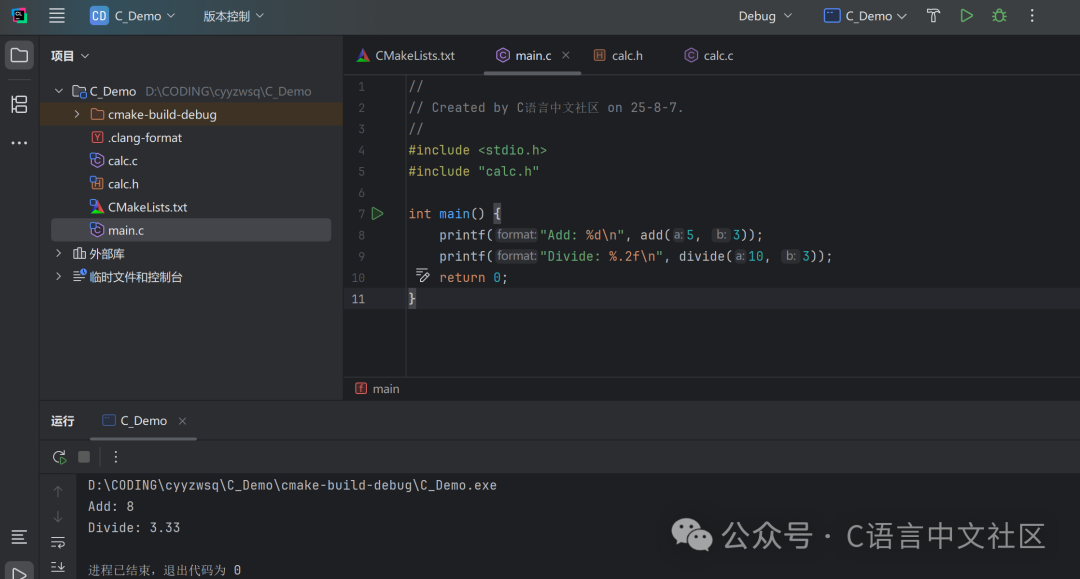
6. Advanced Tools and Automated Builds
-
Makefile Dependency Management simplifies the compilation process, automatically detecting file modifications:
CC = gcc CFLAGS = -Wall -g TARGET = calculator OBJS = main.o calc.o $(TARGET): $(OBJS) $(CC) $(CFLAGS) $(OBJS) -o $@ clean: rm -f $(OBJS) $(TARGET) -
CMake Cross-Platform Build
cmake_minimum_required(VERSION 3.10)
project(calculator)
set(CMAKE_C_STANDARD 99)
add_executable(calculator main.c calc.c)
7. Common Issues and Solutions
-
Duplicate Definition Error
- Cause: Header file not protected, or global variable defined in header file.
- Solution: Ensure header files use
<span>#ifndef</span>, and global variable definitions are placed in<span>.c</span>files.
Undefined Reference
- Cause: Target files not included during linking.
- Solution: Check if the compilation command includes all
<span>.o</span>files.
Header File Path Issues
- Solution: Use
<span>-I</span>to specify the header file directory:gcc -I./include main.c -o program
8. Conclusion
Multi-file programming is a core practice in C language project development, enhancing code quality through modular design. Master the following key points:
- Division of Labor between Header and Source Files: Separation of declaration and implementation.
- Compilation and Linking Process: Understanding object files and symbol resolution mechanisms.
- Standards and Tools: Follow coding standards and utilize Makefile/CMake for automated builds.
- Debugging and Maintenance: Effectively use tools to locate dependencies and symbol issues.
Through practical cases (like the calculator module) and continuous optimization, gradually build maintainable and scalable C language projects.
—— End ——

Follow my WeChat public account to receive 300G of programming resources for free.