
1. DWT Trace Component
Trace Component: Data Watchpoint and Trace (DWT)

In DWT, there are remaining counters that are typically used for “performance profiling” of program code. By programming them, they can generate events (in the form of trace packets) when the counter overflows.The most typical use is to measure the number of cycles taken to execute a task using the CYCCNT register, which can also serve as a time reference for purposes related to the operating system, such as calculating CPU usage.
2. DWT in Cortex-M
In Cortex-M, there is a peripheral called DWT (Data Watchpoint and Trace), which is used for system debugging and tracing.
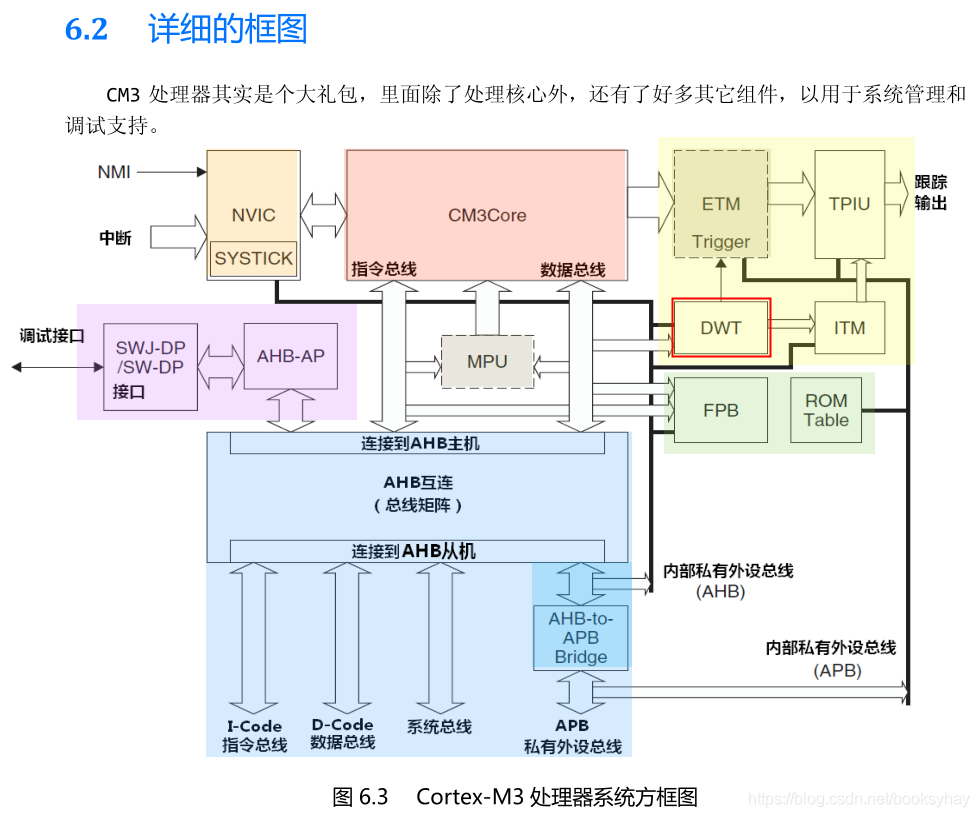
It has a 32-bit register called CYCCNT, which is an up-counter that records the number of kernel clock cycles. Each time the kernel clock ticks, this counter increments by 1, providing very high precision. If the kernel clock is 72M, the precision is 1/72M = 14ns, which is sufficient since the execution time of programs is in the microsecond range.The maximum time that can be recorded is: 59.65s. The calculation method is 2^32 / 72000000.When CYCCNT overflows, it resets to 0 and starts counting up again.
3. Usage Method
To implement a delay function, three registers are involved: DEMCR, DWT_CTRL, and DWT_CYCCNT, which are used to enable DWT functionality, enable CYCCNT, and obtain the system clock count value, respectively.
3.1 – DEMCR
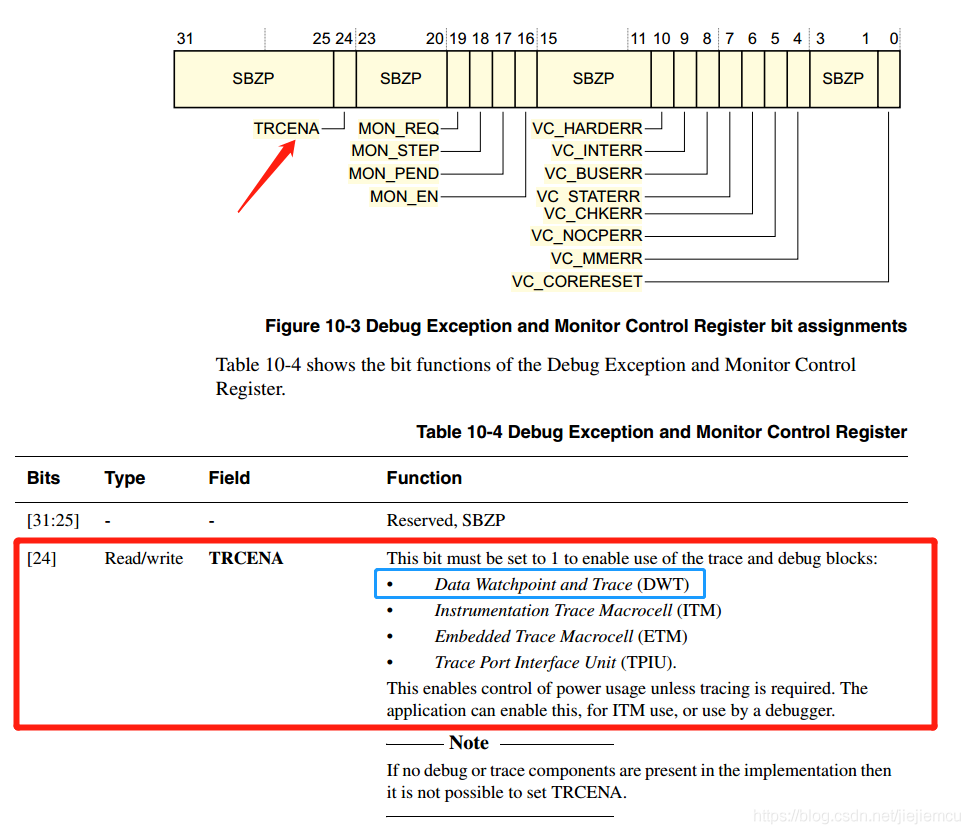
To enable the DWT peripheral, it needs to be controlled by bit 24 of another core debug register, DEMCR. Writing 1 enables it (this is important!). The address of DEMCR is 0xE000 EDFC.
3.2 – About DWT_CYCCNT
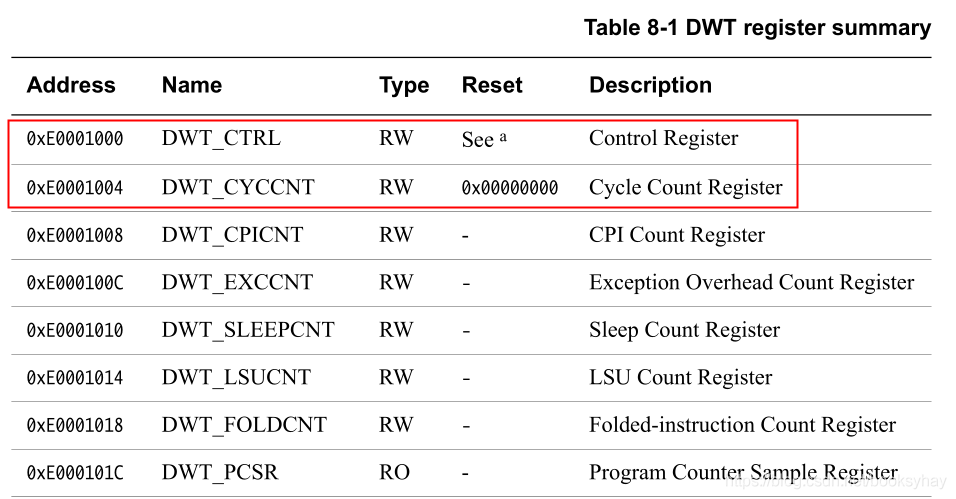
Before enabling the DWT_CYCCNT register, it should be cleared to 0. Let’s look at the base address of DWT_CYCCNT, which can be found in the ARM Cortex-M manual at address 0xE000 1004. The reset default value is 0, and it is readable and writable. Writing 0 to address 0xE000 1004 will clear DWT_CYCCNT to 0.
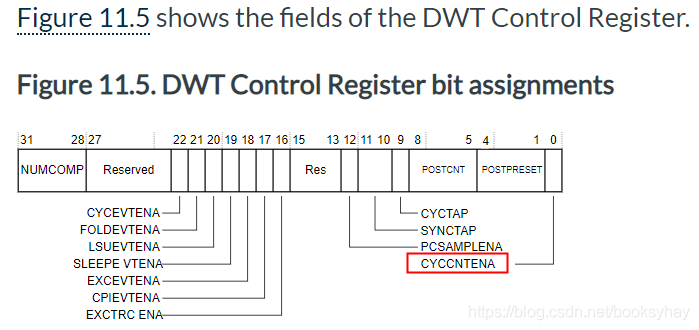
3.3 – About CYCCNTENA
CYCCNTENA enables the CYCCNT counter. If not enabled, the counter does not count, and no event is generated for PS sampling or CYCCNTENA. In normal use, the debugger must initialize the CYCCNT counter to 0.It is the first bit of the DWT control register; writing 1 enables it, otherwise, the CYCCNT counter will not work.[https://developer.arm.com/documentation/ddi0337/e/system-debug/dwt/summary-and-description-of-the-dwt-registers?lang=en]
4. Conclusion
To use the DWT’s CYCCNT, follow these steps:1. First, enable the DWT peripheral, controlled by bit 24 of the other core debug register, DEMCR. Write 1 to enable it.2. Before enabling the CYCCNT register, clear it to 0.3. Enable the CYCCNT register, controlled by DWT’s CYCCNTENA, which is bit 0 of the DWT control register. Write 1 to enable it.Register Definitions:
//0xE000EDFC DEMCR RW Debug Exception and Monitor Control Register. //Enable DWT module functionality#define DEMCR ( *(unsigned int *)0xE000EDFC ) #define TRCENA ( 0x01 << 24) // DWT enable bit in DEMCR //0xE0001000 DWT_CTRL RW The Debug Watchpoint and Trace (DWT) unit //Enable CYCCNT counter to start counting#define DWT_CTRL ( *(unsigned int *)0xE0001000 ) #define CYCCNTENA ( 0x01 << 0 ) // DWT's CYCCNT enable bit //0xE0001004 DWT_CYCCNT RW Cycle Count register, //Internal value of CYCCNT counter (32-bit unsigned)#define DWT_CYCCNT ( *(unsigned int *)0xE0001004) //Display or set the processor's cycle count valueUsage Example:
volatile unsigned int *DWT_CYCCNT ;volatile unsigned int *DWT_CONTROL ;volatile unsigned int *SCB_DEMCR ; void reset_timer(){ DWT_CYCCNT = (int *)0xE0001004; //address of the register DWT_CONTROL = (int *)0xE0001000; //address of the register SCB_DEMCR = (int *)0xE000EDFC; //address of the register *SCB_DEMCR = *SCB_DEMCR | 0x01000000; *DWT_CYCCNT = 0; // reset the counter *DWT_CONTROL = 0; } void start_timer(){ *DWT_CONTROL = *DWT_CONTROL | 1 ; // enable the counter} void stop_timer(){ *DWT_CONTROL = *DWT_CONTROL | 0 ; // disable the counter } unsigned int getCycles(){ return *DWT_CYCCNT;} void main(){ .... reset_timer(); //reset timer start_timer(); //start timer //Code to profile ... myFunction(); ... stop_timer(); //stop timer numCycles = getCycles(); //read number of cycles ...}Example 2:
#define start_timer() *((volatile uint32_t*)0xE0001000) = 0x40000001 // Enable CYCCNT register#define stop_timer() *((volatile uint32_t*)0xE0001000) = 0x40000000 // Disable CYCCNT register#define get_timer() *((volatile uint32_t*)0xE0001004) // Get value from CYCCNT register /************ How to use:* uint32_t it1, it2; // start and stop flag start_timer(); // start the timer. it1 = get_timer(); // store current cycle-count in a local // do something it2 = get_timer() - it1; // Derive the cycle-count difference stop_timer(); // If timer is not needed any more, stopprint_int(it2); // Display the difference****/Example 3:
#define DWT_CR *(uint32_t *)0xE0001000#define DWT_CYCCNT *(uint32_t *)0xE0001004#define DEM_CR *(uint32_t *)0xE000EDFC#define DEM_CR_TRCENA (1 << 24)#define DWT_CR_CYCCNTENA (1 << 0) /* Initialize timestamp */void CPU_TS_TmrInit(void){ /* Enable DWT peripheral */ DEM_CR |= (uint32_t)DEM_CR_TRCENA; /* Clear DWT CYCCNT register count to 0 */ DWT_CYCCNT = (uint32_t)0u; /* Enable Cortex-M3 DWT CYCCNT register */ DWT_CR |= (uint32_t)DWT_CR_CYCCNTENA;} uint32_t OS_TS_GET(void){ return ((uint32_t)DWT_CYCCNT);}Original text: https://blog.csdn.net/booksyhay/article/details/109028712
This article is sourced from the internet, freely conveying knowledge, and the copyright belongs to the original author. If there are any copyright issues, please contact me for deletion.
Finally
The author has collected some embedded learning materials. Reply with【1024】 in the public account to find the download link!
Recommended good articles, click the blue text to jump to the collection ☞ Collection | Linux Application Programming Complete ☞ Collection | Learn Some Network Knowledge ☞ Collection | Handwritten C Language ☞ Collection | Handwritten C++ Language ☞ Collection | Experience Sharing ☞ Collection | From Microcontrollers to Linux ☞ Collection | Power Control Technology ☞ Collection | Essential Mathematics for Embedded Systems ☞ Collection | MCU Advanced Collection