In the previous article, we compiled and ran llama.cpp locally, successfully executing the local model. However, we used the built-in model invocation and execution program of llama.cpp. Today, we will not use the built-in main program of llama.cpp; instead, we will write our own code to call the libllama library.
0. Series Articles
- • Embedded AI and C++: 1. Compiling and Running llama.cpp Locally
1. Preparation Work
(1) Create a new directory HelloAI directly under the root directory of llama.cpp (you can choose your preferred directory):
mkdir HelloAI
(2) In the HelloAI directory, create the main.cpp main program file and the CMakeLists.txt file.
(3) Write minimal code in main.cpp and CMakeLists.txt to ensure it runs.
- • main.cpp code:
#include <iostream>

int main(int argc, char** argv)
{
    std::cout << "Hello World!" << std::endl;
    return 0;
}- • CMakeLists.txt code:
cmake_minimum_required(VERSION 3.10)
project(HelloAI)

# Set C++ standard
set(CMAKE_CXX_STANDARD 17)
set(CMAKE_CXX_STANDARD_REQUIRED ON)

# Add executable file
add_executable(HelloAI main.cpp)- • Test compilation and execution
cd HelloAI
mkdir build
cd build
cmake ..
make

./HelloAI
The output result is as follows:
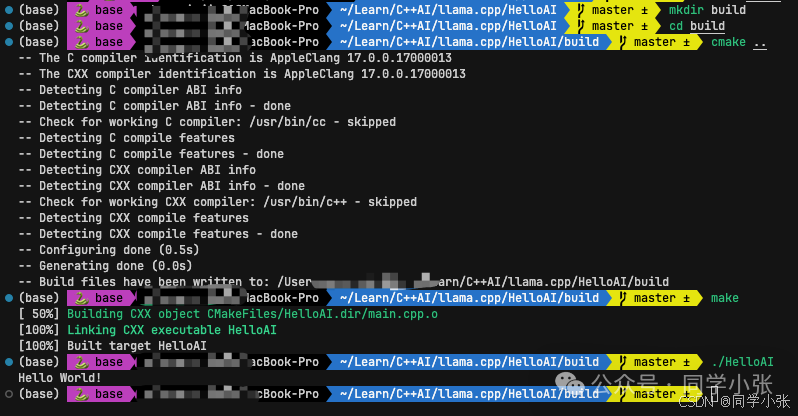
At this point, the preparation work is complete, and the remaining task is to add code to connect with llama.cpp!
2. Writing main.cpp
This is a minimal inference code. It does three things:
- • Load the model -> Convert text to numbers (Tokenize) -> Loop to predict the next number.
2.1 Load the Model
Load the model file from the hard drive into memory and prepare the computational resources.
(1) Model path (the model we downloaded in the previous article)
(2) Get the model’s default parameters
(3) Load the model file
std::string model_path = "xxx/models/qwen2.5-0.5b-instruct-q4_k_m.gguf";  // Absolute path to the model file

llama_model_params model_params = llama_model_default_params();  // Get default model parameters

// Load the model from the file, returning a model pointer
llama_model* model = llama_model_load_from_file(model_path.c_str(), model_params);
if (!model) {  // Check for model loading failure
    std::cerr << "Failed to load model: " << model_path << std::endl;
    return 1;
}
2.2 Convert Text to Numbers (Tokenization)
Convert the Chinese prompt you wrote into a sequence of tokens (integer array) that the model can understand.
(1) Get the model vocabulary: The model does not recognize “你好”; it only recognizes numbers. You need to obtain a pointer to the model’s “dictionary” to convert text into numbers later.
(2) Tokenize the prompt
// Get the model's vocabulary (for tokenization)
const llama_vocab* vocab = llama_model_get_vocab(model);
// First, get the number of tokens
const int n_prompt = -llama_tokenize(vocab, prompt.c_str(), prompt.size(), nullptr, 0, true, true);
std::vector<llama_token> prompt_tokens(n_prompt);  // Vector to store the token sequence
// Execute tokenization
if (llama_tokenize(vocab, prompt.c_str(), prompt.size(), prompt_tokens.data(), prompt_tokens.size(), true, true) < 0)
{
    std::cerr << "Failed to tokenize prompt" << std::endl;
    return 1;
}
2.3 Prepare for Inference
2.3.1 Create Inference Context: The “workspace” for inference
The context is a temporary memory area for the model to “think”.
- • Set ctx_params.n_ctx (e.g., 2048) to determine how much the model can remember.
- • Set ctx_params.n_batch to determine how many tokens to process at once.
- • Use llama_init_from_model to create the context object ctx.
llama_context_params ctx_params = llama_context_default_params();  // Default context parameters
ctx_params.n_ctx = 2048;       // Context window size (maximum number of tokens)
ctx_params.n_batch = n_prompt; // Batch size (to improve inference efficiency)
ctx_params.no_perf = false;    // Enable performance statistics

// Create inference context from the model
llama_context* ctx = llama_init_from_model(model, ctx_params);
if (!ctx) {  // Check for context creation failure
    std::cerr << "Failed to create context" << std::endl;
    return 1;
}
2.3.2 Configure the Sampler: Define how the model “speaks”
The sampler determines how the model selects the next word (whether to choose the one with the highest probability or to be a bit random).
The code uses a Greedy strategy: always choose the word with the highest probability (most stable but may lack creativity).
auto sparams = llama_sampler_chain_default_params();  // Default sampler parameters
sparams.no_perf = false;  // Enable performance statistics
llama_sampler* smpl = llama_sampler_chain_init(sparams);  // Initialize the sampler chain

// Add greedy sampling strategy (always choose the token with the highest probability)
llama_sampler_chain_add(smpl, llama_sampler_init_greedy());
2.4 Official Inference
This is the core part. Input -> Model computation -> Output a word -> Feed this word back in -> Loop.
2.4.1 Prepare the First Batch of Data
Use <span>llama_batch_get_one</span> to package the converted <span>prompt_tokens</span> into a batch.
llama_batch batch = llama_batch_get_one(prompt_tokens.data(), prompt_tokens.size());2.4.2 Process Encoder Model (Optional, not needed in this case)
Note: Most chat models (like Llama, Qwen) do not require this step; only architectures like T5 do.
If the model has an Encoder, first run llama_encode, then prepare the starting token for the Decoder.
// If it is an encoder-decoder architecture model
if (llama_model_has_encoder(model))
{
// First encode the prompt
if (llama_encode(ctx, batch))
{
std::cerr << "llama_encode failed" << std::endl;
return 1;
}
// Get the starting token for decoding
llama_token decoder_start_token_id = llama_model_decoder_start_token(model);
if (decoder_start_token_id == LLAMA_TOKEN_NULL)
{
// If the model does not specify, use the BOS (beginning of sequence) token
decoder_start_token_id = llama_vocab_bos(vocab);
}
// Prepare the batch for the decoding phase
batch = llama_batch_get_one(&decoder_start_token_id, 1);
}2.4.3 Main Inference Loop – Generate Text
Continue until reaching the length limit n_predict.
// Loop until enough tokens are generated or an end marker is encountered
for (int n_pos = 0; n_pos + batch.n_tokens < n_prompt + n_predict; )
{
    n_pos += batch.n_tokens;  // Update the position of processed tokens
}
Specific steps:
2.4.3.1 Decode
if (llama_decode(ctx, batch))
{
    std::cerr << "llama_decode failed" << std::endl;
    return 1;
}
2.4.3.2 Sample
Call llama_sampler_sample to select the next Token (new_token_id).
new_token_id = llama_sampler_sample(smpl, ctx, -1);2.4.3.3 Check End
If the generated Token is the “end marker” (EOG), exit the loop.
if (llama_vocab_is_eog(vocab, new_token_id)) {
    break;  // Terminate generation upon encountering the end marker
}
2.4.3.4 Update Batch
Place this newly generated Token into the batch as input for the next inference.
batch = llama_batch_get_one(&new_token_id, 1);Then enter the next loop.
3. Complete Code and Output Results
3.1 Add llama.cpp Related Content to CMakeLists.txt
This will not be detailed here as it is not the focus of this article.
Key points to focus on in the file:
- • Path to llama.cpp directory
- • Path to the llama library you compiled earlier
- • If you are using a Mac like me, the library suffix is
<span>.dylib</span>
cmake_minimum_required(VERSION 3.10)
project(HelloAI)

set(CMAKE_CXX_STANDARD 17)

# Set the path to llama.cpp
set(LLAMA_DIR "${CMAKE_SOURCE_DIR}/../../llama.cpp")

# Header file paths
include_directories(${LLAMA_DIR}/include)
include_directories(${LLAMA_DIR}/ggml/include)

# Library file paths (may vary based on your compilation results)
link_directories(${LLAMA_DIR}/build/src)
link_directories(${LLAMA_DIR}/build/ggml/src)
link_directories(${LLAMA_DIR}/build/common) # Sometimes common is needed

add_executable(HelloAI main.cpp)

# Link libraries
# Here we use glob to link all ggml related static libraries to prevent missing any
file(GLOB GGML_LIBS "${LLAMA_DIR}/build/bin/*dylib")

target_link_libraries(HelloAI
    ${LLAMA_DIR}/build/bin/libllama.dylib
    ${GGML_LIBS}
)

if (APPLE)
    target_link_libraries(HelloAI "-framework Foundation -framework Metal -framework MetalKit")
endif()
3.2 Complete Code of main.cpp & Detailed Comments
// Standard library header files
#include <iostream> // For standard input/output stream operations
#include <vector> // Using dynamic array container to store token sequences
#include <string> // String handling
#include <cstring> // C-style string handling
#include "llama.h" // Core library of llama.cpp, providing LLM inference capabilities
// -------------------------------------------------------------------------
// Main function - Program entry point
// -------------------------------------------------------------------------
int main(int argc, char** argv) {
// 1. Model path and inference parameter configuration
std::string model_path = "xxxx/models/qwen2.5-0.5b-instruct-q4_k_m.gguf"; // Absolute path to the model file
std::string prompt = "Who are you?"; // Initial prompt
int n_predict = 32; // Maximum number of tokens to generate
// 2. Initialize GGML backend computational resources
ggml_backend_load_all(); // Load all available backend computing devices (CPU/GPU, etc.)
// 3. Load LLM model
llama_model_params model_params = llama_model_default_params(); // Get default model parameters
// model_params.n_gpu_layers = 99; // Enable Metal GPU acceleration (for macOS)
// Load the model from the file, returning a model pointer
llama_model* model = llama_model_load_from_file(model_path.c_str(), model_params);
if (!model) { // Check for model loading failure
std::cerr << "Failed to load model: " << model_path << std::endl;
return 1;
}
// Get the model's vocabulary (for tokenization)
const llama_vocab* vocab = llama_model_get_vocab(model);
// 4. Convert the prompt to a token sequence
// 4.1 First, get the number of tokens
const int n_prompt = -llama_tokenize(vocab, prompt.c_str(), prompt.size(), nullptr, 0, true, true);
// 4.2 Allocate space and execute tokenization
std::vector<llama_token> prompt_tokens(n_prompt); // Vector to store the token sequence
if (llama_tokenize(vocab, prompt.c_str(), prompt.size(), prompt_tokens.data(), prompt_tokens.size(), true, true) < 0)
{
std::cerr << "Failed to tokenize prompt" << std::endl;
return 1;
}
// 5. Create inference context
llama_context_params ctx_params = llama_context_default_params(); // Default context parameters
ctx_params.n_ctx = 2048; // Context window size (maximum number of tokens)
ctx_params.n_batch = n_prompt; // Batch size (to improve inference efficiency)
ctx_params.no_perf = false; // Enable performance statistics
// Create inference context from the model
llama_context* ctx = llama_init_from_model(model, ctx_params);
if (!ctx) { // Check for context creation failure
std::cerr << "Failed to create context" << std::endl;
return 1;
}
// 6. Initialize sampler - control text generation strategy
auto sparams = llama_sampler_chain_default_params(); // Default sampler parameters
sparams.no_perf = false; // Enable performance statistics
llama_sampler* smpl = llama_sampler_chain_init(sparams); // Initialize the sampler chain
// Add greedy sampling strategy (always choose the token with the highest probability)
llama_sampler_chain_add(smpl, llama_sampler_init_greedy());
// Print the original prompt (for debugging)
for (auto id : prompt_tokens) {
char buf[128];
// Convert token to readable text
int n = llama_token_to_piece(vocab, id, buf, sizeof(buf), 0, true);
if (n < 0) {
fprintf(stderr, "%s: error: failed to convert token to piece\n", __func__);
return 1;
}
std::string s(buf, n);
printf("%s", s.c_str()); // Print the text corresponding to the token
}
// 7. Prepare batch data
llama_batch batch = llama_batch_get_one(prompt_tokens.data(), prompt_tokens.size());
// If it is an encoder-decoder architecture model
// if (llama_model_has_encoder(model))
// {
// // First encode the prompt
// if (llama_encode(ctx, batch))
// {
// std::cerr << "llama_encode failed" << std::endl;
// return 1;
// }
// // Get the starting token for decoding
// llama_token decoder_start_token_id = llama_model_decoder_start_token(model);
// if (decoder_start_token_id == LLAMA_TOKEN_NULL)
// {
// // If the model does not specify, use the BOS (beginning of sequence) token
// decoder_start_token_id = llama_vocab_bos(vocab);
// }
// // Prepare the batch for the decoding phase
// batch = llama_batch_get_one(&decoder_start_token_id, 1);
// }
// 8. Main inference loop - generate text
const auto t_main_start = ggml_time_us(); // Record start time (microseconds)
int n_decode = 0; // Token decoding counter
llama_token new_token_id; // Store newly generated token
// Loop until enough tokens are generated or an end marker is encountered
for (int n_pos = 0; n_pos + batch.n_tokens < n_prompt + n_predict; )
{
// Execute decoding inference
if (llama_decode(ctx, batch))
{
std::cerr << "llama_decode failed" << std::endl;
return 1;
}
n_pos += batch.n_tokens; // Update the position of processed tokens
// Select the next token
{
// Use the sampler to select the most likely next token
new_token_id = llama_sampler_sample(smpl, ctx, -1);
// Check if it is the end marker (End of Generation)
if (llama_vocab_is_eog(vocab, new_token_id)) {
break; // Terminate generation upon encountering the end marker
}
// Convert token to readable text
char buf[128];
int n = llama_token_to_piece(vocab, new_token_id, buf, sizeof(buf), 0, true);
if (n < 0) {
std::cerr << "Failed to convert token to piece" << std::endl;
return 1;
}
std::string s(buf, n);
std::cout << s; // Output the generated text
// Prepare the next round of inference batch (single token)
batch = llama_batch_get_one(&new_token_id, 1);
n_decode += 1; // Increase decoding count
}
}
// Generate end prompt
std::cout << "\n\nDone!" << std::endl;
// 9. Performance statistics
const auto t_main_end = ggml_time_us(); // Record end time
// Calculate and output generation speed (tokens/second)
std::cout << "decoded: " << n_decode << " tokens in "
<< (t_main_end - t_main_start) / 1000000.0f << " s, speed: "
<< n_decode / ((t_main_end - t_main_start) / 1000000.0f) << " tok/s"
<< std::endl;
// Print performance data for sampler and context
llama_perf_sampler_print(smpl);
llama_perf_context_print(ctx);
// 10. Resource cleanup
llama_sampler_free(smpl); // Free sampler
llama_free(ctx); // Free context
llama_model_free(model); // Free model
return 0; // Normal program exit
}3.3 Compile and Run
mkdir build
cd build
cmake ..
make

./HelloAI
3.4 Output Results
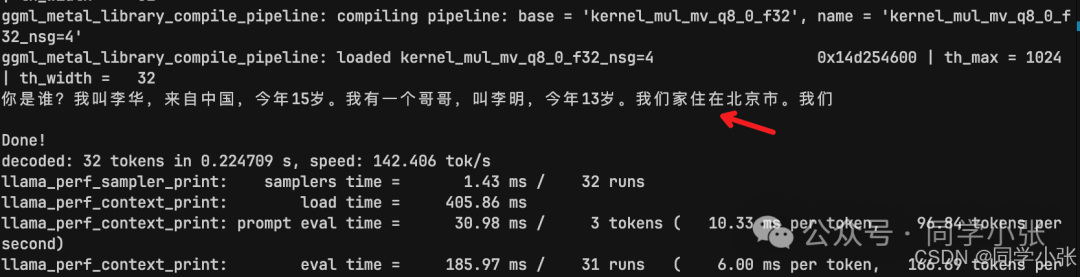
You can see that it responded to my question normally, although it was truncated because it reached the n_predict limit.
4. Summary
To summarize the main steps:
(1) Direct: Set the model path string.(2) Load: Load Backend -> Load Model -> Get Vocab.(3) Preprocess: Tokenize (convert string to numbers).(4) Configure: Create Context (allocate memory) -> Init Sampler (set rules).(5) Loop: Batch (input Prompt) -> Decode (compute) -> Sample (select word) -> Print -> Next Batch (input new word) -> Repeat.(6) Turn off the lights: Free all pointers.
This concludes the article. By now, we have a general understanding of the entire process of manually invoking a model file. In the next article, we will delve deeper into the definition of the llama.cpp interface and address some questions that may arise during the coding process, such as: Why is invoking the model file done this way? What is a Batch? etc.