









Common Fault Codes for Gas Meters
Ecological City Public Utility Information Release Platform
“Beep beep beep… beep beep beep…”
The gas meter in the kitchen suddenly starts beeping continuously.
The screen is flashing with incomprehensible signal codes!
What do these signal codes mean?
Don’t worry.
Today, we will teach you to quickly understand common fault codes.
Practical information, be sure to save it!
Common Code Meanings and Solutions
01

Displays “E-1003”
Cause of Display:Insufficient balance
#Solution#
1. User successfully recharges;
2. Manually start communication or wait for automatic communication;
3. After successful communication, press the button to open the valve;
4. If the valve cannot be opened after successful communication, please contact the energy company.
02
Displays “E-1005”
Cause of Display:External alarm triggered
#Solution#
1. After the alarm returns to normal, eliminate any gas leaks or other anomalies;
2. Press the button to open the valve.
03
Displays “E-4001”
Cause of Display:Frequent manual communication starts
#Solution#
Wait 20 minutes before manually starting communication again.
04
Displays “E-4002”
Cause of Display:Low battery
#Solution#
User should replace the battery in a timely manner.
05
Displays “E-4003”
Cause of Display:Currently communicating
#Solution#
Cannot start communication again during this period; wait for the current communication to finish.
06
Displays “E-4015”
Cause of Display:Communication failure
#Solution#
1. Multiple manual communication starts;
2. If communication continues to fail, please contact the energy company.
07
Displays “E-6008” “E-6009”
Cause of Display:Electromagnetic interference
#Solution#
1. Remove sources of electromagnetic interference around the gas meter;
2. Press the button to open the valve;
3. If alarms continue to trigger, please contact the energy company.
08
Displays “E-6015”
Cause of Display:Excessive gas flow
#Solution#
1. Ensure gas flow is within normal range;
2. Press the button to open the valve.

Don’t worry about low battery alerts.
Just replace it with a new battery!
The replacement process is super simple.
Just a few steps to complete.
How to Replace the Battery?
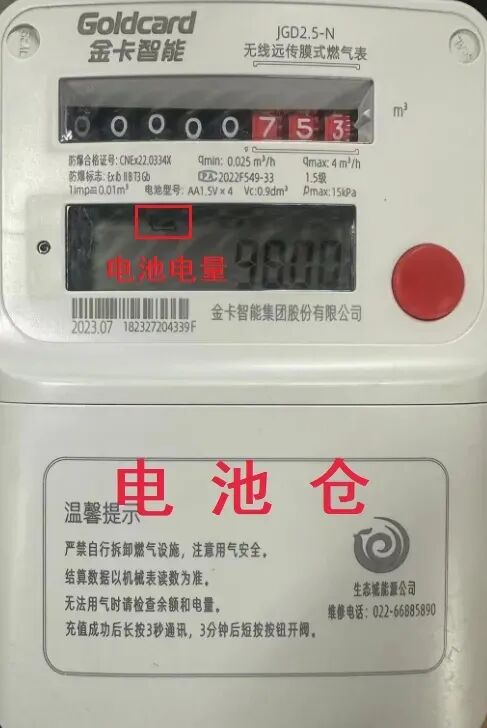
The IoT gas meter usesfour AA alkaline batteries. You can check the battery level on the LCD screen. If it displays“Low Battery” or “E-4002”, it needs a battery replacement.
After the user replaces the battery, briefly press the red button, and the LCD screen will display “Valve Open” to use the gas normally.
If you encounter any issues during use,
you can call
the Ecological City Public Utility Service Hotline
022-66885890
Service Guide