Python provides various tools for environment and package management, each with its unique advantages and use cases. As a developer, choosing the right tool can significantly optimize the workflow for creating new projects and managing dependencies. In this article, we will compare the most popular tools: Conda, Poetry, uv and virtualenv from the following perspectives:
- Overall Overview
- Creating New Projects
- Setting Up Existing Projects
- Managing Packages
- Building and Publishing Packages
Let’s first get an overall understanding of each tool. We will explore their purposes, as well as their main advantages and disadvantages.
1. Conda
- Purpose: Environment management and package management (including both Python and non-Python dependencies).
- Advantages:
- Supports cross-language (e.g., R, C libraries).
- Provides pre-compiled binaries for scientific computing/data science stacks (such as NumPy, SciPy, TensorFlow).
- Robust dependency resolution for complex environments.
- Disadvantages:
- Requires significant disk space.
- Slower than lightweight alternatives.
- Can conflict with pip if used improperly.
- Best Use Cases: Data science, scientific computing, or projects requiring non-Python libraries.
2. Venv (Python built-in module)
- Purpose: Provides lightweight virtual environments (no built-in package management).
- Advantages:
- Provided with Python (no additional installation required).
- Minimal overhead, simple process.
- Seamless integration with pip and requirements.txt.
- Disadvantages:
- No package management (requires pip).
- Dependency resolution limited to pip’s capabilities.
- Manual activation/deactivation of environments.
- Best Use Cases: Simple projects, quick environment isolation, or scenarios avoiding third-party tools.
3. UV (Astral)
- Purpose: A very fast alternative to pip/pip-tools/virtualenv (based on Rust).
- Advantages:
- Extremely fast (10-100 times faster than pip/pip-tools).
- Combines virtualenv, package installation, and dependency resolution.
- Compatible with requirements.txt and pyproject.toml.
- Disadvantages:
- Relatively new (may lack niche features).
- Primarily optimized for speed, not complex workflows.
- Best Use Cases: High-performance workflows, large projects, CI/CD pipelines.
4. Poetry
- Purpose: Dependency management + packaging/releasing (integrated tool).
- Advantages:
- Uses a unified pyproject.toml to manage dependencies, packaging, and metadata.
- Uses a lockfile (poetry.lock) for advanced dependency resolution.
- Automatically creates/manages virtual environments.
- Built-in functionality for building and publishing to PyPI.
- Disadvantages:
- Steeper learning curve.
- May be overly complex for non-packaged applications.
- Not suitable for non-Python dependencies.
Best Use Cases: Application/library development, publishing packages, strict dependency control.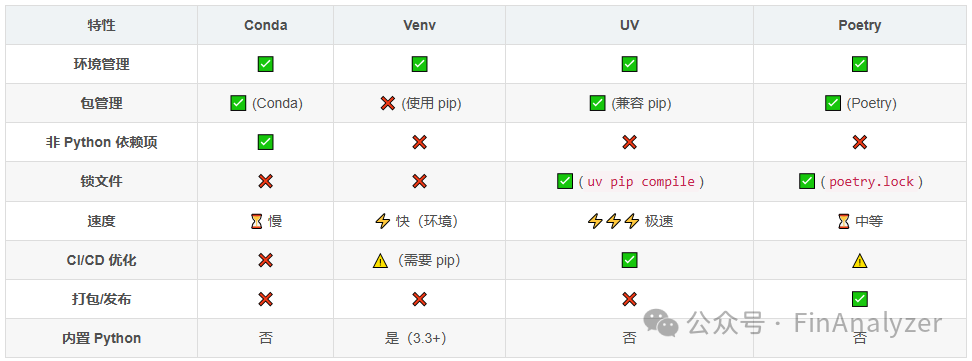
Recommended Solutions
- Use Conda: Suitable for machine learning/data science projects requiring CUDA or non-Python dependencies.
- Use Venv: Suitable for simple scripts or scenarios avoiding third-party tools.
- Use UV: Suitable for workflows with high speed requirements, large projects, or as an alternative to pip.
- Use Poetry: Suitable for developing publishable libraries/applications requiring strict dependency control.
Step-by-Step Comparison for Creating Projects
Now that we have an understanding of each tool, let’s explore and compare how they are used in everyday development tasks, starting with how to create new projects with each tool.
1. Conda
Workflow: Environment-centric, supports cross-platform packages.
# Create environment (specify Python version)conda create --name my_project python=3.11# Activate environmentconda activate my_project# Install packages (via Conda or pip)conda install requests # Install from Conda Forge# orpip install requests# Export environment (ensure reproducibility)conda env export > environment.yml # Includes OS-specific dependenciesKey Files: environment.yml (for rebuilding the environment).
2. Venv + pip
Workflow: Lightweight isolation + pip for package management.
# Create virtual environmentpython -m venv venv# Activate environmentsource venv/bin/activate # Linux/macOS.\\venv\Scripts\activate # Windows# Install packagespip install requests# Freeze dependenciespip freeze > requirements.txt# Deactivate environment when done.deactivateKey Files: venv/ (isolated environment), requirements.txt.
3. UV
Workflow: Unified high-speed pip/virtualenv alternative.
# Create environment and install packages in one commanduv venv venv # Create virtual environmentsource venv/bin/activate # Activate# Install packages (fast parallel installation)uv pip install requests# Generate lock dependenciesuv pip compile requirements.txt -o requirements.lock # Optional lock file# Another method: using pyproject.tomlecho 'requests = "^2.32"' > pyproject.tomluv pip install -e . # Install project in editable modeKey Files: venv/requirements.lock (optional), pyproject.toml.
4. Poetry
Workflow: Dependency resolution + packaging + releasing.
# Create new project (interactive setup)poetry new my_projectcd my_project# Initialize environment (automatically created on first install)poetry env use 3.11# Add dependenciespoetry add requests # Automatically updates pyproject.toml and poetry.lock# Install all dependencies (creates environment if missing)poetry install# Activate environmentpoetry shellKey Files:
- pyproject.toml (dependencies, metadata)
- poetry.lock (fixed dependencies)
- my_project/ (package structure).
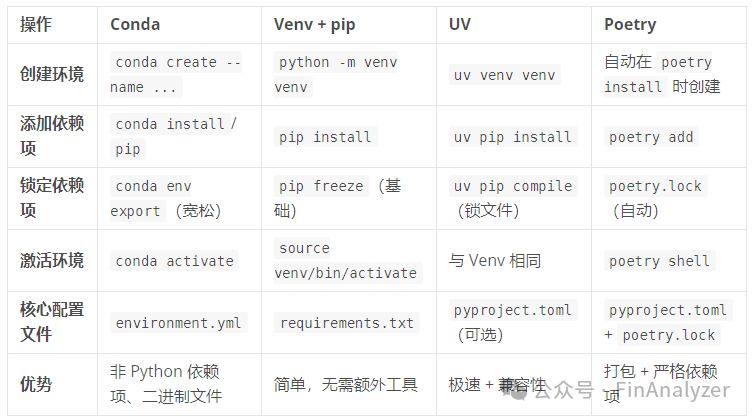
Key Differences Summary
Package Management: Adding/Removing Comparison
In everyday development, adding or removing packages is a common task. Let’s review how each tool handles these tasks.
1. Conda
Adding Packages:
conda install requests # Install from default channelconda install -c conda-forge tensorflow # Install from specific channel Removing Packages:
conda remove requests - Notes:
- Use conda list to verify installed packages
- Mixing conda install and pip install may lead to conflicts
2. Venv + pip
Adding Packages:
pip install requests # Install development dependencies:pip install pytest --upgrade # Optional version specification Removing Packages:
pip uninstall requests - Notes:
- Manually update requirements.txt:
pip freeze > requirements.txt- No native lock file (can use pip-tools to generate requirements.in/requirements.txt).
3. UV
Adding Packages:
uv pip install requests # Install latest versionuv pip install "requests==2.32" # Install specific versionuv pip install -e . # Install from local pyproject.toml Removing Packages:
uv pip uninstall requests - Lock File Workflow:
# Generate/update lock file:uv pip compile pyproject.toml -o requirements.lock # Install from lock file:uv pip install -r requirements.lock 4. Poetry
Adding Packages:
poetry add requests # Install latest versionpoetry add requests@^2.32 # Install specific versionpoetry add pytest --group dev # Install development dependencies Removing Packages:
poetry remove requests - Automatic Updates:
- Every time dependencies are added/removed, pyproject.toml is modified and poetry.lock is updated.
- Install all dependencies:poetry install (default includes –with dev).
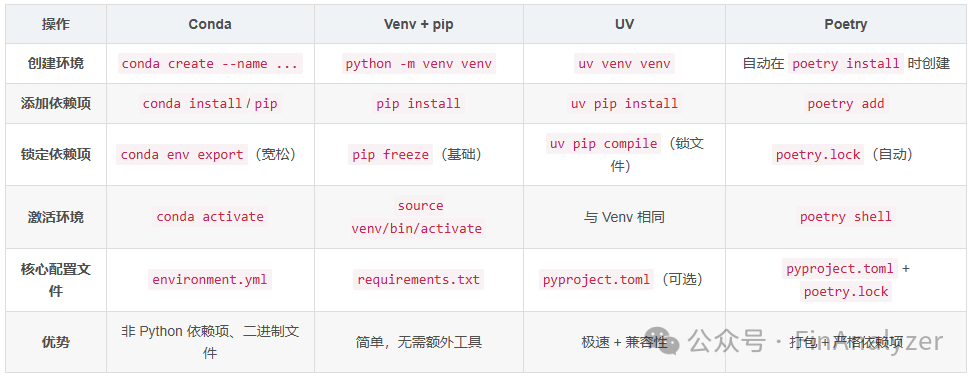
Key Differences Summary
Key Considerations
- Dependency Resolution
- Poetry and UV have deterministic resolvers (Poetry: poetry.lock, UV: requirements.lock).
- Conda/pip resolve dependencies at install time (which may lead to environment breakage).
# Always create environment first (except for Poetry):conda create -n my_env # Condapython -m venv venv # Venvuv venv venv # UV #Poetry: Automatically creates environment on first install/add- Uninstall Edge Cases
- Conda: May remove dependencies shared by other packages
- Poetry/UV: Track dependency trees to avoid breakage
💡Tip: For complex uninstall operations:
·Rebuild environment from lock file:
conda env create -f environment.yml # Condauv pip install -r requirements.lock # UVpoetry install --no-dev # Poetry Package Building and Publishing
After completing a milestone, you may want to publish the package to a repository so that others can install and use it. Let’s review how each tool supports this process.
Brief Summary
- Conda: Builds Conda packages for the Conda repository (.tar.bz2).
- Venv/UV: Requires setuptools/build + twine to publish to PyPI.
- Poetry: Provides a unified workflow for PyPI packages (wheel/sdist).
1. Building Packages
Let’s start with building packages.
Conda
# Create recipe (meta.yaml)conda skeleton pypi my_packageconda build my_package-recipe/ # Build .tar.bz2- Output:conda-bld/linux-64/my_package-*.tar.bz2
- Dependencies:conda-build
Venv + setuptools
# Install build toolspip install build setuptools wheel# Build wheel/sdistpython -m build # Generates dist/.whl and dist/.tar.gzUV
Install tools via UVuv pip install buildUse Python standard library to buildpython -m build # Same as VenvPoetry
# Automatically build from pyproject.tomlpoetry build # Outputs: dist/.whl + dist/.tar.gz2. Publishing Packages
Once the package is built, we can publish it to a repository.
Conda (publish to Anaconda Cloud)
conda install anaconda-clientanaconda login # Authenticateanaconda upload path/to/my_package-*.tar.bz2Venv/UV (publish to PyPI)
# Install twinepip install twine# Upload using Twinetwine upload dist/*Poetry (publish to PyPI)
# Publish with a single commandpoetry publish # Uses PyPI credentials configured in poetry# Optional flagpoetry publish --build # Build and upload in one stepPackage building and publishing command comparison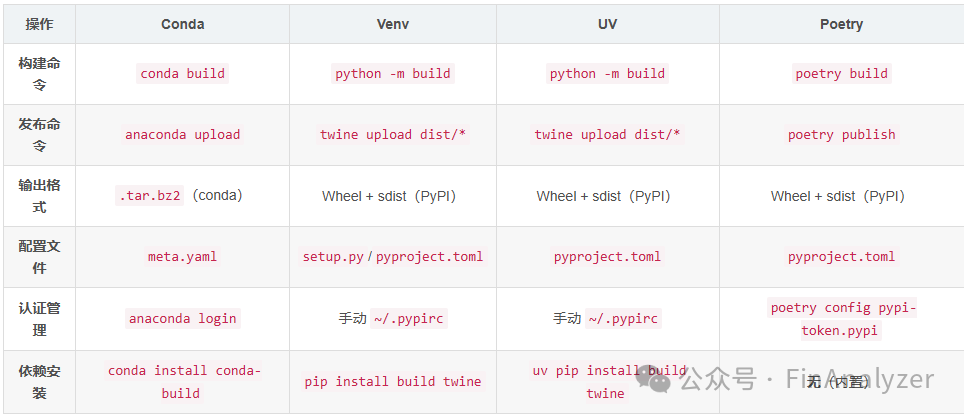
Key Considerations
- Platform Support:
- Conda: Builds OS-specific packages (Linux/Windows/macOS).
- Poetry/Venv/UV: Pure Python or universal wheel (no OS restrictions).
- PyPI packages: Poetry (easiest) or Venv/UV + Twine.
- Conda packages: Conda-build (mandatory).
- No Packaging: No tools required (install directly using pip/conda).
Conclusion
After comparing these tools from different angles, we now face a question: which one should we choose before starting a new project? If you are not ready to choose a specific tool, you can start by setting up the project using the pyproject.toml file. This allows you to define project configuration in a tool-agnostic way, deferring the choice of environment or package manager until later.
# Option 1 (Poetry):poetry install# Option 2 (UV):uv venv venv && uv pip install -e .[dev]# Option 3 (Venv):python -m venv venv && pip install -e .[dev]# Option 4 (Conda):conda create -n proj python=3.10conda activate projpip install -e .