Hello everyone, I am Awei from Mako Control. I often get asked by newcomers what kind of computer is suitable for learning PLC.
In fact, whether you are learning PLC or other skills, such as C# upper computer development, the selection process is the same. It is essentially the same logic as choosing which PLC to use for a project and how to select a PLC.
Today, I will demonstrate how to select a computer based on objective data rather than just guessing, hoping to help newcomers. Please remember to follow, like, and save.
In our daily lives, when we buy a phone or a car, there is also a selection process. Usually, we choose based on the intended use. For example, if you want a phone with good photography capabilities or gaming performance, you will focus on camera parameters and CPU/GPU specifications. For cars, whether it is for commuting or business use, you will pay attention to fuel consumption, endurance, brand reputation, and comfort.
For computers, it is the same. Since we are using it to learn PLC, we need to understand what electrical engineers use computers for.
Electrical engineers, in the context of automation projects, typically engage in project design, drawing design, programming, debugging, and after-sales training. The commonly used software includes Office, AutoCAD/ePlan for drawing design, and various programming and debugging software such as Siemens TIA Portal, Inovance AutoShop, IFA, Codesys, Kunlun Tongtai, Weilin Tong, etc. Therefore, we just need to select a computer that can smoothly run the aforementioned software.
How do we know what kind of performance these software require? Generally, official software will specify the conditions needed for smooth operation in their user manuals. You can also search online using keywords like “XXXX software installation requirements,” “installation conditions,” “operating environment,” or “configuration requirements.” Here, I will take TIA Portal, Inovance IFA, ePlan, and AutoCAD as examples.
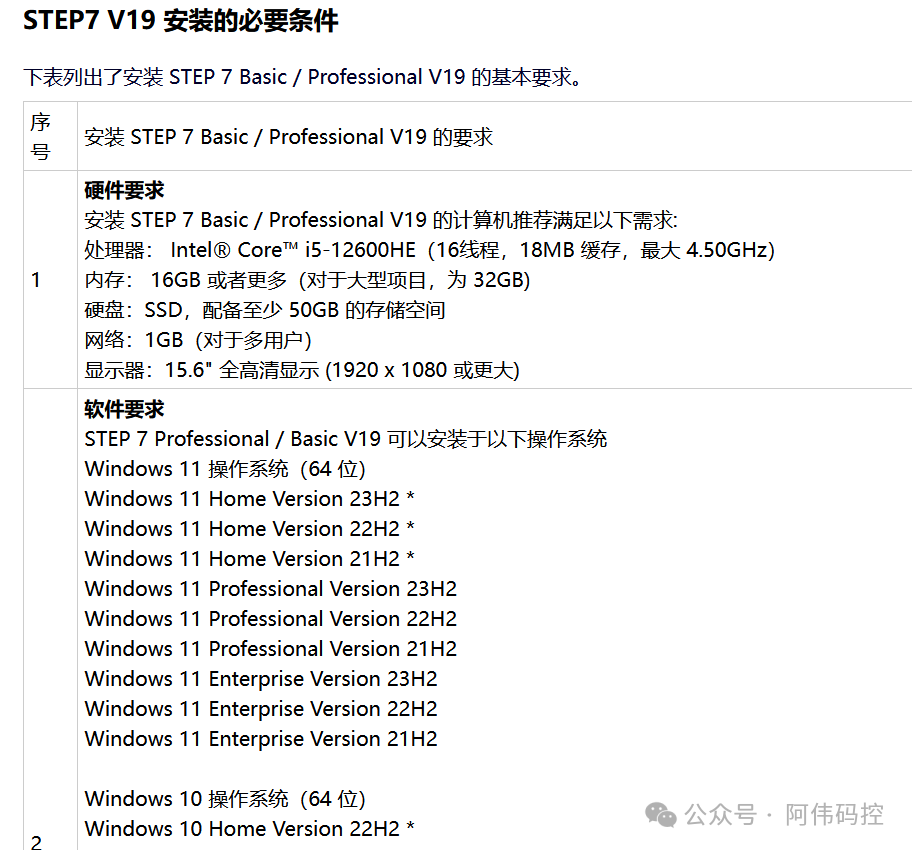
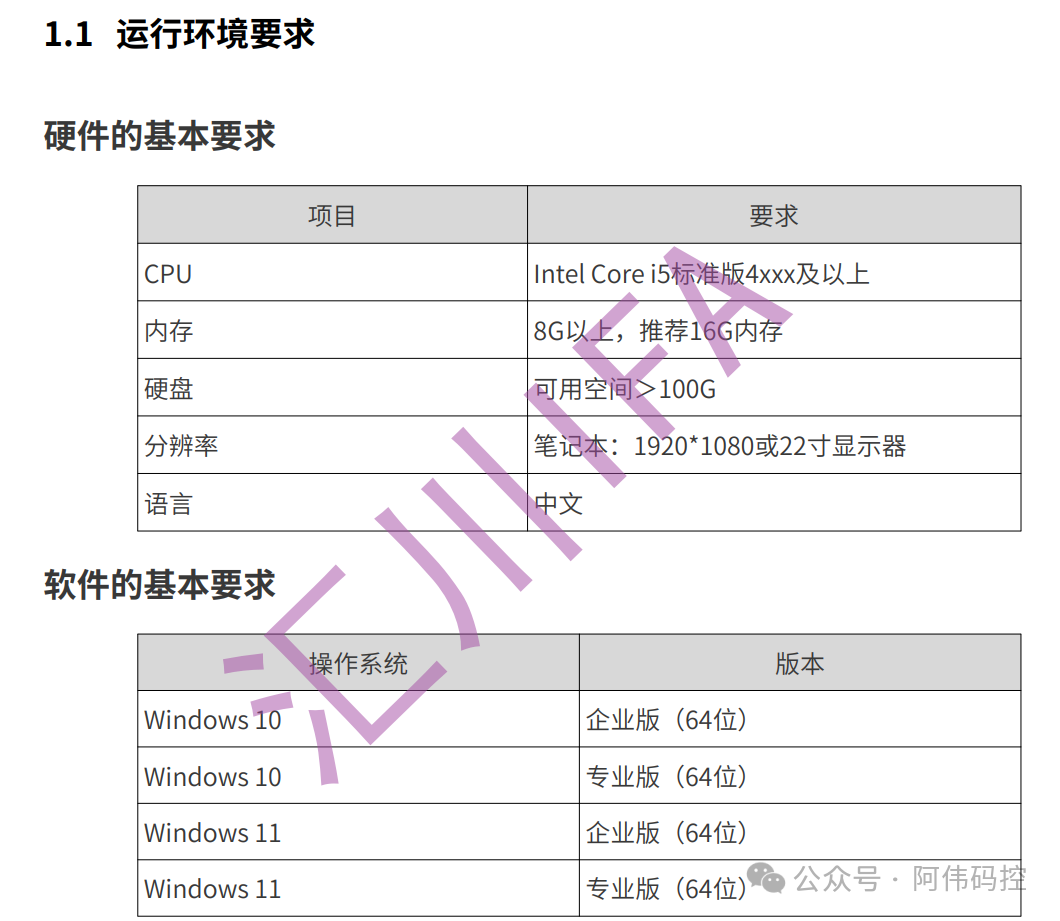
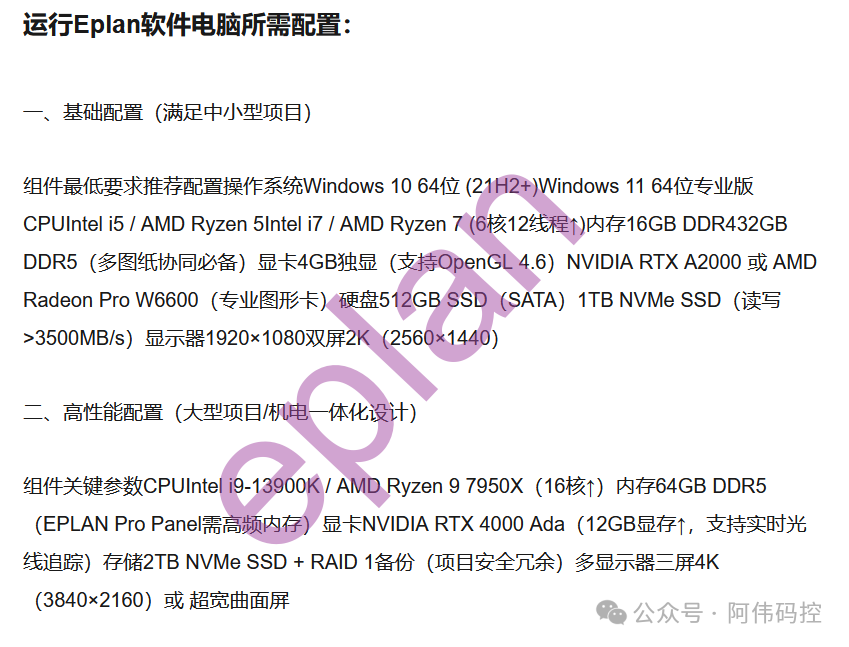
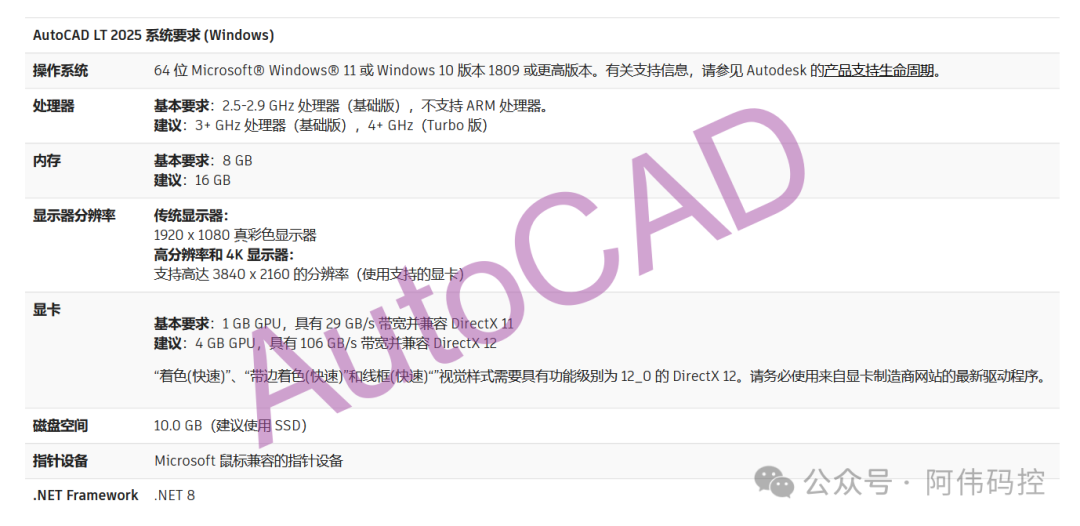
Each software will clearly state its requirements for CPU, memory, hard disk, graphics card, operating system, etc. We just need to take the highest performance tier from these specifications.
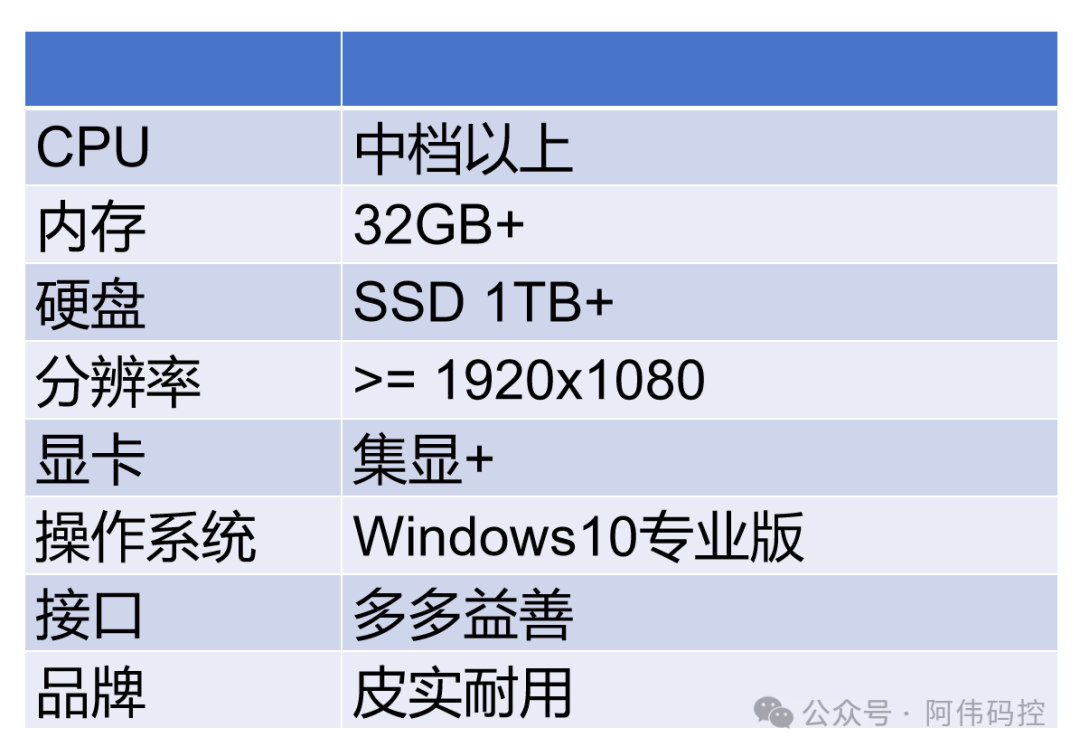
My suggestion is to choose a mid-range or higher CPU, as the CPU is usually not the performance bottleneck. For memory, at least 16GB is required, 32GB is preferable, and if conditions allow, go for 64GB. For the hard disk, a solid-state drive of 1TB or more is necessary, as modern software takes up a lot of space. The minimum resolution should be 1920×1080, and if possible, opt for 2K. As for the graphics card, if you are not using SolidWorks or other complex drawing software, a standard graphics card should suffice.
For the operating system, I recommend using Windows 10 Professional. The latest Windows 11 may have unforeseen issues, and you wouldn’t want to experience a situation where the system fails to work the next day after a smooth shutdown. As an industrial control professional, it’s best not to chase after the latest versions, as most industrial control software manufacturers will continue to support the previous generation of operating systems.
I suggest that you do not need to buy a new laptop; a second-hand ThinkPad T480S is sufficient—it’s cheap and durable.
If you are buying new, avoid ultra-thin laptops. They sacrifice cooling and connectivity for slimness. Our work environment in industrial control is not very friendly, with cold winters and hot summers. Don’t wait until you experience throttling when switching windows, causing the system to lag.
Pay attention to connectivity as well; choose a laptop with an RJ45 Ethernet port instead of one that requires an adapter, as losing the adapter can be troublesome. Also, ensure there are enough USB ports and an HDMI port for connecting external displays, and select durable brands.
I recommend a screen size of at least 14 inches.
These are some aspects I personally suggest considering when choosing a computer. The logic of selecting a PLC or any other equipment is the same: based on what you intend to use it for, translate that into objective conditions. PLCs will have parameters such as axis count, I/O point count, signal types, communication types, and quantities, and the logic is the same.
Finally, to summarize, here’s a diagram:
This concludes this session. If you found it helpful, please follow and like.
If you have any questions or wish to submit content, feel free to leave a comment or send a private message.