The C_SysInfo project can actually be seen as a simple translation of the previous PySinfo project. This is a typical scenario where I believe online models and local models are particularly suitable for application – a broad “translation” process:
1.The requirements must be very clear about what needs to be done, and the technical path should also be clear, rather than relying on large models to make decisions;2.There may even be available reference projects, and using models at this point is like translating between different programming languages;3.Translating human natural language into programming languages to supplement or modify the original.
This project may also have certain reference value for beginners, as it demonstrates a transition process from basics to practice: how to gradually shift from tedious mathematical calculations in the command line (many university courses involve various common divisors, narcissistic numbers, etc.) to solving practical problems encountered in real life (such as checking system hardware and software information, which, although boring, is relatively specific and useful). For students just starting to learn programming, this helps achieve a shift from “problem-solving mindset” to “problem-solving thinking,” such as deeply understanding how to interact with the operating system to obtain hardware and software information. In terms of cross-platform development, the project encourages trying different operating systems and learning to write code that can run on multiple platforms. From the perspective of project construction, it also demonstrates how a minimal yet complete project should be organized, including documentation, build instructions, license selection, and other basic elements. There are many ways to check hardware information, and C_SysInfo’s functionality is quite rudimentary, but it can still serve as a barely usable practical reference example.
New developers can completely consider gradually exploring the development process from simple functions to complex system integration, laying the foundation for more complex projects in the future.
Overview
C_SysInfo is a lightweight utility that runs on Windows and Linux systems to collect and display system information, including details about the CPU, GPU, memory, operating system, etc.
Features
•Cross-Platform Support: Runs on both Windows and Linux•Hardware Information:
•CPU model and core count•GPU details•Memory usage (RAM)•Disk usage•Motherboard information•BIOS version•Battery status (for laptops)
•Software Information:
•Operating system name and version•Kernel version•System uptime•Shell information•Desktop environment•Window manager
Build
Environment Requirements
Windows
•C compiler (GCC, MSVC, etc.)•Windows SDK
Linux
•GCC or Clang•X11 development libraries•Basic development tools
Compile and Run
Windows
git clone https://github.com/EasyCam/C_SysInfo.gitcd C_SysInfogcc -o c_sys_info.exe src/c_sys_info.c./c_sys_info.exe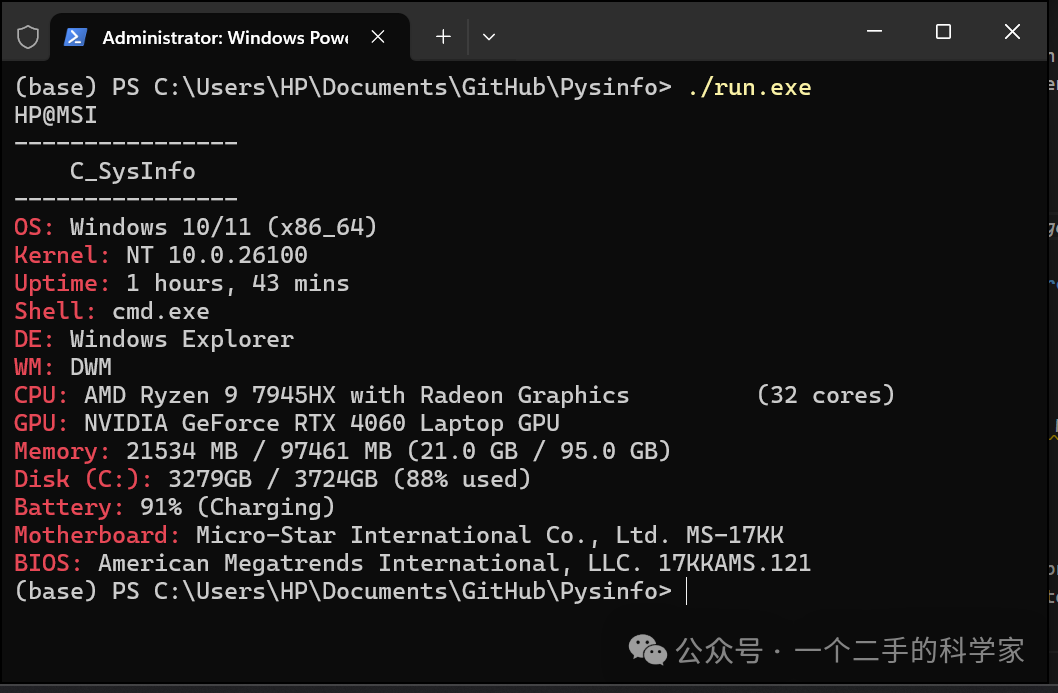
Linux
git clone https://github.com/EasyCam/C_SysInfo.gitcd C_SysInfogcc -o c_sys_info src/c_sys_info.c./c_sys_info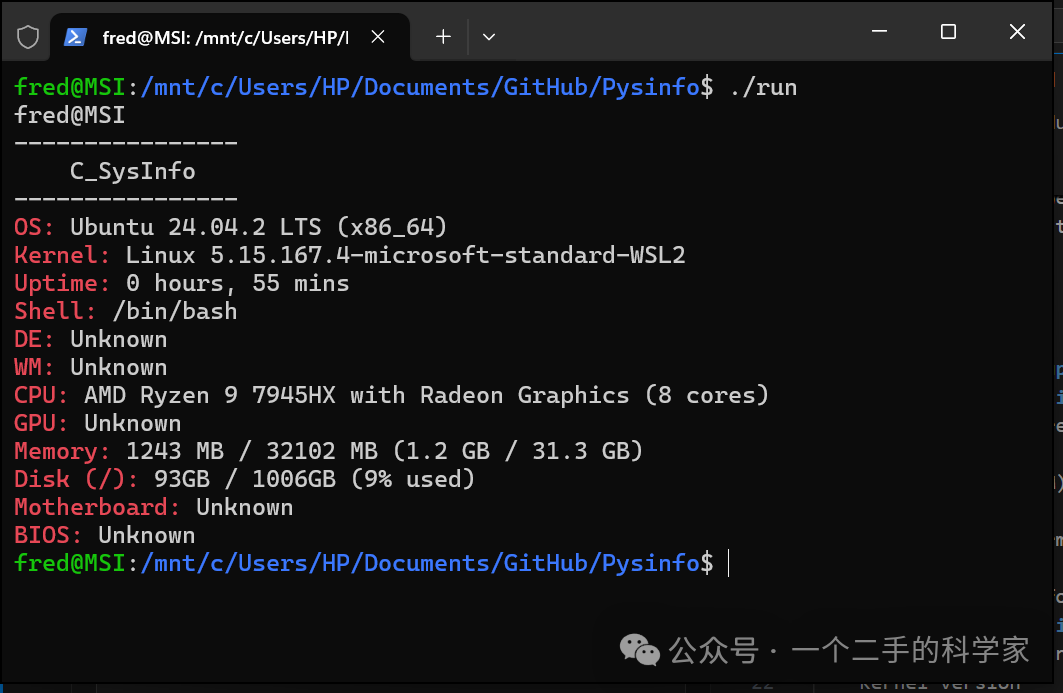
Implementation Details
C_SysInfo uses platform-specific APIs to collect system information:
•Windows: Uses Windows API functions, WMI queries, and CPUID instructions•Linux: Uses <span>/proc</span> and <span>/sys</span> system files, environment variables, and command-line utilities