Last time, in C++ Project Build Part Seven: Creating a Library with CMake, all the source code of the modules (libraries and executables) in the example demo7 was in one directory, which made the structure very unclear (if there are hundreds of source files, it would be a nightmare). Below, we will look at an improved solution, see demo8-1: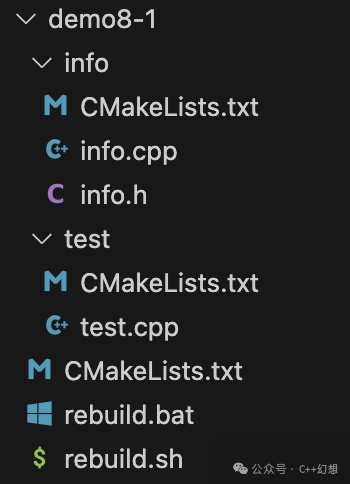 This time, instead of creating a src directory, the CMakeLists.txt file (Note: there are actually three files with this name, here referring to the last one) is placed directly in the root directory of the project. Its content is as follows:
# File CMakeLists.txt

cmake_minimum_required(VERSION 3.21)

project(demo-8-1)

set(CMAKE_CXX_STANDARD 17)
set(CMAKE_CXX_STANDARD_REQUIRED ON)

if(MSVC)
    add_compile_options(/utf-8)
endif()

add_subdirectory(info)
add_subdirectory(test)
Note: The last two lines of this file indicate adding the directories info and test to this project, the add_subdirectory command requires that the added directories also contain a CMakeLists.txt file.First, let’s take a look at the files in the info directory. For simplicity, libraries are usually specified as dynamic libraries (Appendix One).The content of info.h file is as follows:
// File info/info.h

// Here we assume it is definitely a dynamic library

#ifndef __INFO_H___
#define __INFO_H___

#ifdef _WIN32
// Windows
// Actually, using the _WIN32 macro for judgment may have issues,
// A better method is to use CMake to define corresponding macros.

#ifdef MY_INFO_IMPL
#define MY_INFO_EXPORT __declspec(dllexport)
#else
#define MY_INFO_EXPORT __declspec(dllimport)
#endif // MY_INFO_IMPL

#else
// If not Windows, we simply assume it is Linux or MacOS

#if __has_attribute(visibility)
#define MY_INFO_EXPORT __attribute__((visibility("default")))
#else
#define MY_INFO_EXPORT
#endif

#endif // _WIN32

MY_INFO_EXPORT const char* GetInfo();

#endif // __INFO_H___
The content of info.cpp file is as follows:
// File info/info.cpp

#include "info.h"

const char* GetInfo() {
    return "C++ Fantasy";
}
Finally, the content of the CMakeLists.txt file is as follows:
# File info/CMakeLists.txt

set(INFO_SOURCES
    info.cpp
    # ... Of course, more source files can be included here if needed
)

# The library defined by add_library can explicitly specify whether it is a dynamic or static library
# For example, the following specifies my_info as a static library
# add_library(my_info STATIC ${INFO_SOURCES})
# Of course, in practice, we use the following line to define my_info as a dynamic library
add_library(my_info SHARED ${INFO_SOURCES})

target_compile_definitions(my_info PRIVATE MY_INFO_IMPL)
Next, let’s look at the contents of the test directory. The content of test.cpp file is as follows:
// File test/test.cpp

#include "../info/info.h"

#include <iostream>

int main(int argc, char* argv[]) {
    std::cout << GetInfo() << std::endl;
    return 0;
}
The content of the CMakeLists.txt file is as follows:
# File test/CMakeLists.txt

set(TEST_SOURCES
    test.cpp
    # ... Of course, more source files can be included here if needed
)

add_executable(test ${TEST_SOURCES})
target_link_libraries(test PUBLIC my_info)
This time, the compilation script has a slight difference from the C++ project build part two: Introduction to CMake compilation scripts, so I have also displayed the content.The content of rebuild.bat file is as follows:
:: File rebuild.bat

:: Note: This file contains Chinese characters and needs to be encoded in GBK or a compatible encoding (Chinese Windows system)
:: Otherwise, the bat file will have issues
:: Another requirement for the bat file is that the line ending flag is CRLF

@echo off

:: Enter the directory where the script is located
CD /d %~dp0

:: Set two variables representing the compilation directory and compilation type
SET BUILD_DIR=build
SET BUILD_TYPE=Release

:: VC_VERSION variable represents the version of VS used
::SET VC_VERSION=Visual Studio 15 2017
SET VC_VERSION=Visual Studio 17 2022

:: Windows programs are divided into 64-bit and 32-bit, using the following variables
::SET ARCH_TYPE=x64
SET ARCH_TYPE=win32

:: Clear the compilation directory
:: If previously compiled, this will recompile
IF EXIST "%BUILD_DIR%" (
    RMDIR /s /q "%BUILD_DIR%"
)

cmake -B "%BUILD_DIR%" -S . -G "%VC_VERSION%" -A %ARCH_TYPE% -DCMAKE_BUILD_TYPE=%BUILD_TYPE%
IF %ERRORLEVEL% neq 0 (
    echo CMake project creation failed
    goto end
)

cmake --build "%BUILD_DIR%" --config %BUILD_TYPE%
IF %ERRORLEVEL% neq 0 (
    echo CMake compilation failed
    goto end
)
The content of rebuild.sh file is as follows:
# File rebuild.sh

# Enter the directory where the script is located
cd $(dirname "$0")

# Set two variables representing the compilation directory and compilation type
BUILD_DIR=build
BUILD_TYPE=Release

# Clear the compilation directory
# If previously compiled, this will recompile
if [ -d "$BUILD_DIR" ]; then
    rm -rf "$BUILD_DIR"
fi

cmake -B "$BUILD_DIR" -S . -DCMAKE_BUILD_TYPE=$BUILD_TYPE
if [ $? != 0 ]; then
    echo "CMake project creation failed"
    exit 0
fi

cmake --build "$BUILD_DIR" --config $BUILD_TYPE
if [ $? != 0 ]; then
    echo "CMake compilation failed"
    exit 0
fi
Note: The compilation scripts actually differ in only one place, which is due to the relative position of the compilation scripts and CMakeLists.txt files.Thus, the info directory can be considered the info module (or library). The test directory is the test module, which is the executable program and will call the info module.Although example demo8-1 compiles and runs without issues, the line in test.cpp that includes info.h looks quite awkward, so let’s take a look at the improved version—demo8-2: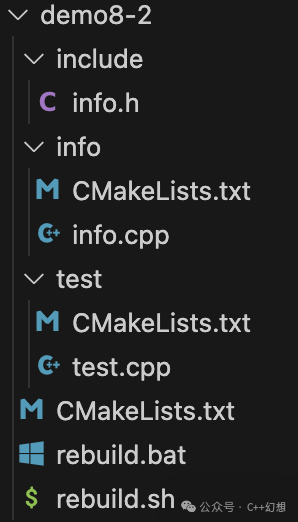 In terms of file storage structure, we have placed the info.h file in a separate include directory. As a common resource for both modules (info and test), it makes more sense to separate it out.The content of test.cpp file is as follows:
// File test/test.cpp

// Actually, only this line has been modified
#include "info.h"

#include <iostream>

int main(int argc, char* argv[]) {
    std::cout << GetInfo() << std::endl;
    return 0;
}
The content of info/CMakeLists.txt file is as follows:
# File info/CMakeLists.txt

set(INFO_SOURCES
    info.cpp
    # ... Of course, more source files can be included here if needed
)

add_library(my_info SHARED ${INFO_SOURCES})
target_compile_definitions(my_info PRIVATE MY_INFO_IMPL)

# target_include_directories sets the header file search directory for the compilation target
# The second parameter has significance introduced in previous articles
#   PUBLIC is because both my_info and the targets using it need to use the header file search directory set here
# Multiple directories can be specified, here only one is specified
#   If multiple are specified, they need to be space-separated
# CMAKE_CURRENT_SOURCE_DIR is a built-in variable of CMake
#   It represents the full path of the directory where the current file is located

target_include_directories(my_info PUBLIC ${CMAKE_CURRENT_SOURCE_DIR}/../include)
# Of course, the following line can also be used
# The variable CMAKE_SOURCE_DIR represents the full path of the root CMakeLists.txt file
# target_include_directories(my_info PUBLIC ${CMAKE_SOURCE_DIR}/include)
The content of the remaining files has not changed, see demo8-1 (not rewriting it).Now, demo8-2 compiles and runs without issues, but its code looks more comfortable than demo8-1.In both demo8-1 and demo8-2, the content of the root CMakeLists.txt file is modified to:
# File CMakeLists.txt

cmake_minimum_required(VERSION 3.21)

project(demo-8-2)

set(CMAKE_CXX_STANDARD 17)
set(CMAKE_CXX_STANDARD_REQUIRED ON)

if(MSVC)
    add_compile_options(/utf-8)
endif()

# Just modified the order of the following two lines
add_subdirectory(test)
add_subdirectory(info)
At this point, compiling and running also has no issues. At first glance, it seems that test depends on info, so why is it okay to process test first?This is because the above file describes the relationship between modules, not the compilation order. Executing add_subdirectory just indicates that the test module needs to link to the info module (since the info module is also defined by CMake, it implies a dependency, thus the public header file directory of info also applies to the test module), but it does not need to know the details of the info module.In fact, when compiling test.cpp, it is necessary to know the details of the info module; otherwise, the info.h file cannot be found.Let’s take a look at the output information during compilation:
[ 25%] Building CXX object info/CMakeFiles/my_info.dir/info.cpp.o
[ 50%] Linking CXX shared library libmy_info.dylib
[ 50%] Built target my_info
[ 75%] Building CXX object test/CMakeFiles/test.dir/test.cpp.o
[100%] Linking CXX executable test
[100%] Built target test
Did you see that, the compilation order:
- Compile info.cpp
- Link to generate libmy_info.dylib shared library (my system is Mac, dylib is the dynamic library extension for this system).
- Compile test.cpp
- Link to generate the executable program test
Appendix:Appendix OneThe usage scenarios for dynamic libraries are more complex, and there are more aspects to discuss. Moreover, dynamic libraries are more convenient for third-party use. Of course, if used internally, static libraries may be more appropriate.One more thing: remember that for iOS programs, third-party libraries can only be static libraries.Appendix TwoFor parts of CMake knowledge used in the text that are not discussed, refer to the previous articles in the collection (CMake).