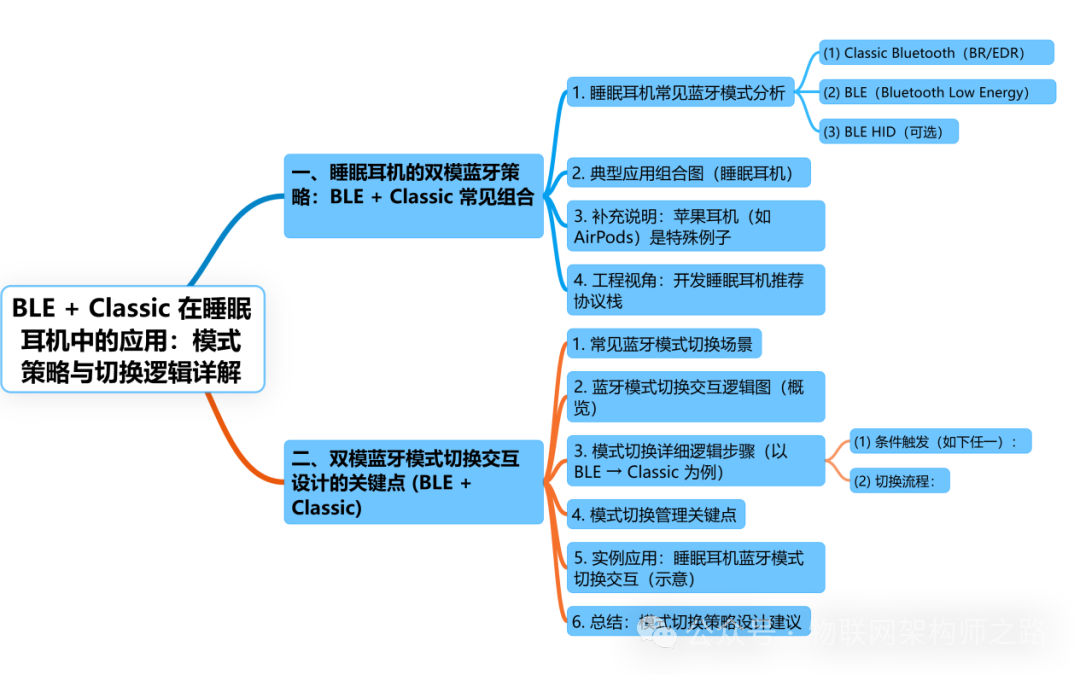
1. Dual-mode Bluetooth Strategy for Sleep Headphones: Common Combination of BLE + Classic
|
Sleep headphones typically use a BLE (Bluetooth Low Energy) + BR/EDR (Classic Bluetooth) hybrid mode, based on their functional characteristics and product positioning. |
Common combinations include:
1. Analysis of Common Bluetooth Modes for Sleep Headphones
(1) Classic Bluetooth (BR/EDR)
•Main Use: Audio transmission (A2DP protocol)
•Protocol Stack Support:
○A2DP (Advanced Audio Distribution Profile): Stereo audio streaming
○AVRCP (Audio/Video Remote Control Profile): Volume and playback control
•High bandwidth and strong stability, suitable for transmitting music and white noise
•Higher power consumption than BLE
|
Most sleep headphones support Classic Bluetooth for playing sleep music or white noise. |
(2) BLE (Bluetooth Low Energy)
•Main Use: Status synchronization, App control, firmware upgrade (OTA), battery display
•Common Protocols:
○GATT (Generic Attribute Profile)
○HID (for simple remote control)
○OTA DFU (firmware upgrade)
•Ultra-low power communication, can maintain connection during deep sleep
If the headphones support App control, such as timing, mode switching, and sleep monitoring, they are likely to support BLE mode.
(3) BLE HID (optional)
•If the headphones have simple “physical button” controls for the phone (e.g., double-click to play/pause), some brands may use BLE HID to implement mouse/keyboard event sending;
•This is rare in sleep headphones unless positioned as multifunctional controllers.
2. Typical Application Combination Diagram (Sleep Headphones)
|
Function |
Used Protocol |
Mode |
|
Music playback / White noise |
A2DP, AVRCP |
Classic Bluetooth |
|
Battery synchronization, status notification |
GATT Service |
BLE |
|
OTA upgrade |
GATT + DFU |
BLE |
|
Timer control / Sleep record |
GATT |
BLE |
|
Simple control of the phone (optional) |
HID over GATT |
BLE |
3. Additional Note: Apple Headphones (e.g., AirPods) are a special case
•AirPods use Apple’s proprietary protocol + BLE + Classic hybrid;
•Use BLE to achieve popup pairing, battery synchronization, wear detection, and other smart features;
•Use Classic Bluetooth for audio transmission;
•Apple synchronously uses W1/H1 chips to provide a “seamless connection experience”.
4. Engineering Perspective: Recommended Protocol Stack for Developing Sleep Headphones
Can adopt the following protocol configuration:
|
Plain Text ▶ Audio transmission: A2DP + AVRCP (Classic Bluetooth) ▶ Control communication: GATT Profile (BLE) – Battery Service – Custom Control Service (timer, EQ, sleep mode) – OTA DFU Service (firmware upgrade) ▶ Optional: HID over GATT (when used as a remote control) |
2. Key Points of Interaction Design for Dual-mode Bluetooth Mode Switching (BLE + Classic)
|
The interaction logic for Bluetooth mode switching, especially in BLE (Bluetooth Low Energy) and Classic Bluetooth (BR/EDR) mixed devices, is a key design point that balances user experience, system stability and power consumption optimization. |
The following is the complete interaction logic design framework:
1. Common Bluetooth Mode Switching Scenarios
|
Scenario |
Description |
Switching Direction |
|
Initial Pairing |
User opens the device or App |
Idle → BLE → Classic |
|
Playing Music |
Switching from low power control to audio transmission |
BLE → Classic |
|
Playback End / Idle |
Fallback to save power |
Classic → BLE |
|
OTA Upgrade |
Firmware upgrade or parameter adjustment |
Classic/BLE → BLE (GATT) |
|
User Manual Control |
App control switches communication mode |
Bidirectional controllable |
|
Incoming Call |
Prioritize audio |
BLE → Classic (+HFP) |
2. Bluetooth Mode Switching Interaction Logic Diagram (Overview)
|
Plain Text +———————-+ | Initial State (Idle) | +———————-+ | v +———————-+ | Broadcasting BLE Mode | +———————-+ | +————+————-+ | | v v +————-+ +—————–+ | App Connection | | Phone Pairing Classic | +————-+ +—————–+ | | | BLE Control Connection Established | Classic Audio Connection Established v v +——————+ +———————-+ | Control Interaction (BLE)| –> | Audio Streaming Mode (Classic) | +——————+ +———————-+ ^ | | BLE OTA Control | +————————–+ |
3. Detailed Logic Steps for Mode Switching (Taking BLE → Classic as an Example)
(1) Condition Trigger (any of the following):
•User selects “Play Audio” in the App
•User clicks the play button (triggers AVRCP command)
•The phone actively connects to Classic Bluetooth service (e.g., A2DP)
(2) Switching Process:
1. Notify App or host in BLE: Preparing to enter audio mode
2. Close BLE broadcasting (or maintain connection)
3. Classic Bluetooth enters pairing/connection state
4. Audio transmission channel opens (A2DP)
5. BLE enters idle or low-frequency state to reduce power consumption
4. Key Points for Mode Switching Management
|
Point |
Description |
|
Bluetooth Dual-mode Chip Coordination |
When using Qualcomm, BES, Actions chips, it is necessary to coordinate the operation conflicts of BLE + Classic modules (timing, bandwidth) |
|
Power Management |
During Classic activation, BLE enters Connection Latency or suspend |
|
User Transparent Switching |
All switches should be triggered automatically through the App or automatically, avoiding user re-pairing or manual selection |
|
App Pairing Process Guidance |
During initial use, guide users to complete the BLE binding → Classic pairing process |
|
Multi-platform Compatibility |
Differences in iOS and Android BLE/Classic Bluetooth stacks need to be handled separately (e.g., MFi certification, Bluetooth reconnection strategy) |
5. Example Application: Bluetooth Mode Switching Interaction for Sleep Headphones (Illustration)
|
User Action |
Bluetooth Mode |
System Behavior |
|
Turn on headphones |
Broadcasting BLE mode |
Waiting for App control or Classic connection |
|
App connects and sets timer |
BLE control mode |
Using GATT control service to set parameters |
|
User clicks to play sleep music |
Switching to Classic |
BLE maintains connection, Classic starts A2DP |
|
15 minutes of inactivity |
Fallback to BLE |
Classic disconnects, BLE maintains low power connection |
6. Conclusion: Design Recommendations for Mode Switching Strategy
|
Goal |
Recommendation |
|
Good User Experience |
App automatically determines switching scenarios, automatic switching between BLE + Classic |
|
Power Saving |
Automatically fallback to BLE after audio playback, set a timed fallback strategy |
|
Strong Stability |
Avoid frequent switching between BLE and Classic, need to determine connection status/user intent |
|
Strong Compatibility |
iOS uses CoreBluetooth + MFi protocol, Android uses BluetoothAdapter / GATT API |