“Assembly Language” 3rd Edition by Wang Shuang
Chapter 5 [BX] and loop instructions (Page 121)
Experiment 4 Usage of [bx] and loop
(1) Program to sequentially transfer data 0 to 63 (3FH) to memory 0:200~0:23F.
(2) Program to sequentially transfer data 0 to 63 (3FH) to memory 0:200~0:23F. The program can only use 9 instructions, including “mov ax, 4c00H” and “int 21H”.
(3) The function of the following program is to copy the instructions before “mov ax, 4c00H” to memory location 0:200, completing the program. Debug the program and trace the execution results.
assume cs:codecode segment mov ax, ________ mov ds, ax mov ax, 0020H mov es, ax mov bx, 0 mov cx, ________ s: mov al, [bx] mov es:[bx], al inc bx loop s mov ax, 4c00H int 21Hcode endsend
Hint:
(1) What is being copied? From where to where?
(2) What is being copied? How many bytes? How do you know the number of bytes to copy?
Note: You must complete this experiment before proceeding to the next course.
===============
Experiment Process and Results
Part (1) of the Experiment
Reference Code:
assume cs:codecode segment mov ax, 0 mov ds, ax mov bx, 200H mov cx, 64 mov al, 0 s: mov [bx], al inc al inc bx loop s mov ax, 4c00H int 21Hcode endsend
Code Debugging Execution Result:
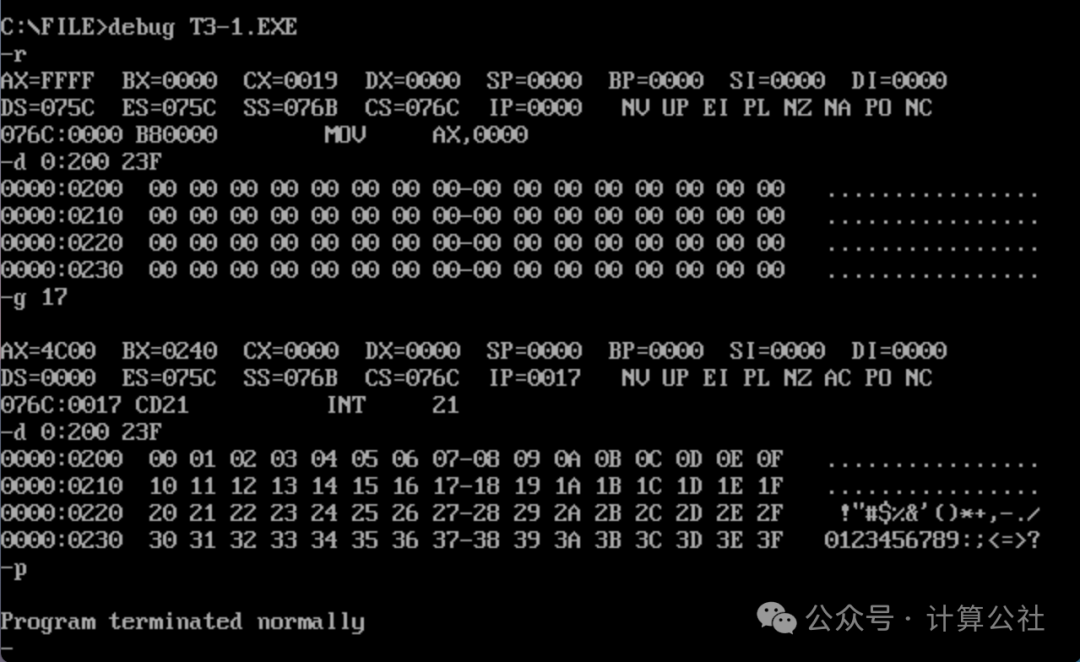
Part (2) of the Experiment
The task requires implementation with 9 lines of code. First, we carefully analyze the implementation code from Part (1), which has a total of 11 lines (excluding pseudo-instructions). Instructions like mov ds, ax, mov cx, 64, loop s, mov ax, 4c00H, int 21H are essential and cannot be reduced. The slightly verbose parts of the code are the assignments to the bx and al registers and the increment in the loop.
Secondly, since the offset addresses of the data to be copied and the target location are the same, we can merge these two together, using only one register to represent them, thus reducing some code.
Furthermore, since the offset address must be represented by [bx], the register should be bx. Because the data is from 0 to 63, using the [bx] offset address, the range can only be from 0 to 63.
Finally, as we learned in Chapter 2, the same physical address can be represented by different segment addresses and offset addresses. For example, the physical address 00200H can be represented as 0:200, 0010:100, or 0020:0. If we use the latter representation, we define the segment address as 0020H, and the offset address from 00200H to 0023FH can be represented as 0 to 63.
Based on the above analysis, the following code can be referenced for implementation:
assume cs:codecode segment mov ax, 0020H mov ds, ax mov bx, 0 mov cx, 64 s: mov [bx], bl inc bx loop s mov ax, 4c00H int 21Hcode endsend
Compile and link the code, the Debug debugging execution result is as follows:
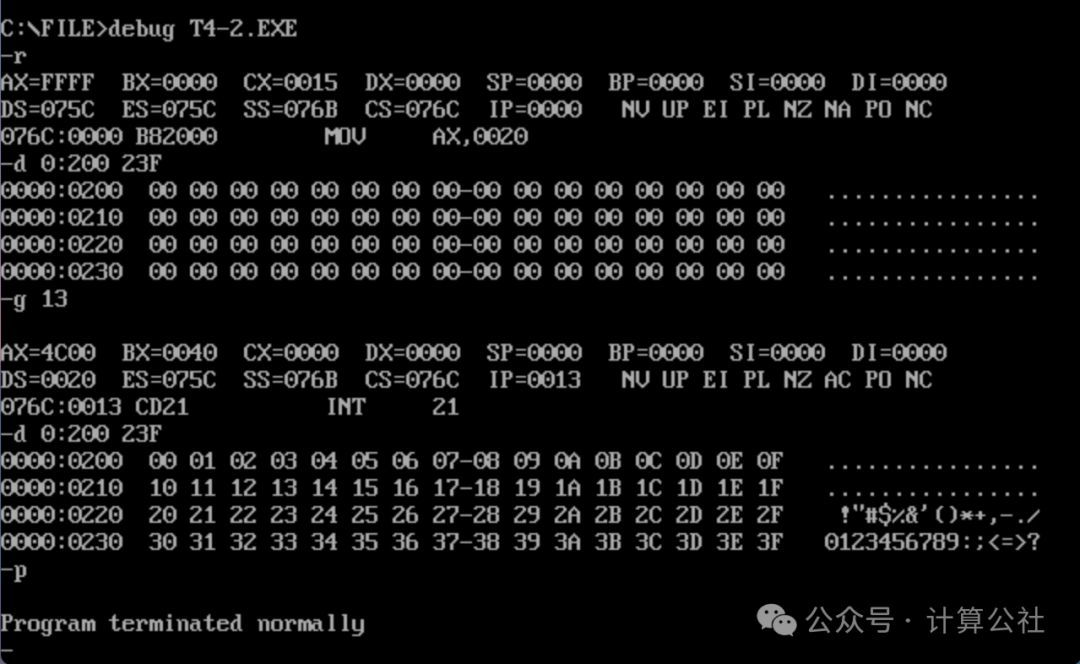
Part (3) of the Experiment
First, we answer the questions posed by Teacher Wang Shuang in the hints:
What is being copied?
All instructions from the first instruction of the code segment to just before “mov ax, 4c00H” (specifically, the machine code corresponding to the instructions).
From where to where?
From the memory address where the instructions are located to the memory address 0:200.
How many bytes?
23 (17H) bytes.
How do you know the number of bytes to copy?
In the code, first write a random value, compile, and then use Debug to check the actual number of bytes to copy, and then modify it to the correct value. There are two methods to determine the actual byte count:
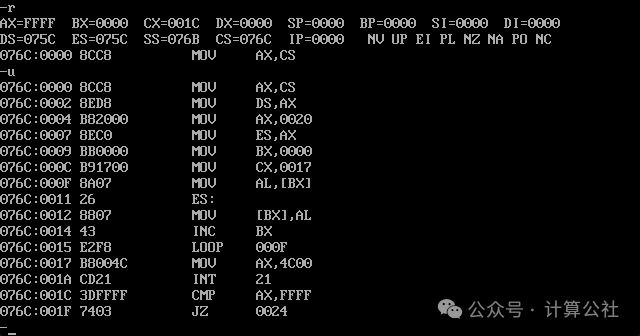
The first method is that CX saves the total length of the machine code (1CH). The total machine code for the instructions “mov ax, 4c00H” and “int 21H” is 5 bytes, so CX-5 gives the number of bytes to copy.
The second method is to use the u command to view the machine code and corresponding assembly instructions. The instruction “mov ax, 4c00H” starts from 0017H, indicating that there are a total of 17H (23) bytes before it.
After answering these questions, we can derive the answer. The code to be supplemented is as follows:
mov ax, cs
mov cx, cx-5
After completing the code, compile and link, and debug as follows:
First, let’s take a look at the registers and the machine code corresponding to the instructions:
Comparison of contents at 0:200 before and after the loop copy execution:
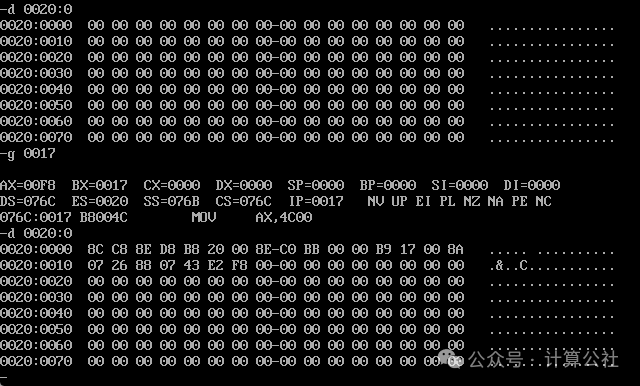
From this, we can also see that for the CPU, there is no distinction between code and data; they are just numbers byte by byte. How these bytes are organized and what they mean is entirely defined by us humans. The CPU, as hardware, simply operates according to the method set during production, reading or writing these bytes.