The C language supports array data structures, which can store a fixed size collection of elements of the same type in a sequential manner. Arrays are used to store a series of data, but they are often considered as a series of variables of the same type.The declaration of an array does not declare individual variables like PLC0, PLC1, …, PLC99, but rather declares an array variable, such as PLC, and then uses PLC[0], PLC[1], …, PLC[99] to represent individual variables; the numbers 0 and 1 are called indices, also known as subscripts, which default to start from 0.All arrays consist of contiguous memory locations. The lowest address corresponds to the first element, and the highest address corresponds to the last element.The C language also allows us to use pointers to manipulate arrays, making operations on arrays more flexible and efficient.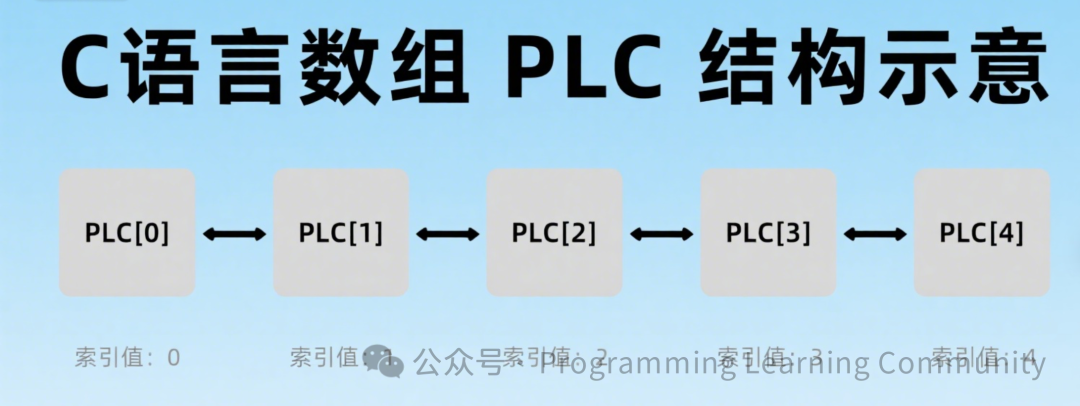 Declaring ArraysIn C, to declare an array, you need to specify the type of the elements and the number of elements, with the specific declaration format as follows:
element_type array_name[array_length];This is called a one-dimensional array. The array length must be a positive integer constant, and the element type can be any valid C data type.Initializing ArraysIn C, you can initialize an array element by element, or you can use an initialization statement as shown below:
double Array[5]={1000.0,2.0,3.4,7.0,50.0};The number of values between the curly braces { } cannot exceed the number of elements specified in the square brackets [ ] during the array declaration.If you omit the size of the array, the size of the array will be equal to the number of elements during initialization. Therefore, if:
double Array[]={1000.0,2.0,3.4,7.0,50.0};You will create an array that is exactly the same as the one created in the previous instance.Accessing Array ElementsSome students may ask, I know how to declare and create an array, but how do I access the value of a corresponding element in the array? How do I perform addition, query, modification, and deletion on array elements, which is commonly referred to as CRUD in programming? This will be covered when we discuss data structures later, so stay tuned.So, how do we access an array element? Array elements can be accessed using the array name followed by the index. The index of the element is placed in square brackets, following the array name. For example:
double salary = PLC[9];The above statement assigns the value of the 10th element in the array to the salary variable. The following example uses the three concepts mentioned above: declaring an array, assigning values to the array, and accessing the array:
#include <stdio.h>
int main (){   int n[ 10 ]; /* n is an array containing 10 integers */   int i,j;
   /* Initialize array elements */            for ( i = 0; i < 10; i++ )   {      n[ i ] = i + 100; /* Set element i to i + 100 */   }
   /* Output the value of each element in the array */   for (j = 0; j < 10; j++ )   {      printf("Element[%d] = %d\n", j, n[j] );   }
   return 0;}
The final compiled and executed result of the above program is:
Element[0] = 100Element[1] = 101Element[2] = 102Element[3] = 103Element[4] = 104Element[5] = 105Element[6] = 106Element[7] = 107Element[8] = 108Element[9] = 109Of course, the C language header file also provides many convenient methods, such as obtaining the length of an array, etc., such as:
#include <stdio.h>
int main() {    int array[] = {1, 2, 3, 4, 5};    int length = sizeof(array) / sizeof(array[0]);
    printf("Array length is: %d\n", length);
    return 0;}
Array NamesIn C, the array name represents the address of the array, specifically the address of the first element of the array (this statement is very important and will be mentioned frequently). When we declare and define an array, the array name represents the address of that array.For example, in the following code:
int myArray[5]={10,20,30,40,50};Here, myArray is the array name, which represents an integer type array containing 5 elements. myArray also represents the address of the array, specifically the address of the first element.The array name itself is a constant pointer, meaning its value cannot be changed; once determined, it cannot point to another location.We can use the & operator to obtain the address of the array, as shown below:
int myArray[5]={10,20,30,40,50};int*ptr =&myArray[0];// or simply write int *ptr = myArray;In the above example, the ptr pointer variable is initialized to the address of myArray, which is the address of the first element of the array.It is important to note that although the array name represents the address of the array, in most cases, the array name automatically converts to a pointer to the first element of the array. You can also briefly understand that the array name is a pointer to the first element of the array, and you can use the following example to deepen your understanding:
void printArray(int arr[], int size) {    for (int i = 0; i < size; i++) {        printf("%d ", arr[i]); // The array name arr is used as a pointer    }}
int main() {    int Array[5] = {10, 20, 30, 40, 50};    printArray(Array, 5); // Pass the array name to the function    return 0;}
In C, arrays are very important, and below are some array-related concepts that you can explore further:
| Concept | Description |
|---|---|
| Multidimensional Arrays | C supports multidimensional arrays. The simplest form of multidimensional arrays is two-dimensional arrays. |
| Passing Arrays to Functions | You can pass a pointer to an array to a function by specifying the array name without an index. |
| Returning Arrays from Functions | C allows returning arrays from functions. |
| Pointers to Arrays | You can generate a pointer to the first element of an array by specifying the array name without an index. |
| Static Arrays vs Dynamic Arrays | Static arrays allocate memory at compile time with a fixed size, while dynamic arrays allocate memory manually at runtime with a variable size. |
As a fundamental tool for processing bulk data, we have mastered the core usage of arrays today. Next, enumerations will help us solve another problem – assigning more readable identifiers to collections of meaningful numbers, just like labeling each number. In the next lesson, we will specifically learn about this “labeling method”. See you in the next class (づ。◕‿‿◕。)づ