We apologize for the two-week hiatus for various reasons. In the coming time, we will maintain a daily update with a fresh approach and different content, allowing more children to experience the charm of Python programming and guiding them to sail in the ocean of code! Welcome to the“Code Little General” classroom, where we are dedicated to youth programming. With lively and interesting courses, we lead children into the world of programming to feel the charm of code. We aim to let children learn programming knowledge through play, cultivate programming thinking, and provide rich project practice, allowing them to apply what they have learned to real projects and experience the joy of creation.





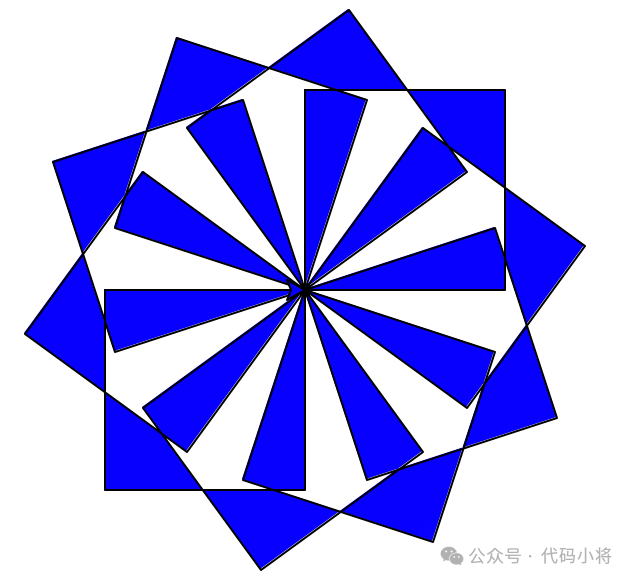
 Have you ever thought that a few lines of code can make a computer paint like an artist? The Python turtle module is such a magical tool—it simulates a little turtle with a paintbrush. You command it to move forward and turn, and you can easily draw lines, shapes, and even complex patterns. Today, let’s unlock this “code canvas” and become a programming artist in no time, even with zero foundation!
1.What is Turtle Graphics?
Turtle is a built-in drawing module in Python. The core logic is to command the pen to move through code: for example, moving forward, backward, and turning. When the pen touches the screen, it leaves a trail; when lifted, it does not draw. Turtle graphics is suitable for beginners because the code is simple, and you can achieve results with just a few lines, providing a great sense of accomplishment. The visual operation is also a major highlight, as you can see the changes on the screen at every step, intuitively understanding programming logic, with unlimited creativity—draw whatever you want.
2.Basic Commands
Here is a simple piece of code that can draw a square::
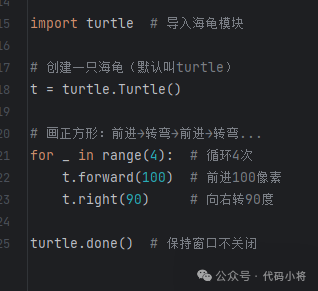
Core command breakdown:
1.forward (distance): Move forward a specified number of pixels (can also be abbreviated as fd());
2.Right (angle)/left (angle): Turn right/left by a specified angle;
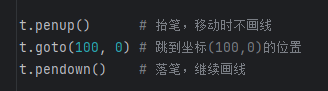
3.Penup()/pendown(): Lift the pen/put down the pen (controls whether to leave a trail)
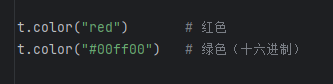
4.color (color): Set the pen color (supports English words and hexadecimal color codes)
5.pensize (thickness): Set the pen thickness

3.Advanced Techniques
Once you master the basic commands, you can combine them to create various patterns. Let’s try it out together!
1.Colorful Star
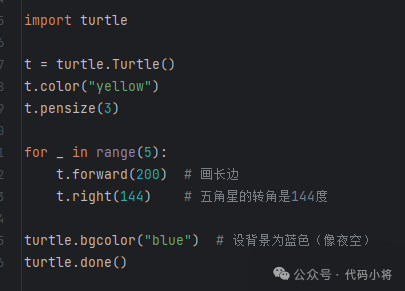
After running, you will get a yellow star with a blue background. Doesn’t it look like a star in the night sky?
2.Spiral Line (using loops)
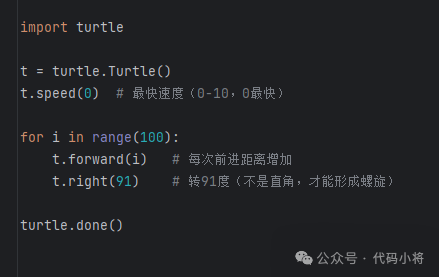
The little turtle will turn outward in circles, drawing beautiful spiral lines, just like a whirlpool!
4.Hidden Techniques of Turtle Graphics
1.Control Speed: Use speed (value) to adjust the drawing speed, 0 is the fastest, 1 is the slowest, suitable for observing the process;
2.Hide Turtle: When drawing complex shapes, use hideturtle() to hide the turtle for a cleaner drawing;
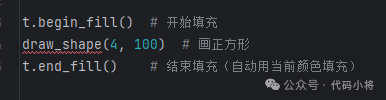
3.Fill Color: Use beg_fill() and end_fill() to color the shapes:
5.Why Learn Turtle Graphics?
1.Cultivate Interest in Programming: The immediate transformation of code into visuals is more appealing than tedious calculations, especially suitable for children and programming beginners.
2.Understand Mathematical Logic: Drawing shapes involves knowledge of angles, distances, symmetry, etc. For example, “Each angle of a regular n-gon is 360/n degrees,” understanding mathematics through practice.
3.Exercise Logical Thinking: Complex patterns need to be broken down into steps (for example, outline first, then fill), cultivating the ability to “decompose problems.”
Turtle graphics is like “programming version of simple drawing.” No artistic foundation is needed; as long as you have creativity, you can draw infinite possibilities with code. Whether it’s drawing birthday cards, designing logos, or creating abstract art, it can all be realized~
If you want to learn more about youth programming, feel free to follow us or click the “Consult” option in the menu to contact us!





Once again, we welcome everyone to join our “Code Little General” programming family, letting children set sail in the ocean of programming!