
—— START ——
Time management sounds sophisticated, but it is not that difficult. The first step is to record how you spend your time. Do not underestimate the importance of time tracking; doing this brings countless benefits.
Benefits of Time Tracking
First, it shows where your time goes. Once you start recording, you will realize how shocking the waste of time is and how dismal your efficiency can be. The reasons for not accomplishing tasks become clear: two hours chatting, two hours scrolling through WeChat, etc. This situation is common and can be quite embarrassing. Those who want to improve should take action.
Second, the act of recording itself serves as a wake-up call. Often, when recording, you might struggle to remember, “What did I do three hours ago? I can’t recall at all.” From my experience, it can be said bluntly that either you are dazed and wasting time, or you are wasting time while being dazed. At this point, a smart person can rise up, seize the present moment, and try to make up for the previous waste.
Third, recording time also serves as a log. Time is filled with activities, and time tracking is a detailed daily account. When needed, you can quickly check what you did on a particular day, which is a skill that surpasses most people.
Finally, recording is the foundation for improving efficiency. With “big data” about how you spend your time, after a period (weekly or monthly), you can conduct statistical analysis, identify time-wasting issues, find reasons for inefficiency, gradually change your attitude towards time, and increase the efficiency of time usage. This is the most important point.
Types of Time Tracking
Time tracking methods can be categorized into periodic tracking and task-based tracking. Each category can further be divided into full-day tracking and partial tracking.
Partial tracking focuses only on important tasks, such as work logs that only record work-related activities. Full-day tracking records all activities throughout the day, like the protagonist of the book “A Unique Life,” Liubisheff, whose method is to record tasks throughout the day, as shown below.
5:08-6:10 Wake up, tidy up, wash up
6:10-7:00 Take a taxi to the airport, KFC
7:10-8:05 Change tickets, security check, wait for the flight, board the plane
8:09-12:50 Read for 2 hours, rest for 55 minutes, watch a movie for 50 minutes…
The benefit of this method is that time spent is very precise, accurate to the minute. The downside is that you have to record every time you switch tasks, which can make it difficult to develop a habit and also takes a lot of time to record.
Most current time management apps belong to the category of task-based full-day tracking, such as “Ai Today,” where you have to click a start button every time you begin a task and an end button when you finish, then select the type of the next task, repeating the start and end process. I tried using it for a few days, but often forgot to press the switch, and recalling was mentally exhausting, so I eventually gave up on this method.
My Time Tracking Spreadsheet
Based on my habit of frequently using a computer, I created an EXCEL spreadsheet inspired by a friend, choosing the method of periodic full-day tracking, which has made it easier to record time and I have been consistent since February.
The advantage of this method is that it is not cumbersome, making it suitable for developing the habit of time tracking. Additionally, using different colors for different categories of tasks facilitates statistics and can greatly save time.
However, the downside is obvious; the start and end of tasks may not align perfectly with the hour or half-hour, leading to inaccuracies. But for someone who has not yet started managing time or developing recording habits, this small error is negligible compared to the wasted time.
Below, I will introduce my time tracking method in conjunction with the spreadsheet.
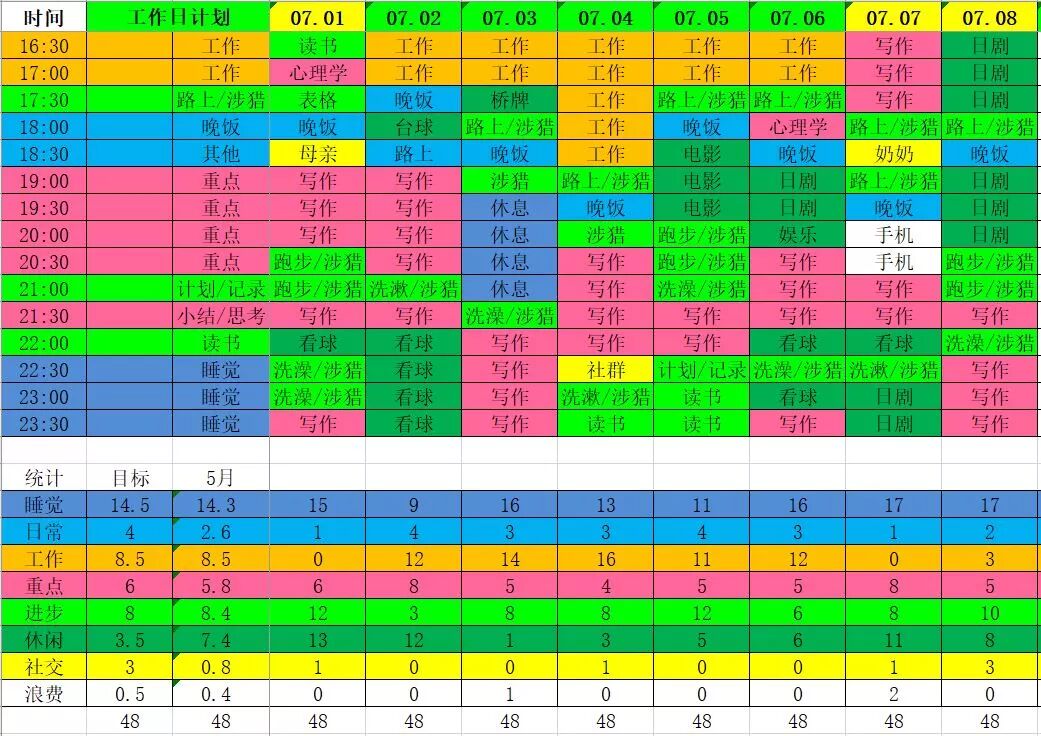
The entire spreadsheet is roughly divided into four parts: the upper left part is the time slots, the upper right part is daily records, the lower right part is daily statistics, and the lower left part is monthly goals and statistics.
1. Upper Left Time Slots
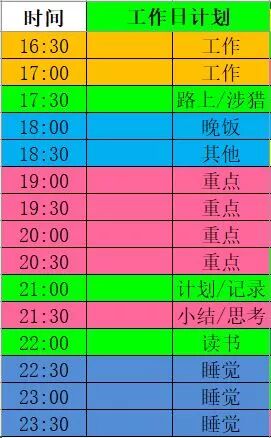
The entire day is divided into 48 units of half an hour each. Why divide by half an hour? Because half an hour perfectly matches the Pomodoro Technique. An hour can accommodate too many tasks, while 15 minutes is too detailed and cumbersome for recording.
2. Upper Right Daily Records
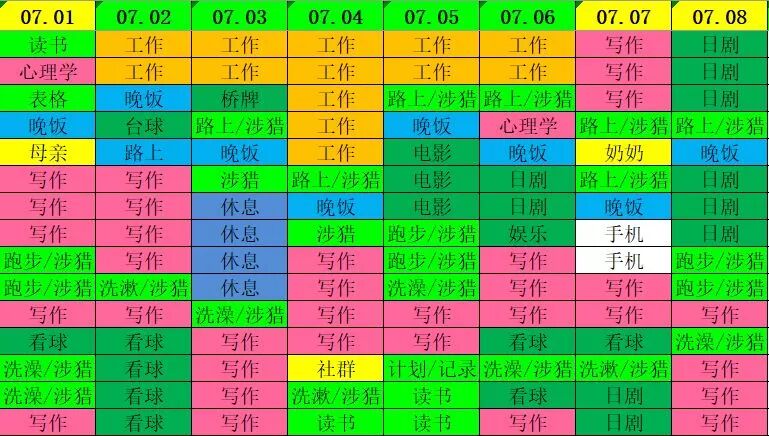
The daily records are the main body of the spreadsheet, serving as the input section for recording.
The top part is the date, with green indicating workdays and yellow indicating rest days. The table below corresponds to the time slots on the left, filled in according to tasks. Different colors represent different categories of tasks, with specific categories listed in the lower left statistics table.
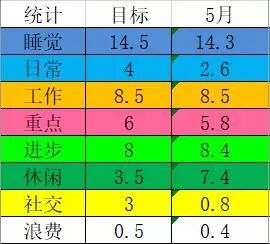
The eight categories are: sleep and work need no explanation. Daily mainly refers to necessary activities such as eating, washing up, and commuting; Focus refers to activities that require significant time investment for self-improvement, such as studying for qualifications, thematic reading, and language learning; Progress refers to activities that contribute to self-improvement, often daily habits like listening to audio for broadening horizons, memorizing vocabulary, fitness, writing, reading, planning, recording, and summarizing; Leisure refers to activities that help relax, such as watching movies, TV shows, sports, playing games, and card games; Social refers to gatherings and chatting; Waste includes aimless internet browsing, scrolling through social media, or forgetting what you did, all categorized as waste.
3. Lower Right Daily Statistics
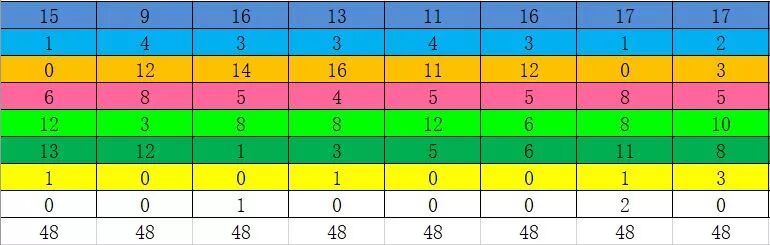
Based on the records in the upper right, the daily time usage is categorized into the eight classifications and filled into the table (this part is currently filled manually, but it could be optimized to be automatic through formulas).
4. Lower Left Monthly Goals and Statistics
This is the essence of the entire spreadsheet; you could say that the direct purpose of recording time every day and every moment is to obtain this data.
Each month, by comparing the target data with the previous month’s data, you can analyze the time usage for the month, especially focusing on areas of deficiency, analyzing the reasons, formulating improvement methods, and establishing new goals for the upcoming month.
My Time Management Experience
Through more than two years of recording and summarizing, my efficiency has greatly improved. This improvement comes from identifying problems and gradually finding solutions through analysis, whether it be a shift in mindset or proactive actions. In summary, here are a few points:
1. Do not compress or excessively extend sleep time. Only with sufficient energy can you ensure high efficiency throughout the day. By recording, I gradually figured out my normal sleep needs, for example, I need 15 Pomodoros (i.e., 7.5 hours). I try to ensure 15 Pomodoros of sleep each day; if I lack sleep at night, I take a nap during the day. On weekends, I ensure sufficient sleep at night, and if I reach 15 Pomodoros, I try to avoid napping or limit nap time.
2. The habit of waking up early is very important. Morning time is very pure, with no interruptions, and the brain is relaxed, making memory and creativity peak. For example, I used to write at night, but often ended up coming home late or being too tired from a busy day, leading to late nights and affecting the next day’s efficiency. By developing the habit of waking up early and moving my writing time to the morning, my mind is much clearer, and I can complete the most challenging tasks first thing in the morning, making the rest of the day feel much easier.
3. Do not underestimate work time. Due to the nature of my work, tasks are quite varied but generally not urgent, allowing for reasonable self-arrangement. I often thought about compressing work time to do self-improvement activities. However, it has proven to be wishful thinking; even a simple task takes longer than expected, and there are always unexpected tasks. Therefore, I can comfortably plan enough work time; if I can save some, that’s great, but if not, I won’t feel anxious.
4. Allocate solid blocks of time for key tasks. General improvement tasks, such as memorizing vocabulary, reading, and listening to audio, can utilize fragmented time. However, important tasks, like studying for qualifications, require large blocks of focused time and cannot be fragmented. This requires finding or squeezing out a solid block of time; for me, that time is from 7 PM to 9 PM. As long as I can get home on time, I ensure that this time is dedicated to key tasks. The early morning time is also a solid block that can be well utilized.
5. Multitasking to improve time utilization efficiency. Sometimes, certain tasks can be done simultaneously, such as listening to audio while washing up or eating, or memorizing vocabulary while commuting. It is important to note that most tasks that can be done simultaneously are “daily” tasks; never attempt to do “progress” tasks while working on “key” tasks, as this will lead to distraction and loss of the most valuable resource.
6. Upgrading time management skills. By reviewing time records daily, you will unconsciously start managing your time. For example, seeing the white “waste” time can be painful; those hours could be better spent on entertainment or gaming, so wasting them feels like a shame. Thus, as you continue to record, the “waste” time will gradually decrease. Similarly, as recording deepens, you will discover more tips, your awareness will subtly improve, and your actions will become quicker, bringing you closer to your ideal self.
—— END ——
References: “A Unique Life” by Granin
Postscript: This article was first published in October 2016 on my JianShu account, with nearly 8000 views. Readers have continuously requested the time management spreadsheet, and many friends have shown interest, so I have made appropriate modifications and moved it to my public account. I will also write articles introducing other forms in the time management spreadsheet, so please stay tuned.

Last Issue Review
Ridiculous System
Related Articles
Start Learning Time Management by Categorizing Tasks