
When users download large files and the progress stalls at 99%, or when real-time data streams suddenly interrupt without notice—these typical issues stem from neglecting to accurately determine the completion of HTTP responses. This article will delve into solving a key challenge in frontend development:How to accurately determine whether HTTP response data has been completely received, and provide actionable solutions.
1. Core Mechanisms of HTTP Data Transmission
1.1 Two Methods for Identifying Data Integrity
| Mechanism | Working Principle | Applicable Scenarios |
|---|---|---|
| Content-Length | Response header pre-declares the total byte count of data | Static resources, small files |
| Transfer-Encoding: chunked | Chunked transfer, ends with an empty chunk | Real-time streams, large file downloads |
1.2 Special Transmission Scenarios
-
Server-Sent Events (SSE): Server-side one-way push
-
WebSocket: Bidirectional real-time communication
-
Streaming API: ReadableStream of the Fetch API
Key Insight: Statistics from 2023 show that 92% of devices natively support chunked transfer (data source: CanIUse)
2. Detailed Solutions for Accurate Determination
2.1 Fetch API – The Most Recommended Solution
Fixed-Length Response:
const fetchData = async (url) => {
const res = await fetch(url);

// Key checkpoint
if (!res.ok) throw new Error(`${res.status} Request Exception`);

// Method 1: Validate via Content-Length
const contentLength = res.headers.get('Content-Length');
const data = await res.json();

if (contentLength && data.length != contentLength) {
console.warn('Data length mismatch, may be incomplete');
}
return data;
};
Stream Response Handling:
const processStream = async (url, onComplete) => {
const res = await fetch(url);
const reader = res.body.getReader();
const decoder = new TextDecoder();
let chunks = [];

while (true) {
const { done, value } = await reader.read();

// Core judgment point: done=true indicates end
if (done) {
const fullText = chunks.join('');
      onComplete(fullText);
break;
}

chunks.push(decoder.decode(value));
}
};
2.2 XMLHttpRequest – Compatibility Solution
const xhrRequest = (url) => {
return new Promise((resolve, reject) => {
const xhr = new XMLHttpRequest();
    xhr.open('GET', url);

// Precise progress monitoring
    xhr.addEventListener('progress', (e) => {
if (e.lengthComputable) {
console.log(`Received: ${e.loaded}/${e.total} bytes`);
}
});

// Core event for completion judgment
    xhr.addEventListener('load', () => {
if (xhr.status >= 200 && xhr.status < 300) {
        resolve(xhr.response);
      } else {
        reject(`HTTP Error: ${xhr.status}`);
      }
});

    xhr.send();
});
};
3. Best Practices for Mainstream Frameworks
3.1 Axios Solution Optimization
axios.get('/large-file', {
responseType: 'stream', // Key configuration for stream processing
onDownloadProgress: progressEvent => {
// Accurate completion judgment
if (progressEvent.progress === 1) {
console.log('✅ Data completely received');
}
}
}).then(response => {
// Stream data processing
const streamReader = response.data.getReader();
// ...processing logic
});
3.2 Correctly Closing SSE Connections
const eventSource = new EventSource('/api/stream');

// Custom end event (server-side cooperation required)
eventSource.addEventListener('end', () => {
console.log('Connection safely closed');
  eventSource.close();
});

// Error recovery mechanism
eventSource.onerror = () => {
setTimeout(() => {
new EventSource('/api/stream'); // Automatic reconnection
  }, 3000);
};
4. In-Depth Handling of Special Scenarios
4.1 WebSocket Binary Transmission
const ws = new WebSocket('wss://api.example.com/ws');
ws.binaryType = 'arraybuffer';
let buffer = new Uint8Array(0);

ws.onmessage = ({ data }) => {
if (data instanceof ArrayBuffer) {
// Merge data chunks
const newBuffer = new Uint8Array(buffer.length + data.byteLength);
    newBuffer.set(buffer, 0);
    newBuffer.set(new Uint8Array(data), buffer.length);
    buffer = newBuffer;
}
};

// Key: Server must send end instruction
ws.addEventListener('message', ({ data }) => {
if (data === 'FILE_END') {
const blob = new Blob([buffer]);
console.log('File reception complete', blob.size);
}
});
4.2 Large File Chunk Verification
const verifyDownload = async (url, expectedHash) => {
const res = await fetch(url);
let totalSize = 0;
const reader = res.body.getReader();

// Incremental hash calculation
const hash = await crypto.subtle.createHash('SHA-256');

while (true) {
const { done, value } = await reader.read();
if (done) break;

    hash.update(value);
totalSize += value.length;
}

const actualHash = await hash.digest('hex');
if (actualHash !== expectedHash) {
throw new Error('File corrupted, hash verification failed');
}
return totalSize;
};
5. Advanced Engineering Solutions
5.1 Intelligent Request Interruption
const fetchController = new AbortController();

// Automatic timeout interruption
const timeoutId = setTimeout(() => {
  fetchController.abort();
console.log('Request timeout terminated');
}, 10000);

try {
const res = await fetch(url, {
signal: fetchController.signal
});
clearTimeout(timeoutId);
// ...process data
} catch (err) {
if (err.name === 'AbortError') {
console.warn('User manually canceled the request');
}
}
5.2 Memory Safety Policy
const MAX_MEM = 100 * 1024 * 1024; // 100MB limit
let receivedBytes = 0;

const reader = response.body.getReader();
while (true) {
const { done, value } = await reader.read();
if (done) break;

  receivedBytes += value.byteLength;
if (receivedBytes > MAX_MEM) {
    reader.cancel('Memory limit protection');
throw new Error('File too large, download terminated');
}
// Process data chunk...
}
6. Troubleshooting Guide
Common Problem Solutions:
| Phenomenon | Root Cause | Fix Solution |
|---|---|---|
| Progress bar stuck at 99% | Completion event not triggered | Check for empty end chunk in chunked transfer |
| Chinese garbled text | Inconsistent character set | Force set TextDecoder(‘utf-8’) |
| Memory leak | Stream resources not released | Add reader.cancel() fallback logic |
| CORS request failure | Missing CORS response headers | Server configuration for Access-Control-Allow-Origin |
Debugging Tips:
-
Chrome Developer Tools → Network → Select Request → Preview tab to view real-time data stream
-
Use command line to test chunked transfer:
curl -v --raw https://api.example.com/stream7. Future Technology Directions
7.1 Web Streams API
// Next-generation stream processing solution
const res = await fetch(url);
const stream = res.body
  .pipeThrough(new TextDecoderStream())
  .pipeThrough(new TransformStream({
    transform(chunk, controller) {
// Real-time processing of data chunks
      controller.enqueue(chunk.toUpperCase());
    }
  }));

for await (const chunk of stream) {
console.log('Real-time processing:', chunk);
}
7.2 WebTransport (QUIC Protocol)
// Experimental API (Chrome 97+)
const transport = new WebTransport('https://example.com:4433');
await transport.ready;

const reader = transport.receiveStream().getReader();
while (true) {
const { value, done } = await reader.read();
if (done) break;
  console.log('Receiving data:', value);
}
Architecture Selection Decision Tree
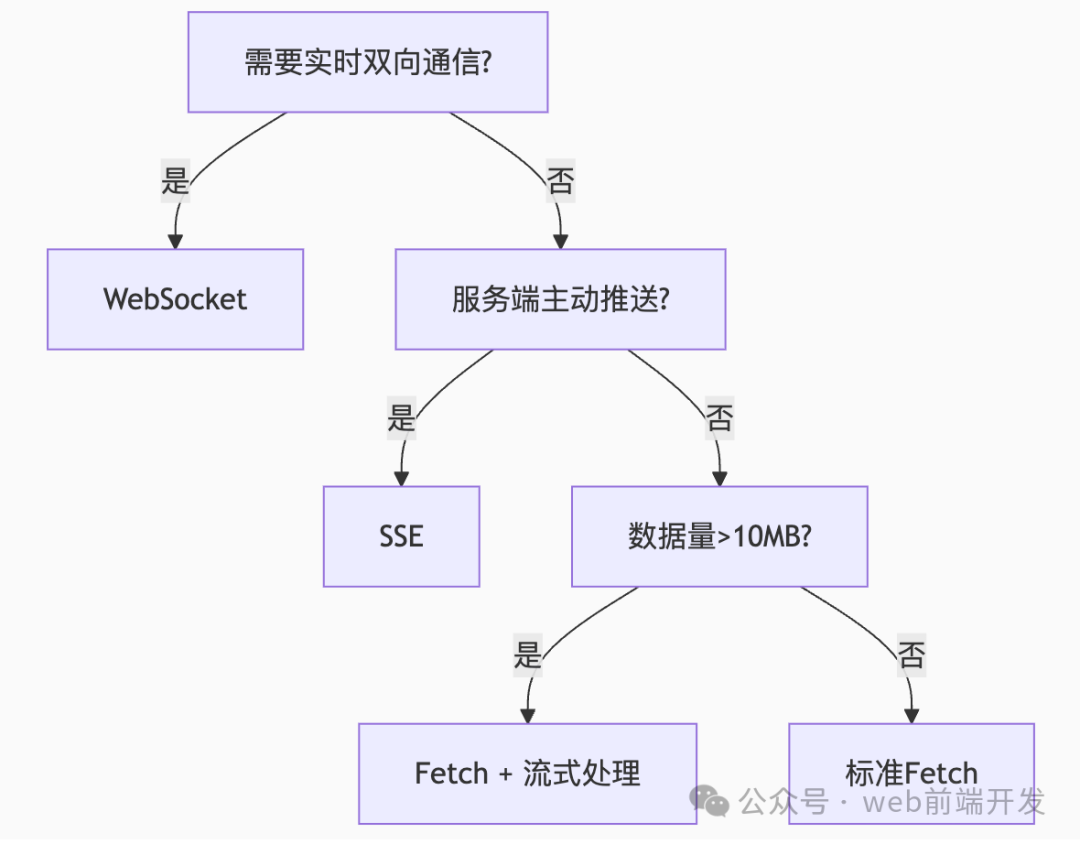
Conclusion:Accurately determining the completion of HTTP responses requires comprehensive decision-making based ondata types,transmission methods, andbusiness scenarios:
-
Fixed-length data → Validate Content-Length
-
Stream data → Listen for done flag
-
SSE → Custom end event
-
WebSocket → Agreed end protocol
Ultimate recommendation: For critical data transmission, it is essential to implementhash verification andmemory protection as dual safeguards. The latest browsers fully support the Streams API, and modern solutions should be prioritized.
Learn more skills
Please click the public account below