1. What is QTreeWidget?
<span><span>QTreeWidget</span></span> is a very important and commonly used widget in the Qt framework, used to display and edit item data in a tree structure (Tree Structure). It is a high-level, user-friendly wrapper around <span><span>QTreeView</span></span>, similar to <span><span>QListWidget</span></span> and <span><span>QTableWidget</span></span>, providing a convenient item-based interface without the need to manually create a model.
Core Concepts:
-
Tree: A hierarchical structure composed of multiple nodes.
-
Item: Each node in the tree is a
<span><span>QTreeWidgetItem</span></span>object. -
Column: Each item can contain multiple columns of information (similar to columns in a table).
-
Parent and Child Items: The topmost node is called the root item or top-level item (Top-Level Item), which can contain multiple child items (Child Item). Child items can also be parents of other child items, forming complex hierarchical relationships.
2. Core Features and Uses
-
Uses:
-
Display hierarchical data (e.g., file browsers, organizational charts, catalogs).
-
Show items with multiple attributes (multiple columns).
-
Allow users to browse large amounts of data through expand/collapse functionality.
-
Support interactions such as item selection, editing, and drag-and-drop.
-
Advantages:
-
Easy to Use: For simple tree structures, there is no need to understand the complex Model/View architecture; you can directly manipulate
<span><span>QTreeWidgetItem</span></span>. -
Feature-Rich: Built-in features for item selection, sorting, editing, icon display, checkboxes, etc.
-
Disadvantages:
-
Performance: For very large datasets (tens of thousands of rows) or very complex structures, performance may not be as good as a custom model using
<span><span>QTreeView</span></span>. -
Flexibility: Not as flexible as
<span><span>QTreeView + QStandardItemModel</span></span>or custom models, with a higher coupling between data and view.
3. Core Classes and Their Relationships
-
<span><span>QTreeWidget</span></span>: The widget itself.
-
Responsible for overall display, layout, and interaction.
-
Access an invisible root item through
<span><span>invisibleRootItem()</span></span>, where all top-level items are its children.
<span><span>QTreeWidgetItem</span></span>: Each node in the tree.
-
Stores actual data (text, icons, checkbox states, etc.).
-
Manages relationships of child items (adding, deleting, traversing).
4. Basic Usage and Code Example
Below are the steps and code to create a simple <span><span>QTreeWidget</span></span>.
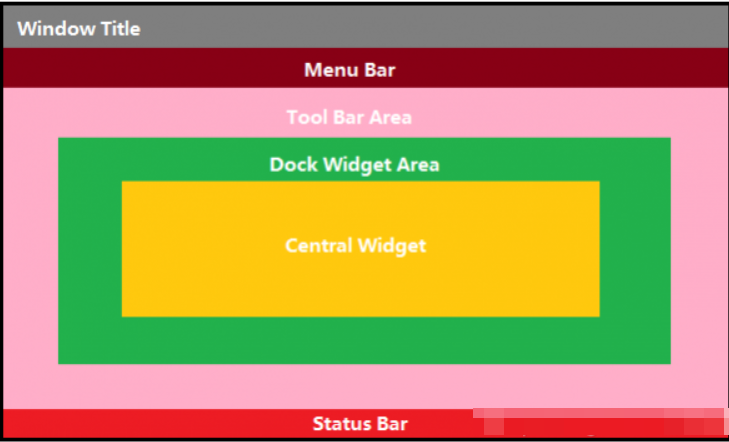
Functionality:1. Add directories2. Add images3. Delete nodes4. Zoom in, zoom out, fit to width/heightFirst, here is the effect image: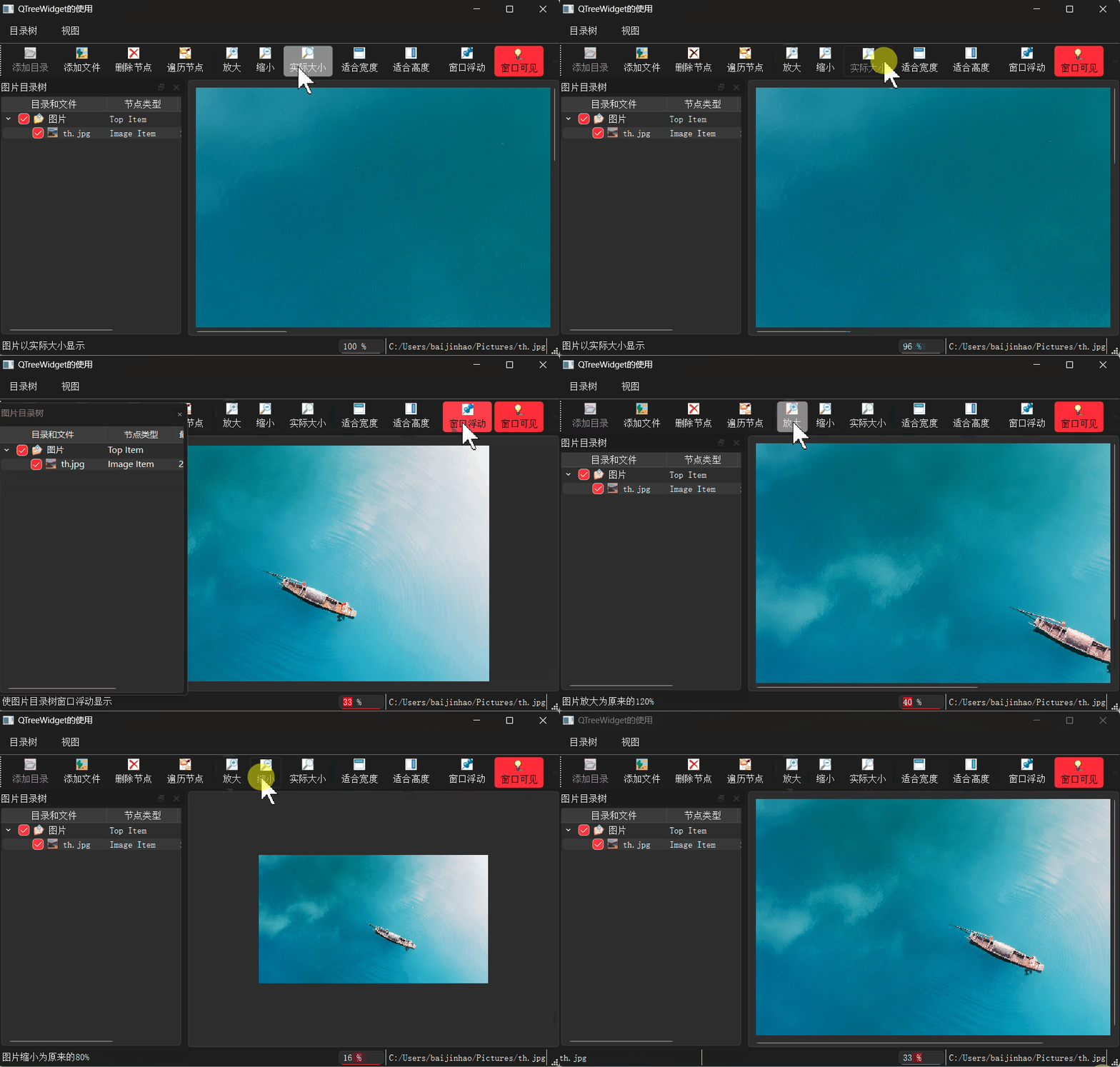 Before reading the source code, understand the layout positions of QStatusBar, QMenuBar, and QToolBar. These three cannot be found in the left toolbox of QT Creator; they need to be added using another editor to the .ui layout, and then return to the UI design to add actions and connect slots.
 Main entry file main.cpp
#include "mainwindow.h"
#include <QApplication>
int main(int argc, char *argv[]){    QApplication a(argc, argv);    MainWindow w;    w.show();    return a.exec();}
Header file mainwindow.h
#ifndef MAINWINDOW_H
#define MAINWINDOW_H
#include <QMainWindow>
#include <QTreeWidgetItem>
#include <QLabel>
#include <QSpinBox>

QT_BEGIN_NAMESPACE
namespace Ui { class MainWindow; }
QT_END_NAMESPACE
class MainWindow : public QMainWindow{    Q_OBJECTprivate:// Enumeration type treeItemType, used as the type of nodes when creating QTreeWidgetItem, custom types must be greater than 1000// itTopItem top-level node;  itGroupItem group node; itImageItem image    enum treeItemType{itTopItem=1001,itGroupItem,itImageItem};
// Enumeration type, representing column numbers    enum treeColNum{colItem=0, colItemType=1, colDate}; // Directory tree column number definitions
    QLabel  *labFileName;    QLabel  *labNodeText;    QSpinBox *spinRatio;
    QPixmap m_pixmap; // Current image    float   m_ratio;// Current image scaling ratio
    void    buildTreeHeader();  // Build header    void    iniTree();// Initialize directory tree
    void    addFolderItem(QTreeWidgetItem *parItem, QString dirName);// Add a directory node
    QString getFinalFolderName(const QString &fullPathName);// Get the last folder name from the full directory name
    void    addImageItem(QTreeWidgetItem *parItem,QString aFilename);// Add an image node
    void    displayImage(QTreeWidgetItem *item); // Display an image node's image
    void    changeItemCaption(QTreeWidgetItem *item); // Traverse and change node title
    void    deleteItem(QTreeWidgetItem *parItem, QTreeWidgetItem *item);  // Completely delete a node and its child nodes
public:    MainWindow(QWidget *parent = nullptr);    ~MainWindow();private slots:
// Signal for current node change in the directory tree    void on_treeFiles_currentItemChanged(QTreeWidgetItem *current, QTreeWidgetItem *previous);
    void on_actAddFolder_triggered();// Add directory node
    void on_actAddFiles_triggered();// Add image node
    void on_actZoomOut_triggered(); // Zoom out
    void on_actZoomIn_triggered(); // Zoom in
    void on_actZoomFitW_triggered(); // Fit to width
    void on_actZoomFitH_triggered();// Fit to height
    void on_actZoomRealSize_triggered(); // Actual size
    void on_actDeleteItem_triggered(); // Delete node
    void on_actScanItems_triggered(); // Traverse nodes
    void on_dockWidget_visibilityChanged(bool visible);
    void on_dockWidget_topLevelChanged(bool topLevel);
    void on_actDockFloat_triggered(bool checked);
    void on_treeFiles_itemChanged(QTreeWidgetItem *item, int column);
    void on_treeFiles_itemCollapsed(QTreeWidgetItem *item);
    void on_treeFiles_itemExpanded(QTreeWidgetItem *item);
    void on_treeFiles_itemSelectionChanged();
    void on_treeFiles_itemClicked(QTreeWidgetItem *item, int column);
    void on_treeFiles_itemPressed(QTreeWidgetItem *item, int column);

    void on_actDockVisible_triggered(bool checked);
private:    Ui::MainWindow *ui;};
#endif // MAINWINDOW_H
Source file mainwindow.cpp
#include "mainwindow.h"
#include "ui_mainwindow.h"
#include <QTreeWidgetItem>
#include <QFileDialog>

// Reconstruct the header of TreeWidget
void MainWindow::buildTreeHeader(){    ui->treeFiles->clear();     // Clear all nodes but do not change the header
    QTreeWidgetItem*  header=new QTreeWidgetItem();     // Create node    header->setText(MainWindow::colItem,     "Directory and Files");    header->setText(MainWindow::colItemType, "Node Type");    header->setText(MainWindow::colDate,     "Last Modified Date");
    header->setTextAlignment(colItem,       Qt::AlignHCenter | Qt::AlignVCenter);    header->setTextAlignment(colItemType,   Qt::AlignHCenter | Qt::AlignVCenter);
    ui->treeFiles->setHeaderItem(header);}

// Initialize the directory tree, create a top-level node
void MainWindow::iniTree(){    QIcon  icon(":/images/icons/15.ico");    QTreeWidgetItem*  item=new QTreeWidgetItem(MainWindow::itTopItem); // Node type is itTopItem    item->setIcon(MainWindow::colItem,icon);          // Set icon for the first column    item->setText(MainWindow::colItem, "Image");     // Set text for the first column    item->setText(MainWindow::colItemType, "Top Item");     // Set text for the second column    item->setFlags(Qt::ItemIsSelectable | Qt::ItemIsUserCheckable | Qt::ItemIsEnabled | Qt::ItemIsAutoTristate);    item->setCheckState(MainWindow::colItem, Qt::Checked);  // Set to checked
//    item->setData(MainWindow::colItem,Qt::UserRole,QVariant(dataStr)); // Set the data for the first column's Qt::UserRole    ui->treeFiles->addTopLevelItem(item);// Add top-level node}
// Add a group node
void MainWindow::addFolderItem(QTreeWidgetItem *parItem, QString dirName){    QIcon   icon(":/images/icons/open3.bmp");    QString NodeText=getFinalFolderName(dirName);   // Get the last folder name from a full directory name
    QTreeWidgetItem *item=new QTreeWidgetItem(MainWindow::itGroupItem); // Set type to itGroupItem    item->setIcon(colItem,icon); // Set icon    item->setText(colItem,NodeText); // Last folder name, first column    item->setText(colItemType,"Group Item"); // Full directory name, second column
    item->setFlags(Qt::ItemIsSelectable | Qt::ItemIsUserCheckable                   | Qt::ItemIsEnabled | Qt::ItemIsAutoTristate); // Set node options    item->setCheckState(colItem,Qt::Checked); // Node checked    item->setData(colItem,Qt::UserRole,QVariant(dirName)); // Set role as Qt::UserRole data, store full directory name
    parItem->addChild(item);  // Add child node under parent node}
// Get the last folder name from a full directory name
QString MainWindow::getFinalFolderName(const QString &fullPathName){    int cnt=fullPathName.length();              // String length    int i=fullPathName.lastIndexOf("/");        // Last occurrence position    QString str=fullPathName.right(cnt-i-1);    // Get the last folder name    return str;}
// Add an image file node
void MainWindow::addImageItem(QTreeWidgetItem *parItem, QString aFilename){    QIcon   icon(":/images/icons/31.ico");
    QFileInfo fileInfo(aFilename);      // QFileInfo object    QString NodeText=fileInfo.fileName();          // File name without path    QDateTime birthDate=fileInfo.lastModified();   // File creation date
//    QTreeWidgetItem *item;    QTreeWidgetItem *item=new QTreeWidgetItem(MainWindow::itImageItem); // Node type is itImageItem    item->setIcon(colItem,icon);    item->setText(colItem,NodeText);            // Text for the first column    item->setText(colItemType,"Image Item");    // Text for the second column    item->setText(colDate,birthDate.toString("yyyy-MM-dd"));    // Text for the third column    item->setFlags(Qt::ItemIsSelectable | Qt::ItemIsUserCheckable                   | Qt::ItemIsEnabled | Qt::ItemIsAutoTristate);    item->setCheckState(colItem,Qt::Checked);
    item->setData(colItem,Qt::UserRole,QVariant(aFilename)); // Set user data, store full file name    parItem->addChild(item);  // Add child node under parent node}
// Display image, the data() of the node stores the image file name
void MainWindow::displayImage(QTreeWidgetItem *item){    QString filename=item->data(colItem,Qt::UserRole).toString();   // Get the file name stored in the node's data    labFileName->setText(filename);             // Display in status bar    labNodeText->setText(item->text(colItem));  // Display in status bar    m_pixmap.load(filename);       // Load image from file    ui->actZoomFitH->trigger();     // Trigger the Action's triggered() signal, execute its connected slot function
    ui->actZoomFitH->setEnabled(true);    ui->actZoomFitW->setEnabled(true);    ui->actZoomIn->setEnabled(true);    ui->actZoomOut->setEnabled(true);    ui->actZoomRealSize->setEnabled(true);}
// Change the title text of the node
void MainWindow::changeItemCaption(QTreeWidgetItem *item){    QString str="*"+item->text(colItem);    // Add "*" before node text    item->setText(colItem,str);             // Set node text
    if (item->childCount()>0)   // If there are child nodes        for (int i=0;i<item->childCount();i++)  // Traverse child nodes            changeItemCaption(item->child(i));  // Recursive call to itself}
// Completely delete a node and its child nodes, recursive call function
void MainWindow::deleteItem(QTreeWidgetItem *parItem, QTreeWidgetItem *item){    if (item->childCount()>0)   // If there are child nodes, need to delete all child nodes first    {        int count=item->childCount();       // Number of child nodes        QTreeWidgetItem *tempParItem=item;  // Temporary parent node        for (int i=count-1; i>=0; i--)      // Traverse child nodes            deleteItem(tempParItem, tempParItem->child(i));   // Recursive call to itself    }
    // After deleting child nodes, delete itself    parItem->removeChild(item); // Remove node    delete  item;               // Delete node from memory}
MainWindow::MainWindow(QWidget *parent) :    QMainWindow(parent),    ui(new Ui::MainWindow){    ui->setupUi(this);
// Create components on the status bar    labNodeText=new QLabel("Node Title",this);    labNodeText->setMinimumWidth(200);    ui->statusBar->addWidget(labNodeText);
    spinRatio=new QSpinBox(this);   // QSpinBox component for displaying image scaling ratio    spinRatio->setRange(0,2000);    spinRatio->setValue(100);    spinRatio->setSuffix(" %");    spinRatio->setReadOnly(true);    spinRatio->setButtonSymbols(QAbstractSpinBox::NoButtons);  // Do not show up/down adjustment buttons    ui->statusBar->addPermanentWidget(spinRatio);
    labFileName=new QLabel("File Name",this);    ui->statusBar->addPermanentWidget(labFileName);
// Initialize directory tree    buildTreeHeader();  // Rebuild directory tree header    iniTree();          // Initialize directory tree
    setCentralWidget(ui->scrollArea); // Set central layout component}
MainWindow::~MainWindow(){   delete ui;}
// Triggered when the current node selection changes
void MainWindow::on_treeFiles_currentItemChanged(QTreeWidgetItem *current, QTreeWidgetItem *previous){    qDebug("currentItemChanged() is emitted");    if (current==nullptr)         // Current node is null        return;
    if (current == previous)     // No node switch, only column change        return;
    int var=current->type();    // Node type    switch(var)    {    case  itTopItem:        // Top-level node        ui->actAddFolder->setEnabled(true);        ui->actAddFiles->setEnabled(true);        ui->actDeleteItem->setEnabled(false);    // Top-level node cannot be deleted        break;
    case  itGroupItem:      // File group node        ui->actAddFolder->setEnabled(true);        ui->actAddFiles->setEnabled(true);        ui->actDeleteItem->setEnabled(true);        break;
    case  itImageItem:      // Image file node        ui->actAddFolder->setEnabled(false);    // Cannot add directory nodes under image nodes        ui->actAddFiles->setEnabled(true);        ui->actDeleteItem->setEnabled(true);        displayImage(current);                  // Display image    }}
// Select a folder to add as a child node of the current node
void MainWindow::on_actAddFolder_triggered(){    QString dir= QFileDialog::getExistingDirectory();    // Select directory    if (dir.isEmpty())  // Directory name is empty        return;
    QTreeWidgetItem *parItem= ui->treeFiles->currentItem();    if (parItem == nullptr) // Current node is null        return;
    if (parItem->type() != itImageItem)   // Cannot add group nodes under image nodes        addFolderItem(parItem,dir);       // Add a group node under parent node}
// Add image file node
void MainWindow::on_actAddFiles_triggered(){    QStringList files= QFileDialog::getOpenFileNames(this,"Select Files","","Images(*.jpg)");    if (files.isEmpty())    // No files selected        return;
    QTreeWidgetItem *parItem, *item;    item= ui->treeFiles->currentItem();  // Current node
    if (item == nullptr)    // If empty node        item= ui->treeFiles->topLevelItem(0);   // Get top-level node
    if (item->type() == itImageItem)  // If current node is an image node, take its parent as the parent node        parItem= item->parent();    else                            // Otherwise take current node as parent node        parItem= item;
    for (int i = 0; i < files.size(); ++i)  // File list    {        QString aFilename= files.at(i);      // Get a file name        addImageItem(parItem,aFilename);    // Add an image node    }
    parItem->setExpanded(true);     // Expand parent node}
// Zoom out display
void MainWindow::on_actZoomOut_triggered(){    m_ratio=m_ratio*0.8;      // Multiply current ratio by 0.8    spinRatio->setValue(100*m_ratio);
    int w=m_ratio*m_pixmap.width();   // Display width    int h=m_ratio*m_pixmap.height();  // Display height
    QPixmap pix=m_pixmap.scaled(w,h);  // Scale image to specified height and width, maintaining aspect ratio
    ui->labPic->setPixmap(pix);}
// Zoom in display
void MainWindow::on_actZoomIn_triggered(){    m_ratio=m_ratio*1.2;          // Multiply current ratio by 1.2    spinRatio->setValue(100*m_ratio);  // Display zoom percentage on status bar
    int w=m_ratio*m_pixmap.width();   // Display width    int h=m_ratio*m_pixmap.height();  // Display height
    QPixmap pix=m_pixmap.scaled(w,h);  // Scale image to specified height and width, maintaining aspect ratio    ui->labPic->setPixmap(pix);}
// Fit to width display
void MainWindow::on_actZoomFitW_triggered(){    int w=ui->scrollArea->width()-20;   // Get the height of scrollArea    int realw=m_pixmap.width();        // Actual width of the original image    m_ratio=float(w)/realw;            // Current display ratio, must convert to float
    spinRatio->setValue(m_ratio*100);
    QPixmap pix=m_pixmap.scaledToWidth(w-30);    ui->labPic->setPixmap(pix);}
// Fit to height display image
void MainWindow::on_actZoomFitH_triggered(){    int H=ui->scrollArea->height(); // Get the height of scrollArea    int realH=m_pixmap.height();   // Actual height of the original image    m_ratio=float(H)/realH;        // Current display ratio, must convert to float
    spinRatio->setValue(100*m_ratio);  // Display zoom percentage on status bar
    QPixmap pix=m_pixmap.scaledToHeight(H-30);     // Scale image to specified height    ui->labPic->setPixmap(pix);     // Set PixMap for Label}
// Display actual size
void MainWindow::on_actZoomRealSize_triggered(){    m_ratio=1;    spinRatio->setValue(100);    ui->labPic->setPixmap(m_pixmap);}
// Delete current node and its child nodes
void MainWindow::on_actDeleteItem_triggered(){    QTreeWidgetItem *item= ui->treeFiles->currentItem(); // Current node    if(item == nullptr)        return;
    QTreeWidgetItem *parItem= item->parent();   // Parent node of the current node    deleteItem(parItem, item);
// The following two lines of code have issues; if item has child nodes, its child nodes will not be completely deleted
//    parItem->removeChild(item);//    delete item;}
// Traverse nodes
void MainWindow::on_actScanItems_triggered(){    for (int i=0; i <ui->treeFiles->topLevelItemCount(); i++)    {        QTreeWidgetItem *item=ui->treeFiles->topLevelItem(i);   // Top-level node        changeItemCaption(item);        // Change node title    }}
void MainWindow::on_dockWidget_visibilityChanged(bool visible){// Dock widget visibility change    ui->actDockVisible->setChecked(visible);}
void MainWindow::on_dockWidget_topLevelChanged(bool topLevel){// Dock widget floating change    ui->actDockFloat->setChecked(topLevel);}
void MainWindow::on_actDockFloat_triggered(bool checked){// Dock widget floating    ui->dockWidget->setFloating(checked);}
void MainWindow::on_actDockVisible_triggered(bool checked){// Dock widget visibility    ui->dockWidget->setVisible(checked);}
void MainWindow::on_treeFiles_itemChanged(QTreeWidgetItem *item, int column){    Q_UNUSED(item);    Q_UNUSED(column);    qDebug("itemChanged() is emitted");}

void MainWindow::on_treeFiles_itemCollapsed(QTreeWidgetItem *item){    Q_UNUSED(item);    qDebug("itemCollapsed() is emitted");}

void MainWindow::on_treeFiles_itemExpanded(QTreeWidgetItem *item){    Q_UNUSED(item);    qDebug("itemExpanded() is emitted");}
void MainWindow::on_treeFiles_itemSelectionChanged(){    qDebug("itemSelectionChanged() is emitted");}
void MainWindow::on_treeFiles_itemClicked(QTreeWidgetItem *item, int column){    Q_UNUSED(item);    Q_UNUSED(column);    qDebug("itemClicked() is emitted");}

void MainWindow::on_treeFiles_itemPressed(QTreeWidgetItem *item, int column){    Q_UNUSED(item);    Q_UNUSED(column);    qDebug("itemPressed() is emitted");}
Corresponding ui file for mainwindow.ui
<?xml version="1.0" encoding="UTF-8"?><ui version="4.0"> <class>MainWindow</class> <widget class="QMainWindow" name="MainWindow"> <property name="geometry"> <rect> <x>0</x> <y>0</y> <width>796</width> <height>477</height> </rect> </property> <property name="font"> <font> <family>SimSun</family> <pointsize>10</pointsize> </font> </property> <property name="windowTitle"> <string>Using QTreeWidget</string> </property> <widget class="QWidget" name="centralWidget"> <widget class="QScrollArea" name="scrollArea"> <property name="geometry"> <rect> <x>40</x> <y>50</y> <width>421</width> <height>301</height> </rect> </property> <property name="minimumSize"> <size> <width>200</width> <height>0</height> </size> </property> <property name="sizeAdjustPolicy"> <enum>QAbstractScrollArea::SizeAdjustPolicy::AdjustIgnored</enum> </property> <property name="widgetResizable"> <bool>true</bool> </property> <property name="alignment"> <set>Qt::AlignmentFlag::AlignCenter</set> </property> <widget class="QWidget" name="scrollAreaWidgetContents"> <property name="geometry"> <rect> <x>0</x> <y>0</y> <width>419</width> <height>299</height> </rect> </property> <layout class="QVBoxLayout" name="verticalLayout_2"> <item> <widget class="QLabel" name="labPic"> <property name="text"> <string>labPic</string> </property> <property name="scaledContents"> <bool>false</bool> </property> <property name="alignment"> <set>Qt::AlignmentFlag::AlignCenter</set> </property> </widget> </item> </layout> </widget> </widget> <widget class="QMenuBar" name="menuBar"> <property name="geometry"> <rect> <x>0</x> <y>0</y> <width>796</width> <height>18</height> </rect> </property> <widget class="QMenu" name="menuPic"> <property name="title"> <string>Directory Tree</string> </property> <addaction name="actAddFolder"/> <addaction name="actAddFiles"/> <addaction name="actDeleteItem"/> <addaction name="actScanItems"/> <addaction name="separator"/> <addaction name="actQuit"/> </widget> <widget class="QMenu" name="menuView"> <property name="title"> <string>View</string> </property> <addaction name="actZoomIn"/> <addaction name="actZoomOut"/> <addaction name="actZoomRealSize"/> <addaction name="actZoomFitW"/> <addaction name="actZoomFitH"/> </widget> <addaction name="menuPic"/> <addaction name="menuView"/> </widget> <widget class="QToolBar" name="mainToolBar"> <property name="toolButtonStyle"> <enum>Qt::ToolButtonStyle::ToolButtonTextUnderIcon</enum> </property> <attribute name="toolBarArea"> <enum>TopToolBarArea</enum> </attribute> <attribute name="toolBarBreak"> <bool>false</bool> </attribute> <addaction name="actAddFolder"/> <addaction name="actAddFiles"/> <addaction name="actDeleteItem"/> <addaction name="actScanItems"/> <addaction name="separator"/> <addaction name="actZoomIn"/> <addaction name="actZoomOut"/> <addaction name="actZoomRealSize"/> <addaction name="actZoomFitW"/> <addaction name="actZoomFitH"/> <addaction name="separator"/> <addaction name="actDockFloat"/> <addaction name="actDockVisible"/> <addaction name="separator"/> <addaction name="actQuit"/> </widget> <widget class="QStatusBar" name="statusBar"/> <widget class="QDockWidget" name="dockWidget"> <property name="allowedAreas"> <set>Qt::DockWidgetArea::LeftDockWidgetArea|Qt::DockWidgetArea::RightDockWidgetArea</set> </property> <property name="windowTitle"> <string>Image Directory Tree</string> </property> <attribute name="dockWidgetArea"> <number>1</number> </attribute> <widget class="QWidget" name="dockWidgetContents"> <layout class="QVBoxLayout" name="verticalLayout"> <property name="leftMargin"> <number>4</number> </property> <property name="topMargin"> <number>2</number> </property> <property name="rightMargin"> <number>4</number> </property> <property name="bottomMargin"> <number>2</number> </property> <item> <widget class="QTreeWidget" name="treeFiles"> <property name="columnCount"> <number>2</number> </property> <attribute name="headerDefaultSectionSize"> <number>150</number> </attribute> <column> <property name="text"> <string>Node</string> </property> <property name="font"> <font> <bold>true</bold> </font> </property> <property name="textAlignment"> <set>AlignCenter</set> </property> </column> <column> <property name="text"> <string>Node Type</string> </property> <property name="font"> <font> <bold>true</bold> </font> </property> <property name="textAlignment"> <set>AlignLeading|AlignVCenter</set> </property> </column> <item> <property name="text"> <string>Image File</string> </property> <property name="icon"> <iconset resource="res.qrc"> <normaloff>:/images/icons/15.ico</normaloff>:/images/icons/15.ico</iconset> </property> <item> <property name="text"> <string>Group Node</string> </property> <property name="icon"> <iconset resource="res.qrc"> <normaloff>:/images/icons/open3.bmp</normaloff>:/images/icons/open3.bmp</iconset> </property> <item> <property name="text"> <string>Image Node</string> </property> <property name="icon"> <iconset resource="res.qrc"> <normaloff>:/images/icons/31.ico</normaloff>:/images/icons/31.ico</iconset> </property> </item> </item> <item> <property name="text"> <string>Group 2</string> </property> <item> <property name="text"> <string>Image 2</string> </property> <property name="icon"> <iconset resource="res.qrc"> <normaloff>:/images/icons/31.ico</normaloff>:/images/icons/31.ico</iconset> </property> </item> </item> </item> </widget> </item> </layout> </widget> </widget> <action name="actAddFolder"> <property name="icon"> <iconset resource="res.qrc"> <normaloff>:/images/icons/open3.bmp</normaloff>:/images/icons/open3.bmp</iconset> </property> <property name="text"> <string>Add Directory...</string> </property> <property name="toolTip"> <string>Add Directory</string> </property> <property name="statusTip"> <string>Select a directory to create a directory node</string> </property> <property name="shortcut"> <string>Ctrl+F</string> </property> </action> <action name="actAddFiles"> <property name="icon"> <iconset resource="res.qrc"> <normaloff>:/images/icons/824.bmp</normaloff>:/images/icons/824.bmp</iconset> </property> <property name="text"> <string>Add Files...</string> </property> <property name="toolTip"> <string>Add Files</string> </property> <property name="statusTip"> <string>Select multiple files to create file nodes</string> </property> <property name="shortcut"> <string>Ctrl+N</string> </property> </action> <action name="actZoomIn"> <property name="enabled"> <bool>false</bool> </property> <property name="icon"> <iconset resource="res.qrc"> <normaloff>:/images/icons/418.bmp</normaloff>:/images/icons/418.bmp</iconset> </property> <property name="text"> <string>Zoom In</string> </property> <property name="toolTip"> <string>Zoom in image</string> </property> <property name="statusTip"> <string>Image zoomed to 120% of original</string> </property> <property name="shortcut"> <string>Ctrl+I</string> </property> </action> <action name="actZoomOut"> <property name="enabled"> <bool>false</bool> </property> <property name="icon"> <iconset resource="res.qrc"> <normaloff>:/images/icons/416.bmp</normaloff>:/images/icons/416.bmp</iconset> </property> <property name="text"> <string>Zoom Out</string> </property> <property name="toolTip"> <string>Zoom out image</string> </property> <property name="statusTip"> <string>Image zoomed to 80% of original</string> </property> <property name="shortcut"> <string>Ctrl+O</string> </property> </action> <action name="actZoomRealSize"> <property name="enabled"> <bool>false</bool> </property> <property name="icon"> <iconset resource="res.qrc"> <normaloff>:/images/icons/414.bmp</normaloff>:/images/icons/414.bmp</iconset> </property> <property name="text"> <string>Actual Size</string> </property> <property name="toolTip"> <string>Display image at actual size</string> </property> <property name="statusTip"> <string>Display image at actual size</string> </property> </action> <action name="actZoomFitW"> <property name="enabled"> <bool>false</bool> </property> <property name="icon"> <iconset resource="res.qrc"> <normaloff>:/images/icons/424.bmp</normaloff>:/images/icons/424.bmp</iconset> </property> <property name="text"> <string>Fit to Width</string> </property> <property name="toolTip"> <string>Display image fit to width</string> </property> <property name="statusTip"> <string>Image width fits display area width</string> </property> <property name="shortcut"> <string>Ctrl+W</string> </property> </action> <action name="actDeleteItem"> <property name="enabled"> <bool>false</bool> </property> <property name="icon"> <iconset resource="res.qrc"> <normaloff>:/images/icons/delete1.bmp</normaloff>:/images/icons/delete1.bmp</iconset> </property> <property name="text"> <string>Delete Node</string> </property> <property name="toolTip"> <string>Delete Node</string> </property> <property name="statusTip"> <string>Delete current node</string> </property> </action> <action name="actQuit"> <property name="icon"> <iconset resource="res.qrc"> <normaloff>:/images/icons/exit.bmp</normaloff>:/images/icons/exit.bmp</iconset> </property> <property name="text"> <string>Exit</string> </property> <property name="toolTip"> <string>Exit this system</string> </property> <property name="statusTip"> <string>Exit this system</string> </property> </action> <action name="actZoomFitH"> <property name="enabled"> <bool>false</bool> </property> <property name="icon"> <iconset resource="res.qrc"> <normaloff>:/images/icons/426.bmp</normaloff>:/images/icons/426.bmp</iconset> </property> <property name="text"> <string>Fit to Height</string> </property> <property name="toolTip"> <string>Display image fit to height</string> </property> <property name="statusTip"> <string>Image height fits display area height</string> </property> <property name="shortcut"> <string>Ctrl+H</string> </property> </action> <action name="actScanItems"> <property name="icon"> <iconset resource="res.qrc"> <normaloff>:/images/icons/fold.bmp</normaloff>:/images/icons/fold.bmp</iconset> </property> <property name="text"> <string>Traverse Nodes</string> </property> <property name="toolTip"> <string>Traverse Nodes</string> </property> <property name="statusTip"> <string>Traverse all nodes, add * before node title</string> </property> </action> <action name="actDockVisible"> <property name="checkable"> <bool>true</bool> </property> <property name="checked"> <bool>true</bool> </property> <property name="icon"> <iconset resource="res.qrc"> <normaloff>:/images/icons/BEBULB_16.ICO</normaloff>:/images/icons/BEBULB_16.ICO</iconset> </property> <property name="text"> <string>Window Visible</string> </property> <property name="toolTip"> <string>Dock window visibility</string> </property> <property name="statusTip"> <string>Show or hide the image directory tree</string> </property> </action> <action name="actDockFloat"> <property name="checkable"> <bool>true</bool> </property> <property name="checked"> <bool>false</bool> </property> <property name="icon"> <iconset resource="res.qrc"> <normaloff>:/images/icons/814.bmp</normaloff>:/images/icons/814.bmp</iconset> </property> <property name="text"> <string>Window Floating</string> </property> <property name="toolTip"> <string>Dock window floating</string> </property> <property name="statusTip"> <string>Make the image directory tree window floating display</string> </property> </action> </widget> <layoutdefault spacing="6" margin="11"/> <resources> <include location="res.qrc"/> </resources> <connections> <connection> <sender>actQuit</sender> <signal>triggered()</signal> <receiver>MainWindow</receiver> <slot>close()</slot> <hints> <hint type="sourcelabel"> <x>-1</x> <y>-1</y> </hint> <hint type="destinationlabel"> <x>522</x> <y>286</y> </hint> </hints> </connection> </connections></ui>
In the above ui file, there are attached resources; it can run without importing resources at runtime. These are basic introductions to the controls. If you need to engineer it, you still need to adjust or customize according to actual needs.Reference: <<Qt 6 C++ Development Guide>>▼Follow me for more basic programming knowledge ▼

👆🏻👆🏻👆🏻Scan to follow👆🏻👆🏻👆🏻
▼Click “ ” to like, it is my motivation for continuous updates ▼
Blog address: codeceo.net