The previous article introduced special permissions for files in Linux, including SUID, SGID, and Sticky Bit. Today, this article will provide a detailed explanation of SUID and its practical application scenarios and usage.
What is SUID?
Let’s continue with the example from the previous article about a regular user changing their own password. We all know that user password information in Linux is stored in the `/etc/shadow` file, which can only be modified by the root user. So why can a regular user use the `passwd` command to change their password? The reason behind this is that ‘passwd’ has set the SUID, allowing any regular user executing this file to actually run it as the superuser root.
SUID (Set User ID) acts like a “temporary pass” in the Linux system. When an executable file has the SUID bit set, any user executing this file will temporarily “transform” into the identity of the file owner to run the program.
Why is SUID needed?
The permission system in Linux is designed to be very strict, which is a good thing as it largely ensures system security. However, sometimes, as a regular user, it is necessary to perform operations that only the root user has permission to do. For example:
1. A regular user needs to change their password, but the password file can only be written by root.
2. Certain system tools require special permissions to function properly, which regular users cannot use normally, such as the ‘ping’ command that needs to create a raw socket, which can only be done by the root user.
3. In network services, binding to ports below 1024 requires root permissions.
In the above cases, without SUID, either users would be given excessive permissions, leading to security issues, or regular users would have to seek help from administrators every time, which is impractical in real operations. Therefore, SUID provides an elegant solution to these challenges. SUID adheres to the “principle of least privilege.” It is typically set on executable files to perform specific operations, allowing regular users to execute these files as the root user, but without full root permissions on the file. In summary, the configuration of SUID has the following restrictions:
-
Only executable files can have SUID permissions set; setting SUID on a non-program is meaningless.
-
The executor of the command must have execute permission on the file; otherwise, SUID is meaningless.
-
SUID permissions are only effective during the execution of the file.
Understanding SUID Permission Bits
Linux file permissions are represented by a four-digit octal number:
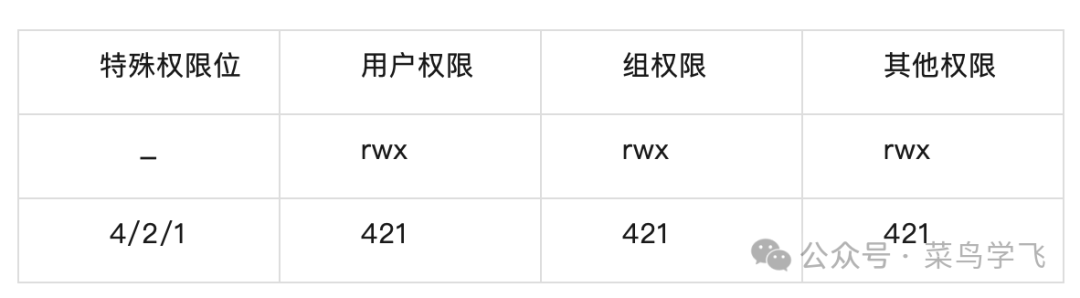
Let’s break it down bit by bit:
The first digit (special permission bit):
-
4 = SUID (Set User ID)
-
2 = SGID (Set Group ID)
-
1 = Sticky Bit
-
0 = No special permissions
The last three digits are the familiar rwx permissions.
There are two ways to set SUID, namely numeric and symbolic methods.
# Numeric method: add 4 before the permissionschmod 4755 myprogram# Symbolic method: add s permission to the ownerchmod u+s myprogramVerification of settings:
$ ls -l myprogram-rwsr-xr-x 1 root users 12345 Jan 15 10:30 myprogramApplication Scenarios and Usage of SUID
Scenario 1: User Self-Service Password Management
In an enterprise environment, it is impractical to contact the IT administrator every time a password expires. SUID allows users to manage their passwords independently.
$ ls -l /usr/bin/passwd-rwsr-xr-x 1 root root 68208 Jul 15 2021 /usr/bin/passwdNotice the magical ‘s’! It appears in the execute bit of the owner permissions, which is the hallmark of SUID. When the regular user cainiao executes the `passwd` command, the system detects that this file has the SUID bit set, so the program runs as root instead of cainiao, allowing modification of the password information in the `/etc/shadow` file. Let’s verify:
# Check shadow file permissions (only root can write)$ ls -l /etc/shadow-rw-r----- 1 root shadow 1285 Jan 15 10:30 /etc/shadow
# Direct modification by a regular user will be denied$ echo "test" >> /etc/shadowbash: /etc/shadow: Permission denied
# But the password can be changed through the passwd command$ passwdChanging password for cainiao.Current password: New password:
This is the power of SUID, enabling specific operations without granting excessive permissions to users. Besides `passwd`, these commands also utilize the SUID mechanism: `chfn` for modifying user information and `chsh` for changing the default shell. Let’s check their permissions:
$ ls -l /usr/bin/{passwd,chfn,chsh}-rwsr-xr-x 1 root root 68208 /usr/bin/passwd-rwsr-xr-x 1 root root 32128 /usr/bin/chfn -rwsr-xr-x 1 root root 28936 /usr/bin/chshScenario 2: Privileged Requirements for Network Tools
Regular users need to use the ping command to diagnose networks, but sending ICMP packets requires special permissions. Setting SUID on ping perfectly solves this issue, allowing any regular user to use the ping command.
$ ls -l /bin/ping-rwsr-xr-x 1 root root 64424 /bin/ping
# The ping command has SUID set, so regular users can use it normally$ ping google.comPING google.com (172.217.160.142): 56(84) bytes of data.
Scenario 3: Secure Service Deployment
Some services need to bind to privileged ports (<1024), but it is impractical for the root user to run the entire service every time. We want regular users to be able to perform this operation, so we set SUID on nginx.
# Set SUID on nginx (use with caution!)chown root:root /usr/sbin/nginxchmod 4755 /usr/sbin/nginx# A safer way is to use capabilitiessetcap 'cap_net_bind_service=+ep' /usr/sbin/nginxScenario 4: Usage of Database Management Tools
Create dedicated management tools for database administrators:
# Create a database backup script and set SUID#!/bin/bash# /usr/local/bin/db_backupmysqldump --all-databases > /backup/$(date +%Y%m%d).sql
# Set permissionschown root:dba /usr/local/bin/db_backupchmod 4750 /usr/local/bin/db_backup
In this way, users in the dba group can execute the backup, but the program runs with root permissions, ensuring sufficient access to all databases.
Security Precautions for SUID Applications
SUID is an important mechanism in Unix/Linux systems that balances security and usability, allowing regular users to safely perform privileged operations while keeping risks to a minimum. However, SUID is not absolutely secure; it also has potential risks, as dangerous SUID files may be exploited by malicious users. For example: if vim is set with SUID, a malicious user could directly edit sensitive files as root.
# -rwsr-xr-x 1 root root vimvim /etc/shadowTherefore, in daily work, it is necessary to take security precautions and proactively identify potential security risks.
1. Regularly check SUID files
As a system administrator, regularly checking SUID files is an important part of security auditing:
# Find all SUID filesfind / -perm -4000 -type f 2>/dev/null# Results may include:/usr/bin/passwd/usr/bin/sudo/usr/bin/su/usr/bin/ping/usr/bin/mount2. Monitor for abnormal SUID files
Experienced administrators will establish a “whitelist” of SUID files and regularly check for any new suspicious files. If suspicious files are found, they should be addressed promptly.
# Create a list of SUID filesfind / -perm -4000 -type f 2>/dev/null > suid_baseline.txt
# Regularly compare and checkfind / -perm -4000 -type f 2>/dev/null > suid_current.txtdiff suid_baseline.txt suid_current.txt
3. Audit permissions for specific users
Regularly check if a regular user has any abnormal SUID programs, as regular users typically should not own SUID files.
# Find all SUID files owned by regular user cainiao find / -user cainiao -perm -4000 -ls 2>/dev/null4. Monitor changes to SUID files
Some malicious attackers often exploit the SUID mechanism for privilege escalation, so monitoring changes to SUID files is an important security measure. Here are some sample scripts for monitoring changes to SUID files.
# Script to monitor changes to SUID files#!/bin/bashBASELINE="/etc/security/suid_baseline"CURRENT="/tmp/suid_current"# Generate current SUID file listfind / -perm -4000 -type f 2>/dev/null | sort > $CURRENT# Compare with baselineif [ -f $BASELINE ]; then NEW_FILES=$(comm -13 $BASELINE $CURRENT) if [ ! -z "$NEW_FILES" ]; then echo "Warning: New SUID files found!" echo "$NEW_FILES" # Send alert email or log fi fiSUID elegantly solves many challenges in Linux permission management, keeping the system secure while providing necessary flexibility. Like an experienced doorman, it knows when to be lenient and when to be strict. However, like all powerful tools, SUID must be used with caution. Each SUID file is a potential security risk point, and while enjoying its convenience, we must remain vigilant, regularly auditing to ensure system security.
That concludes today’s sharing. Thank you for reading this far. I will continue to share special permissions for files in Linux, so stay tuned. Finally, here is an overview of special permissions for files in Linux, which is the first article in this series for your reference.
Overview of Special Permissions in Linux Files (Part 1): SUID, SGID, Sticky Bit