A complete explanation of the basic knowledge of C language files — “Create, Flush, Seek, Read, Write”, recommended for collection.
| 1. Introduction to the essence of C files |
| 2. Overview of core APIs |
| 3. File creation API |
| 4. Disk flush API |
| 5. File pointer API |
| 6. File read API |
| 7. File write API |
0. C File Knowledge Points
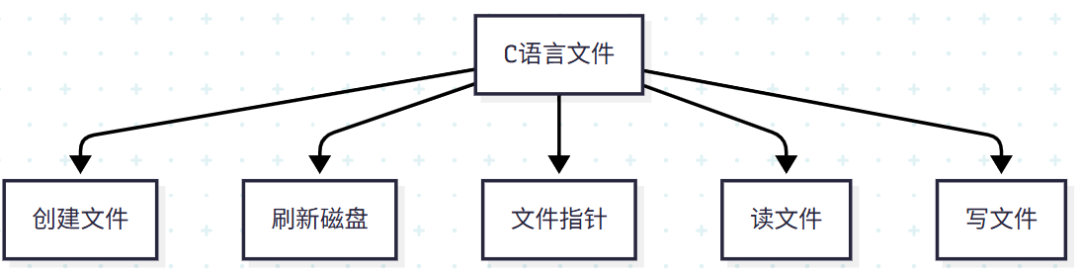
If you thoroughly understand the above 5 knowledge points, you will have completely mastered C files!
1. Essence of C Files
A file is essentially a binary storage area on the disk. When we operate on a file, we first read the file from the disk into the high-speed buffer of physical memory, and then the CPU reads and writes data in that area according to the actual commands, followed by triggering the write disk command to flush the data to the disk.
2. Overview of Core APIs
| Function | ||||
|---|---|---|---|---|
| 1. Create File | fopen | |||
| 2. Flush Disk | fflush | |||
| 3. Close File | fclose | |||
| 4. File Pointer | ftell | fseek | rewind | |
| 5. Write File | fwrite | fputc | fputs | fprintf |
| 6. Read File | fread | fgetc | fgets | fscanf |
3. File Creation
1. fopen
| API Name | fopen |
| Signature | FILE *fopen(const char *filename, const char *mode); |
| Signature Explanation | Open the file at the specified path filename in the specified mode (mode) and return a pointer to this file. |
| Notes | The value of mode determines how the file is opened, detailed as follows:Detailed explanation of modes for C language file operations. |
4. Flush Disk
1. Explicit Flush — fflush
| API Name | fflush |
| Function Prototype | int fflush(FILE *stream); |
| Function Description | Force the data in the buffer to be written to the corresponding file or stream. For output streams, it immediately writes the data in the buffer to the file; for input streams, its behavior depends on the specific implementation (standard C does not specify, but it is usually used to clear the input buffer). |
| Return Value | – Returns <span>0</span> on success. – Returns <span>EOF</span> on error, and sets <span>errno</span>. |
| Parameter Explanation | <span>stream</span>: A pointer to the <span>FILE</span> object representing the stream to be flushed. If it is <span>NULL</span>, it flushes all open output streams. |
| Note 1 | 1. File operations in C rely on buffers; without a flush operation, data cannot be persisted to the disk. |
| Note 2 | 2. Process termination, modification of file pointers, etc., often implicitly trigger fflush, which is why data appears on the disk even when fflush seems not to have been called. For details, see implicit flush: |
2. Implicit Flush
For specific implicit triggers, please click here:Summary of behaviors that trigger flush to disk in C language.
5. File Pointer
Since files are mediated by high-speed buffers, the file pointer points to this memory area. Its core APIs are as follows:
| Operation | Core API |
|---|---|
| 1.Return Internal Offset of File | ftell |
| 2.Specify File Offset | fseek |
| 3.Reset File Pointer to Start | rewind |
1. ftell
Function: Returns the internal offset of the file (file internal pointer)
| Signature | long ftell(FILE *_File) |
| Return Value | Returns the offset of the internal pointer from the beginning of the file. |
| Explanation | Note that the value of FILE* fp remains unchanged, only the internal offset of the file pointer changes, similar to the relationship between an array address and its offset. |
2. fseek
Function:
<span>Move the internal file pointer</span>, moving to the position reached by moving a specified offset from a specified starting position.
Difference between Internal Pointer and File Pointer:
fseek() only modifies the internal position pointer (offset) of the file, and does not change the value of FILE fp itself (i.e., the memory address pointing to the FILE structure). Therefore, the fp address output by two printf statements remains the same.
| Signature | int fseek(FILE *stream, long offset, int whence); |
| Signature Explanation | offset is the offset; whence is the starting position, which can be SEEK_SET (beginning of file), SEEK_CUR (current position), or SEEK_END (end of file). |
| Return Value | Returns 0 on success; returns a non-zero value on error. |
| Notes | Automatic Movement: Note that any read or write operation will move the file pointer to the next unread character. This facilitates subsequent reading. |
3. rewind
Function: Resets the internal pointer to the beginning of the file.
| Signature | void rewind(FILE *stream); |
| Signature Explanation | Resets the file pointer to the beginning of the file and clears the end-of-file and error flags. |
| Return Value | No return value (void type). |
| Notes | 1. Equivalent to fseek(stream, 0, SEEK_SET); but also clears <span>feof</span> and <span>ferror</span> states.2. After execution, the file pointer points to the start of the file, and subsequent read and write operations start from the beginning.3. Commonly used in scenarios where the entire file content needs to be re-read, such as when looping through file data. |
#include <stdio.h>

int main(void)
{
    FILE *fp = fopen("C:\\Users\\29001\\Desktop\\file.txt", "w+");
    printf("%p,%d\n", fp/*Address of the file structure itself*/, ftell(fp)/*Get the offset of the internal file pointer*/);
    fseek(fp, 1000, SEEK_SET);//Move the internal file pointer
    printf("%p,%d\n", fp, ftell(fp));
    rewind(fp);//Reset
    printf("%p,%d\n", fp, ftell(fp));
    return 0;
}
Output
00007FFA0CC78A90,0
00007FFA0CC78A90,1000
00007FFA0CC78A90,0
6. File Write API
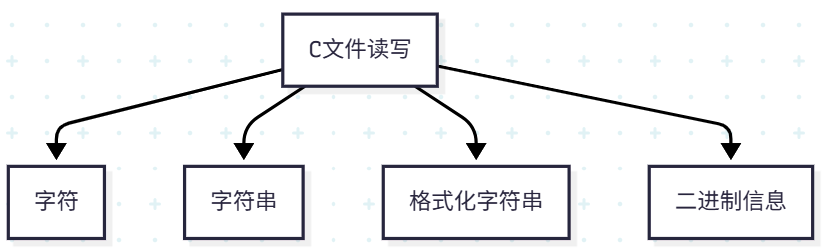
Classification of C language file read and write