Click the blue “Yikou Linux” in the upper left corner, and select “Set as Favorite“
Get the latest technical articles first

☞【Technical】Learning Path for Embedded Driver Engineers
☞【Technical】Linux Embedded Knowledge Points - Mind Map - Free Access
☞【Employment】A Comprehensive Project Based on Linux IoT for Your Resume
☞【Employment】Resume Template
Embedded system development often requires the use of command line functionalities, such as the U-Boot command line.
The command line can increase the flexibility of program execution, facilitate debugging, and significantly improve our development efficiency.
This article teaches you how to implement a simple command line module through a straightforward example,
which can be easily ported to your own C projects.
For the complete source code, see the end of the article.
1. Design Philosophy
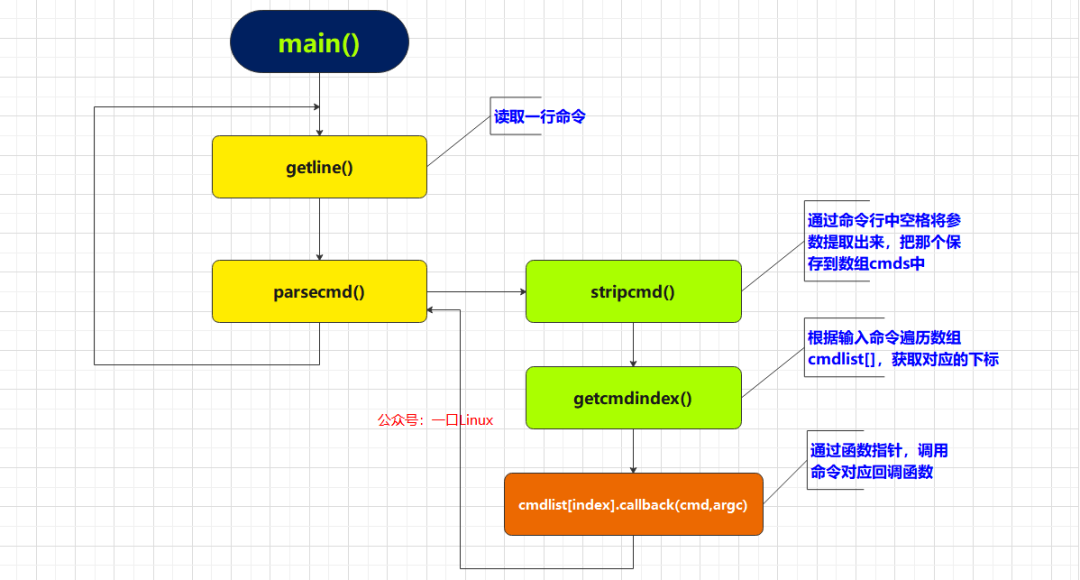
2. Implementation
1. Structure
We use the structure struct _cmdnum to maintain the command-related information supported by the module.
typedef void (* CMDFUNC)(char [][256],int argc);
typedef struct _cmdnum{
    char *cmd;
    int index;
    int paramcount;
    CMDFUNC callback;
    char *info;
}CMDNUM,*PCMDNUM;
| Member | Meaning |
|---|---|
| char *cmd | Command name |
| int index | Command index |
| int paramcount | Number of command parameters |
| CMDFUNC callback | Callback function corresponding to the command |
2. Supported Commands
This example adds four commands:
| Function | Number of Parameters | Callback Function | |
|---|---|---|---|
| help | Displays all command information | 0 | showhelp() |
| exit | Exits the current process | 0 | quit() |
| test | Prints all parameter information, for testing | 3 | test() |
| send | Converts the input hexadecimal string to a hexadecimal integer and stores it in an array | MAX_PARAM_NUM | send() |
Defined as follows:
CMDNUM cmdlist[] =
{
    {"help",1,0,showhelp},
    {"exit",2,0,quit},
    {"test",3,3,test},
    {"send",4,MAX_PARAM_NUM,send},
};
3. Related Functions
1. getline()
#include <stdio.h>
ssize_t getline(char **lineptr, size_t *n, FILE *stream);
Reads a line of data from the file stream stream, saving the result to *lineptr, including the terminating null character and newline character.
2. parsecmd()
void parsecmd(char *s)
Parses the command line content, mainly implemented through the functions stripcmd/getcmdindex.
- stripcmd
int stripcmd(char *s,char cmds[][256])
Utilizes the library function strtok to split the parameters in the command line s by spaces, extracting parameters and storing them in the two-dimensional array **char cmds[256]**.
- getcmdindex
int getcmdindex(char *name)
Traverses the array cmdlist[] using the command name name to obtain the array index.
4. Core Code
CMDNUM cmdlist[] =
{
    {"help",1,0,showhelp,"show all cmd info"},
    {"exit",2,0,quit,"quit application"},
    {"test",3,3,test,"[param...]print params"},
    {"send",3,MAX_PARAM_NUM,senddata,"[xx...]converts data from string to hex and store to buf"},
};

void parsecmd(char *s)
{
char cmd[MAX_PARAM_NUM][256];
int argc = 0;
int index = -1;

 argc = stripcmd(s,cmd);

//printf("argc=%d\n",argc);
 index=getcmdindex(cmd[0]);
if(index == -1)
 {
if(argc>0)
  {
   cprintf(RED,"\tNo such command \n");
  }
return;
 }
elseif(argc>0)
 {
  cmdlist[index].callback(cmd,argc);
 }
}

UINT8 hex2char(UINT8 ch)
{
if ((ch >= '0') && (ch <= '9')) {return ch - '0';}
if ((ch >= 'a') && (ch <= 'f')) {return ch - 'a' + 10;}
if ((ch >= 'A') && (ch <= 'F')) {return ch - 'A' + 10;}
return (UINT8)0xff;
}

UCHAR stringToByte(char* str)
{
 UCHAR bytes = 0;

if(strlen(str)==1)
 {
  bytes= 0 << 4 | hex2char(str[0]);
 }else
 {
  bytes= hex2char(str[0]) << 4 | hex2char(str[1]);
 }

return bytes;
}
//7e 01 02 01 00 07 07 01 00 00 00 c6 51 2a 7e

void senddata(char argv[][256],int argc)
{
int i = 0;
int len = 0;
 UCHAR buf[256] = {0};

if(argc < 2)
 {
return;
 }
for(i=1;i<argc;i++)
 {
   buf[i-1] = stringToByte(argv[i]);
 }
cprintf(GREEN,"\n  buf:");
for(i=0;i<argc-1;i++)
 {
cprintf(GREEN,"%02x ",buf[i]);
}
putchar('\n');

}
void test(char argv[][256],int argc)
{
int i = 0;

for(i=0;i<argc;i++)
 {
cprintf(YEL,"\targv[%d]:%s\n",i,argv[i]);
}

return;
}
void showsysinfo(void)
{
cprintf(D_GREEN_H,"---------------yikoulinux cmdline demo-----------\n");
}
void quit(char cmd[][256],int argc)
{
cprintf(RED_H,"exit to system \n");
    exit(0);
}

void showhelp(char cmd[][256],int argc)
{
int i = 0;

for(i=0;i<sizeof(cmdlist)/sizeof(CMDNUM);i++)
 {
    cprintf(GREEN_H,"\t%s",cmdlist[i].cmd);
  cprintf(YEL_H,"\t%s\n",cmdlist[i].info);
 }
return ;
}

int main(int argc, char* argv[])
{
    char *line;
    int ret = 0;
size_t len_line = 0;

    showsysinfo();

while(1)
 {
  fflush( stdin );
  cprintf(D_GREEN_H,DEV_NAME"# ");

  ret = getline(&line, &len_line, stdin);
if(ret == -1)
  {
   break;
  }
  parsecmd(line);
free(line);
  line = NULL;
 }

    return 0;
}
3. Testing
1. help

2. test

3. send

4. exit

4. Source Code Access
Reply in the public account:cmd
Or add Yikou Jun as a friend. Additionally:
All basic knowledge of C language and example codes are compiled into a PDF document【Regularly Updated】
end
Yikou Linux
Follow, reply 【1024】 to receive a wealth of Linux materials
Collection of Wonderful Articles
Article Recommendations
☞【Collection】ARM☞【Collection】Fan Q&A☞【Collection】All Originals☞【Collection】LinuxGetting Started☞【Collection】Computer Networks☞【Collection】Linux Drivers☞【Technical】Learning Path for Embedded Driver Engineers☞【Technical】All Knowledge Points of Linux Embedded – Mind Map