Using macros as feature switches during compilation is a common practice in C++. Below is a simple example (this example is not simple enough; in fact, it could be done with just one source file. However, for the sake of demonstration, two files are used here).The content of the first source file name.cpp is as follows:
// File src/name.cpp

#include <string>

std::string GetName() {
#ifdef CPP_FANTASY_CHINESE
    return "C++幻想";
#else
    return "c++ fantasy";
#endif
}
The content of the second source file main.cpp is as follows:
// File src/main.cpp

#include <iostream>

#include <string>

// No header file is written this time -- providing the declaration of the GetName function
// The declaration method below is more cumbersome in practical use than writing a header file
// 1. If there are multiple source files, each source file must write this declaration once
//    If the prototype of the GetName function needs to be modified, it will be more troublesome
// 2. Here, the GetName function uses std::string type
//    This requires an additional include <string>; each source file that needs to use the GetName function must also include it
// Therefore, the following writing method is not recommended
std::string GetName();

const char* GetLabel() {
#ifdef CPP_FANTASY_CHINESE
    return "C++幻想";
#else
    return "c++ fantasy";
#endif
}

int main(int argc, char* argv[]) {
    std::cout << "Label: " << GetLabel() << std::endl;
    std::cout << "Name: " << GetName() << std::endl;
    return 0;
}
Of course, we also need a CMakeLists.txt file, which contains:
# File src/CMakeLists.txt

cmake_minimum_required(VERSION 3.21)

project(demo-4)

set(CMAKE_CXX_STANDARD 17)
set(CMAKE_CXX_STANDARD_REQUIRED ON)

add_executable(test main.cpp name.cpp)
The project file structure is as follows: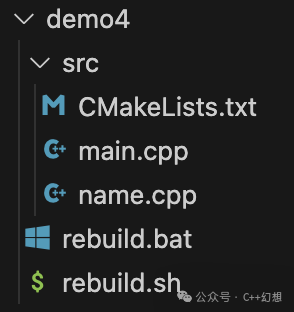 After compilation (refer to Appendix 1 for compilation methods), running the compiled product — test (or test.exe, for convenience, we will just use test), the output is:
Label: c++ fantasy
Name: c++ fantasy
This output is as expected because the macro CPP_FANTASY_CHINESE is not defined.Next, let’s modify the CMakeLists.txt file to demonstrate how to define macros.The content of the CMakeLists.txt file is as follows:
# File src/CMakeLists.txt

cmake_minimum_required(VERSION 3.21)

project(demo-4)

set(CMAKE_CXX_STANDARD 17)
set(CMAKE_CXX_STANDARD_REQUIRED ON)

add_executable(test main.cpp name.cpp)

# add_definitions(-DCPP_FANTASY_CHINESE)
# The above line, if not commented out, indicates that all compilation targets will add the macro CPP_FANTASY_CHINESE definition
# Although in this example there is only one compilation target -- test
# CMake can configure multiple compilation targets.
# Here, a compilation target refers to executable programs, dynamic libraries, and static libraries, etc.
# Therefore, using add_definitions is not recommended -- it affects all compilation targets

# add_compile_definitions(-DCPP_FANTASY_CHINESE)
# In addition to add_definitions, add_compile_definitions can also be used
# add_compile_definitions has been supported since 3.12
# The above definition of the macro has a prefix -D
# add_compile_definitions can be used without this prefix, like this:
# add_compile_definitions(CPP_FANTASY_CHINESE)
# add_definitions and add_compile_definitions can define multiple macros at the same time
# separated by spaces -- in CMake syntax, parameters are usually separated by spaces
# The following line defines two macros CPP_FANTASY_CHINESE and CPP_FANTASY_ENGLISH
# add_compile_definitions(CPP_FANTASY_CHINESE CPP_FANTASY_ENGLISH)
# add_compile_definitions also affects all compilation targets, so it is not recommended

target_compile_definitions(test PUBLIC CPP_FANTASY_CHINESE)
# The only difference between target_compile_definitions and add_compile_definitions is that
# target_compile_definitions only affects one target -- which is the first parameter (in the above example, it is test)
# The second parameter is assumed to be fixed PUBLIC -- this will be introduced later when discussing compilation targets as library files
# The following parameters are the same as add_compile_definitions -- including the optional omission of -D
# Note: target_compile_definitions only affects a single target
# If there are two targets: test1 and test2, then it needs to be written twice:
# target_compile_definitions(test1 PUBLIC CPP_FANTASY_CHINESE)
# target_compile_definitions(test2 PUBLIC CPP_FANTASY_CHINESE)
# It can sometimes feel cumbersome, in which case consider using add_compile_definitions or add_definitions
There are many comments, and the explanations are in the comments; in fact, the real source code only adds one line. (After compilation) let’s look at the running result of test again:
Label: C++幻想
Name: C++幻想
Now, we can see that both cpp source files have detected the definition of the macro CPP_FANTASY_CHINESE defined.Next, let’s modify name.cpp, and the modified content is as follows:
// File src/name.cpp

#include <string>

// Add the following segment
// The meaning is, if the macro CPP_FANTASY_CHINESE is defined
// then cancel the definition of this macro -- equivalent to undefined
#ifdef CPP_FANTASY_CHINESE
#undef CPP_FANTASY_CHINESE
#endif

std::string GetName() {
#ifdef CPP_FANTASY_CHINESE
    return "C++幻想";
#else
    return "c++ fantasy";
#endif
}
(After compilation) let’s look at the running result of test again:
Label: C++幻想
Name: c++ fantasy
This indicates that when compiling the GetLabel function (in the main.cpp file), it is considered that the macro CPP_FANTASY_CHINESE is defined; when compiling the GetName function (in the name.cpp file), it is considered that the macro CPP_FANTASY_CHINESE is not defined.We know this is because before compiling the GetName function, we canceled the definition of the macro CPP_FANTASY_CHINESE. Now consider a question: does the order of compiling name.cpp and main.cpp have an impact? This means that since the definition of the macro CPP_FANTASY_CHINESE has been canceled during the compilation of name.cpp, will it not be defined when compiling main.cpp?But in fact, it is not the case. The compilation of any two cpp files is independent; the impact of the environment during the compilation of a cpp file is only valid during that file’s compilation. In fact, most compilation tools can compile in parallel using multiple threads (each thread compiles one cpp file).Appendix:Appendix 1The content of the scripts rebuild.sh and rebuild.bat used for compilation refers to the introduction to CMake.Appendix 2This article belongs to the (CMake) collection, which will gradually discuss the usage of CMake. If it has been discussed previously, it will not be repeated here. Therefore, if you have any questions about the content in this CMakeLists.txt file, please refer to the previous articles.Appendix 3In the scripts rebuild.sh and rebuild.bat, the command cmake -B followed by the parameter: -DCMAKE_BUILD_TYPE= $BUILD_TYPE should be distinguished from the macro definitions in this chapter. Here, CMAKE_BUILD_TYPE is not a macro in cpp, but a variable in CMake.Appendix 4This chapter demonstrates how to define macros in CMake, but in C++, macros can define values. CMake can also do this. For example, in CMakeLists.txt:
target_compile_definitions(test PUBLIC MY_NUMBER=10)
Which is equivalent to in C++:
#define MY_NUMBER 10