1. Introduction
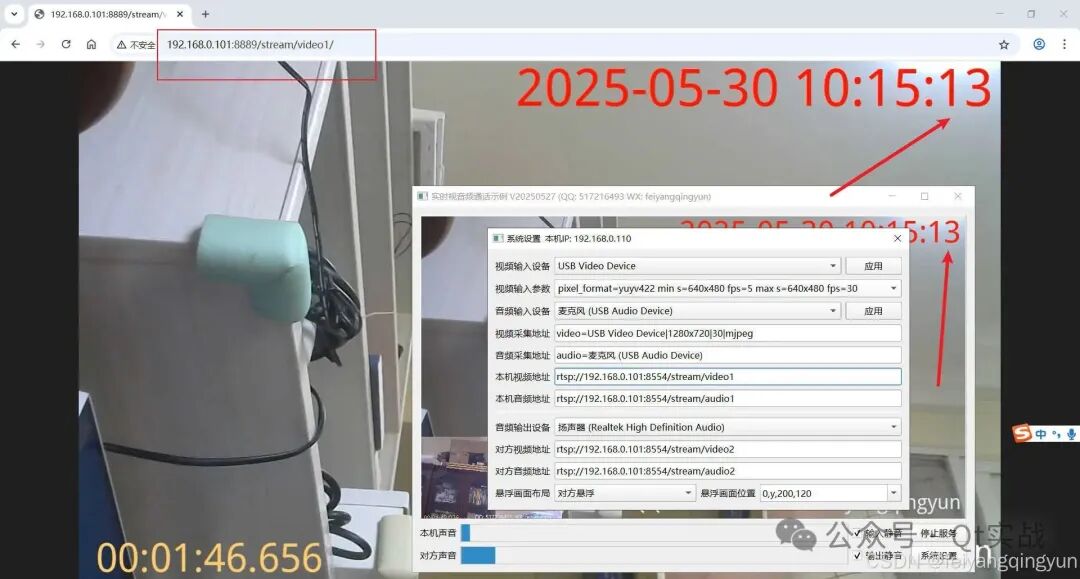
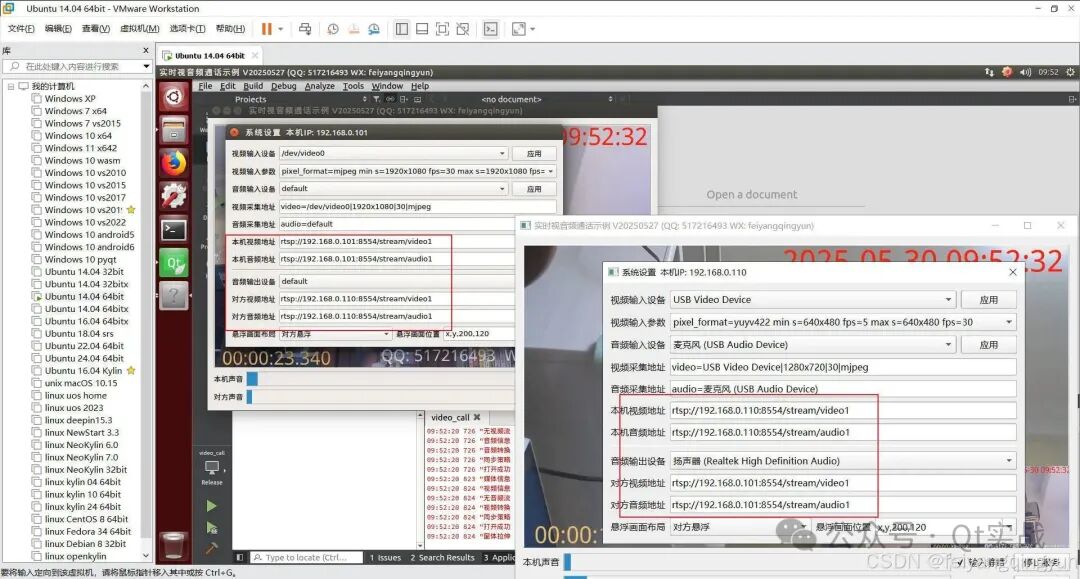
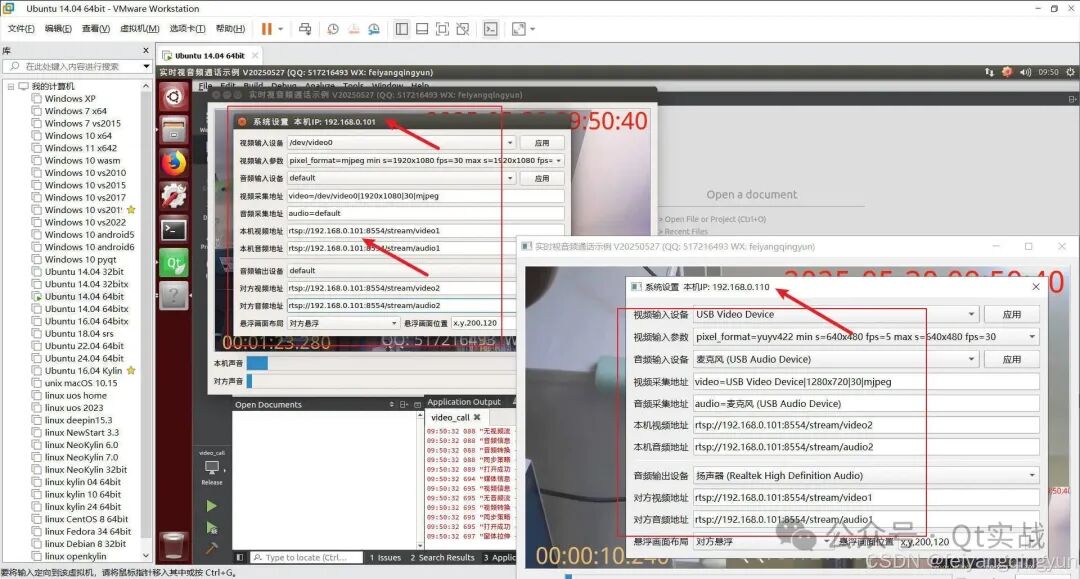
Recently, several requests have come in for audio and video calling solutions. Many people choose to use WebRTC, which is indeed a good option, but it has too many dependencies and a large amount of related component code, making development difficult. Therefore, we ultimately opted for our own solution, which involves streaming and pulling streams. The capturing end is responsible for collecting the local camera or desktop, encoding, and streaming to the media server. Then, to pull the audio and video from the other party, one simply needs to play the corresponding RTSP address; it can also be an RTMP address, etc. Generally, media server programs also provide various HTTP/FLV formats for pulling streams, facilitating various scenario requirements, such as directly playing FLV or WebRTC streams on a webpage.
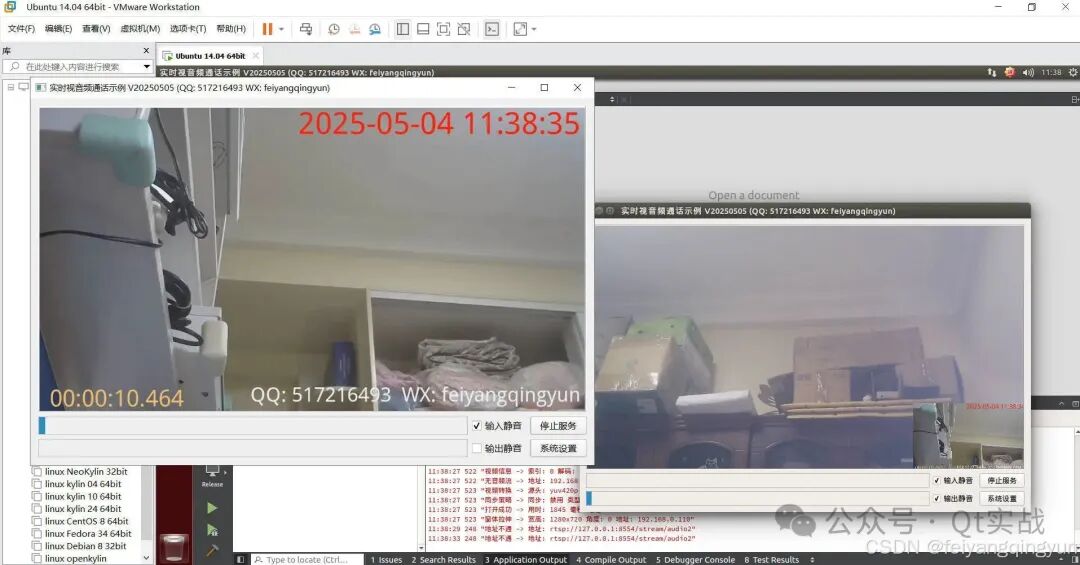
To make usage more convenient, we have specifically added customizable floating screen positions, allowing specification of the top left, top right, bottom left, bottom right, custom positions, and sizes. It also supports a fixed picture-in-picture function, allowing the main screen and floating window to be swapped, and layout options such as left-right arrangement can be set. Considering the actual needs of customers, it also supports customizable watermarks, including text and image watermarks, with support for multiple watermarks at any specified position.
2. Effect Diagrams
3. Related Code
#include "frmconfig.h"
#include "frmmain.h"
#include "ui_frmmain.h"
#include "qthelper.h"
#include "apphelper.h"
#include "osdgraph.h"
#include "ffmpegthread.h"
#include "ffmpegthreadcheck.h"

frmMain::frmMain(QWidget *parent):QWidget(parent),ui(new Ui::frmMain)
{
    ui->setupUi(this);
    this->initForm();
    this->installEventFilter(this);
    QMetaObject::invokeMethod(this,"formChanged", Qt::QueuedConnection);
}

frmMain::~frmMain()
{
    delete ui;
}

void frmMain::savePos()
{
    AppConfig::FormMax =this->isMaximized();
    if(!AppConfig::FormMax){
        AppConfig::FormGeometry =this->geometry();
    }
    AppConfig::writeConfig();
}

bool frmMain::eventFilter(QObject *watched, QEvent *event)
{
    // Record window position when size changes or window moves
    int type = event->type();
    if(type == QEvent::Resize || type == QEvent::Move){
        QMetaObject::invokeMethod(this,"savePos", Qt::QueuedConnection);
    } else if(type == QEvent::Close){
        audioInput->stop(false);
        audioOutput->stop(false);
        exit(0);
    }

    // Adjust small preview window position when size changes
    if(this->isVisible() && type == QEvent::Resize){
        this->formChanged();
    }

    return QWidget::eventFilter(watched, event);
}

void frmMain::initForm()
{
    // Initialize input and output video controls
    int decodeType = AppConfig::DecodeType;
    AppHelper::initVideoWidget(ui->videoInput, decodeType);
    AppHelper::initVideoWidget(ui->videoOutput, decodeType);

    // Initialize input and output audio threads
    audioInput = new FFmpegThread(this);
    audioOutput = new FFmpegThread(this);
    checkInput = new FFmpegThreadCheck(audioInput, this);
    AppHelper::initAudioThread(audioInput, ui->levelInput, decodeType);
    AppHelper::initAudioThread(audioOutput, ui->levelOutput, decodeType);

    // Start streaming immediately after input opens successfully
    connect(audioInput, SIGNAL(receivePlayStart(int)), this, SLOT(receivePlayStart(int)));
    connect(ui->videoInput, SIGNAL(sig_receivePlayStart(int)), this, SLOT(receivePlayStart(int)));

    ui->ckInput->setChecked(AppConfig::MuteInput ? Qt::Checked : Qt::Unchecked);
    ui->ckOutput->setChecked(AppConfig::MuteOutput ? Qt::Checked : Qt::Unchecked);
    if(AppConfig::StartServer){
        on_btnStart_clicked();
    }
}

void frmMain::clearLevel()
{
    ui->levelInput->setLevel(0);
    ui->levelOutput->setLevel(0);
}

void frmMain::formChanged()
{
    AppHelper::changeWidget(ui->videoInput, ui->videoOutput, ui->gridLayout, NULL);
}

void frmMain::receivePlayStart(int time)
{
    QObject *obj = sender();
    if(obj == ui->videoInput){
        #ifdef betaversion
        OsdGraph::testOsd(ui->videoInput);
        #endif
        ui->videoInput->recordStart(AppConfig::VideoPush);
    } else if(obj == audioInput){
        audioInput->recordStart(AppConfig::AudioPush);
    }
}

void frmMain::on_btnStart_clicked()
{
    if(ui->btnStart->text() == "Start Service"){
        if(AppConfig::VideoUrl == "video=" || AppConfig::AudioUrl == "audio="){
            QtHelper::showMessageBoxError("Please open system settings first and select the corresponding audio and video devices.");
        }

        ui->videoInput->open(AppConfig::VideoUrl);
        ui->videoOutput->open(AppConfig::VideoPull);
        audioInput->setMediaUrl(AppConfig::AudioUrl);
        audioOutput->setMediaUrl(AppConfig::AudioPull);
        audioInput->play();
        audioOutput->play();
        checkInput->start();
        ui->btnStart->setText("Stop Service");
    } else {
        ui->videoInput->stop();
        ui->videoOutput->stop();
        audioInput->stop();
        audioOutput->stop();
        checkInput->stop();
        ui->btnStart->setText("Start Service");
        QMetaObject::invokeMethod(this,"clearLevel", Qt::QueuedConnection);
    }

    AppConfig::StartServer = (ui->btnStart->text() == "Stop Service");
    AppConfig::writeConfig();
}

void frmMain::on_btnConfig_clicked()
{
    static frmConfig *config = NULL;
    if(!config){
        config = new frmConfig;
        connect(config, SIGNAL(formChanged()), this, SLOT(formChanged()));
    }

    config->show();
    config->activateWindow();
}

void frmMain::on_ckInput_stateChanged(int arg1)
{
    bool muted = (arg1 != 0);
    audioInput->setMuted(muted);
    AppConfig::MuteInput = muted;
    AppConfig::writeConfig();
}

void frmMain::on_ckOutput_stateChanged(int arg1)
{
    bool muted = (arg1 != 0);
    audioOutput->setMuted(muted);
    AppConfig::MuteOutput = muted;
    AppConfig::writeConfig();
}
4. Related Links
- Domestic site:https://gitee.com/feiyangqingyun
- International site:https://github.com/feiyangqingyun
- Personal works:https://blog.csdn.net/feiyangqingyun/article/details/97565652
- File address:https://pan.baidu.com/s/1d7TH_GEYl5nOecuNlWJJ7g Extraction code: 01jf File name: bin_video_call.
5. Features
- Supports real-time audio and video calls over LAN and the internet, with extremely low latency and resource usage.
- Automatically retrieves all local audio and video input devices, listing all supported resolutions, frame rates, and capture formats for local camera devices.
- Allows specification of the video and audio input devices, with flexible combinations; video devices can be set to different resolutions, frame rates, and capture formats.
- Supports capturing the local desktop screen as a video device, with support for multiple screens and automatic recognition of screen resolutions.
- Allows selection of different sound card devices for audio playback.
- Built-in automatic reconnection mechanism, with hot-plug support for audio and video devices.
- Supports fixed picture-in-picture functionality, allowing the main screen and floating window to be swapped, and layout options such as left-right arrangement can be set.
- Customizable floating screen positions, allowing specification of the top left, top right, bottom left, bottom right, custom positions, and sizes.
- Built-in media server program, which automatically starts the media service and streams upon program startup.
- Audio and video stream data supports RTSP/RTMP/HTTP/WebRTC methods for pulling streams, allowing video display to be opened directly on a webpage.
- Real-time display of local audio amplitude and remote volume amplitude, with separate mute settings for input and output volume, facilitating testing.
- Supports customizable watermarks, including text and image watermarks, with support for multiple watermarks at any specified position.
- Supports different combinations of audio and video devices, such as a local camera with a computer microphone instead of the camera’s microphone, or a local computer desktop screen with the camera’s microphone, etc.
- Written in pure Qt + FFmpeg, supporting Windows, Linux, and macOS systems, compatible with all Qt versions, all systems, and all compilers.
- Supports embedded Linux boards and Raspberry Pi, Orange Pi, etc., as well as domestic Linux systems.