Ansible Task Delegation
Task Delegation
Let’s discuss two scenarios:
- • Deploying a K8S cluster using Ansible (assuming using
<span>kubeadm</span>to initialize the cluster). The Playbook will first perform initialization configuration on the<span>all</span>host group (installing packages, setting<span>sysctl</span>,<span>selinux</span>, etc.), and then it needs to execute<span>kubeadm init</span>on one node to start the cluster, but this command only needs to be executed once and does not need to be executed on all nodes. - • Configuring a load balancing cluster requires adding backend server information on the load balancer node, which needs to be executed on the load balancer node.
For these two scenarios, Ansible provides a delegation feature, which allows tasks originally meant to be executed on other nodes to be delegated to a specific host, as detailed in the figure below:
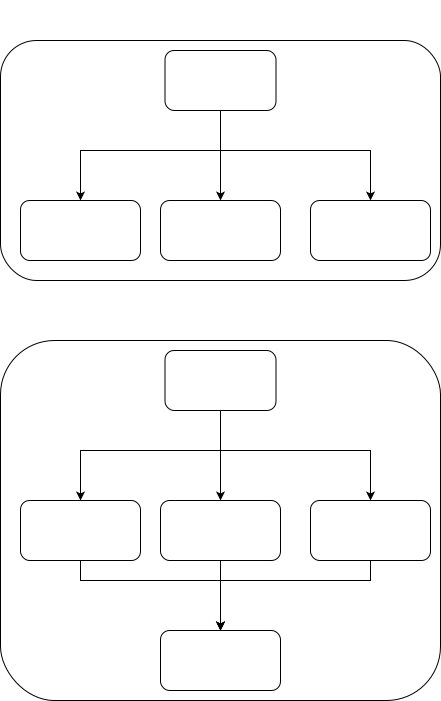
Taking the <span>ansible.builtin.shell</span> module as an example, by default, the module will execute on all controlled nodes. If delegation is used, tasks that should have been executed on three nodes will all be executed on the delegated node.
Delegating All Tasks to One Node
Let’s look at the following YAML:
- name: test delegate_to
  hosts: all
  gather_facts: true
  tasks:
  - name: delegate_to command
    ansible.builtin.command: "echo {{ ansible_facts.hostname }}"
    delegate_to: servera
    register: delegate_to
  - name: debug
    ansible.builtin.debug:
      var: delegate_to.stdout
  - name: delegate_to shell
    ansible.builtin.shell: "echo {{ ansible_facts.hostname }} >> /tmp/testlog"
    delegate_to: servera
This example delegates the <span>ansible.builtin.command</span> to <span>servera</span>. If there are three hosts: <span>servera</span>, <span>serverb</span>, and <span>serverc</span>, the output will be as follows:
[root@study ansible]# ansible-playbook delegate.yml

PLAY [test delegate_to] *******************************************************************************************************************************************

TASK [Gathering Facts] ********************************************************************************************************************************************
ok: [serverb]
ok: [servera]
ok: [serverc]

TASK [delegate_to command] ****************************************************************************************************************************************
changed: [servera]
changed: [serverb -> servera]
changed: [serverc -> servera]

TASK [debug] ******************************************************************************************************************************************************
ok: [servera] => {
    "delegate_to.stdout": "servera"
}
ok: [serverc] => {
    "delegate_to.stdout": "serverc"
}
ok: [serverb] => {
    "delegate_to.stdout": "serverb"
}

TASK [delegate_to shell] ******************************************************************************************************************************************
changed: [serverc -> servera]
changed: [servera]
changed: [serverb -> servera]

PLAY RECAP ********************************************************************************************************************************************************
servera                    : ok=4    changed=2    unreachable=0    failed=0    skipped=0    rescued=0    ignored=0
serverb                    : ok=4    changed=2    unreachable=0    failed=0    skipped=0    rescued=0    ignored=0
serverc                    : ok=4    changed=2    unreachable=0    failed=0    skipped=0    rescued=0    ignored=0

[root@study ansible]# ssh servera cat /tmp/testlog
serverc
servera
serverb
As we can see, the tasks were executed on <span>servera</span>, but the variables used were still from the original controlled nodes. Checking the delegated node’s <span>/tmp/testlog</span> also shows the hostnames of all three nodes, so it is possible to execute all tasks on one node through delegation.
Not all modules are suitable for delegation. For example, the
<span>ansible.builtin.copy</span>module will only copy files to the delegated node when using delegation. (To achieve file copying from the delegated host to other nodes, you can use<span>ansible.posix.synchronize</span>.)
Delegation will by default execute all tasks on the delegated node, but sometimes we only want a task to execute once (for example, we only want to execute a command once on a specific node using
<span>ansible.builtin.command</span>), in which case we need to use<span>run_once</span>, as shown below.
Execute a Command Only Once on a Specific Node
<span>delegate_to</span> can be combined with <span>run_once</span> to execute a command only once on a specific node. Let’s look at the following YAML:
- name: test delegate_to
  hosts: all
  become: true
  gather_facts: false
  tasks:
  - name: file delegate to servera
    ansible.builtin.file:
      path: /tmp/hostlist
      state: touch
    delegate_to: servera
    run_once: true
  - name: lineinfile delegate to servera
    ansible.builtin.lineinfile:
      path: /tmp/hostlist
      line: "{{ inventory_hostname }}"
    delegate_to: servera
  - name: shell delegate to servera
    ansible.builtin.shell:
      cmd: "echo 'test kubeadm init' > /tmp/kubeadm.log"
    delegate_to: servera
    run_once: true
Here, we replace <span>echo 'test kubeadm init' > /tmp/kubeadm.log</span> with a command that only needs to be executed on the first node, while the other nodes do not need to execute it, hence we added <span>run_once: true</span>.
Local Execution of Delegation
If you want to execute delegated tasks on the control node, you can use <span>local_action</span>, which is equivalent to <span>delegate_to: localhost</span>.
- name: file delegate to localhost
  ansible.builtin.file:
    path: /tmp/log
    state: touch
  delegate_to: localhost
  run_once: true
- name: lineinfile delegate to localhost
  ansible.builtin.lineinfile:
    path: /tmp/log
    line: "{{ inventory_hostname }}"
  delegate_to: localhost

# The effect is the same

- name: file with local_action
  local_action:
    module: ansible.builtin.file
    path: /tmp/log
    state: touch
- name: lineinfile with local_action
  local_action: ansible.builtin.lineinfile path=/tmp/log line="{{ inventory_hostname }}"

# The above can also be written in the following format

- name: file with local_action
  local_action:
    module: ansible.builtin.file
    path: /tmp/log
    state: touch
- name: lineinfile with local_action
  local_action:
    module: ansible.builtin.lineinfile
    path: /tmp/log
    line: "{{ inventory_hostname }}"
Fact Delegation
Fact delegation allows the output of <span>ansible_facts</span><span> from nodes not in the execution scope to be sent to other nodes. For example:</span>
The following Playbook only executes tasks on the <span>webserver</span> host group, but one task needs to use variables from the <span>dbserver</span> host group. Since the <span>dbserver</span> host group is not in the execution scope, the fact variables from the <span>dbserver</span> group cannot be accessed by default, so we need to use <span>delegate_facts: true</span> to delegate the <span>dbserver</span> fact variables to the <span>webserver</span> host group.
- name: test delegate_facts
  hosts: webserver
  become: true
  gather_facts: true
  tasks:
  - name: file delegate to servera
    ansible.builtin.setup:
    delegate_to: "{{ item }}"
    delegate_facts: true
    loop: "{{ groups['dbserver'] }}"
  - name: print hostname from dbserver groups
    debug:
      var: hostvars['{{ item }}']['ansible_facts'].hostname
    loop: "{{ groups['dbserver'] }}"
  - name: print hostname with delegate
    debug:
      var: ansible_facts.hostname
    delegate_to: servera
By default, <span>ansible_facts.hostname</span><span> will only print the information of the node where the task was originally meant to be executed. For example, if the task for </span><code><span>serverb</span> is delegated to <span>servera</span>, the result will show that the task is executed on <span>servera</span>, but the output will be <span>serverb</span>’s <span>ansible_facts.hostname</span><span>. Let’s look at the output below:</span>
[root@study ansible]# ansible-playbook delegate_test.yml

PLAY [test delegate_facts] ****************************************************************************************************************************************

TASK [Gathering Facts] ********************************************************************************************************************************************
ok: [servera]
ok: [serverc]

TASK [file delegate to servera] ***********************************************************************************************************************************
ok: [serverc -> serverb] => (item=serverb)
ok: [servera -> serverb] => (item=serverb)

TASK [print hostname from dbserver groups] ************************************************************************************************************************
ok: [servera] => (item=serverb) => {
    "ansible_loop_var": "item",
    "hostvars['serverb']['ansible_facts'].hostname": "serverb",
    "item": "serverb"
}
ok: [serverc] => (item=serverb) => {
    "ansible_loop_var": "item",
    "hostvars['serverb']['ansible_facts'].hostname": "serverb",
    "item": "serverb"
}

TASK [print hostname with delegate] *******************************************************************************************************************************
ok: [servera] => {
    "ansible_facts.hostname": "servera"
}
ok: [serverc -> servera] => {
    "ansible_facts.hostname": "serverc"
}

PLAY RECAP ********************************************************************************************************************************************************
servera                    : ok=4    changed=0    unreachable=0    failed=0    skipped=0    rescued=0    ignored=0
serverc                    : ok=4    changed=0    unreachable=0    failed=0    skipped=0    rescued=0    ignored=0
Therefore, if you want to access variables from a specific host, you need to use <span>hostvars[]</span><span>. For example, to get information from </span><code><span>serverb</span>, you can write <span>hostvars['serverb']</span>.