Source: EETOP
5G has arrived, and so has Wi-Fi 6. While many people are already familiar with 5G through social media and the news, there is still a lack of understanding about Wi-Fi 6. Today, we will answer all your questions about Wi-Fi 6 at once.
1. What is Wi-Fi 6?
In technical terms, Wi-Fi 6 is 802.11AX. On October 4, 2018, the Wi-Fi Alliance announced that the next generation of Wi-Fi technology, 802.11AX, would be renamed Wi-Fi 6. With the renaming of 802.11AX, the previous generations of Wi-Fi will also be renamed accordingly:
802.11ac becomes Wi-Fi 5;
802.11n becomes Wi-Fi 4
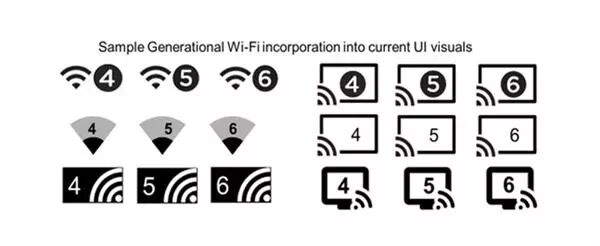
Here are the years of early Wi-Fi releases and their new names:
802.11b — Wi-Fi 1 (1999)
802.11a — Wi-Fi 2 (1999)
802.11g — Wi-Fi 3 (2003)
802.11n — Wi-Fi 4 (2009)
802.11ac — Wi-Fi 5 (2014)
In the author’s view, the previous naming of Wi-Fi was complex and cumbersome, and more importantly, ordinary consumers did not understand it well. After changing to numbers, the Wi-Fi names are simple, unified, and easily recognizable. When ordinary people buy routers, they can simply compare the “numbers after Wi-Fi” to determine which is better, which is very intuitive and straightforward.
2. How fast is Wi-Fi 6? How much faster is it compared to Wi-Fi 5?
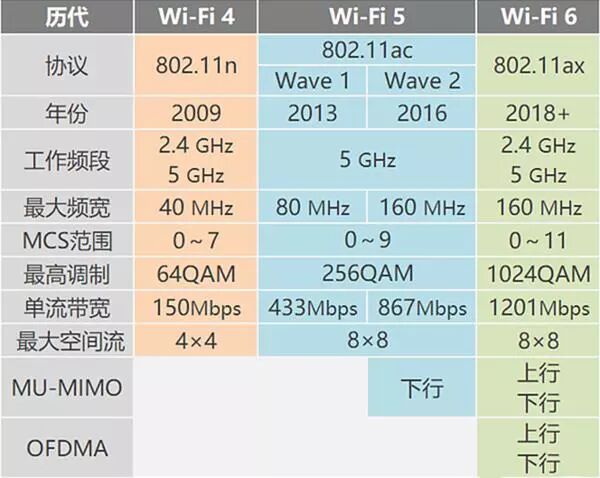
For a single spatial stream on an 80GHz channel, the theoretical speed of Wi-Fi 5 is 866MB/s, while Wi-Fi 6 has a theoretical speed of 1201MB/s.
The theoretical speed of Wi-Fi 4 is 150Mb/s, and Wi-Fi 5 is six times faster than Wi-Fi 4. Compared to this, the speed of Wi-Fi 6 is not significantly faster than Wi-Fi 5; the focus should be on “efficiency” instead.
Moreover, “theoretical speed” is not accurate. In real life, Wi-Fi performance can vary depending on the range of the wireless access point and devices, obstacles, other signals in the air, and the quality of the radio.
3. If I upgrade my AP to Wi-Fi 6, will my existing 802.11ac / 802.11n / 802.11a/b/g devices still work? Is Wi-Fi 6 backward compatible?
Wi-Fi 6 is backward compatible. This means that you should not expect to gain performance improvements just by upgrading the AP—client devices also need to be Wi-Fi 6.
4. How is backward compatibility achieved in 802.11ax?
Wireless devices with 802.11ax use OFDM or OFDMA to communicate with other 802.11ax radios.
Devices with 802.11ax radios can communicate with older radios using OFDM or HR-DSSS.
When only 802.11ax OFDMA sessions occur, the RTS/CTS (Request to Send/Clear to Send) mechanism will be used to defer traditional transmissions.
Additionally:
OFDM—Orthogonal Frequency Division Multiplexing, is a type of multi-carrier modulation. It achieves high-speed serial data transmission through frequency division multiplexing, has good resistance to multipath fading, and supports multi-user access.
OFDMA—Orthogonal Frequency Division Multiple Access, divides the wireless channel into multiple sub-channels (sub-carriers), forming frequency resource blocks, where user data is carried on each resource block instead of occupying the entire channel, allowing multiple users to transmit in parallel during each time period.
5. What problems can Wi-Fi 6 solve?
Traditionally, Wi-Fi performance is unpredictable under load. 802.11ax is more deterministic, including in terms of latency and throughput. The main focus of 802.11ax is not speed. This standard addresses network congestion and capacity issues that arise when “a large number of devices” connect to the network.
Compared to Wi-Fi 5, Wi-Fi 6 increases network bandwidth by four times, increases the number of concurrent users by four times, and reduces network latency from an average of 30ms to 20ms. Wireless access points (APs) can handle up to 12 Wi-Fi streams simultaneously.
6. How does Wi-Fi 6 solve efficiency issues?
In previous Wi-Fi protocols, a wireless access point (AP) could only “session” with one device at a time. However, Wi-Fi 6 enables the AP to send and receive data from multiple devices simultaneously.
Traditionally, in 802.11, there is the concept of DCF (Distributed Coordination Function). This means that if you are a radio preparing to transmit data, you must first check if anyone else is using the channel. This means that even if you are Wi-Fi 5, you still need to “queue up” and compete for channel access with other older 802.11a/b/g devices.
In other words, at any given time—on a channel, within a signal strength range, only one frame can be on that channel. Therefore, different devices must look for each other to see if anyone else is “sessioning” before they can “session”.
Another interesting feature is the concept of “TWT”. TWT, or Target Wake Time, allows the AP to schedule communication with devices, negotiating when and how long to wake up to send/receive data, grouping terminals into different TWT cycles, reducing the time required to keep antennas powered for transmission and signal searching, which means reduced battery consumption and improved battery life, while also reducing the number of devices competing for wireless resources after waking up.
Based on TWT technology, in the future, all smart devices connected to Wi-Fi can establish a “wake-up protocol” where terminal devices only enter working mode after receiving their own “wake-up” information, while remaining in sleep mode the rest of the time. This makes it possible for IoT devices that require high-bandwidth communication, such as smart office devices, to save up to seven times the battery power.
7. My Wi-Fi works well. Do I really need to upgrade to Wi-Fi 6?
It depends on you. The problem that Wi-Fi 6 addresses is “dense deployment scenarios”. There are many places with CCI—Common Channel Interference. Many client devices try to access Wi-Fi simultaneously. In many public wireless access points, such as airports, stadiums, etc., these are scenarios where Wi-Fi 6 can excel. Its characteristics allow for better utilization of wireless media.
Also, if your clients do not support the latest protocol, then upgrading your AP will have little benefit. 802.11ax provides enhancements to the PHY and MAC layers, which should improve operations in limited frequency bandwidth—but only if the clients can also utilize it.
You can still benefit from the advantages brought by MU-MIMO (Multi-User Multiple Input Multiple Output), but this may not justify the cost of upgrading.
That said, if you are deciding between 802.11ac and 802.11ax, it is recommended to choose the latest technology, as it will prove to be a wise choice in the future.
8. I think 2.4GHz is “dead”. Does 802.11ax increase support for the 2.4GHz spectrum?
Wi-Fi 6 is dual-band, while its predecessor only operated on the 5GHz spectrum. Some vendors attempted to implement Wi-Fi 5 on 2.4GHz, but that standard only approved 5GHz wireless.
The author believes that 2.4GHz is driven by economic factors, as both old and newer devices support the cheaper 2.4GHz. Although 2.4GHz is more susceptible to interference, it does provide better reception. In other words, it can “receive” at greater distances.
Due to the new features of Wi-Fi 6, such as BSS coloring technology, even devices that operate on “only 2.4GHz” will benefit.
9. Is 802.11ax an official standard code?
No, the IEEE plans to approve the protocol standard sometime in the third quarter of 2019. That said, network manufacturers like Cisco, ASUS, and Netgear have already begun to launch 802.11ax products to the market.
10. Is Wi-Fi 6 full-duplex communication?
Unfortunately, no. Using OFDMA, you only need to divide a 20MHz channel into 2MHz sub-channels. It is still half-duplex and can be viewed as a half-duplex switch with shared bandwidth.
While many major manufacturers support the opening of the unlicensed Wi-Fi spectrum in the 6GHz band, this has not yet occurred. We are still operating devices on the 2.4GHz and 5GHz bands.
11. When will 802.11ax devices be available?
Over 70% of device chips globally are manufactured by Broadcom. We expect Wi-Fi 6 devices to become widespread by the second quarter of 2020.
Currently, there are discussions about some phones produced by Samsung and LG that will be compatible with 802.11ax.
12. What is BSS coloring technology?
BSS (Basic Service Set) adds a 6-bit identifier to distinguish different BSSs on the same channel from different APs. The 6 bits are added to the message header, so that when an AP receives a message that is not its own, it does not need to unpack the entire message as before; it can simply discard it after unpacking the physical header, thus avoiding conflicts. This makes channel resource usage more orderly and deterministic, significantly improving overall system performance in dense environments.
Public Account ID: imecas_wx