🔓 A deep dive into automotive OEM communication files! From the principles to applications of DBC files, get all the essential information in one go!
1 CAN Description File DBC
The CAN DBC file (CAN Database) is a text file that contains information for decoding raw CAN bus data into “physical values”.
1.1 How to Obtain
The process of encoding sensor data into CAN bus frames is entirely determined by each Original Equipment Manufacturer (OEM). Therefore, DBC[1] files are proprietary, known only to the OEM manufacturers. Engineers at OEMs typically have access to the complete DBC files for the equipment they produce.
1. DBC File Standardization
<span>DBC</span> files have different encoding/decoding rules for different protocols:
- • J1939: Most heavy-duty vehicles use the
<span>J1939</span>protocol - • NMEA 2000: Most vessels use the
<span>NMEA 2000</span>protocol - • ISOBUS DBC: Most agricultural vehicles use the
<span>ISOBUS/J1939</span>protocol - • OBD2 DBC: Most passenger cars support OBD2 connections via the CAN bus (for OBD2 protocol-related content, see 👉CAN Bus | In-depth Understanding of the UDS Diagnostic Protocol)
2 DBC Syntax
In 👉CAN Bus | In-depth Understanding of the CAN Protocol, we have initially understood the meanings of some key terms in <span>DBC</span> files. Below is an excerpt from a <span>DBC</span> file.
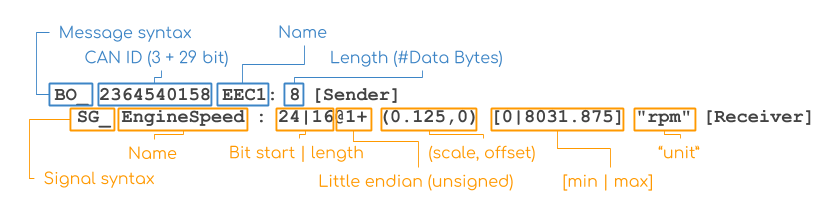
Image fromcsselectronics
Message Section:
- • Message keyword: starts with
<span>BO_</span>and the<span>DBC ID</span>must remainunique (29 (CAN ID bits) + 3 (extra bits as “extended ID” flag) bits, represented in decimal) - • Message name: must remainunique (1-32 characters, including uppercase and lowercase letters, numbers, and underscores)
- • Message length: an integer between 0 and 1785
- • Message sender: the name of the transmitting node; defaults to
<span>Vector__XXX</span>if none is specified
Signal Section:
- • Signal keyword: each message contains one or more signals (starting with
<span>SG_</span>) - • Signal name: must remainunique (1-32 characters, including uppercase and lowercase letters, numbers, and underscores)
- • Signal start bit and length: separated by “|”, indicating the starting position of the signal, with length indicating the signal length
- • Signal storage method:
<span>@1</span>specifies byte order as little-endian (Intel),<span>@0</span>as big-endian (Motorola) - • Signal formula calculation: (scale, offset) used for linear calculations
- • Signal metadata: optional (e.g., [0|0] “”)
- • Signal receiver: the name of the receiving node; defaults to
<span>Vector__XXX</span>if none is specified
3 DBC Software/Library Applications
Similar to <span>ldf</span>, <span>dbc</span> can also be viewed and edited using a text editor. The following software is available for processing and editing:
- • Vector CANDB++: The
<span>Vector CANalyzer</span>application includes a handy<span>CANDB++</span>(Vector DBC editor). It offers comprehensive features, including quick “consistency checks” for DBC files. - • canmatrix[2]: This open-source
<span>Python DBC</span>library can load, edit<span>DBC</span>files and export them to other formats.
Below is an example using <span>canmatrix</span>.
3.1 Loading DBC Files
import canmatrix

# Load DBC file
dbc = canmatrix.formats.loadp("dbc.dbc")
dbc_matrix = dbc.get("")
<span>canmatrix</span> can not only load <span>dbc</span> files but also load <span>ldf</span> files, just by importing the file path.
ldf = canmatrix.formats.loadp("ldf.ldf")Note: If the loaded <span>ldf</span> variable is <span>None</span>, check if your <span>Python</span> environment has the <span>ldfparser</span> package installed, as <span>canmatrix</span> parses <span>ldf</span> files by calling <span>ldfparser</span> at a lower level. Opening the source code of <span>canmatrix.formats</span> reveals that <span>canmatrix</span> supports many types of file parsing, including:
moduleList = ["arxml", "csv", "dbc", "dbf", "json", "ldf", "kcd", "fibex", "sym", "xls", "xlsx", "yaml", "scapy", "wireshark", "odx", "eds"]3.2 Getting ECU
import inspect

for ecu in dbc_matrix.ecus:
    print(type(ecu), inspect.getmembers(ecu))
3.3 Getting Frames
for msg in dbc_matrix.frames:
    print(type(msg), msg.__dict__)
3.4 Getting Signals
Analyzing the data structure of <span>dbc_matrix</span><span>, it is not difficult to find that it has a </span><code><span>signals</span> attribute. However, when we directly loop and print, the output is empty. This is because <span>dbc</span> files generally contain many signals, and loading them all into memory at once is unnecessary and slows down performance. Therefore, a lazy loading approach is adopted, where signals are retrieved only after specifying the frame message.
#1 Lazy loading
for signal in dbc_matrix.signals:
    print(type(signal), inspect.getmembers(signal))

#2 Load signals after specifying the frame
for msg in dbc_matrix.frames:
        print(type(msg), msg.__dict__)
        for signal in msg.signals:
              print(type(signal), inspect.getmembers(signal))
3.5 Getting Signal Groups
for msg in dbc_matrix.frames:
        for signalGroup in msg.signalGroups:
              print(type(signalGroup), signalGroup.__dict__)
<span>canmatrix</span> can automate most of the work; you can practice with publicly available DBC files.
Reference Links
<span>[1]</span> DBC: https://www.csselectronics.com/pages/can-dbc-file-database-intro<span>[2]</span> canmatrix: https://github.com/ebroecker/canmatrix
If you’ve made it this far, consider giving a like and follow to support the author 🙏, your support is the motivation for my continued creation!