
In previous posts, we became familiar with performance testing analysis charts. Today, we will share performance testing HTTP response statistics. Subsequent articles will systematically share valuable content, guiding you from 0 to 1 in learning performance testing. Additionally, there will be tutorials and other related materials available. You can add the editor on WeChat to receive them.
Introduction
HTTP response summary is shown in Figure 5-24.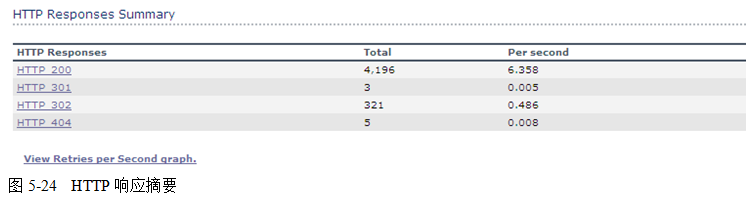
This view is only available for Web Vusers and reflects the processing status of the Web Server.
The table has three columns, with the meanings of each column as follows:
1. HTTP ResponsesThis indicates the status codes of the HTTP responses.2. TotalThis is the total number of clicks for that HTTP response status code.3. Per secondThis is the number of clicks per second for that HTTP response status code.HTTP (Hypertext Transfer Protocol) is a communication protocol that allows HTML documents to be transmitted from a web server to a web browser. HTML is a markup language used to create documents that contain links to related information. You can click a link to access other documents, images, or multimedia objects and obtain additional information about the linked items.The HTTP protocol is stateless and relies on instantaneous or nearly instantaneous request processing. Request information is sent immediately, ideally processed without delay, although delays do exist. The HTTP protocol has a built-in timeout mechanism, which is the maximum time the client waits for a response message to return.The information exchange process based on the HTTP client/server request-response mechanism is shown in Figure 5-25: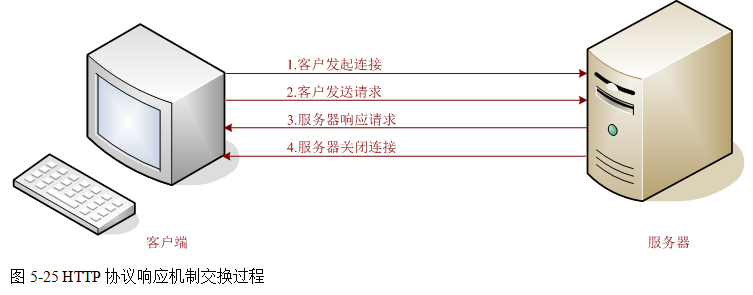
1) Establishing a connection: The client establishes a TCP connection with the server;
2) Sending a request: After opening a connection, the client sends the request information to the corresponding port on the server, completing the request action submission;
3) Sending a response: After processing the client’s request, the server sends a response message back to the client;
4) Closing the connection: Both the client and server can close the socket to end the TCP/IP dialogue;
After receiving and interpreting the request message, the server returns an HTTP response message.
HTTP responses also consist of three parts, namely: status line, message headers, and response body.
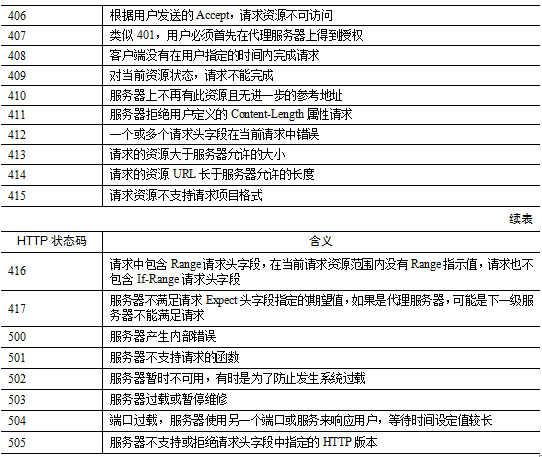
The format of the status line is as follows: HTTP-Version Status-Code Reason-Phrase CRLFWhere, HTTP-Version indicates the version of the HTTP protocol used by the server;Status-Code indicates the response status code returned by the server;Reason-Phrase provides a textual description of the status code.Status codes consist of three digits, with the first digit defining the category of the response, which can take five possible values:1xx: Informational – indicates that the request has been received and is being processed;2xx: Success – indicates that the request has been successfully received, understood, and accepted;3xx: Redirection – further action is required to complete the request;4xx: Client Error – indicates a syntax error in the request or that the request cannot be fulfilled;5xx: Server Error – indicates that the server failed to fulfill a valid request;For detailed meanings of HTTP response status codes, see Table 5-1.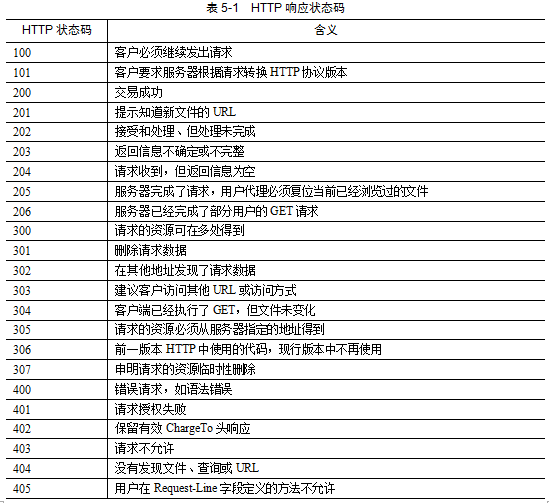


-End-
「If useful, spread it」
「If useful, click to view」