This section demonstrates how to compile a kernel module into the kernel using the Linux Kernel Build system, as well as how to load and unload kernel modules.
To maintain the flow, this section will focus on demonstrating the overall operation process, while the details and principles will be elaborated in later sections. As introduced at the beginning, this section emphasizes HOW, while WHY will be explained in detail in subsequent chapters.
In addition to learning about compiling and using kernel modules, this article can serve as a kernel compilation template. When you need to add custom modules to the kernel in the future, you can write code based on this template and follow the steps to compile it.
My documents and manuals are verified and can be followed step by step in a foolproof manner. If you find it helpful, feel free to bookmark it.
If you are not familiar with the Linux Kernel Build system, you can refer to the first chapter of this series.
My experimental environment can be referenced in this article: A Comprehensive Guide to Setting Up Development Environment with Ubuntu 24.04 + Qemu + ARMV8 + Linux 6.12
1. Kernel Module Template
First, let’s introduce the composition of kernel module files. A simple Linux driver needs to include the following points:
-
Header files (mandatory): You need to include kernel-related header files,
<span><linux/module.h></span>and<span><linux/init.h></span> -
Driver load and unload functions (mandatory): You must declare the
<span>module_init</span>function, which will be automatically executed by the kernel when loading the driver -
Driver unload function (mandatory): You must declare the
<span>module_exit</span>function, which will be automatically executed by the kernel when unloading the driver -
License declaration (mandatory): The Linux kernel is open source and complies with the GPL (General Public License). The GPL is an open-source license published by the Free Software Foundation, which requires that any software that complies with or is developed based on the GPL must provide source code upon release and allows anyone to freely copy, study, modify, and distribute the software.
-
Module parameters (optional): Module parameters are values passed to the kernel module when the module is loaded, which will be introduced separately later
-
Author and version information (optional): You can declare the author information and version information of the driver code
Below is a template for the simplest kernel module:
// hello_module.c
#include <linux/init.h>      // Include initialization macros
#include <linux/module.h>    // The most important header file, describing module information
#include <linux/kernel.h>    // Provides commonly used macros and functions in the kernel

// Module load function (initialization function)
static int __init hello_init(void)
{
    printk(KERN_INFO "Hello, Core&Chip Kernel Module!\n");
    return 0; // Return 0 indicates successful loading
}

// Module unload function (cleanup function)
static void __exit hello_exit(void)
{
    printk(KERN_INFO "Goodbye, Core&Chip Kernel Module!\n");
}

// Specify load and unload functions
module_init(hello_init);
module_exit(hello_exit);

MODULE_LICENSE("GPL v2");               // Specify the module license
MODULE_AUTHOR("shashixiong");            // Specify the module author
MODULE_DESCRIPTION("A simple Hello World kernel module"); // Description
Place this file in the corresponding directory as needed; my example places it in the <span>drivers/hello_module</span> directory, and continue with the following operations.
2. Configuring Files to Compile Kernel Modules
2.1 Modify Kconfig
Next, add the custom configuration entry to the corresponding <span>Kconfig</span> file.
If you have added a module in an existing directory, such as <span>drivers/char</span>, you only need to append to the <span>drivers/char/Kconfig</span> file
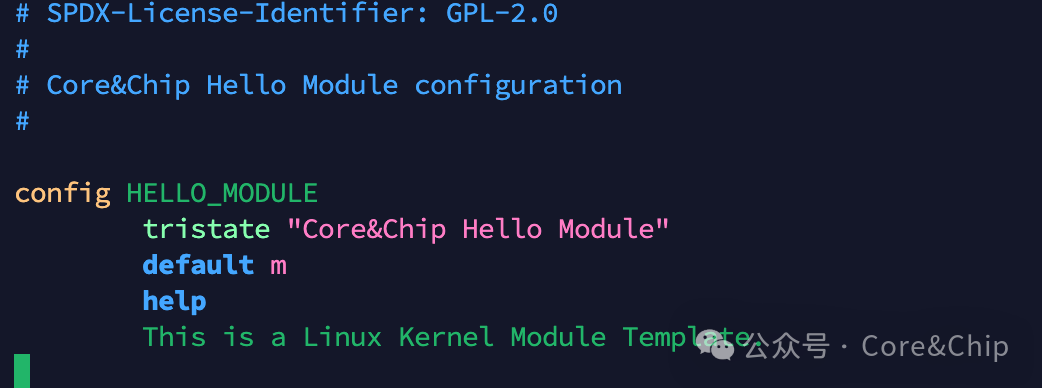
config HELLO_MODULE
        tristate "Core&Chip Hello Module"
        default m
        help
          This is a Linux Kernel Module Template.
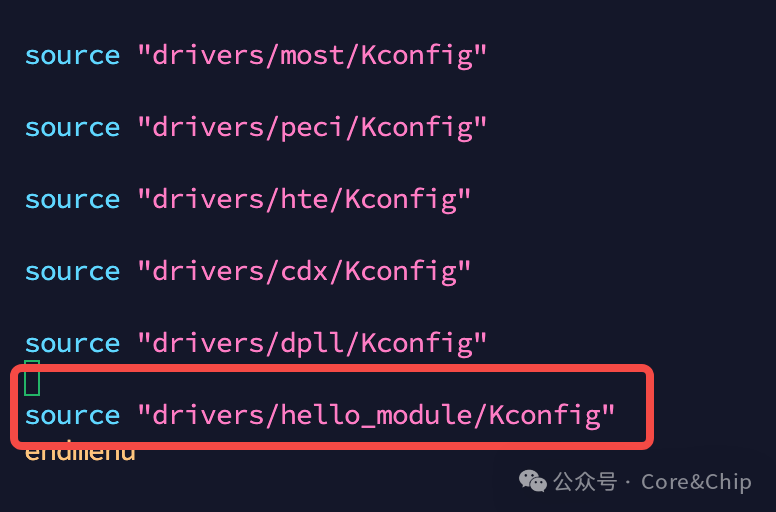
For the sake of complete demonstration and future extensibility, a new <span>hello_module</span> directory was created in the driver directory, so a new <span>Kconfig</span> needs to be added, and a reference should be added in the upper-level <span>Kconfig</span>. As shown in the figure below:
- Append
<span>source</span>in
2. Create a <span>Kconfig</span> file in the <span>hello_module</span> directory
2.2 Modify Makefile
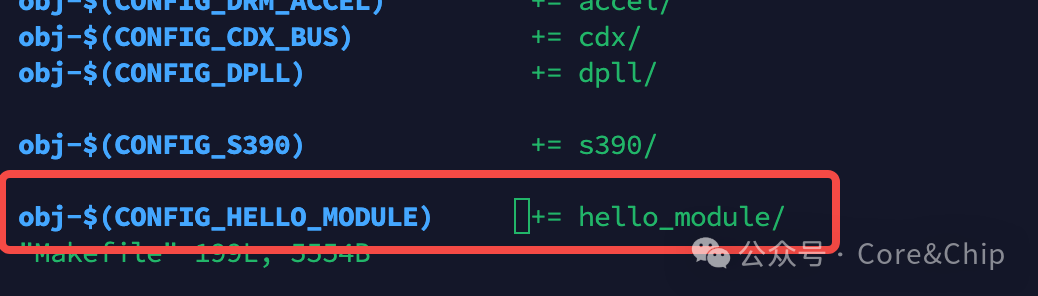
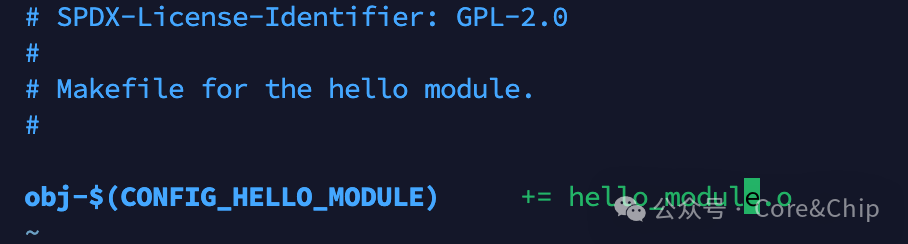
<span>Makefile</span> should similarly be modified or added according to the needs of the corresponding directory.
- In the
<span>drivers</span>directory, add references to subdirectories in the<span>Makefile</span>file
2. In the <span>hello_module</span> directory, add the target compilation for the corresponding file; currently, there is only one file <span>hello_module.o</span>
2.3 Configuration in menuconfig
After the above modifications, you can enter <span>menuconfig</span> to see the new configuration we added
cd corechip_qemu_sdk
# The envsetup.sh contains export operations for toolchain and architecture, which are environment variables required for compilation
source envsetup.sh

cd linux-6.12.28
make menuconfig
In the <span>Device Drivers</span> path, scroll to the end to see
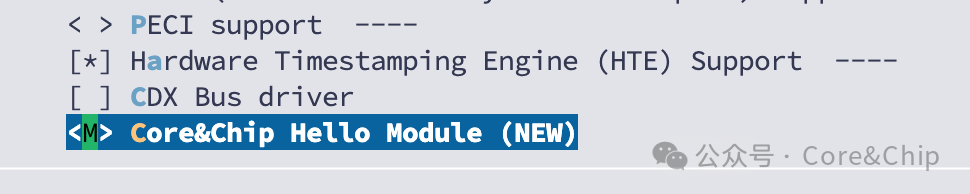
If you select <span>*</span>, it will be automatically loaded when the kernel starts, and we will not demonstrate that here. We will select <span>M</span> for manual loading.
Save the configuration and exit.
3. Compiling Kernel Modules
After completing the above configuration, you can compile the kernel:
make -j$(nproc)
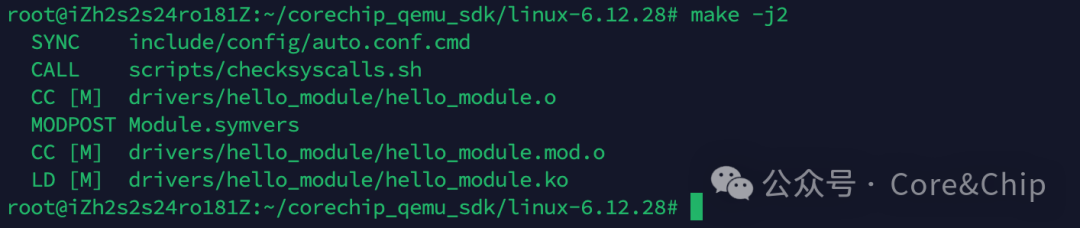
The above method compiles the kernel, equivalent to <span>make all</span>, which includes compiling kernel modules. You can also compile specific modules separately:
make -C <path_to_kernel_dir> M=$PWD
-C: Specify the kernel source directory
M: Specify the kernel module directory

If you want to use <span>modprobe</span>, <span>modinfo</span>, and other commands, you need to additionally use <span>make modules_install</span>
make INSTALL_MOD_PATH=/your/target/rootfs modules_install
<span>INSTALL_MOD_PATH</span>: Points to the path of your rootfs.

This command will automatically create <span>/lib/modules/$uname -a/</span> in the specified <span>rootfs</span> directory and copy the <span>ko</span> files and module dependency files there for use by <span>modprobe</span>, <span>modinfo</span>, and other commands.
If you do not use <span>make modules_install</span>, commands like <span>modprobe</span> will not work due to missing file dependencies.
4. Loading/Unloading Kernel Modules
4.1 NFS Mount + insmod
<span>corechip_qemu_sdk</span> environment supports NFS mounting, copy the ko file to the <span>corechip_qemu_sdk/share</span> directory
In <span>qemu</span>, after starting, enter the <span>shell</span> and enter the following command to mount the shared directory
mkdir /mnt/host
mount -t 9p -o trans=virtio share /mnt/host
After mounting, enter the shared directory
cd /mnt/host/share
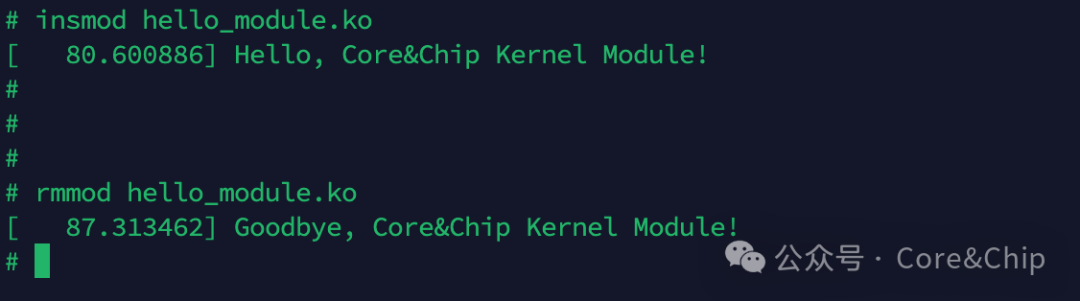
insmod hello_module.ko
Loading and unloading kernel modules execute the registered <span>module_init</span> and <span>module_exit</span> functions, respectively.
4.2 modprobe
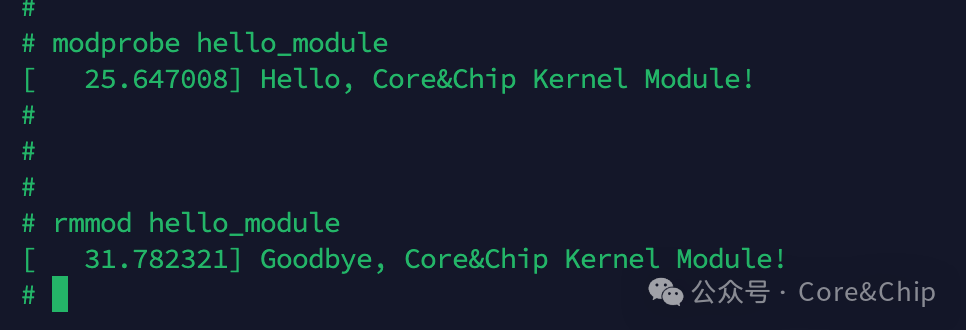
Since we installed the module earlier, the <span>modprobe</span> command will automatically look for the corresponding file in the <span>/lib/modules/6.12.28</span> directory.
Therefore, <span>modprobe + module_name</span> can be used directly from any path.
5. Conclusion
This article provides a detailed introduction to compiling self-built kernel module files through source compilation, as well as methods for loading and unloading kernel modules.
The code demonstrated in this article will be uploaded to my SDK open-source repository, and interested readers can download and use it.
git clone https://gitee.com/core-chip_0/corechip_qemu_sdk.git
The method of compiling within the kernel source can be somewhat cumbersome, and during debugging, there are actually simpler methods. In the next section, we will explain the method of out-of-tree compilation of kernel modules.
However, when the module functionality is stable or needs to be delivered, it is still advisable to use the source compilation method introduced in this section, as it is the standard approach.
Using the out-of-tree method, if your team or client’s project has enabled security mechanisms such as AVB (Android Verified Boot) or module signing, it will lead to inability to load normally.
No matter the size of your company or business, we should strive to ensure that our processes resemble a professional army, Work as a professional~!
If you find this article and this series helpful, please help by following, liking, and recommending; it is very important to me. Thank you very much!!
Reference: https://docs.kernel.org/kbuild/modules.html
– END –
If you have any questions, feel free to add me on WeChat for discussion. I have created a small group and will gradually add some industry leaders I know, all of whom are engineers from top companies at P7 level and above. Welcome to chat~~

Self-introduction:Previously worked at AMD, currently a senior BSP engineer in a major chip department.Advocating pragmatism, I believe in learning by doing.Series Introduction:The Basic Skills of Kernel for BSP Engineers, aimed at explaining kernel knowledge and underlying principles that driver and BSP engineers will use in their work.Previous Recommendations:A Comprehensive Guide to Setting Up Development Environment with Ubuntu 24.04 + Qemu + ARMV8 + Linux 6.12As we enter the AI era, the irreplaceability of low-level software engineers is becoming increasingly prominent.