Hello everyone, I am Labi, who loves to share life hacks! Many of us receive various Douyin commands from friends and family on WeChat, whether they are for videos, products, or live streams, accompanied by a few sentences describing how to open these command messages. Today, I will teach you how to quickly and accurately open Douyin commands in just 1 minute.
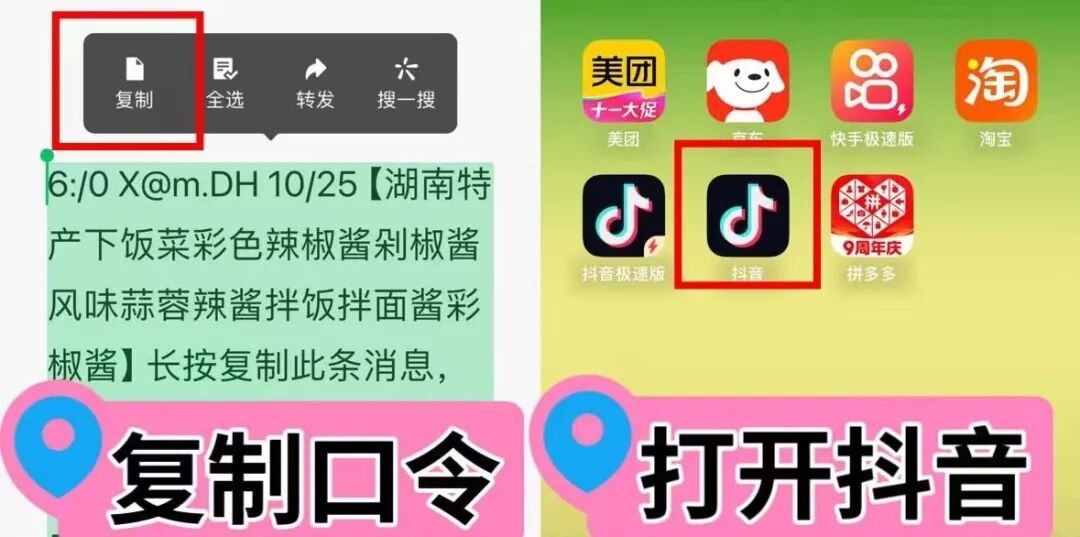
First, the universal method to open Douyin commands: Long press to copy this message or link, then open Douyin to search and watch online videos/live streams:
1. Long press the command content, and it will be highlighted in cyan. Drag the cursor to select it, then click “Copy” above the command, as shown in the image.
2. Close WeChat and return to your phone’s home screen. Find the Douyin or Douyin Lite app. Once opened, a prompt will appear saying “Douyin wants to paste from WeChat,” and you need to click “Allow Paste.” Then, another prompt saying “View Details” will appear; click that as well. If you don’t know how to operate, refer to the red box in the image below.

3. The Douyin command http://v.douyin.com/ip can be opened smoothly. What if there is no response after copying the command and opening the Douyin app?
Step 1: Find a magnifying glass 🔍 in the Douyin app and click to enter;
Step 2: After a rectangular search box appears, long press to paste the copied command into it, then click confirm or search.
Then, the super simple way to open Douyin commands: click the link to open directly.
1. Click the http://v.douyin.com/if link; if there is no response, click a few more times;
2. The built-in browser in WeChat will open a Douyin webpage for you, which may contain videos, products, or live streams, allowing you to watch videos or live streams.
3. If you want to see more about the command content in the Douyin app, you can click “Open Douyin” or “Take a Look” in the upper right corner of the webpage, and follow the prompts to jump to the Douyin app.
4. If your WeChat webpage prompts you “To browse, please long press to copy the URL and visit it in a browser,” the subsequent operations can be a bit cumbersome, so it is still recommended to use the first method to open the Douyin command.